-
Posts
22854 -
Joined
-
Last visited
-
Days Won
1000
Content Type
Profiles
Pokédex
Portal
Technical Documentation
Pages
Tutorials
Forums
Events
Downloads
Gallery
Blogs
Everything posted by theSLAYER
-
Trading Japanese old sea map Mew to English cartridge
theSLAYER replied to TheDoctorCM's topic in Events Help and Questions
Maybe you're missed something, either in what you're telling us or what you've seen. So far: 1. Caught 3 Ralts and 3 Lotad on Japanese Emerald Using Ralts as an example, the 3 names are: ラルトス (unnicknamed), R A L T S , R a l t s (last 2 using native keyboard on Japanese Emerald) 2. Traded them to English Emerald. (names can also be seen here) 3. Pal Parked up 4. And in PKHeX.. As expected, they're all seen as JPN. Anyhow I doubt what you've said is a 'Mew-centric' mechanic.. It is to be noted that I do not think a language tag exists for Gen 4.. EDIT: Also looking deeper into your post, you probably just *thought* it was English. Language tags only started existing in summary screens in Gen 6. To be certain it isn't in English, you'll notice the spaces between letters are wider, and/or the letters are bigger. Japanese 'English font' versus Standard English Font (Not too mention, there is probably another issue; if you changed the nickname via PKHeX, it is likely you used the wrong font, if you didn't know that Japanese Gen 3-Gen 5 Roman character fonts are different from English games.. But I'm not going to throw that accusation out there just yet. More of an 'extra info' kinda thing for other readers) IN SUMMARY: Pal Park doesn't change your 'language of origin' when shifted upwards, even if your nickname matched Species name. You probably didn't know that language tags don't exist until Gen 6. And didn't notice the differences in font displayed. -
Unable to change pokeball of crystal ilex forest celebi?
theSLAYER replied to OnceInABlueMew's topic in Pokémon Legality
Gen 2 Pokemon’s data structure doesn’t contain the “ball caught in” parameter (that parameter was only introduced in Gen 3). So when any Gen 1 or 2 Mon is transferred up, it can only be in Poke Ball.- 1 reply
-
- 1
-
-
I don’t think there was a tool for Pokémon GO? Tho I guess the next part I’m gonna say can partially work for GO too. just dump the RAM of HOME when logged into your phone and looking at the whole chunk of Pokémon. I I imagine the best way is to use some Android emulator and sign in to your account, then dump from there. Then look through the RAM data and look for the mons and extract them manually. all at your own risk tho. Pokémon games don’t like being on mobile emulators and I don’t know what would happen to your account if they detect such activity.
-
Trading Japanese old sea map Mew to English cartridge
theSLAYER replied to TheDoctorCM's topic in Events Help and Questions
This thread brought up interesting questions/scenarios. I would like to replicate the scenario for myself before pushing forward -
Trading Japanese old sea map Mew to English cartridge
theSLAYER replied to TheDoctorCM's topic in Events Help and Questions
I’m not convinced. Gonna need to test that. Also if Pal Park has that weird quirk, then you wouldn’t have to do it with Mew, can be any other Mon. -
No as in, if you removed the data by deleting it in a hex editor, write those lines of data back also using a hex editor. Besides manually doing that, there’s also probably converters online that would do it for you. Look for it.
-
You mean restoring. Dumping is the act of grabbing data. You’re restoring data into the cart. I reckon you’re gonna have to write back the extra strings of data before you can send it back to your cart.
-
once you cobble saves together (like a frankenstein monster), you'll need to use PKHeX to fix the checksums, before you can restore that save into a game. Load the edited save into PKHeX, then export the edited save from PKHeX (from here on we'll call it 2), then restore 2 into a game. Without valid checksums, the game would read the save as corrupted.
-
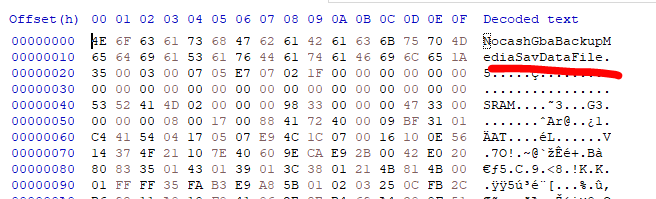
it dumped correctly. it's just that there's extra data at the end of the save (as per the image I showed). In this case, open the save in HxD (or any other hex editing program), delete data from 0x8000 onwards (the highlighted portion in the image). You could also just download the sav file I attached.
-
I think RTC information got dumped with the save. Trimming the save allows it to be used with PKHeX Pokemon Gold.sav
-
While I do not know if program like Raid Crawler exists for SWSH, you can do this: 1. Use an external program to calculate the seed for your den 2. Check how much date skips you'll need 3. Use the Overlay Luxray to skip the dates: https://gbatemp.net/threads/luxray-an-overlay-utility-for-pokemon-sword-and-shield-in-form-of-a-sys-module.557242/
-
Can’t speak to the other unnamed software you’re talking about, but FBI and CheckPoint are homebrew (user made). So they’re not ‘pirated’. Granted, having Homebrew CIA installed maybe risky, but you can always just launch them via the homebrew launcher. Been doing that for years. Not banned. Not blocked on Bank/Transporter. Not the definition of piracy. May wanna read that up. Granted, it’s not endorsed by Nintendo and you may wanna go the homebrew launcher route, but at the very least homebrew doesn’t compete with their profits. I don’t think I’ve heard people with purely homebrew being banned, but maybe I’ve not looked hard enough for it. Bans usually are a thing due to piracy. Probably not that big but since it’s controlled by Nintendo, a risk, no matter how small, is always there. I’ve not heard of any non-piracy bans in recent years…
-
Relevance of HOME tracker (HOME v2.0.0, v3.0.0, and beyond)
theSLAYER posted a technical document in Pokémon HOME
17th September 2023 Preamble With the release of HOME v3.1.0, Pokémon that bears records of not being initialized correctly (technically invalid HOME tracker) can no longer be sent back into HOME, typically with HOME throwing an error 10015. Everything below explains how and why people could obtain a broken or invalid HOME tracker, even if the screenshots aren't fully relevant anymore. Introduction With the release of version 2.0.0 of Pokémon HOME, compatibility with Brilliant Diamond & Shining Pearl and Legends Arceus was added. In version 3.0.0, they also added support for Scarlet and Violet, and allowed Pokémon to be transferred across those games.Pokémon HOME made some changes to how the HOME tracker works, and why it is relevant, when it comes to importing Pokémon. Brief Overview For every individual Pokémon you see in the box in Pokémon HOME, they are made up of the entire ring of data above. These are the data structures within a single structure for a Pokémon file that is in HOME, which is associated and identifiable by the HOME tracker (among other common data that is usually immutable3). While version 3.0.0 made some data more visible to players, not all are. The table below will help to explain what the various substructures are. Important Substructures Purpose Initiated By Used By Views on HOME mobile Core Contains most bits of data that are shared across all games. Gets initiated regardless of what entry game Used across all listed games The data here shows up in all views Child: LGPE Data specific to LGPE Child: SWSH Data specific to SWSH For origin IDs pre-Switch games. Affected by changes in SWSH games. Child: PLA Data specific to PLA Child: BDSP Data specific to BDSP Child: SV Data specific to SV In essence, when a deposited Pokémon first gets a HOME tracker via entry from a specific game, it gets data written to both core and the corresponding child. For the children substructures relating to other games, those get generated when said Pokémon is transferred into those games. This means that is a Pokémon never visits the other games, those children substructures remain blank. Any Pokémon that comes from Bank -> HOME or GO -> HOME gets written into SWSH child. Any children substructure that gets generated afterwards appears to generate data based on core + first child that was first generated A look into HOME mobile's various views As of version 3.0.0, Pokémon HOME added a feature that would allow you to see various 'views', which effectively allows you a sneak peak into the various children substructure. However this view is rather limited; it is constrained by a) the origin game of the Pokémon and b) the species. A few examples: 1. Stuff from GO that have not entered any game would not give you the view option 2. Darkrai from GO that entered PLA and BDSP won't give you an option to use the SWSH view, despite SWSH child being populated. 3. If a species exists in SWSH, and said species went from GO -> HOME -> BDSP without interacting with SWSH, it'll still gain the SWSH view as SWSH child is populated. 4. Bank view is based on game ID. Bank view actually uses SWSH child, so any modifications in SWSH child affects Bank view 5. Mr. Rime that has the origin game of PLA (a Mime Jr. evolved in SWSH) would not give you the option of PLA view, despite PLA child being populated (link). Example on moving mons across games without a valid HOME tracker So this is the example portion. Let's look at this Pichu I bred in BDSP. Pichu, a species that exists in SWSH, BDSP, and PLA. Beast Ball, a ball that visually exists in SWSH and BDSP. Now, for this exercise, I'll take the PB8 of this Pichu, and import it into Legends Arceus. They'll both be clones of each other. Difference being, the one on the left Leftchu has a valid HOME tracker (from entering HOME from BDSP previously), and the one on the right Rightchu does not. (Also note, while it shows as Beast Ball in the PKHeX, due to how PLA works, it'll appear as the Strange Ball in-game or in HOME [when viewing as PLA]) Now that they're both in HOME, entering from PLA (which they've both never entered from before). And they'll be entering Sword (which they've both also not entered before). And this is the result: Leftchu correctly shows that it is in a Beast Ball, while Rightchu shows that it is in a Poké Ball. Also, on mobile HOME, Leftchu shows the correct first met location (Seabreak Path) but Rightchu doesn't. Leftchu also shows Beast Ball, and Rightchu doesn't show any ball. [note: I sent back the mons from Sword for the screenshots] Summary In the present day, if you're injecting Pokémon into any Switch games, and if you're injecting Pokémon with origin games (a) Gen 7 and below or (b) a different Gen 8 game from your current one, make sure they have a valid HOME tracker attached to the file. To keep a HOME tracker valid, make sure you do not change any immutable values3 on your Pokémon. Also, it is okay if your HOME tracker changes on your existing Pokémon; as long as you deposited a Pokémon with a valid HOME tracker, even if the tracker were to change after, all previous data are cloned and carried forward to the next tracker. If you perform any kind of transfer with an invalid HOME tracker via HOME, data would not be displayed correctly on other games. Here's a bunch of mons with valid HOME trackers, make sure you don't change the immutable values3! Footnotes 1. Values stored in Core (Common data) are 2. Values stored in Children substructures for the games are I would like to point out that while the Gmax/Alpha/Noble data is stored in Core, HOME doesn't carry forward that data into every game. 3. Immutable values refer to values that normally can't be changed on a captured Pokémon. Stuff like PID, EC, IVs, etc -
Pokémon Scarlet Fashion Files
theSLAYER replied to Rad the Zero's topic in Saves - Files and Requests
Fashion block research is very low priority so I am not surprised people aren't doing it. You could try this: -
The save block (or section; a term more in-line with what Bulbapedia uses, relevance being the image I’m about to share) shuffles with every save. So there isn’t a fixed location. Source: https://bulbapedia.bulbagarden.net/wiki/Save_data_structure_(Generation_III) The section ID (what he’s using to identify the save block numbers) can be found at every 0x??FF4 interval (?? are incremental hexadecimal values starting from 0), so if you’re into checking the data via Hex, this is how you can identify the sections.
-
Maybe edit the save after you’ve received the starter.
-
My changes aren’t syncing to my y save
theSLAYER replied to Shokimei's topic in ROM - 3DS Discussion & Help
If you reopen the save in PKHeX (after editing the save and closing PKHeX), are the changes there? -
Bootleg Pokèmon Emerald Save File Editing
theSLAYER replied to Branded_James's topic in ROM - GBA Discussion & Help
I don’t own one myself but if I’m not mistaken it’s GB Operator. As long as used properly, yes. The save *should* be indistinguishable from one generated by a retail cart (unless there’s extra details that I didn’t know about) Usually yes. However shouldn’t matter cause most emulators has a menu item that allows you to import other saves, even ones that aren’t named correctly. -
Bootleg Pokèmon Emerald Save File Editing
theSLAYER replied to Branded_James's topic in ROM - GBA Discussion & Help
You’ll need to own hardware to be able to restore ROMs to your cart. Without that, even if you manage to edit the save and return it to the ‘ROM’, you won’t be able to return that modified ROM + SAV into your cart. since you’re using GBA Tools, I don’t think it’ll work; I don’t recall it have a ROM editing/restoration function. -
pkhex binary is not compatible with save file
theSLAYER replied to UNDEFEATABLEX999's topic in Off Topic
PKHeX isn’t meant to function for ROM hacks. if you can get the save to load, good. Sav editors can’t change evolution mechanisms or shiny odds tho; you’ll need a ROM editor for that. -
pkhex binary is not compatible with save file
theSLAYER replied to UNDEFEATABLEX999's topic in Off Topic
Can you explain what it is? -
Manipulating Effort Values in Gen III Games - ROM Hacks
theSLAYER replied to clecavs2's topic in RAM - GBA Cheats
Ah so the issue is you use any save editors. Try checking if any cheat codes work for those games. Then proceed to use party modifying codes -
Manipulating Effort Values in Gen III Games - ROM Hacks
theSLAYER replied to clecavs2's topic in RAM - GBA Cheats
Oh you mean rom hacks that has extra entries. You’re could try using batch editor to convert to an editable species, change EVs, then change the species back