



theSLAYER
-
Posts
22960 -
Joined
-
Last visited
-
Days Won
1016
Content Type
Profiles
Pokédex
Portal
Technical Documentation
Pages
Tutorials
Forums
Events
Downloads
Gallery
Blogs
Everything posted by theSLAYER
-
Once again, don’t edit anything that has been through HOME. OT was by HOME for sanitisation reason, be it invalid characters, language mismatched characters, censorship, etc.
-

PowerSave code for Shiny Pokemon... modify PID… and IVS?!
theSLAYER replied to RoninS's topic in Miscellaneous Help
We don’t operate under PowerSaves, so wouldn’t know for sure until we see an example of the changed file. -
Making Gen 5 Pokémon on SV without transporting them with bank/home
theSLAYER replied to Otaku_user's topic in PKHeX
If it has been through HOME before, it would have obtained a HOME tracker. As long as you don’t edit any of the immutables on the file, then it should be fine. -
Yea if it’s triangular it is possible 1/16512. But out of all the people that have done it, I’ve not heard reports stating it’s possible, so who knows. Not safe. Whether they’re clones doesn’t matter. HT/WT appears to be assigned randomly (if they didn’t already have it). Don’t edit anything that has a HOME tracker.
-
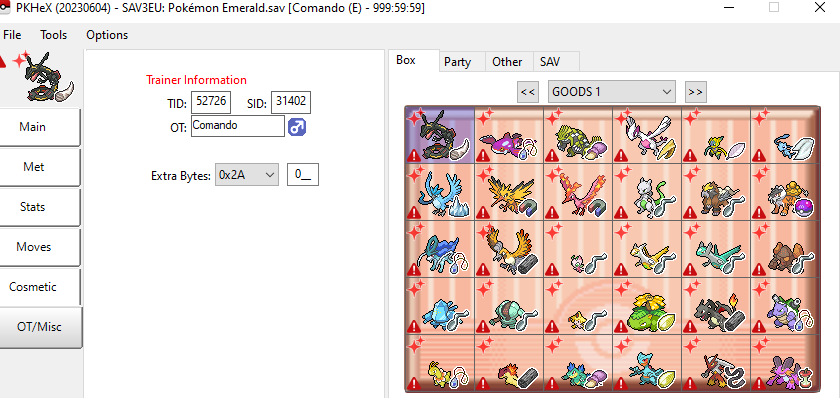
I'm sorry, is the issue loading the save into PKHeX, or loading the save back into your game? It loads into PKHeX just fine. (A lot of illegal stuff lol)
-
@apri I figured out how it works (in terms of why I had mons that were HTWT 0). But you’re probably out of luck. if you want to keep a Bank transfer Pokémon to have HT/WT 0 (resulting in scale 0) in HOME v3.0.0 (and other stuff, such as old HOME events), it needs to have entered PLA before v3.0.0. Once it gains a scale, that value sticks, and the HT/WT doesn’t get rerolled. As of now the rerolling is random, as I’ve got clones that gets different values, meaning it’s likely not derived from some other value on the Mon. edit: If you're looking at the chance to generate a mini/jumbo via HOME, read the Tweet thread
-
I think all PLA uniques evolutions are known to have this false flag right now. Wait for a PKHeX update
-
You likely injected your mons (presumably their templates show them as caught from other games, you did not mention that) into PLA. The way HOME works, is that any legitimate Pokémon sent you from Bank effectively goes into “SWSH data” first (HOME has many subcategories). So any Pokémon from the previous games need to go into “SWSH data slot” from SWSH first. If their game of origin isn’t PLA, you cannot enter from PLA first, that is just how HOME works. The fix would be to transfer them from Bank properly, or have them enter HOME from SWSH. Note that you can only send from SWSH if their species exist in SWSH. Read this if you’re interested in the technical details:
-
Get someone to actually transfer the mon into HOME. This way it'll have a HOME tracker. After that, you can use PKHeX to convert the PK8 into a PK9 for usage in SV.
-
Making Gen 5 Pokémon on SV without transporting them with bank/home
theSLAYER replied to Otaku_user's topic in PKHeX
You can make it appear legal, but if you ever need to use HOME to transfer them to other games, they’ll look and be illegal. It won’t be detected in the sense that “you’ll be banned” or any negative consequence will come to you, but it’ll effectively become illegal; it is just how HOME works. You’ll be going against how HOME works and stores the data, resulting in illegal Pokémon. -
PKHeX isn’t fully updated to deal with old transfers. Even then, if you didn’t receive an XD Mon in SWSH, transferring it back from SV would yield an illegal Pokémon, due to data being missing and it not having a proper HOME Tracker.
-
Upload the new save you just made
-
I was moving them to and fro. originally, they entered HOME A and SWSH, PLA, and LGPE in v2.0.0 After HOME v3.0.0, they entered HOME B, and went to and fro SV, then finally went back in and out of HOME A to have a different HOME tracker.
-
Yup! Give that a try
-
Not event news. Thread moved.
-
Stuff that has been through HOME before v3.0.0 gets size 0, yes. Yes but v3.0.0 supposedly gives those Pokémon a proper size. Meaning none of them should be non-zero; it fixes them retroactively. Why some of them non-zero for me, I can only theorise that it involves me swapping them across different HOME accounts. Maybe they only fix non-zero to HOME existing HOME trackers at that point, and the act of me entering from a HOME (hence getting those assigned different trackers) circumnavigated that. However I cannot be sure, as not all my old Pokémon are non-zero, only some.
-
Tho to be fair the size 0 could be a result of me messing with things way too much. Those shinies were previously transferred in v2.0.0. Then proceeded to use a different HOME account to import them into HOME, then out. Then into yet a different HOME account. I only noticed this on my shinies, and not my regular mons, so there's a chance I messed with something somewhere. In any case, it may not be a thing, who knows. No one can properly answer that.
-
No real way. HT/WT/Scale is a HOME only thing, and can't be hacked. If there's any consolation, I have some stuff with 0 in all three stats, despite being transferred up normally. It is a weird scenario.
-
Don't edit any Pokemon transferred via HOME. You're probably make the HOME trackers invalid. Read: Also, SWSH will blank out certain details, that is normal.
-
Yeah don’t use save states for the purposes of save editing. Actually save the game in-game normally, then close the emulator. Then use PKHeX to edit the save. Then reopen the emulator without using save states to load the save. It should open at your edited save.
-
Can you tell if a shiny Pokémon was found naturally?
theSLAYER replied to SamP_64's topic in Miscellaneous Help
Well just drag the Mon into PKHeX and it’ll tell you whether it’s legal or not. -
Urgh, then you should probably use a different browser.
-
Can you tell if a shiny Pokémon was found naturally?
theSLAYER replied to SamP_64's topic in Miscellaneous Help
Check the PIDIV correlation. Most, if not all, cheats from back in the day don’t account for those. -
HOME compatibility with SV is a recent thing. And cross game stuff, and cross game evo stuff, are all still being worked on. Preliminary support from PKHeX is out, but not complete. Please contribute your Ursaluna here, thanks:
-
There should be a quote button, this way you can quote what a person says, and respond nicely, without it changing the way it looks, nor do you need to copy/paste what they said. Hmm, from what I’ve been reading, you may wanna try a different browser. Sorry it may not be the answer you wanted to hear, but that issue seems hardware+software related
