



theSLAYER
-
Posts
22865 -
Joined
-
Last visited
-
Days Won
1001
Content Type
Profiles
Pokédex
Portal
Technical Documentation
Pages
Tutorials
Forums
Events
Downloads
Gallery
Blogs
Everything posted by theSLAYER
-

Help with GBA Backup savefiles
theSLAYER replied to Juan Carlos Fernandez Piña's topic in Saves - Editing Help
maybe it is the software version of the backup tool. trying using a different version -
Help with GBA Backup savefiles
theSLAYER replied to Juan Carlos Fernandez Piña's topic in Saves - Editing Help
@Juan Carlos Fernandez Piña I’m on windows 10 and I built it what’s the error you get thrown at you? Also, what the heck is this Those strings should not be in a save.. does not look like a save. Looks like stuff for Animal Crossing.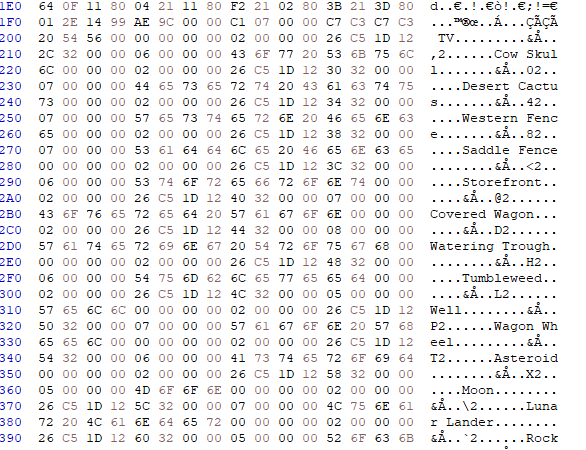
-
Help with GBA Backup savefiles
theSLAYER replied to Juan Carlos Fernandez Piña's topic in Saves - Editing Help
It’s weird that you can’t launch the program. What OS are you running on? -
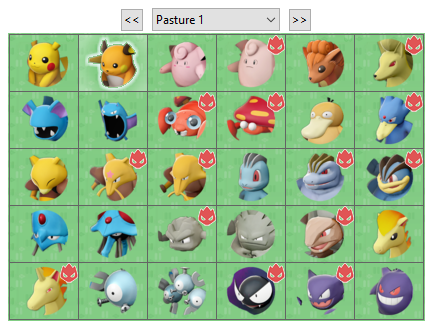 @Steinn transfer moves from Bank aren’t retained when they are sent into BDSP, PLA, SV. They’re changed to regular moves. If you check the Pokémon under Bank View on HOME mobile, you’ll see the event moves. But those moves aren’t used by those games (unless they can learn it) Anyway, moves on a Pokémon doesn’t dictate its event status most of the time. Having regular moves replace event moves aren’t uncommon. It’s more alarming if it had an event move from a different event.
 -
Help with GBA Backup savefiles
theSLAYER replied to Juan Carlos Fernandez Piña's topic in Saves - Editing Help
Don’t upload ROMs here, it is against our rules. To be sure, drop your .GBA file into my program and run it. Does it detect save for you to spit out? -
To be clear: what is the movie listed there vs what movie you think it is?
-
I used a custom made plugin to dump all the HT/WT values in my save into a CSV file, which I then ported the data to my Excel file that already have graphing set-up. Yeah, ultimately it matched the triangular distribution curve. Testing with 50k mons for 95% confidence would be the gold standard, but that just takes way too much time. Even if the odds cannot be confirmed, at least the 'shape' of the distribute is.
-
Few different options: - not have EmuNAND/EmuMMC. I use fusee.bin directly on TegraSMASH, so it loads directly into Atmosphere on SysNAND + CFW - use Hekate boot loader. It allows you to pick Clean or CFW, and Sys or Emu
-
Version 1.0.1
992 downloads
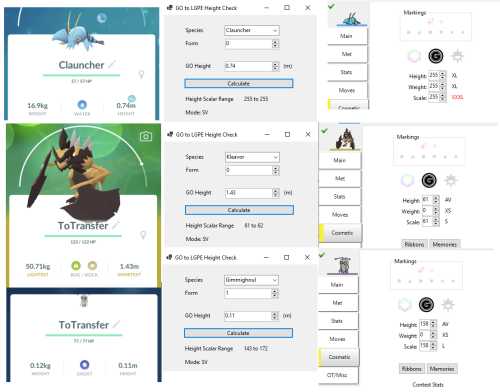
This tool calculates a possible range for the Scalar Height used in Switch Core series games, from the rounded height value provided in Pokémon GO. This tool is still undergoing testing, so any constructive comments/feedback would be appreciated. Use at your own risk. This tool uses the logic in PKHeX.Core of Absolute Height -> Scalar Height. I just repurposed it and made the logic work for our purposes. Edited Note2: 0 in Height can safely be sent to HOME now. -
Background When Let's Go Pikachu & Let's Go Eevee launched, the games added back an old forsaken property to various Pokémon, namely sizes. To be specific, height and weight. While this property remains as a core part in data structure of Pokémon past Let's Go Pikachu & Let's Go Eevee, it will go unused in Sword & Shield and Brilliant Diamond & Shining Pearl (while the values for it are still generated and assigned by those games) Well, if we are being technical, height & weight will continue to go unused in Legends: Arceus and Scarlet & Violet, until HOME v3.0.0 makes it relevant to some degree. Size makes a more prominent impact in those games, as scale. One last bit of information to know, is that prior to HOME v3.0.0, any transfers from Bank do not have height & weight, and those Pokémon would be assigned 0 in both height & weight. So right now, 3 properties for size has been described: height, weight, and scale. Relevance In Scarlet & Violet, new marks were added to those games. Two of those marks are of note, as these two marks are different from the marks previously introduced: these two marks can be obtained by a Pokémon after it was caught. These two marks are known as the Mini Mark and the Jumbo Mark. The Mini Mark gets assigned to a Pokémon with 0 scale, and the Jumbo Mark gets assigned to a Pokémon with 255 in scale. The relevance here would be: scale didn't exist as a property before Legends: Arceus. In order to maintain compatibility of transfers between Sword & Shield, Brilliant Diamond & Shining Pearl and Legends: Arceus, HOME made is so that height gets duplicated into scale. As a result of this compatibility, any Pokémon that didn't already have scale attached to their data on HOME's end also get height duplicated into scale. With this, we have arrived at a method for transfers from previous games to acquire those two marks. Origin games: GO (via GO -> HOME direct transfer) The size depends on whether a Pokémon is XXL in GO. If they were XXL, then the height would be 255. It is believed that XXS would correlate to the height of 0, but currently GO transfers do not possess a height of 0. It is not known if it is a bug or intended. Edit 1: As of 17th June 2023, XXS can be sent to HOME and they retain height 0. Edit 2: Some XS and XL Pokémon actually qualify to be 0 or 255 when transferred. This tool helps give you a range based on the height shown in Pokémon GO. Origin games: GO (via GO -> GO Park in LGPE) XXL Pokémon in GO become 255 in height in Let's Go Pikachu & Let's Go Eevee. XXS Pokémon in GO become 0 in height in Let's Go Pikachu & Let's Go Eevee. This is limited by whether the GO species exists in Let's Go Pikachu & Let's Go Eevee. Since the height & weight values are already assigned in Let's Go Pikachu & Let's Go Eevee, there is no need for HOME to assign/reroll them. Edit 1: As of 17th June 2023, XXS can be sent to HOME and they retain height 0. Edit 2: Some XS and XL Pokémon actually qualify to be 0 or 255 when transferred. This tool helps give you a range based on the height shown in Pokémon GO. Origin games: Switch games The summary would be that the scale values are generated via triangular distribution, which would be 1/16,512 (for 0 or 255 in scale) for basic circumstances, without modifiers. Anubis has written up an easy to digest article here. (how those games generate the values aren't the point; this technical documentation category is about how HOME deals with it) I believe the same method of the generating the values were used for Height and Weight in the other games, as it would be a simple task to port over the mechanism without giving the whole thing much thought. Since the height & weight values are already assigned, there is no need for HOME to assign/reroll them. Origin games: Pre-Switch games (Route A) As I mentioned earlier: This means that any pre-Switch Origin Pokémon that enters HOME prior to v3.0.0, would have their height and weight set to 0. And when they enter Legends: Arceus from HOME prior to v3.0.0, their scale gets locked in to 0. And thus, when they enter Scarlet & Violet, they retain the scale of 0, and are eligible for the Mini Mark. It is important to note that with this method, for non-Switch origin Pokémon, they can only qualify for Mini Mark, not Jumbo Mark. Origin games: Pre-Switch games (Route B) One thing that HOME v3.0.0 set out to fix accomplish, was to assign and reroll height & weight values to any Pokémon that had both 0 height & weight values. The only exception to this (as seen in Route A) was any Pokémon that had visited Legends: Arceus (meaning they have a scale value initiated, even if it was 0). [Note: this fix technically had no 'real' repercussions to the user; they would not have been able to see height/weight values without hacking] So if you have a Pokémon with 0 height & 0 weight, but didn't visit Legends: Arceus prior to HOME v3.0.0, it will be assigned a random height & weight the next time it enters HOME. Now that we know that height & weight reroll exists, and that height gets duplicated into scale for Legends: Arceus and Scarlet & Violet, the question becomes: (a) is it possible to get 0 or 255 in height, and if so, (b) what are the odds to getting them? Based on Anubis' simple explanation of the triangular distribution Scarlet & Violet uses (read here), and me throwing stuff into HOME for it to reroll, I came up with this: I did a mini study, where I threw 18,600 Pokémon into HOME to have their height & weight rerolled. I plotted 2 graphs, one for height (blue dots), and one for weight (orange dots). x-axis are for the values (0 to 255), and y-axis for the number of hits I have come across after collecting all the height and weight rerolled. The black line follows Scarlet & Violet's triangular distribution of 1/16,512. There were adjusted to fit the study based on the number of samples I have (18,600). From the looks of it, the generation of height & weight follows the same triangular distribution used in Scarlet & Violet for scale, and so that answers question (b). As for question (a), I confirm that it is indeed possible to generate 0, as well as 255, in height. Here's a picture of my Mew getting the Jumbo Mark. If you're interested in my data, and the crappy plugin (only for SWSH) used to grab the HTWT data, it can be found here: HTWT.rar for the Excel file and plugin With this method, for non-Switch origin Pokémon, they can qualify for either Mini Mark or Jumbo Mark. Notable mentions: HOME gifts redeemed prior to v3.0.0 (origin games appears as Sword & Shield) Those gifts were distributed as height & weight being 0. If they have been transferred to Legends: Arceus prior to v3.0.0, they follow Route A, thus qualifying them for the Mini Mark. If not, they can also go Route B, and have a 1/16,512 chance to qualify for Mini Mark or Jumbo Mark. Alpha Pokémon in Legends: Arceus These Pokémon have their height, weight, and scale, maxed out at 255 each. This means they qualify for the Jumbo Mark when transferred into Scarlet & Violet. Former Titan Pokémon in Scarlet & Violet These Pokémon have their scale maxed out at 255 (as seen in the Iron Treads image at the start of the page). This means they qualify for the Jumbo Mark when transferred into Scarlet & Violet.
-
Well, 255 only in Weight. Have yet to get 255 in Height yet. Nah that is still within odds. It could be 1/16512; think of it as getting a shiny Pokémon at the 500th encounter. That doesn't mean that shiny odds are not 1/4096, it just means that you got it under odds This would need to be tested multiple times to the full extent, to conclude the probability. (But I probably won't, cause it is mind numbing..) As of now, I'm just trying to see what distribution it forms, and whether 255 in Height is possible or stopped by HOME. edit: Edit yet again: Hopefully this page helps explain it all.
-
(PLA) Save with all wisps discovered
theSLAYER replied to FocusFTW's topic in Saves - Files and Requests
Due to online save verification against shared saves being a thing for PLA, I urge everyone to not share their save. And also to you, OP, to not ask for PLA saves. -
Vivillon got marked illegal in Pokemon Scarlet
theSLAYER replied to Magickid's topic in Pokémon Legality
transfer logic is still being ironed out. -
Vivillon Pokeball Pattern Scarlet Violet
theSLAYER replied to Maystream's topic in Events Help and Questions
Your post isn't an event contribution, thus post moved. Anyhow, I've got one in here. Make sure you read the description of the download page thoroughly -
Yeah I came to the same conclusion in my tweet. Either not possible or possibly triangular distribution. For triangular, need roughly 51 full boxes to be transferred. edit: @apri in case you're curious about my findings
-
"SOLVED" cfw switch local communication not working
theSLAYER replied to skyline29's topic in Saves - Editing Help
no idea. If both games on same patch and both consoles on same firmware should work. -
PowerSave code for Shiny Pokemon... modify PID… and IVS?!
theSLAYER replied to RoninS's topic in Miscellaneous Help
For Gen 6 and 7, they’re thought to be sufficiently random and not linked between the different stats. It would not be detected illegal presently, if you don’t make any other weird changes. -
Fair enough. Yup, HT/WT gets assigned in HOME. And when the mon enters SV, it copies HT to the variable Scale, before it enters SV (Scale is used by SV to visually show sizes of stuff) The only time SV gives HT/WT of stuff, is for stuff that is generated in SV, so it wouldn't apply to stuff caught/bred outside of SV.
-
PowerSave code for Shiny Pokemon... modify PID… and IVS?!
theSLAYER replied to RoninS's topic in Miscellaneous Help
While Gen 5 has some slight PID correlations, if a mon is caught/bred in Gen 5, there’s no PID to IV. While I agree with that statement, I cannot be certain that principle was what Powersaves was aiming to tackle with their shiny code. Hence why I said what I said. -
And for the record, if the Pokémon's origin isn't a SV game, then absolutely no. The HT/WT/Scale was GIVEN BY HOME. It is generate/rerolled in HOME. It has the data before it even enters SV. No offense, I think you have no idea what you're saying, and might be unconsciously bending known facts to fit your mental narrative, to justify you being able to whatever size you want. It is likely an unconscious cognitive bias, and not a personal attack. Just pointing it out before you fully commit to that train of thought. It is true that if a mon was caught/bred in SV, HOME would absolutely have no way of knowing what size it was supposed to have before entering SV, but then you encounter a different breed of issues: the size is defined by RNG, and what if that RNG state was correlated, and became public knowledge after? Changing HT/WT/Scale could break that. A lot of people in Gen 8 didn't know there were RNG correlations (cause at that time it wasn't discovered), and all the edits became illegal. So both sides (pre-HOME and post-HOME) of the coin you're causing trouble for yourself. Literally keeps tracks of data structures. HOME probably doesn’t assign the space for every piece of data to a user, but instead give all of them a list of trackers regarding what mons a user has, done for space saving purposes. In any case I’m not too interested in discussing how to beat HOME’s TOS; this feels like it’s slowly moving to that direction. You probably shouldn’t. When a HOME Tracker changes (if it mutates data from a previously valid tracker), it Carries forward all valid data from the previous tracker. That said, HOME could easily bring forward the previous tracker too, making a chain of trackers. Meaning they can follow the chain to find the first entry point, and see who is the first device that brought stuff over. I feel like I've already tackled the original queries, plus more, in this thread. Any last questions from the people that are in this thread, before I lock this thread?
-
Making Gen 5 Pokémon on SV without transporting them with bank/home
theSLAYER replied to Otaku_user's topic in PKHeX
It’s not working per se. If you deposited it into HOME, and viewed it from HOME mobile, you’ll probably see it has no ball. If you transfer them into other games via HOME, it’ll appear incorrect in those games. You’re better off using unedited copies of mons from my HOME compatible living dex. -
Making Gen 5 Pokémon on SV without transporting them with bank/home
theSLAYER replied to Otaku_user's topic in PKHeX
Then that’s wrong. They must enter HOME from the correct games. And that game differs based on origin game. -
Yeah they should have. People are just documenting the changes as it happens, wondering why. Anyhow, no worries
-
Making Gen 5 Pokémon on SV without transporting them with bank/home
theSLAYER replied to Otaku_user's topic in PKHeX
And how did it enter HOME? -
Once again, don’t edit anything that has been through HOME. OT was by HOME for sanitisation reason, be it invalid characters, language mismatched characters, censorship, etc.


