



theSLAYER
-
Posts
22854 -
Joined
-
Last visited
-
Days Won
1000
Content Type
Profiles
Pokédex
Portal
Technical Documentation
Pages
Tutorials
Forums
Events
Downloads
Gallery
Blogs
Everything posted by theSLAYER
-
I'm curious to why that is as well. As far as I can tell, Theivul can be encountered in Dens at Bridge Field, and it has valid Den RNG. @Kaphotics is there something else that is making this illegal or was it missing from PKHeX? ><
-
 PKHeX isn't updated to deal with non-strawberry Alcremie that can Gigantamax. Check back after the next update drops.
 -
no one knows where it is, so no.
-
Randroll is from 1-100. Given gmax machamp is 5%, so 96-100, and you need 1% that is before gmax machamp, try 95 as randroll. Also update your plugin (use the latest version). They should have fixed all of the one-off errors by now. Also, for rare dens (purple lights), I recommend using either 2-0 or 4-1 for dentype and flag respectively. (as per used by the base game) In any case, it shows up fine on my plugin. (using 95 VS 94)
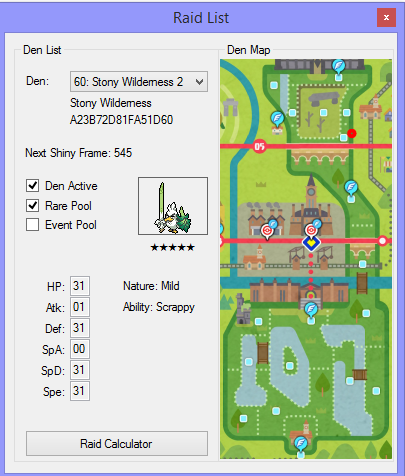
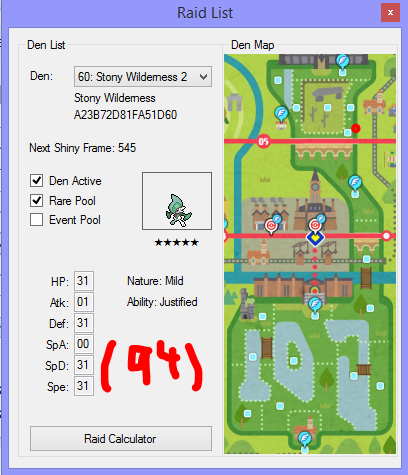
- 1 reply
-
- 1
-

-
you can have illegal mons on PKHeX, they'll just be flagged illegal. Thad doesn't stop PKHeX from functioning.
-
PKHeX doesn't allow me to insert a FireRed save file
theSLAYER replied to BigChickenMan's topic in PKHeX
@BigChickenMan maybe just stop double posting. The edit button is there, and you can edit in to your previous post any new information. I've merged your posts. As mentioned, your save data didn't contain any data. Maybe you didn't save in-game, maybe you attached the wrong file, maybe the emulator punked you, etc etc. -
you said the Larvitar wouldn't spawn, so I tested it to prove that it's working just fine. Hacked raids (set to event raids) would show up just fine, but I've yet to test if you can wishing piece event dens (injected this way) or get those (injected this way) to spawn naturally. However, given that this doesn't seem that different from updating wild area news (no other flags seems to be set), it is probably fine.
-
@Kristian094 as far as I can tell there's nothing wrong with your save. I did add some Dynamax Crystals, and the save does load for me. As you can see, it your save (see the trainer card) and the Larvitar spawned just fine. By the way, the description for the Dynamax Crystals wouldn't exist if the right files didn't exist. (It would display as ??? instead of what you see there)
.thumb.jpg.9554bf3b44eba6ef2cad6a16449bfa3f.jpg)
.thumb.jpg.5d1482d3a8fc3bf84d9905ea0bc6163f.jpg)
.thumb.jpg.b0f23a83c494f34f2e60c314c552e5b5.jpg)
.thumb.jpg.de6ed5587ff8d39eb6bee452d40fb7f1.jpg)
.thumb.jpg.d917a4cfc6a0ac16d11ead3a19c5fabd.jpg)
.thumb.jpg.0cb23958647c51263d13ab5a11cc0afa.jpg)
-
send me your save. I've injected into a fresh save, and the Dynamax Crystals worked, so I'm wondering if you're doing it wrong.
-
did you import the other 3 files as well? Maybe all 4 files are required.
-
I'm assuming that Runerigus wasn't met in raids. Runerigus from evolved Yamask requires at least 49 damage done to it, in order to evolve. In other words, Runerigus that isn't from raids cannot have 0 in that value. (which is that box below Relaxed) [this topic was brought up last week]
-
You save loads just fine on my Switch. (as seen in the screenshots in the spoiler below) This has nothing to do with PKHeX and block editing, and everything to do with your importing process. Maybe update your Checkpoint, make sure the files are named correctly, etc. edit: From what I can tell, you loaded Index 09 (Gigantamax Milcery file) Meaning, it won't be Alcremie event raids, but instead Milcery Event raids. (Alcremie is Index 08. Since the Index is wrong, the raid file you loaded was wrong) In any case, consider using wishing pieces, or try finding red light in the wild area. You can also hack the raids.
.thumb.jpg.81692e470b4e82a6fd9d6379ea710672.jpg)
.thumb.jpg.7c405ec10fb89128e8da431133022da0.jpg)
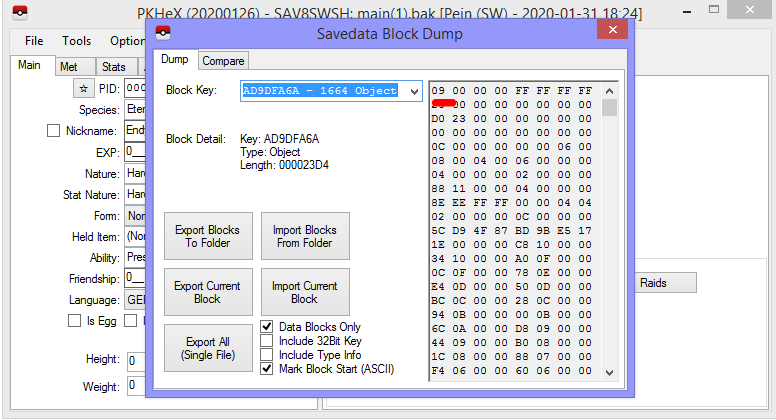
-
the file you sent me is called main.bak Can you confirm the file you sent me is the same as the one in the image?
-
PKHeX is now able to edit parts of the save, known as save blocks. It allows users to export and import various save blocks. Here's a tutorial on how to get it done. Steps 0. Keep a safe backup of your unedited save, somewhere on your computer. We're not liable if this results in a corrupted save. 1. Make sure you redownloaded and use the latest PKHeX. (Initial version with this feature caused corruption. Additionally, older copies do not have the feature) 2. Load the target save in PKHeX. 3. Now, click on SAV on the tabs. 4. Now, click on the button Block Data 5. Another window should open up. 6. Scroll through the dropdown list at Block Key:. For this example, I'll be importing the file normal_encount into *Object KNormalEncount (Original quote below, can be found here) Since I'm importing into *Object KNormalEncount, that is what my screenshot shows. 7. Now that Block Key: is showing the correct value, select Import Current Block. 8. A window should pop-up. Select the correct file to import, then select Open. In my case, I'm importing the file normal_encount. 9. Now that the file has been imported, close only the first window 10. Then, proceed to File > Export SAV... > Export main 11. Now close PKHeX. If you want to make sure the new save file is not corrupted, reopen PKHeX and try to load the save. 12. You're done. Now reimport the save into your Switch to observe the effects. Note: As of v.1.2.0 of the game, they added a new file called normal_encount_rigel1, which I've been told is required for wild area events to work. For wild area events Index 24 and lesser, simply also import normal_encount into knormalencountrigel1. This means normal_encount is imported into two block IDs, being knormalencount and knormalencountrigel1.
-
PKHeX is now able to edit parts of the save, known as save blocks. It allows users to export and import various save blocks. Here's a tutorial on how to get it done. Steps 0. Keep a safe backup of your unedited save, somewhere on your computer. We're not liable if this results in a corrupted save. 1. Make sure you redownloaded and use the latest PKHeX. (Initial version with this feature caused corruption. Additionally, older copies do not have the feature) 2. Load the target save in PKHeX. 3. Now, click on SAV on the tabs. 4. Now, click on the button Block Data 5. Another window should open up. 6. Scroll through the dropdown list at Block Key:. For this example, I'll be importing the file normal_encount into *Object KNormalEncount (Original quote below, can be found here) Since I'm importing into *Object KNormalEncount, that is what my screenshot shows. 7. Now that Block Key: is showing the correct value, select Import Current Block. 8. A window should pop-up. Select the correct file to import, then select Open. In my case, I'm importing the file normal_encount. 9. Now that the file has been imported, close only the first window 10. Then, proceed to File > Export SAV... > Export main 11. Now close PKHeX. If you want to make sure the new save file is not corrupted, reopen PKHeX and try to load the save. 12. You're done. Now reimport the save into your Switch to observe the effects. Note: As of v.1.2.0 of the game, they added a new file called normal_encount_rigel1, which I've been told is required for wild area events to work. For wild area events Index 24 and lesser, simply also import normal_encount into knormalencountrigel1. This means normal_encount is imported into two block IDs, being knormalencount and knormalencountrigel1. View full tutorial
-
Can you also send me a screenshot of the folder you’re importing your Switch? the one that says main, backup etc. Also send me the edited save.
-
When you “switch crashes”, can you show a screenshot of the crash? Can you also send me a screenshot of the folder you’re importing your Switch? just import all of those into the respective blocks. Just import current block. It worked for me
-
Did you save a game with the latest update? (Block editing on gen 8 files caused corruption) initial version of latest update is bugged, please redownload PKHeX and load up a backup file.
-
Did you right click on the file, go to “properties” and unblocked it?
-
Did you redownload the latest versions of PKHeX. The initial version had a bug that was hotfixed. Also make sure that PKHeX can open the file, after you saved the save and quit PKHeX.
-
Wild Area Event #4: New Years 2020
theSLAYER commented on Project Pokémon Bot's file in Sword & Shield
 Details for Index 6 of normal_encount Rewards for Index 6 of normal_encount Details for Index 6 of dai_encount Rewards for Index 6 of dai_encount
 -
 your linked e-mail to the purchase. It sent me an e-mail to my e-mail account. Confirm purchases, as well as serial code.
 -
I'm assuming PKHeX handles this for you, just drag the file into PKHeX with the save open, then export the mon. you don't. Too much data scrubbed to recreate, without taking creative liberties..
-
@Gridelin maybe search for it's moves instead? The moves are together with the mon data. As for @YamiM, I mainly refer to sites and their documentation for their offsets. In Gen 1's case, I would refer to this
-
if I'm not mistaken, the chain of OTs is not in the same offsets as the Pokemon data tho (for gen 1) But if I'm not mistaken, trainer names are further in the file, so maybe that's a good sign.

.jpg.f07b3638591f1d6a17edc66610aee23d.jpg)
.jpg.71126d3355aaf4589307dae36d13bd4a.jpg)
.jpg.e63203dd9d48e585d8af3d58d892c44e.jpg)
.jpg.ec5382079c0408e0f07f70b2018938e6.jpg)
.jpg.ec4fdabe234843f5e59488a02d764ab8.jpg)
.jpg.32d5a1ad6527f0ec1773019803ebe98e.jpg)

.jpg.1195077d7bedc1a3144902072a333ac8.jpg)
.jpg.f9055a446f6a686e92903986dfcdc26f.jpg)