



theSLAYER
-
Posts
22963 -
Joined
-
Last visited
-
Days Won
1016
Content Type
Profiles
Pokédex
Portal
Technical Documentation
Pages
Tutorials
Forums
Events
Downloads
Gallery
Blogs
Everything posted by theSLAYER
-
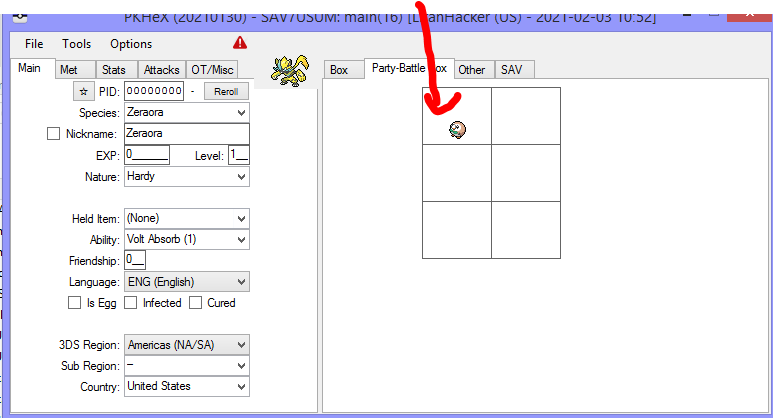
I'm guessing you didn't do it right. Make sure only "main" is in the save folder, and Citra is closed when you edit the save. Only after that, then you can launch Citra.
-
Your starter, it's right there. I'm assuming you've yet to catch other Pokemon yet...
-
upload the save here, lemme take a look.
-
I'm guessing you didn't save in-game, but instead perform state saves. Please save in-game.
-
Is there a question to your statement? Or was it just an acknowledgement to my point? Anyhow, putting the legal and illegal Pokemon discussion aside, it appears they are targeting high traffic accounts or interaction with such account and possession of super blatently illegal mons, typically shiny variants of shiny locked stuff. They don't seem to bother with memories and stuff.
-
PKHeX is a save editor, not a ROM editor. Randomized games are from edited ROMs, not edited saves. Additionally, PKHeX typically only works properly with mainline saves, not saves from ROM edited games. If PKHeX opens the save, you *could* use batch editor to edit the mons (and ignore the illegal status). Alternatively try launching the app in Hax mode.
-

Legit caught 'mon suddenly flagged as illegal?
theSLAYER replied to WraithTDK's topic in Miscellaneous Help
There's something funky going on with Pikachu in Gen 1. I think PKHeX is partially confusing it for Yellow's starter Pikachu. My Lv 3 Pikachu is legal (caught in RB), but at LV 5 it becomes recognized as Yellow starter, even though the catch rate is wrong, and is flagged illegal. Clearing catch rate shows legal. So you could just leave it, it'll probably get fixed. -
Would anyone be interested in event "recreations"?
theSLAYER replied to ArtemiSerebii's topic in PKM
Either sit around and wait or give up. As far as I can tell, only the user has the file. -
no worries, just trying to help (by linking you the files, by telling you how common it is for Pokemon to hang on Citra, and by letting you know people sadly don't fulfill requests anymore )
-
People rarely fulfill save requests anymore. So you could just use the files I provided (in the link) to receive your Kanto starter (it is past Kalos starter). If the reason why you're asking is because Citra freezes on the Kanto starter collection, then what I can say is this: Citra can freeze at almost every story beat. Don't expect people to always provide you a save to get past a hang point :3 Basically, make do with what's available, else get your own save from your 3DS.
-
Check https://projectpokemon.org/home/files/file/1659-pokemon-xy-citra3ds-saves/ Modify the saves if necessary. If not to your liking, grab the save from your 3DS.
-
@Encryption34655 I removed your link. Also you didn't answer my question. Give me a simple variable you're trying to find. Also ajxpk is a ROM researcher here, involving with digging into all kinds of data. I'll say his word is pretty darn reliable when it comes to these kind of things.
-
Gen V Save Tool by Suloku Problem HELP!
theSLAYER replied to NamelessPlayah93's topic in Creative Discussion
yeah that is my assumption One needs to update checksums, then save.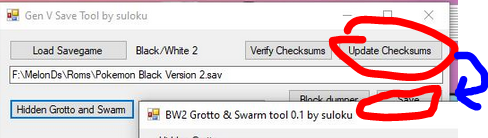
-
Wild Area Event #34: February 2021
theSLAYER commented on Project Pokémon Bot's file in Sword & Shield
 Details for Index 53 of normal_encount and normal_encount_rigel1 and normal_encount_rigel2 (minor differences, in raid chance) Rewards for Index 53 of normal_encount and normal_encount_rigel1 and normal_encount_rigel2 (minor differences, in raid chance) Details for Index 53 of dai_encount Rewards for Index 53 of dai_encount
 -
For example, what variable are you trying to find?
-
I don’t think they have an extra layer of encryption, tho they do shuffle around memory assets. I think people apply an “anti-DMA” code to prevent the shuffling. Search it up.
-
Gen V Save Tool by Suloku Problem HELP!
theSLAYER replied to NamelessPlayah93's topic in Creative Discussion
That means that something something the emulator isn’t reading the save right or you aren’t restoring it right. If the save is fully corrupt, chances are PKHeX won’t read it. If you wanna be sure, after opening up the edited save in PKHeX, make some kind of change (maybe give yourself an item), then export that newly edited save from PKHeX, then insert into your emu. -
Gen V Save Tool by Suloku Problem HELP!
theSLAYER replied to NamelessPlayah93's topic in Creative Discussion
Can PKHeX open the edited save? -
You could simply overwrite your save instead of making copies, but if you corrupt the save, you'll have no backup. If you want to do it in a way that you lose your progress permanently if the save is corrupt, then be my guest.
-
Hence why the save is not usable with PKHeX. You could try losing the battle, and pray that the whole time you try to KO yourself, it doesn't use Aqua Ring. Maybe constantly make state saves at every turn of the battle (at your own risk, keep a backup of your existing state saves). I don't think Citra can make RAM dumps right? In any case, nothing more we can do, if you didn't save your game in-game.
-
I'm guessing you never saved in-game before this, hence why PKHeX won't load the save.
-
Did you save in-game? (read the note near the end)
-
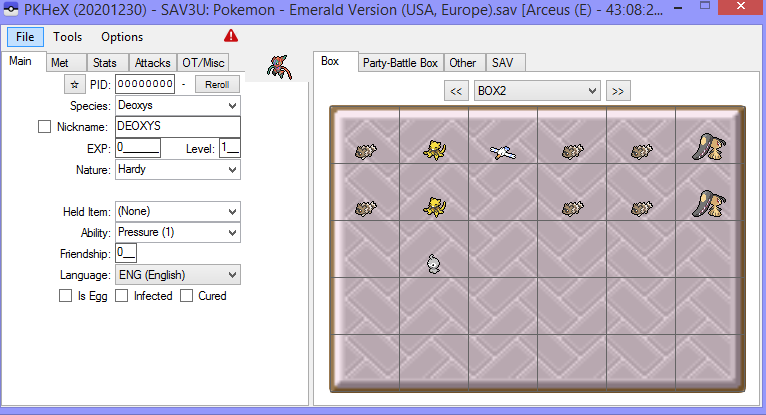
Who knows if it's an issue with your dumping or conversion, but it resulted in a save that is too big. Use a hex editor to trim it down. (I trimmed it to this size) And now it loads.

-
erm.. because those static encounters you tested are shiny locked? Like I said in the disclaimer: You can view the status of XY static encounters and gifts here: https://projectpokemon.org/home/gallery/album/901-x-static-encounter-and-gift-tables/
-
Pokemon Ultra Sun and Moon Story and Difficulty Rom Hack
theSLAYER replied to PyroSaiyan's topic in ROM - 3DS ROM Hacks
Presumably not enough, since there’s been no updates since last year.

