



theSLAYER
-
Posts
22963 -
Joined
-
Last visited
-
Days Won
1016
Content Type
Profiles
Pokédex
Portal
Technical Documentation
Pages
Tutorials
Forums
Events
Downloads
Gallery
Blogs
Everything posted by theSLAYER
-

Does Pokemon legality matter for in-game playthrough?
theSLAYER replied to Kaitou's topic in Debate Forum
Creative discussions is more geared towards discussing the creative work of yourself or other people. Since your question does not fulfill that requirement, your thread has been moved. In my opinion, in a sandbox world of your own, it does not matter. But ultimately there may be other factors at play, i.e. you wanna tell your friends how well you did, and they looked at your team, and was overwhelmed with disgust, etc. -
Pokemon Battle Revolution mod
theSLAYER replied to Red Zardy's topic in ROM - Other Discussion & Help
Popping in the tell you to not bug other developers. If they have an answer, they'll reply here. Thanks. -
Importing Black 2 arm9.bin back into ROM
theSLAYER replied to ChaosHorn's topic in ROM - NDS Discussion & Help
you seem to be posting the same thing everywhere. Should I delete your original thread and let you wait for a response here? -
What a coincidence, someone was asking the same question. Are you able to dump a save from your copy of VC red?
-
It shows if a den is active due to Wishing Piece (not naturally occurring den)
-
Not that I know of. Typically one can make suggestions on the github issues page, which is probably the best place to do it. (tho I imagine they get plagued by all kinds of inane requests ><) true, my bad It's not open source, but if anyone with proven capabilities wanna do it, I'll send them my code.
-
Not a plugin. Also I programmd it in a different language from PKHeX, so I doubt it'll happen. If you want something to be added to PKHeX, fork it in Github, write the code into your forked copy of PKHeX, then make a pull request. Someone has to write the code. The devs would probably be too busy to include it themselves, especially when existing programs/plugins can already handle them. (Also, don't ask me to rewrite it into whatever language PKHeX uses; I don't know the language.)
-
-
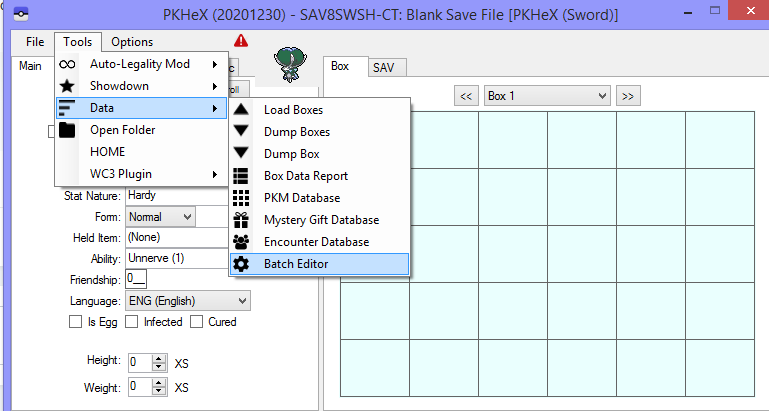
well, you may be able to use batch editor to edit them if you know what is what For example: If you trying to give something species 387: =Box=1 =Slot=1 .Species=387 So it really depends on what you want to edit. I can't really help you beyond that.
-
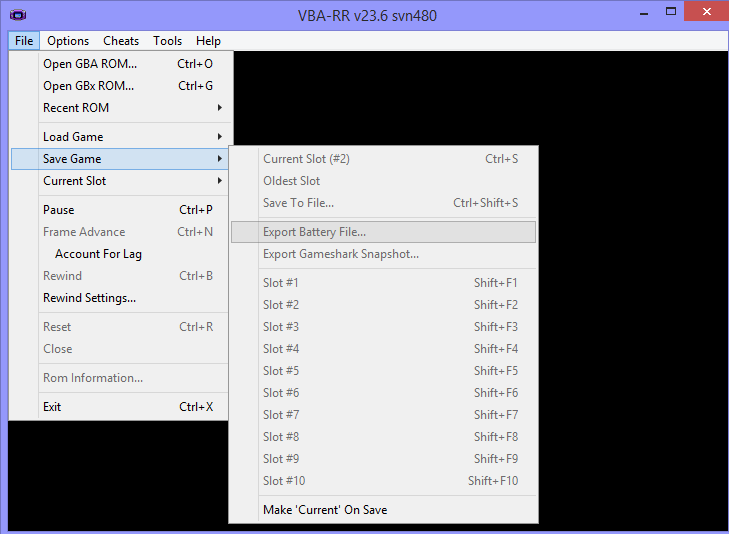
Consider using this instead (or any other option with a similar name; they differ between emulators): It provides a proper .SAV. This may only works if you saved in-game at least twice and perform a soft reset first.
-
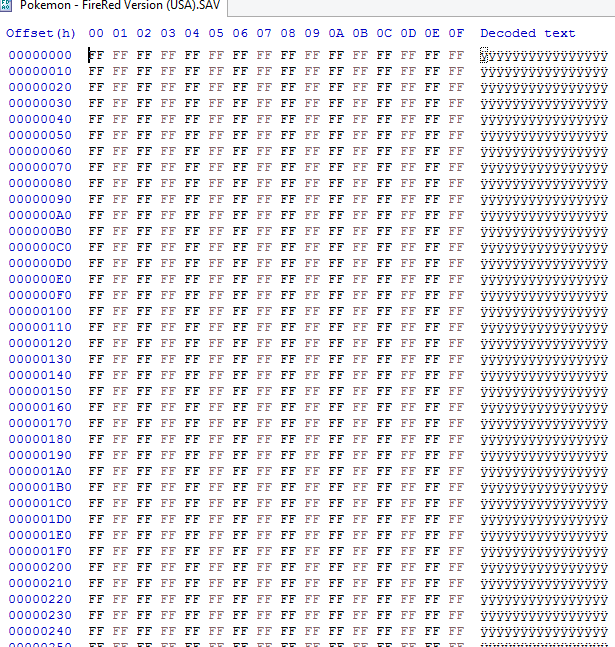
You exported it wrong. I took a look at your file under a Hex editor. This is not a save,
-
yes.
-
you mind uploading that file here, there's something I want to check real quick.
-
As far as I know, there is no cross generation Pokesav. There's a Pokesav that handles Gen 4 saves, and there's another Pokesav that handles Gen 5 saves. Hence, neither can work with Gen 3 saves. That error appearing is not an indication that maybe it could load Gen 3 saves. Programs are not magic, you know ><. Why don't you try to load a Gen 3 save not from a ROM hack, and see if that works, if you are so convinced. Gee, I wonder why. It's almost as tho there's a whole platitude of ROM hacks out there, where they can all do different things to a save's structure. Some might even get released after a save editor is developed. Anyhow, if the ROM hack you're using does minimal changes to the save structure, then at least try loading it in PKHeX or maybe this (either at your own risk, of course ;P) If neither works (not even partially), then you gotta perform RAM editing (cheats) to get what you want. [Do note standard cheat codes will probably not work. You gotta make your own]
-
Pokesav cannot open gen 3 saves. Why aren't you using PKHeX for Gen 3 saves?
-
urgh. At the very least, you should know what you're doing and what CFW you're using. Looking at your second picture from earlier, there's no Luma folder, and there's a Steelhax folder, so I can only assume you're using an old CFW entry way using Steelhax or something. Now, to go back to your main issue. If you dumped the save from the VC game, and edited said save with PKHeX, no reason for the save to not work. You're using a different save manager (that I've never heard of), so the best advice I can give you is to remove main from that folder, only then try to restore it. (I know the main is your other save, but who knows if the entire folder is being squeezed back into your game. And if that's the case, main should not be there) If it doesn't work, then I can't help you. What you need to do is to update your CFW, and please use an updated text guide as opposed to a video. It's imperative that you at least try to understand what you're doing. (Also, any 3DS can be hacked, you just need the requisite accessories). Finally, use JKSM or Checkpoint. We have tutorials on our site regarding backing up and restoring saves using either of those methods.
-
Oh. You're not on Luma, right?
-
Well the solution is right there. Update your CFW. Turn off your 3DS. Then turn it on, and immediately hold down the select button while your screen is still dark. What version of Luma3DS does it say you're on? (Top line of top screen) Also, how was it booted? (Bottom line of bottom screen)
-
no worries, just explain properly what is happening.
-
what doesn't help at all. Too vague. start up of what. Error of what. What were you doing.
-
Do you remember how you did it then? Installing the .3DSX version of Checkpoint is exactly the same.
-
That doesn't really answer how you installed it. What format was the save manager in, .CIA or .3DSX? Did you place the .3DSX in your SD card, or did you install the .CIA using FBI/dev_menu. How did you install it?
-
How did you install your existing save manager?
-
Either install the .CIA or use the Homebrew version (the 3dsx)..? How did you install your existing save manager?
-
Use Checkpoint instead. https://github.com/FlagBrew/Checkpoint/releases Then use Checkpoint to dump fresh saves. Then on your computer, make a copy of a VC Crystal save folder, then replace the sav.dat with your edited copy, then restore that into the game.
