
theSLAYER
-
Posts
22961 -
Joined
-
Last visited
-
Days Won
1016
Content Type
Profiles
Pokédex
Portal
Technical Documentation
Pages
Tutorials
Forums
Events
Downloads
Gallery
Blogs
Everything posted by theSLAYER
-

Is it physically possible to get all 31s and 0s for a Mystery Gift?
theSLAYER replied to da72107's topic in Generation 8
The gift was distributed with fixed IVs.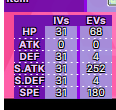
-
Reinstall Checkpoint. You need to be able to see the titles in the squares at the top screen for non-extdata. If Checkpoint continues to be stubborn, use JKSV instead.
-
![More information about "[PKHeX Plugin] Wonder Records Tool"](https://projectpokemon.org/home/uploads/monthly_2021_09/Capture.thumb.PNG.9a1e07c0d1d7206c3b1ad82d390a8c11.PNG)
Version 26.04.11
8762 downloads
PKHeX plugin to import Wonder Cards as Wonder Record (entries that show up in the Gift Album). For SWSH, the 50 slots can be viewed via Sprite Representations: Pokémon represented by the relevant sprites; Items represented by relevant sprites (note: only the first item slot of that gift, not all); the Black Ball can represent Clothes, Money, and BP gift type; Blank represents the slot being unused. (Note: As WR don't store shininess, shininess is only determined by one particular gift title. WR also doesn't store Gmax flag, so it depends on the one particular gift title.) This edit is merely affects what show up in the Gift Album (cannot be redeemed in-game), but some people want it, so here it is. Reminder: Due to changes made starting from LGPE, injecting Wonder Cards (or Wonder Records, for that matter) won't allow the gift to be redeemed in-game. How to use Put the plugin into the plugins folder in your PKHeX directory, then access it from the Tools menu. Note: Win 10 might block DLL files downloaded from the internet. In that case right click the plugin file, go to properties and check "unblock" (as seen here). [You may have to unblock, reblock, then unblock again to get it to work] Example of how to unblock: Usages Used to view the Wonder Records in the KMysteryGift block in the save. Can be used to inject and extract WR8. Can be used to convert WC8 to WR8. Both injections can be used via the button or dragging the file into the form. Do note the conversion is based on best approximation from the data observed. Use at your own risk! Can be used to manipulate the timestamp on entries. Always back up your saves before you perform any edits. Support PLA & BDSP (to a limited extent) Sword and Shield - Viewing, WR8 Injection, WC8 -> WR8 Injection, Timecode manipulation Let's Go Pikachu & Eevee - Viewing (WR7 Injection and Extraction can be done natively using PKHeX) For help and bug reporting, go here. Credits Kaphotics for PKHeX. -
Wait what. So it's about your 3DS not booting the save, not Citra. My bad. Okay, show me a screenshot of the folder (that Checkpoint restores from) that contains main, for Y, and for Alpha. Also, for the record, a screenshot from your first post shows Y's main in extdata folder. That is not correct.
-
It launches fine with or without extdata manipulation? In any case, it seems like the issue is resolved ><
-
And I'm assuming launch the game in Citra still throws the "SD system corrupted" message? If so, can you try these steps and get back to me? https://citra-emu.org/wiki/dumping-extra-data-from-a-3ds-console/ (You already have your extdata, so just place them in the directory as specified. I'm kinda on the fence that it is due to lack of extdata but whatevs. Let's throw everything we got on the wall). An alternative would be to ensure the extdata folders for those games in Citra is empty.
-
SWSH - BDSP Pre-order Shiny Zacian & Shiny Zamazenta (KOR)
theSLAYER replied to Hello, it's me!'s topic in Event Pokémon News
same -
Pokemon become disobey after edit IV - Platinum
theSLAYER replied to betrai49's topic in Saves - Editing Help
@Kaphotics user inadvertently reported that Gen 4 gender symbol in OT is slightly different. -
@justjake I split out your post from the thread, as that thread is not meant to deal with help questions. can you include a screenshot of your Citra's save folder for Alpha and Y? I don't see how the extdata explainer and whatever matters. For starters, let's not over complicate things. All you gotta do is place your main into the Citra Save folder. I don't see that in any of the images.
-
SWSH - BDSP Pre-order Shiny Zacian & Shiny Zamazenta (KOR)
theSLAYER replied to Hello, it's me!'s topic in Event Pokémon News
Well, spoilers -
SWSH - BDSP Pre-order Shiny Zacian & Shiny Zamazenta (KOR)
theSLAYER replied to Hello, it's me!'s topic in Event Pokémon News
For other games, has there been any region based e-Shop exclusives for a game that is simultaneous worldwide launch? If not, then it may just be for all regions, but Korea announced it first. -
Wild Area Event #53: Meteorite Event (2021)
theSLAYER commented on theSLAYER's file in Sword & Shield
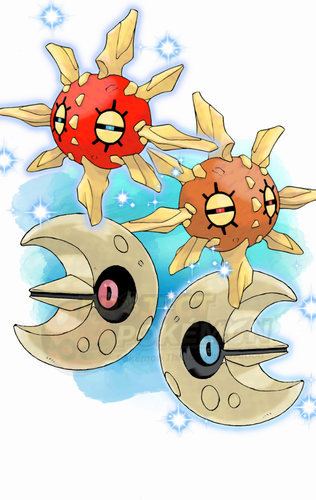 Details for Index 85 of normal_encount and normal_encount_rigel1 and normal_encount_rigel2 (minor differences, in raid chance) Rewards for Index 85 of normal_encount and normal_encount_rigel1 and normal_encount_rigel2 (minor differences, in raid chance) Details for Index 85 of dai_encount Rewards for Index 85 of dai_encount
 -
830 downloads
This is a Wild Area event held by Sword and Shield. This event gives players a chance 2% to find a guaranteed Shiny Solrock or Shiny Lunatone in 5-star raids. Only the files normal_encount, normal_encount_rigel1, normal_encount_rigel2, and dai_encount were updated to Index 85. To import these files into your save, use PKHeX's block importing function. Our tutorial should guide you through it. Our first post of this page contains some data relevant to the importing stage. There's info and some common questions regarding Wild Area Events here. To see other Wild Area Events, here. -
Leon's Hat & Tights Event Downloads?
theSLAYER replied to LettersFrom's topic in Event Contributions
a) We have it uploaded to our github, but the wonder card itself is presently not usable by users, as SWSH no longer stores wonder cards in saves. https://github.com/projectpokemon/EventsGallery/blob/master/Released/Gen 8/Wondercards/1624 SWSH - Clothing Set Leon's Cap %26 Tights.wc8 b) We also have a fashion block you can directly import into your save to have all unlockable fashion items, including event fashion pieces. -
I googled your question, and it appears to be the same problem as another user. And this is the response that user gotten:
-
Save file corrupted (pokemon romhack sors)
theSLAYER replied to Voxel's topic in Saves - Editing Help
Read through this post and try the ones here: https://pokemongamesharkcodes.wordpress.com/fire-red/ My thought process, is to simply use the infinite TM code, and/or the receive all TMs code, and hopefully have it replace the Master Ball. it still doesn't work, consider point 1 to 4 I posted in an earlier reply. -
Save file corrupted (pokemon romhack sors)
theSLAYER replied to Voxel's topic in Saves - Editing Help
No, you probably have to google that yourself. BTW, are you unable to sell Master Balls from the TM case? I could sell TMs from the TM case. edit: just found this on google: https://www.supercheats.com/gameboyadvance/questions/pokemonfirered/363136/my-bag-is-full-of-hms-and-tms.htm -
Save file corrupted (pokemon romhack sors)
theSLAYER replied to Voxel's topic in Saves - Editing Help
Some ROM hacks shift content of the save slightly, and that results in the save not being able to be used by sav hacking program. Most, if not all, save hacking programs only support official saves. Here's an example of using your unedited save with PKHeX This does not look normal. (edit: I hope you didn't upload the wrong save under the wrong title. Besides the invalid box data, PKHeX is showing this unedited save to have invalid checksums over various blocks too) As such, I would advise you to not use any save editing programs and expect it to work. You could either: 1) Manually calculate the checksum of the parts, or 2) Use a cheat code to wipe your TM bag, or 3) Restart your game, and not activate too many cheats at one go in your new playthrough, or 4) Learn to live with it. Trade your mons to another save, where you can use TMs on it, then trade it back. (I'm under the impression you activated too many cheats at one time. I once did that and have Balls in my Key Items, so I would know.)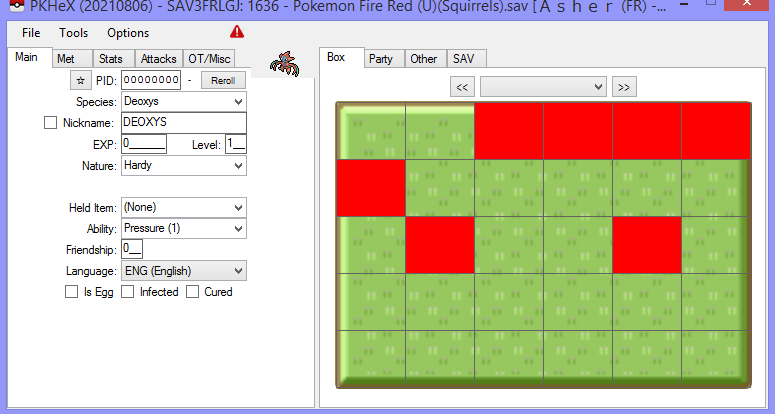
-
@WotDaDogDoin you probably should upload it as a file. And you can edit your upload as many times as you want. As opposed to posting multiple times in threads.. Here: https://projectpokemon.org/home/files/category/195-user-contributed-saves/
-
yeah, I can't really know what people really meant, so gotta try to guess their intentions, while asking a bunch of questions >< well, as long as it got to the point and didn't drive either of us crazy, it works :3 Well, as long as you dump a proper save, it is supported by PKHeX :3 No worries, glad it all worked out :3
-
Do understand, people tend to use older versions of PKHeX, thinking and claiming to be on the latest. Your image of PKHeX did prove that to me. It's the images of your setup that confused me. In any case, glad to hear it is working now :3
-
Don't take this the wrong way, but I don't see how the images of your setup helps me. All I wanted to know is if you are using the latest PKHeX. Reason is, certain older copies of PKHeX don't allow users to change their blank save. The only way to force a gen is to use a save of that generation. Also, certain versions that aren't too old, but also not the newest, uses a different UI to change the blank save, as opposed to what I'm about to show. Hence why I kept asking if you can use the latest version. Anyhow. Go to Options > Settings Then the dropdown box to change default game is right there. Once you're done, close the settings window, and PKHeX should reload.
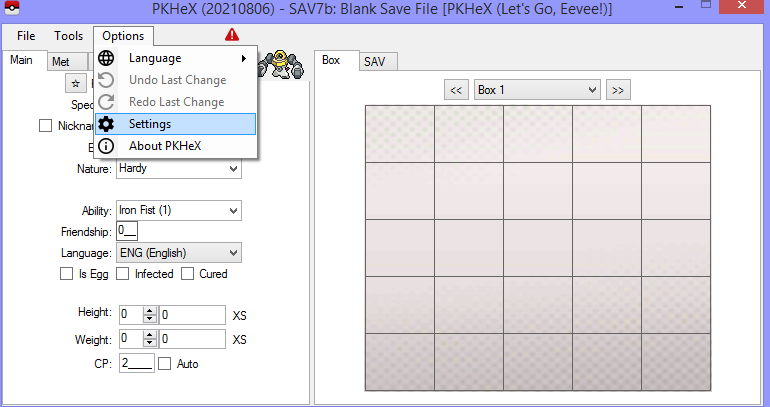
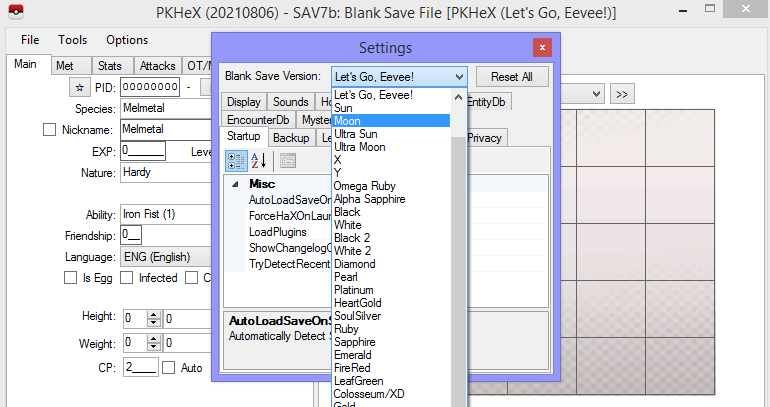
-
Let me know when you have it downloaded and using it.
-
are you unable to use the latest version of PKHeX? if you are able to, use it. Then I'll walk you through how to change the default/blank save.
-
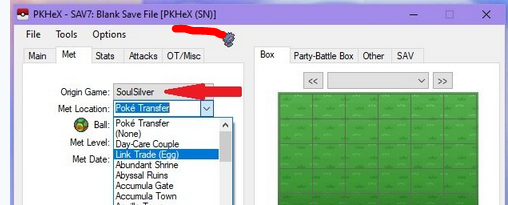
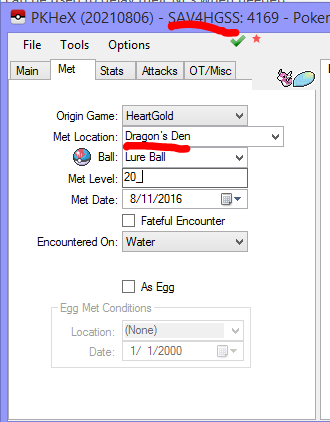
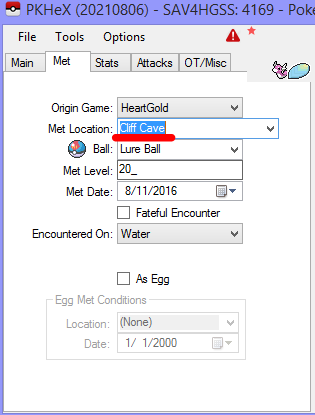
1. It doesn't look like you're on the latest version. 2. Your blank save is in Sun/Moon. You're viewing a mon in a Gen 7 save. Remember how I said Gen 4 Met Location's aren't in Gen 7? Your default/blank save is Gen 7. Refer back to my previous explanation. If you drag a gen 4 pkm file into a Gen 7 save, PKHeX emulates the transfer process. Load a Gen 4 save. Then drag the mon in. As proof, those locations are in Gen 4. edit: stop multi-posting please. :3 Just edit any new info into your latest unanswered post.