Leaderboard




Popular Content
Showing content with the highest reputation on 08/13/20 in all areas
-
Version 2.0.4
13082 downloads
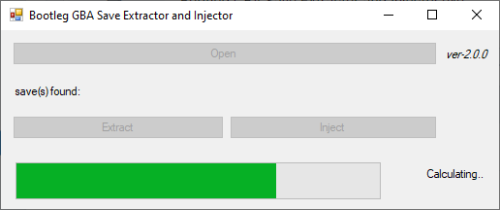
Introduction Normally, save dumps from bootleg GBA carts are not usable on emulators nor save editors. Instead of the designated save location (which is where regular homebrew for retail carts pull data from), the actual save is typically stored within the ROM data. This means that players would need to dump their ROM data, then somehow figure out how to manually extract the save. This program is an attempt at automatically extracting, and also injecting saves into bootleg Pokémon GBA ROMs, without the need to mess with hex editors. Additionally, while it is not the main purpose of this tool, this program can also dump .sav files from .xps or .sps files. [I can't find a working copy of XPS2SAV or SPS2SAV] Usage You can drag and drop the game (.gba/.bin) onto the program, or open the file with a click of the button. The save (if available) is then dumped into the same directory as where the game is. You can extract the save for editing, and then choose to inject back the edited save. If you were to dump .sav files from .xps or .sps files, the program will default to and enforce Full Search. Technical Explanation Quick Search This program checks every 0x1000 of the save file, starting from 0xFF8. (if it's a save, the initial 2-words at every 0xFF8 in the save are identical to each other, and the initial 2-words at every 0xFFE in the save are the same, that being blanks) Image example: Full Search This program goes through every byte in the file, and looks for the first instance of 0x2025. Once it finds the first instance of 0x2025, it checks 0x1000 away to see if that byte is also 0x2025 - this is to determine if the position contains a save. It then checks 0x10000 away to see if this save contains a backup. Tests done. Tested on a copy obtained from here, as well as on an owned bootleg cartridge.1 point -
I solved transfering Pokémons with this problem to HOME and then retransfering back to Sword. Everything was fixed. Thanks @SkyLink24. (Then I used PKHeX to clear all HOME Tracker values).1 point
-
be sure to use the legality mod version compatible with the PKHeX version you are using. I suggest you to use the latest build both for PKHeX and Auto Legality Mod. Also, be sure to put the mod dlls in the "plugins" folder in your PKHeX directory and check that the DLL are not blocked (Right click on DLL -> Properties -> check if there is a checkbox called "Blocked" and if so, uncheck it).1 point
-
v1.2 - August 12, 2020 - Fixed header information - Restored DSi related information Patch Downloads: https://projectpokemon.org/home/forums/topic/24126-pokémon-blaze-black-2-pokémon-volt-white-2/?do=findComment&comment=2748621 point
-
I don't think there is one. Note: what I'm about to say only applies to bootleg copies that stores the save as a sector of the rom dump. Not every bootleg treats saves this way. For starters, learn how to find a save in your rom dump using hex editor. Once you get that done, learn how to replace the save in your rom dump using hex editor. If you cannot get the above 2 points done, no point worrying about restoring the save.1 point
-
Reload the page, and read what I said. I've made that edit quite a while ago. Based on what you're quoting, you've missed what I edited in.1 point
-
@KMSteter_88 it basically means you (and other parties you mentioned) didn't attach a proper save file. Nothing wrong with PKHeX. You mentioned you're using a repro cartridge? For your case, the save is stored in the ROM (cause it's a bootleg isn't it. That's how some store saves). Dump the ROM and run it through this program. Reminder: do not upload the ROM here.1 point
-
When you transferred the save to VBA it took saved the time your computer was set to as the newest time you played the game in the save game. Then you transferred the save back to the original cartridge that had the RTC still showing a older date, effectively time travelling into the past. The game is just waiting until the RTC catches up and passes the date and time you played it on the computer. You can easily fix this by running the homebrew RTC changer to set the cartridge to the current real date. Then after that you can transfer the save back and forth all you want with no problems. Here is the homebrew, two versions one a GBA multiboot file and one a NDS homebrew for use with a NDS flashcart in a 2 slot system https://github.com/megaboyexe/GBA_RTCRead1 point
-
VBA has been known to screw with the RTC function. There should be an option to disable the RTC in VBA which might help.1 point