Leaderboard




Popular Content
Showing content with the highest reputation on 05/25/18 in all areas
-
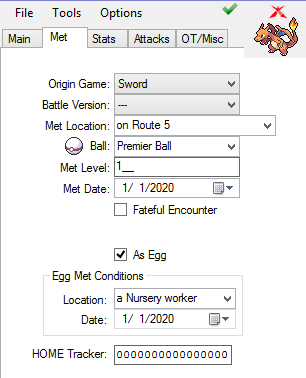
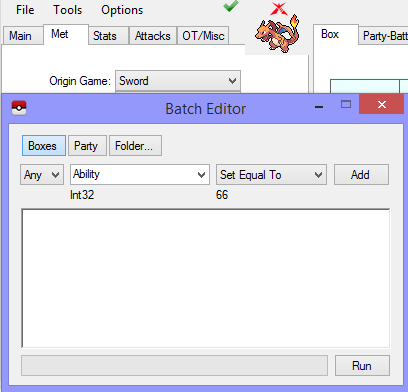
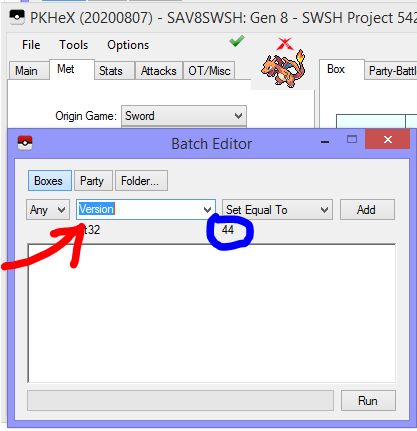
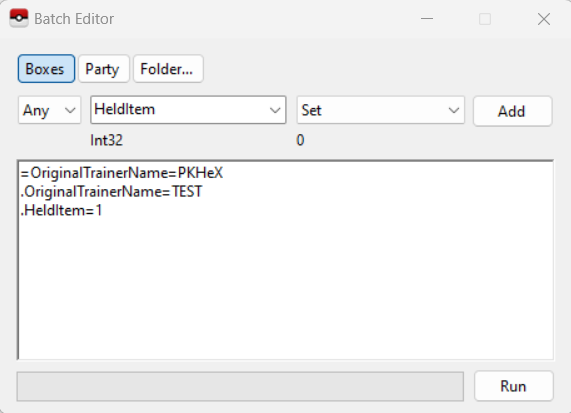
In this tutorial you will learn how to properly use the Batch Editor in PKHeX. The batch editor, when utilized fully and correctly, can be an extremely useful tool for fixing, and editing Pokemon. Please Note: The Batch Editor does NOT have an undo option and therefore all actions taken with the Batch Editor are FINAL unless you quit PKHeX without saving. As a result. MAKE SURE YOU HAVE BACKUPS OF YOUR SAVE BEFORE YOU EDIT IT WITH THE BATCH EDITOR. Section 1: Basic Fundamentals and operation of the Batch Editor The Batch editor works on the simple premise that all possible characteristics pertaining to a Pokemon, boil down to a set of numbers which correspond to certain values in the Pokemon games themselves. Because of this, changing, and editing Pokemon using the Batch Editor is like a mathematical statement, with if then, and true/false statements. The basic operators of the Batch Editor are: "." = Sets the desired value Equal to the value you input "=" = Narrows the editing of Pokemon down to the Pokemon which have the same value as your input value "!" = Narrows the editing of Pokemon down to the Pokemon which do not have the same value as your input value. As an example of how these operators are used, Once you select a variable you would like to change (OT Name, Pokemon Species, Pokemon Level, etc...) and the correct operator, click "Add". This will add your desired variable with your desired operator in the correct format. The next step is to create the formula in which the Batch Editor will run. As an example of a possible combination for use in the Batch Editor, the following formula will change the OT trainer name on Pokemon with a specific OT to a specified OT trainer name, as well as give every Pokemon with that filter, a Master Ball to hold. =OriginalTrainerName=PKHeX This line instructs the Batch Editor to narrow it's scope down to every Pokemon with the OT Trainer Name "PKHeX" .OriginalTrainerName=TEST This lines instructs the Batch Editor to set the OT Trainer Name for all of the previously filtered Pokemon to "TEST" .HeldItem=1 This line instructs the Batch Editor to set the Held Item for all of the previously filtered Pokemon to a Master Ball - which Item Index number is 1. Some Special Tricks to use in the Batch Editor, Courtesy of @Kaphotics (Creator of PKHeX) The Batch Editor window references the PKM that is currently viewed in the editing tabs. If you select a property name, the Batch Editor will indicate whether or not the tabs PKM has that property. If the tabs PKM has that property, the Batch Editor will display the property's current value as well as the data type (number, text, etc). To Randomize a PID, use ".PID=$rand". To Randomize EncryptionConstant, use ".EncryptionConstant=$rand" To Randomize a value within a range, use ".Nature=$x,y" for an inclusive range of [x,y]. To make a Pokémon Shiny: use ".PID=$shiny". To copy the Encryption Constant to the PID, use ".EncryptionConstant=PID" To delete a Pokémon, use ".Species=0" To set a date (Met / EggMet), use yyyyMMdd for the string. Example: ".MetDate=20160409" will set the Met Date to April 9th, 2016. Suggestions can be automatically applied for Moves, RelearnMoves, and Met_Location. Example: ".Moves=$suggest" will retrieve and apply suggested moves from the legality interpreter, same as if you clicked on the Moves groupbox in the tabs editor. Legality can be used as a filter. Use "=Legal=false" to only modify illegal Pokémon. A full up to date list is available by reading the Pokémon properties from the PKHeX source code Section 2: ID Numbers for Use with the Batch Editor This section will focus on the input values you can use in conjunction with the Batch Editor. The Batch Editor uses the in-game index values to set the desired properties to Pokemon. Because of this you will need to use said index numbers instead of relying on the standard text based input present in PKHeX. As an example, to set the species of a Pokemon using the Batch Editor, you must use the equation .Species=150 Not .Species=Mewtwo Below are many of the common variables you may want to use, along with the possible values to use with those variables. Please Note: Some variables (like location, items etc...) have different ID numbers for different generations. Please ensure that you are using the correct ID numbers that correspond to the generation of the game you are editing. Ability: AbilityNumber: Form: Ball: Box: CanGigantamax ConsoleRegion: Country: CurrentFriendship: CurrentLevel: DynamaxLevel: TeraTypeOriginal and TeraTypeOverride: EggLocation: EggMetDate: EV_ATK, EV_DEF, EV_HP, EV_SPA, EV_SPD, EV_SPE: FatefulEncounter: Gender: HeldItem: HPType: IsEgg: IsNicknamed: IV_ATK, IV_DEF, IV_HP, IV_SPA, IV_SPD, IV_SPE: Language: Legal: MarkCircle, MarkDiamond, MarkHeart, MarkSquare, MarkStar, MarkTriangle: MetLevel: MetLocation: MetDate: Move1, Move2, Move3, Move4: Move1_PPUps, Move2_PPUps, Move3_PPUps, Move4_PPUps: Nature: Nickname: OriginalTrainerGender: OriginalTrainerName: OriginalTrainerTrash / HandlingTrainerTrash NicknameTrash PID: RelearnMove1, RelearnMove2, RelearnMove3, RelearnMove4: Ribbons ShinyLeaf (Gen 4 HG/SS Only) SID16 or TrainerSID7: TID16 or TrainerTID7: Slot: Species: Stat_ATK, Stat_DEF, Stat_HP, Stat_SPA, Stat_SPD, Stat_SPE: Version: JUST IN CASE ANY OF THE VALUES ABOVE ARE NOT UPDATED: You can use Batch Editor to also view the particular values you want. Special Thanks to @theSLAYER for help with making and researching this guide with me View full tutorial
 3 points
 -
In this tutorial you will learn how to properly use the Batch Editor in PKHeX. The batch editor, when utilized fully and correctly, can be an extremely useful tool for fixing, and editing Pokemon. Please Note: The Batch Editor does NOT have an undo option and therefore all actions taken with the Batch Editor are FINAL unless you quit PKHeX without saving. As a result. MAKE SURE YOU HAVE BACKUPS OF YOUR SAVE BEFORE YOU EDIT IT WITH THE BATCH EDITOR. Section 1: Basic Fundamentals and operation of the Batch Editor The Batch editor works on the simple premise that all possible characteristics pertaining to a Pokemon, boil down to a set of numbers which correspond to certain values in the Pokemon games themselves. Because of this, changing, and editing Pokemon using the Batch Editor is like a mathematical statement, with if then, and true/false statements. The basic operators of the Batch Editor are: "." = Sets the desired value Equal to the value you input "=" = Narrows the editing of Pokemon down to the Pokemon which have the same value as your input value "!" = Narrows the editing of Pokemon down to the Pokemon which do not have the same value as your input value. As an example of how these operators are used, Once you select a variable you would like to change (OT Name, Pokemon Species, Pokemon Level, etc...) and the correct operator, click "Add". This will add your desired variable with your desired operator in the correct format. The next step is to create the formula in which the Batch Editor will run. As an example of a possible combination for use in the Batch Editor, the following formula will change the OT trainer name on Pokemon with a specific OT to a specified OT trainer name, as well as give every Pokemon with that filter, a Master Ball to hold. =OriginalTrainerName=PKHeX This line instructs the Batch Editor to narrow it's scope down to every Pokemon with the OT Trainer Name "PKHeX" .OriginalTrainerName=TEST This lines instructs the Batch Editor to set the OT Trainer Name for all of the previously filtered Pokemon to "TEST" .HeldItem=1 This line instructs the Batch Editor to set the Held Item for all of the previously filtered Pokemon to a Master Ball - which Item Index number is 1. Some Special Tricks to use in the Batch Editor, Courtesy of @Kaphotics (Creator of PKHeX) The Batch Editor window references the PKM that is currently viewed in the editing tabs. If you select a property name, the Batch Editor will indicate whether or not the tabs PKM has that property. If the tabs PKM has that property, the Batch Editor will display the property's current value as well as the data type (number, text, etc). To Randomize a PID, use ".PID=$rand". To Randomize EncryptionConstant, use ".EncryptionConstant=$rand" To Randomize a value within a range, use ".Nature=$x,y" for an inclusive range of [x,y]. To make a Pokémon Shiny: use ".PID=$shiny". To copy the Encryption Constant to the PID, use ".EncryptionConstant=PID" To delete a Pokémon, use ".Species=0" To set a date (Met / EggMet), use yyyyMMdd for the string. Example: ".MetDate=20160409" will set the Met Date to April 9th, 2016. Suggestions can be automatically applied for Moves, RelearnMoves, and Met_Location. Example: ".Moves=$suggest" will retrieve and apply suggested moves from the legality interpreter, same as if you clicked on the Moves groupbox in the tabs editor. Legality can be used as a filter. Use "=Legal=false" to only modify illegal Pokémon. A full up to date list is available by reading the Pokémon properties from the PKHeX source code Section 2: ID Numbers for Use with the Batch Editor This section will focus on the input values you can use in conjunction with the Batch Editor. The Batch Editor uses the in-game index values to set the desired properties to Pokemon. Because of this you will need to use said index numbers instead of relying on the standard text based input present in PKHeX. As an example, to set the species of a Pokemon using the Batch Editor, you must use the equation .Species=150 Not .Species=Mewtwo Below are many of the common variables you may want to use, along with the possible values to use with those variables. Please Note: Some variables (like location, items etc...) have different ID numbers for different generations. Please ensure that you are using the correct ID numbers that correspond to the generation of the game you are editing. Ability: AbilityNumber: Form: Ball: Box: CanGigantamax ConsoleRegion: Country: CurrentFriendship: CurrentLevel: DynamaxLevel: TeraTypeOriginal and TeraTypeOverride: EggLocation: EggMetDate: EV_ATK, EV_DEF, EV_HP, EV_SPA, EV_SPD, EV_SPE: FatefulEncounter: Gender: HeldItem: HPType: IsEgg: IsNicknamed: IV_ATK, IV_DEF, IV_HP, IV_SPA, IV_SPD, IV_SPE: Language: Legal: MarkCircle, MarkDiamond, MarkHeart, MarkSquare, MarkStar, MarkTriangle: MetLevel: MetLocation: MetDate: Move1, Move2, Move3, Move4: Move1_PPUps, Move2_PPUps, Move3_PPUps, Move4_PPUps: Nature: Nickname: OriginalTrainerGender: OriginalTrainerName: PID: RelearnMove1, RelearnMove2, RelearnMove3, RelearnMove4: Ribbons ShinyLeaf (Gen 4 HG/SS Only) SID16 or TrainerSID7: TID16 or TrainerTID7: Slot: Species: Stat_ATK, Stat_DEF, Stat_HP, Stat_SPA, Stat_SPD, Stat_SPE: Version: JUST IN CASE ANY OF THE VALUES ABOVE ARE NOT UPDATED: You can use Batch Editor to also view the particular values you want. Special Thanks to @theSLAYER for help with making and researching this guide with me2 points
-
Version February 19th, 2025 (FFFF)
216062 downloads
All of the 920+ Pokemon in this save file are legal and will through Bank and HOME. Every pokemon that can legally be obtained as a shiny has its shiny form in the save file, the other pokemon are there in non-shiny form. 90% of the Pokemon in this save file were hatched/captured in USUM meaning that they can be used on battlespot. The first evolutions of almost all of the Pokemon will be level 1; the middle evolutions are often level 70. A majority of the final stage evolution pokemon are a smogon set. I hope this save helps some people out there. All of the complete 806 pokemon sets I could find online were either completely riddled with illegal pokemon, or all of the pokemon only knew 1 move; that is not the case with this save file. Enjoy ! Youtube Video showcasing the savefile: https://youtu.be/-YBj6WgP_ro1 point -
Thanks for the kind words everyone! When I get back from this work trip I plan on redeeming a bunch of shiny Channel Jirachi's and posting the .pk3s1 point
-
i love vaporeon because it is super bulky and that i love the shiny which is pink and love the color pink and i found that Pokemon very useful in battles. another reason why i like this Pokemon than any other Pokemon evolution is because it is also my favorite Pokemon water type and that it learns a variety of moves. very useful and the BEST!!!1 point
-
1 point
-
As for Korrina,I find her the brave kind like for me,I do not skate as I'm too scared.Anyway, I like her design.I won't say that I like her for people say I am childish when I say so but actually, in truth, I like her alot.As for wearing pants,I had a brother and my family wasn't rich so I had no choice but to wear them.I had a younger sister afterwards and my parents bought her new skirts and dresses.I secretly made her like pokemon so that she would ask my parents to get us pokemon games but they said no,pokemon was out-to-date and lame.Yes, they said that.1 point
-
#1 Jigglypuff Jigglypuff is only Pokemon still cute even when she angry. If you want cutest girl singing to you, catch her now. #2 Pikachu Pikachu is the one of the cutest pokemon. Pikachu is funny, sassy and chubby. If we are honest, he is the one we all want. People will go anywhere to catch this cutie. #3 Charmander Charmander is my personal go to first pick. From his little belly, to his little flame tail, Charmander is one of the cutest Pokemon has to offer. #4 Squirtle How can someone not find Squirtle cute? Squirtle is just so damn squeezable and full of joy. Who wouldn’t want one of these cuties with them? #5 Bulbasaur Bulbasaur is feisty but very cute. You must be lucky if you can catch him. #6 Clefairy Clefairy is a cute pokemon from the outside until the name. Do you want her? #7 Vulpix Vulpix is a puppy in Pokemon Go. If you caught Vulpix, you can embrace it all day. #8 Caterpie Caterpie is very rare pokemon. He is so funny and cute. Would you like catch one? #9 Butterfree Butterfree resembles a vaguely anthropomorphic butterfly with a cute purple body. You should quickly catch Butterfree before it flies away. https://phima1d.com #10 Eevee Eevee is a very cute and honest Pokemon. If you want a good friend, you must catch Eevee.1 point
-
Another nostalgia themed thread for me. Back in the days of 2004, me and other people I knew around Pokemon forums in general used to make Pokemon sprite edits a lot :3 It was fun. Did any of you used to make 'recolors' (pokemon colored different colors) or 'splices' (pokemon parts mixed together) of pokemon sprites too? If my old photobucket still shows my images at all, I would enjoy to share some of my old stuff. You can find it scrolling through the pages. I'm a little scared to look, though.....seeing photobucket just do away with all my images is gonna hurt a lot cuz those images meant a lot to me for years Photobucket got eviler than Team Rocket in its more resent days.....1 point
-
Can't seem to make one, with editing the models and all. There's supposed to be, but I can't spot it. They weren't colored shiny. Meaning the star would pop up, but looks the same. As seen below (Partner Cap was the only one that can be obtained shiny, as GF screwed up the shiny-lock implementation): edit: Using the method in this post, the discolored parts can be changed to uniformed color (but it won't be partially transparent, tho)1 point
-
Iirc there was an option to state your gender before the big forums update over a year ago. I'm male by the way.1 point
-
This poll is in need of Sylveon now!1 point