Kaphotics
-
Posts
7957 -
Joined
-
Last visited
-
Days Won
476
Content Type
Profiles
Pokédex
Portal
Technical Documentation
Pages
Tutorials
Forums
Events
Downloads
Gallery
Blogs
Everything posted by Kaphotics
-
Are you sure this is a clean install into a folder? Nothing else attempted/present?
-
Only HOME stores the conglomerated data; individual games only store data applicable to them
-
And how would PKHeX know that? All it has is the SW/SH instance. If it's possible with the data that PKHeX has and what is possible, then it is possible. You can always give it the moves in SW/SH, then transfer it back to S/V and remove it from that moveset, but it will still have the move in SW/SH's learned moveset.
-

Just want Colosseum Starters but am too Stupid
Kaphotics replied to 3rd Gen Expert's topic in Pokémon Requests
Should be the same for both types of starters, just that Espeon and Umbreon generate from the same seed one after another. You can use the obtained Trainer ID seeds to see the PID/IV of the starters via Pokefinder Double check which frame is the one you get by comparing against our example case above. -
Just want Colosseum Starters but am too Stupid
Kaphotics replied to 3rd Gen Expert's topic in Pokémon Requests
Oops, roller => folder. You have to reference the dll and import the namespace `PKHeX.Core` on the other tab. -
Control click on the legality checkmark to bring up the verbose report; should be legal because HOME can "relearn" it if it is in its Scarlet/Violet currently known moves.
-
The issue is that HOME continually changes the HOME tracker. If you have a dump of PK8 files, migrate them through HOME and into SV, you can't just do a lookup on the trackers and try applying their corresponding moves into their SV instance, because the HOME tracker is different for both. You'd have to use a heuristic (combining PID/EC and other details) to try and 1:1 correlate them, then run an operation to try setting those moves legitimately. It's moreso for people looking to make a plugin. That's the name of the class you'd replace with whatever custom implementation. PKHeX's source code is available on GitHub. If your goal is to retain legitimacy, then you have to transfer them legitimately via HOME, which won't use PKHeX's transferring logic. You'd need some other bulk operation that is triggered from a box / folder, completely separate code from what PKHeX currently does. Then you would likely want to audit to see which ones were able to have all moves migrated, which had none, and which had a few. Learnsets change between games, and meta movesets are not always the same. It's not something I'm interested in doing since it's incredibly niche (how many people would actually jump through the hoops to get bulk moveset copying?). You (or someone else) is more than welcome to make a plugin that adds a button to do all that, but I don't see it as necessary to be in the main program that is distributed & maintained by me.
-
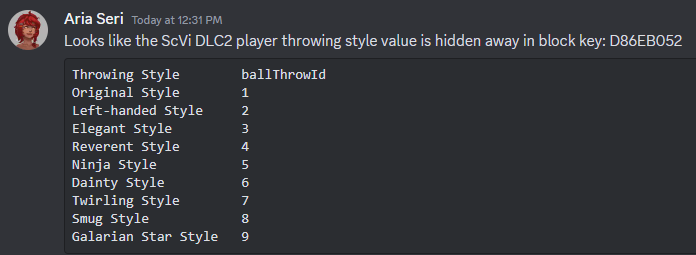
I would assume the unlock flags are these: private const uint KUnlockedBallThrowSet01 = 0x9BC0F251; // FSYS_CLUB_ROOM_BALL_THROW_FORM_01 private const uint KUnlockedBallThrowSet02 = 0x9BC0ED38; // FSYS_CLUB_ROOM_BALL_THROW_FORM_02 private const uint KUnlockedBallThrowSet03 = 0x9BC0EEEB; // FSYS_CLUB_ROOM_BALL_THROW_FORM_03
-
Your first images are you trying to open a folder You have a pcdata Just open the pcdata file via File->Open, or drag & drop it into your save file.
-
Moving it into a game with PKHeX won't notify HOME that it was moved, so the tracker wouldn't match their expected state (thus it would still get flagged by them). {X} tracker on game {Y} is valid, but {X} tracker on game {Z} is not valid. PKHeX aims to mimic the official behaviors, so it mimics the move reset logic. The program has a "LegalityRejuvenator" which detects the original relearn moves to try and keep things legal, but it does not attempt to migrate the prior moveset. If the logic were changed to try copying moves, it would have to try and do it legally (including setting all moves and any relearn flags) from the original. Chances are, you're going to want to validate the moveset copied over, so just copy it over yourself? If you're wanting to bulk move thousands of files, I would recommend using PKHeX.Core with LINQPad to write your own c# script that converts each file, copies the moves and sets the relearn flags, and compares the movesets, and puts them in separate folders if they match or are illegal. PKHeX has PKHeX.Core available as a code library, and others have written plugins to override/enhance behaviors. Anyone can provide a custom IEntityRejuvenator implementation that maintains a facade of HOME's database and custom migration behaviors, but it's not something that the regular PKHeX aims to do.
-
Open the folder, or press the open button while in the folder?
-
Remove a Pokémon from GTS with PkHex (US/UM)
Kaphotics replied to spider2MW's topic in Saves - Editing Help
Open the Save File in PKHeX and look through the tabs. There should be a single slot to indicate what was last uploaded to the GTS. -
Pokemon from HOME no longer allowed back in??? Please Help!!!!
Kaphotics replied to bigdom8's topic in General Development
This is correct; just looking at your Jirachi, it doesn't have a HOME tracker, which means someone hacked it in to S/V directly instead of it being put in the game by HOME. https://projectpokemon.org/home/docs/home_165/relevance-of-home-tracker-home-v200-v300-and-beyond-r154/ -
Pokémon are shiny based on the PID and OT IDs they have. You can always test this by just making a shiny egg and setting it to the box; PKHeX displays the star just the same as it were hatched.
-
You don't need an older version. Open your Sword/Shield save file. If you're looking to edit pk8 files without a save file, just change the Blank Save File setting via Options.
-
Same junk. If whatever is being dumped is what is on the cart, then there isn't any valid save data to recover / use.
-
HxD works fine. Bad dumps can be from dirty contacts on the cartridge, or a bad/fake cartridge. If there's only junk, then there's nothing to recover
-
Attached file is just junk. Open it in a hex editor, and compare the overall visuals to a valid Yellow save file.
-
Partially untrue .NET 8 works on macOS and Linux; the issue you are having is that Windows Forms .exe does not work for those operating systems unless you use a compatibility shim like Wine, because the .exe uses Windows Forms (Windows-specific drawing GUI stuff) rather than something like Avalonia. The repo is divided into multiple projects. PKHeX.Core being just a code library, no GUI, which works on any OS, and PKHeX.WinForms that uses Windows Forms. The releases that are posted are not code-signed, and new releases are "new" in that it is new to the antimalware scanning (not a scanned definition). The release pipeline is me just clicking Publish on the WinForms csproj and zipping the exe; nothing special beyond that. If you have an extremely high DPI monitor, then yes it might look tiny. If your OS is sandboxing it, then it might be interfering with its rendering. Without seeing a screenshot, can't diagnose/advise. == There have been discussions about Linux/Mac support, and the answer is always that you're free to port whatever. The GUI code is some of the oldest & least abstract code in the repo, and most of the contributions are in the PKHeX.Core side of things as we try to keep up with mechanics on each new game content release. The GUI has been a relative afterthought, and porting >100 forms/controls to another GUI framework when the current one works well enough for most users. Using Avalonia would require each release to include the Avalonia GUI libraries (or require people to install something NOT from Microsoft), which would be a "bloated" exe rather than the ~22 MB zip it is currently. MAUI hasn't shaped up well (Linux support for Desktop lol). So the suggestion from us has always been to just use Windows/vm/wine on a desktop PC, because nobody wants to spend the time porting it to another GUI/mobile framework with full support. Running as a web app (wasm blazor) has its own pitfalls, like some crypto (md5, aes) not being supported (so can't export certain save files). == Checking the contributor graph (and knowing the content of every commit), PKHeX is mostly a solo-contributor project with others chipping in occasionally. I have other projects and interests, and duplicating the GUI (learning a new framework/language) is not something I have much of an interest in.
-
The file you attached has the mark. It's just not "affixed"/equipped by default (I will change the default behavior in a commit). The other attachment is generated from the regular Area Zero encounter, again at level 52.
-
Creating things from scratch is a bad idea; Vivillon cannot be wild captured with a Normal tera type. Familiarize yourself with the Encounter Database, and create new things from the templates in there. Manually modifying something else into what you want requires you to make all the necessary changes, which you didn't do.
- 669 replies
-
- 1
-

-
- legality
- question or check
- (and 1 more)
-
The 7 star raid isn't found at level 52. You likely generated from a different encounter template.
-
None of that savedata is anything savedata like; many files are either nonsense / junk, and some have pieces of RAM/ROM data from the games instead of save data.
-
Thanks for reporting, fixed on latest commit: https://github.com/kwsch/PKHeX/commit/9897630b08674fca077073c11232231e2f18b994