theSLAYER
-
Posts
22864 -
Joined
-
Last visited
-
Days Won
1001
Content Type
Profiles
Pokédex
Portal
Technical Documentation
Pages
Tutorials
Forums
Events
Downloads
Gallery
Blogs
Everything posted by theSLAYER
-
SV save sharing are against our rules, due to save-user profile validation + potential bans. Don’t ask again.
-

Help removing background of 3ds sprites are missing
theSLAYER replied to Kalaxe's topic in ROM - 3DS Discussion & Help
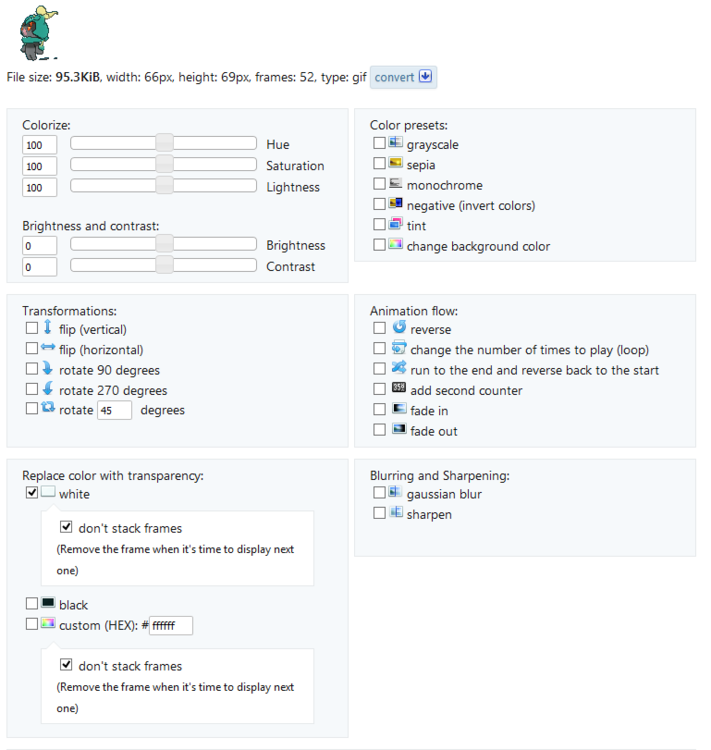
First try the following using ezgif.com/maker if your changing background eats into the body, consider: Else use their site to split gif to frames, then manually edit the frames, then use their site to recombine the frames.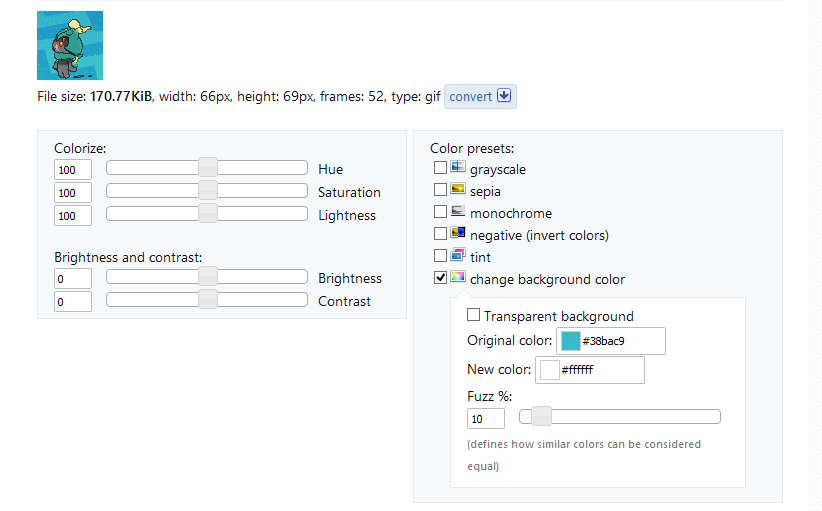
.gif.0f57d24a9ec974333d8d97fcaa3cd173.gif)
.gif.e5798ceedd3046902c2f075cfb0189a0.gif)
-
Help removing background of 3ds sprites are missing
theSLAYER replied to Kalaxe's topic in ROM - 3DS Discussion & Help
yes, we still use this forum, but no one is actively doing background removals. You're better off trying to remove it frame by frame, cause the colour of the background is similar it's attack stance -
Problems editing the save of Pokemon Emerald
theSLAYER replied to Fr3ny's topic in Saves - Editing Help
why wouldn't it be transferable to HOME? Hatched legal pokemon transfer to HOME just fine. If you're up for reading: You could always Search VIA IVs, then perform shinification afterwards. -
Problems editing the save of Pokemon Emerald
theSLAYER replied to Fr3ny's topic in Saves - Editing Help
Make the treecko hatched and you'll probably be fine, -
some genned pokemon crash my Omega Ruby but others dont.
theSLAYER replied to kingputs1's topic in Saves - Editing Help
What if you hack in a different Arcanine, one with generated by encounter database. Has the same moves and same origin but different everything else. Does the game still crash then? -
Problems editing the save of Pokemon Emerald
theSLAYER replied to Fr3ny's topic in Saves - Editing Help
glad it worked. This time make a proper dump with GBABF as per the tutorial. Could be a size thing, try doing 16Mbytes dump. -
Problems editing the save of Pokemon Emerald
theSLAYER replied to Fr3ny's topic in Saves - Editing Help
take it out of the slot, clean the contacts, then put it back in. Even if it doesn't show up, GBABF may still be able to access the read the slot. I've had something similar happen before. -
Problems editing the save of Pokemon Emerald
theSLAYER replied to Fr3ny's topic in Saves - Editing Help
GBABF -> Erase Flash After the Flash is erased, Flash the unmodified ROM into the cart. -
Problems editing the save of Pokemon Emerald
theSLAYER replied to Fr3ny's topic in Saves - Editing Help
I'm assuming you used a .gba with the program? If so, that is fine. Now rename it to .bin and continue with the process -
Problems editing the save of Pokemon Emerald
theSLAYER replied to Fr3ny's topic in Saves - Editing Help
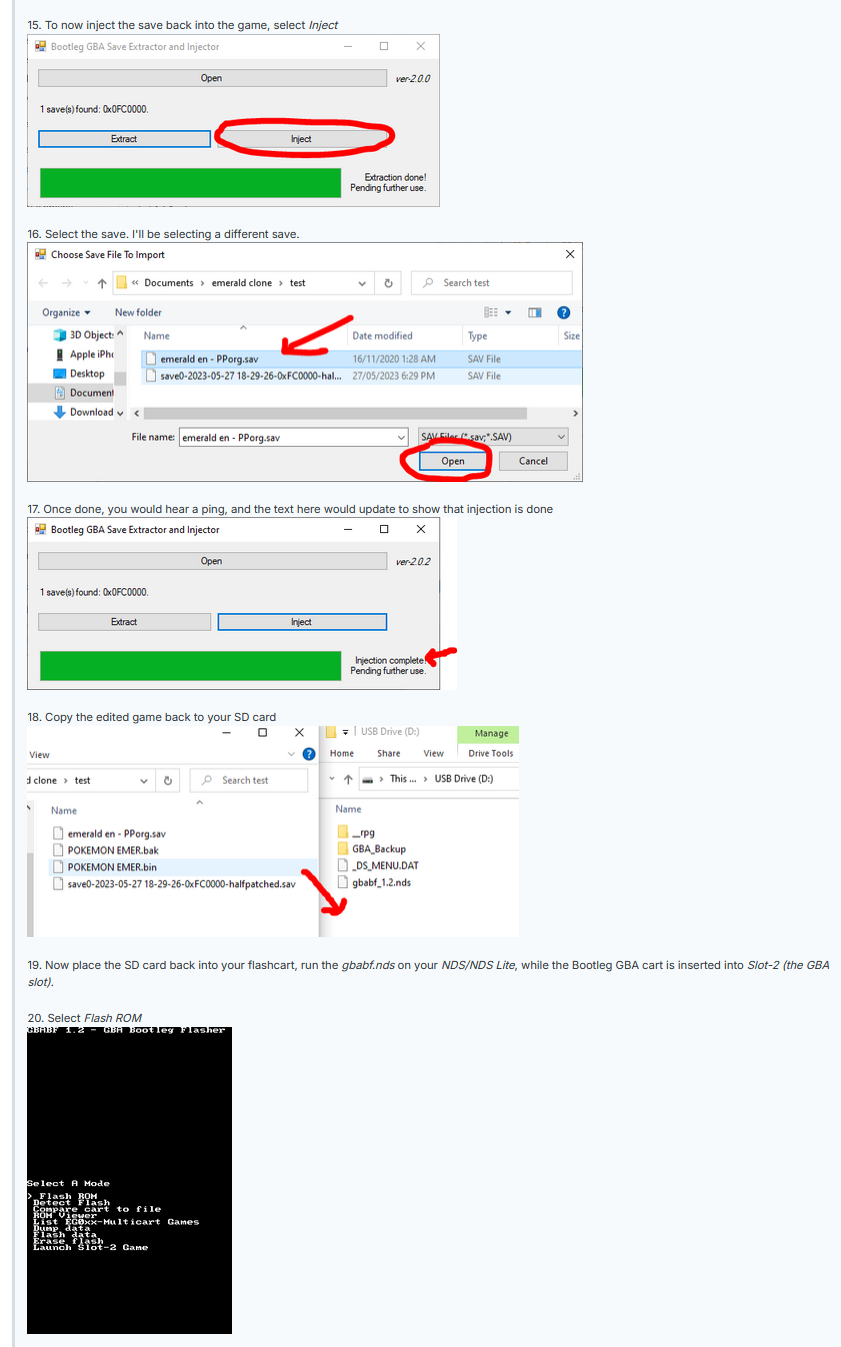
This quote from you shows you don't understand what I have been trying to say. You're playing on a bootleg cart, not a legitimately retail cartridge. You cannot restore save using GBA Backup tool. Hence for you and your situation, I said: Now, in the tutorial: Step 15: Inject the modified save into the rom file. Step 20: Flashing ROM to cart using GBABF. Is the confusion due to a translation error? Do you think GBABF is the same as GBA backup tool? (For the record, it isn't the same). Your video doesn't help; it doesn't show you using GBABF. It shows you use GBA backup tool (which is incorrect). All your post and video did is give me the impression that you did not follow the tutorial fully. Read the tutorial. Follow it step-by-step, fully. The tutorial isn't just for extracting the save. It is also for injecting the save. Follow it fully. Only then, can anyone try to help you.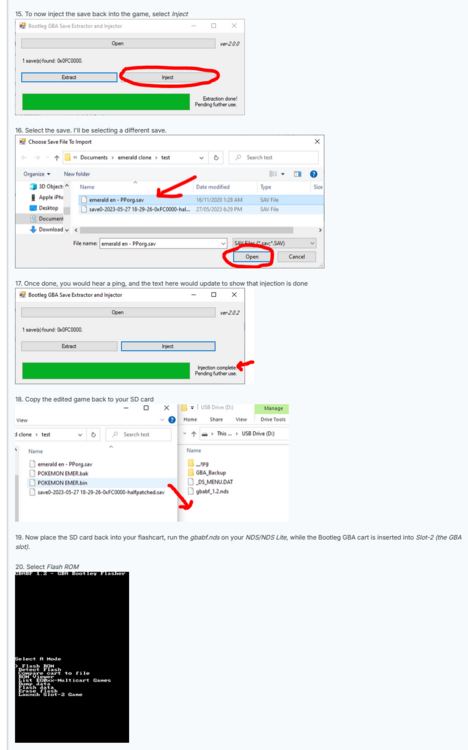
-
some genned pokemon crash my Omega Ruby but others dont.
theSLAYER replied to kingputs1's topic in Saves - Editing Help
Injected Pokemon typically don't "crash the game", so I gotta ask a few questions to understand the situation better. Few questions 1. Did you inject into PC or into party 2. Did you perform any other edits while injecting this 3 3. What action did you have to perform to lead to the 'crash' 4. What does the crash look like. Any error messages? Or does it just hang? Garbled music? etc. -
Problems editing the save of Pokemon Emerald
theSLAYER replied to Fr3ny's topic in Saves - Editing Help
GBABF didn't allow you to insert the ROM, or it threw an error? Or it wrote successfully, but the save didn't change? You shouldn't use GBA backup tool to inject the ROM nor save. -
Problems editing the save of Pokemon Emerald
theSLAYER replied to Fr3ny's topic in Saves - Editing Help
PKHeX doesn’t stop you placing illegal mons into your save. Did you right clock on a PC slot and select Set? Did you export the save (File > Export main > save as…)? can you be specific and show a screenshot of the error PKHeX gives you? Can you also try and confirm if reloading the save shows the Treecko? Did you even follow the tutorial I linked earlier? Did you try using GBABF, is it giving any error? -
Problems editing the save of Pokemon Emerald
theSLAYER replied to Fr3ny's topic in Saves - Editing Help
Can you specify what error you’re having, and which specific step is failing you? have you been able to export an edited save that contains the pokemon (reopen the modified save in PKHeX to check if the shiny treecko is there) is GBABF throwing an error when trying to write the ROM to the cart? -
Problems editing the save of Pokemon Emerald
theSLAYER replied to Fr3ny's topic in Saves - Editing Help
So once you inject the shiny treecko into the modified save, export the modified save. Then, use the tutorial I linked you, to teach our how to inject the modified save into the ROM. Then finally use the GBABF tool to reinject the modified ROM into your cart. Make sure you read all the steps of the tutorial carefully. Make sure you store separately the unmodified save and unmodified ROM. Make sure you have a photograph of the detected chip type GBABF gives you. And as a reminder, replacing the data in the cart can be risky, and it will all be at your own risk. -
Problems editing the save of Pokemon Emerald
theSLAYER replied to Fr3ny's topic in Saves - Editing Help
The tutorial I linked includes the usage of this program and how to place the edited save back into the game. Good price, so long as you're happy it isn't a real issue. In any case, glad you got it all resolved! -
Problems editing the save of Pokemon Emerald
theSLAYER replied to Fr3ny's topic in Saves - Editing Help
Sounds like a scam. He didn't "remove the battery problem", he just bought something to resell. Hope you didn't pay too much. A dump is just a term for when extracting data. Depends on what the tool is meant to give you, the dump could be a ROM or a save etc. If it's a bootleg cart, then the save in GBA backup tool won't be dumped correctly. Try this, at your own risk: -
Problems editing the save of Pokemon Emerald
theSLAYER replied to Fr3ny's topic in Saves - Editing Help
In this scenario, the process of extracting the file is "dumping", and the resultant file is a "dump". What he meant is "The file obtained is not valid, likely not a save." what you could do is: 1. Use Isopropyl Alcohol (rubbing alcohol) to clean the cartridge contacts (the gold parts which come into contact with your console and gets read) and try again 2. Check if your cartridge is real (a retail copy, not a fake/bootleg; bootlegs require different tool and procedure) As with everything, do this all at your own risk. -
Issue with injection of Liberty pass ( black 2 ) into mystery box
theSLAYER replied to zabour's topic in Saves - Editing Help
Liberty Pass is for Black/White, not Black 2/White 2 -
Pokemon Emerald Bootleg cart help
theSLAYER replied to Kittfox's topic in Saves - Files and Requests
Few things you can try 1. you may have to select the type of flash as opposed to Auto (the same type as detected by "detect flash" in earlier steps). 2. The issue could also be related to R4/NDS cart; this user resolved their issue this way: 3. An alternative method by another user: Remember, it is all at your own risk. Good luck. -
Pokemon Emerald Bootleg cart help
theSLAYER replied to Kittfox's topic in Saves - Files and Requests
as in GBABF can't write to your cart? or the tool didn't work for your bin file? -
Pokemon Emerald Bootleg cart help
theSLAYER replied to Kittfox's topic in Saves - Files and Requests
I removed the offending file. @Kittfox read and follow this: -
Modifying dynamax raids to choose what pokemon to spawn.
theSLAYER replied to Bryansouza87's topic in PKHeX
Glad you got it to work. Now hopefully you’ll be able to tackle it. -
Question about creating Pokémon in Gen7 (USUM)
theSLAYER replied to bee8's topic in Pokémon Legality
If I’m not mistaken mons caught in Gen 7 have sufficiently random RNG; I don’t think any correlation has been discovered. If you’re concerned, catch the desired mons in game (so that’s if there’s any undiscovered correlation, the PID IV etc relationship be maintained), then shinify it by only flipping the front half of the PID against your Trainer details In practice similar to the Overworld Shiny + Forced Shiny function of this: (that’s what happens in Gen 8; the shiny generated by a random “seed” value has stat correlations, and how the game shinifies it is just by modifying the front half of the PID. Longer seeds, like with raids, are a bigger problem as they also generate what’s called “fake trainer tid sid”, which is what the game uses to determine if the encounter can even be shiny)