
theSLAYER
-
Posts
22963 -
Joined
-
Last visited
-
Days Won
1016
Content Type
Profiles
Pokédex
Portal
Technical Documentation
Pages
Tutorials
Forums
Events
Downloads
Gallery
Blogs
Everything posted by theSLAYER
-

File Size Too Large (Pokemon Platinum)
theSLAYER replied to culturedminecrafter's topic in Saves - Editing Help
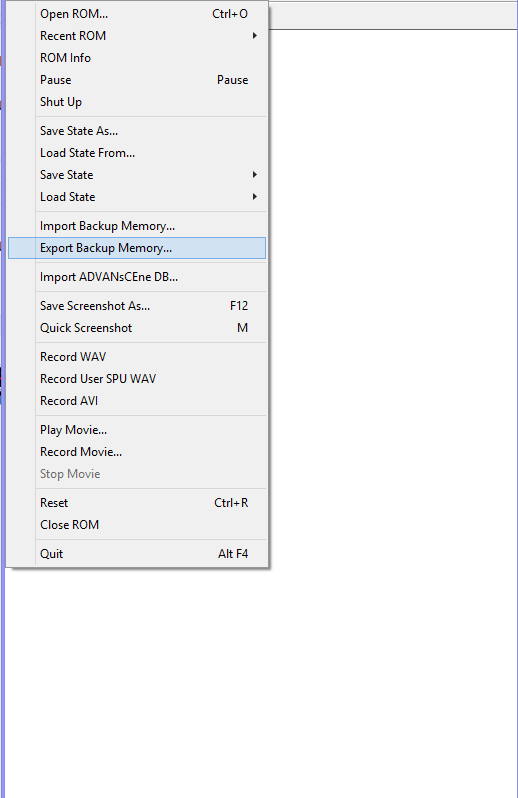
The usage of trimmed here is slightly concerning. It makes it sound like you took the oversized DSV, edited it (downsized it), and renamed it .sav. when the game is running normally, and a save is loaded, you're supposed to export via this.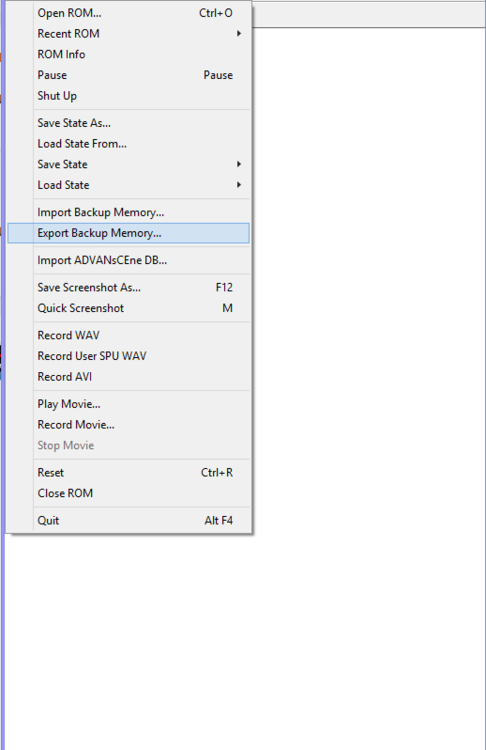
-
File Size Too Large (Pokemon Platinum)
theSLAYER replied to culturedminecrafter's topic in Saves - Editing Help
Just to be clear, did that save come from your game play, or did it come from the start of the game (possibly prior to saving in-game?) -
File Size Too Large (Pokemon Platinum)
theSLAYER replied to culturedminecrafter's topic in Saves - Editing Help
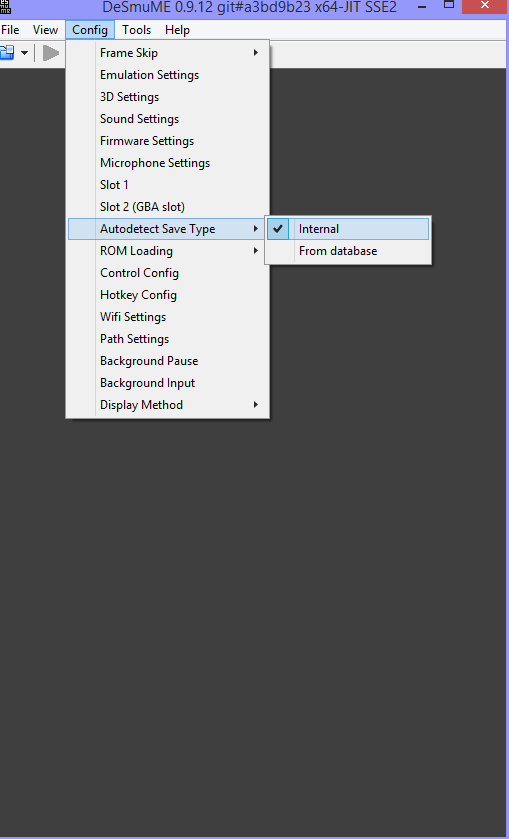
Few things come to mind, so I'll just address the points 1. Probably something off with your Desmume settings. It shouldn't just ignore your previous save and start over. Is your auto save type Internal (as I showed a few posts prior) As double check your Path Settings to ensure it's reading and write to and from the right place. 2. PKHeX would not ignore the save, as long as (i) it's the right size and (ii) properly initialized. You could upload the save here, but I'm guessing it's probably not properly initialized. Make sure you save in-game, not just use state saves. -
File Size Too Large (Pokemon Platinum)
theSLAYER replied to culturedminecrafter's topic in Saves - Editing Help
you're at the start of the game. can you at least reach the first saving point, then saving, then trying again? -
File Size Too Large (Pokemon Platinum)
theSLAYER replied to culturedminecrafter's topic in Saves - Editing Help
There's probably something wrong with your settings. Desmume can open PKHeX edited DSVs directly. Maybe you're editing the dsv in a dupe battery folder or something. who knows. An alternative, would be to save the game, export battery file as .sav, import the .sav into PKHeX, then save the progress from PKHeX as a .sav (when done editing), then import battery file into the emulator, then soft reset. When you import battery file, make sure to go with this option: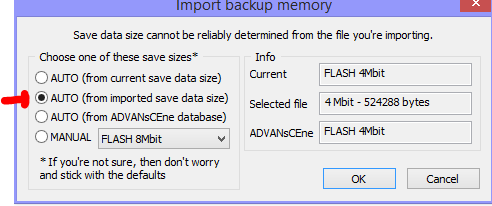
-
File Size Too Large (Pokemon Platinum)
theSLAYER replied to culturedminecrafter's topic in Saves - Editing Help
maybe you're importing it wrong? Close the emulator. Load the DSV in PKHeX Save the DSV Open the emulator, play the game. You don't have to "import" the DSV into the game every time, it just loads from the battery folder. -
File Size Too Large (Pokemon Platinum)
theSLAYER replied to culturedminecrafter's topic in Saves - Editing Help
Dude look at what I highighted on the left of my image. Go to that value in your file. Think of that as the address for the row of data. (it increases at every row: 0x0, 0x10, 0x20, 0x30, so on and so forth) Your address is much larger, which shows your file is much larger. -
File Size Too Large (Pokemon Platinum)
theSLAYER replied to culturedminecrafter's topic in Saves - Editing Help
For Pokemon Platinum: Regular DSVs end here. Anything past here should be removed. Nothing fancy, that's all I did to your previous file.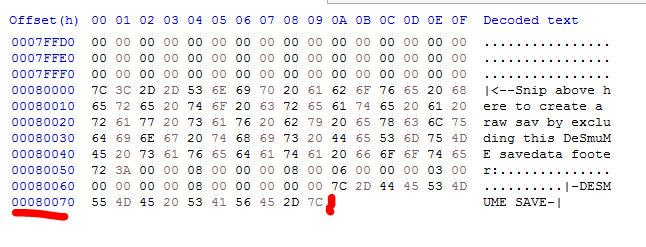
-
I'm presently inclined to believe that as well: someone proposed that the level follows the wild encounter cap (trainer level + 2), and everyone else just took it as fact without checking for themselves. [Most people don't have low level accounts anyway] Do you happen to have seen any old video or photos that may help to prove this point? Just for verification, so that we can confirm whether to add downlevelling to PKHeX
-
We're aware, and dealt with. Read: https://projectpokemon.org/home/forums/topic/58329-pokemon-go-level-15-shiny-legends/
-
File Size Too Large (Pokemon Platinum)
theSLAYER replied to culturedminecrafter's topic in Saves - Editing Help
use a hex editor, and compare file sizes/hex offsets, and delete the extra data. (I use HxD) Then make sure your settings are correct. I feel like it should be this: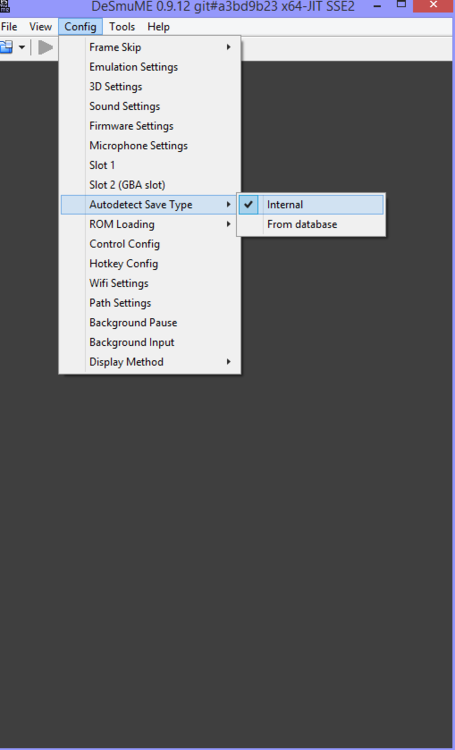
-
Batch error? What you talking about. Luma error? PK3DS error?
-
Sorry for the bump, but I needed to ask you about the previous method of trading for low level legend (or any raid boss, really). Can you recall when was the last time it worked for you, and you got any screenshots of date + ball on the mon? (just wanted to figure out when they changed the mechanic >< )
-
File Size Too Large (Pokemon Platinum)
theSLAYER replied to culturedminecrafter's topic in Saves - Editing Help
No idea why your save file size changed. Could be related to your emulator settings. Anyhow, all I had to do is cut away the excess data. <file removed due to file name> -
you should load a gen 7 save first, or set the Option for default blank save to be gen 7.
-
If I'm not mistaken, PKHeX checks date caught in, ball caught in, met level. So if you're sure those are correct, then it's legal.
-
I need help restoring a Black 2 save file from 2014
theSLAYER replied to Im lost's topic in Saves - Editing Help
In relation to AR->sav conversion, it's merely about how AR saves may be hard to convert to a usable save, or the conversion process isn't direct. I don't think there's any risk in any other sense, as long as you can get a few proper stable dumps. (restoring a corrupted dump will corrupt your save, so make a few stable dumps beforehand) -
yeah just we narrowed down that one. As far as I can tell, I can't seem to find any other Asian languaged Event that has too long an OT, so perhaps only this Rayquaza would fail to this. ><
-
and are you asking for help? Just complaining?
-
Upon closer inspection, the OT is 소드., which is Korean for Sword. (I previously assumed it was HOME, but that isn't the case) So it appears Sword/Shield changes the OT during trades, when the OT name is too long. Thanks for the confirmations :3
-
shift-click on keyboard, when mouse is hovering over the IV box.
-
you're replying to a post after 7 years, and that member hasn't been back since 2013, not sure who you're helping...
-
that means it was hyper trained.
-
Yup. I'm unsure if there is another event with an overly long name, so you may have to do it to a random mon Cheers
-
Use Pandora's Box (as the guide stated), to see if the chosen PID can generated your TID/SID. If it doesn't, then it won't work. Any other questions, start your own thread