
Kaphotics
-
Posts
8122 -
Joined
-
Last visited
-
Days Won
503
Content Type
Profiles
Pokédex
Portal
Technical Documentation
Pages
Tutorials
Forums
Events
Downloads
Gallery
Blogs
Everything posted by Kaphotics
-
Don't change the Version. Gen4 event gifts are distributed with a fixed Version value, not taking your save file's version.
-
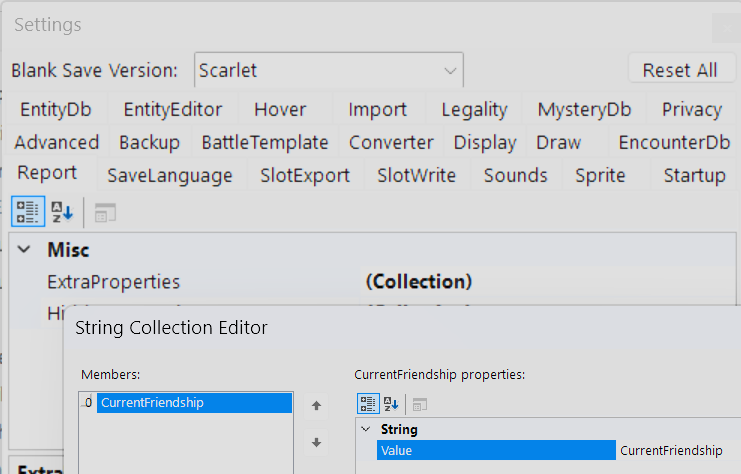
Add CurrentFriendship To the program settings for Report. You can do this for any property that is present in the PKM's data structure. Refer to the program's source code for a full list of properties, but they should match whatever is in the drop-down in the Batch Editor for the PKM's current object format (such as PK9).
-
The report is set up to show the Original Trainer friendship, not the current friendship with whoever is currently handling it.
-
Doesn't need to be; it was "fixed" in wine as of November 2023: WineHQ Bugzilla – Bug 55892 – .NET 8 Windows Forms crashes due to missing DPI functions in user32, so any version of wine after 9.0-rc1. WineHQ - News (How did I identify what was your issue? The program gave the error message "GetThreadDpiHostingBehavior" and it's Wine, and this bug is one of the top results on search engines -- you're also not the first person to report this error message.)
-

Shiny Cute Charm and PID Nautres Tables Help
Kaphotics replied to abszs123's topic in ROM - NDS Discussion & Help
The only alteration the game does when generating the pokemon, in comparison to how it normally does, is that it skips the normal PID generating process and uses a fixed value based on the nature it wants. The Smogon article is poorly worded -- you can't get every single option that was listed in that sentence, only those that are in the same "shiny group". You can get a few, but not every nature all in the same save file. Pick a group, then get a TID/SID that pairs with that group to make it shiny, then use a searching tool like RNG Reporter / Pokefinder to see what IV spreads you can get shinies with. -
Update your version of Wine.
-
romFS extraction help (for use with PK3DS)
Kaphotics replied to Ukasuhs's topic in ROM - 3DS Discussion & Help
You could always google it. "Bad IVFC Header" RomFS - 3dbrew > The RomFS is wrapped inside a IVFC hash-tree container, and the actual data is structured like a node-based tree Since you're trying to extract the RomFS and the program is giving you an error saying something is bad, you should probably double check your ROM dump. It's probably a bad ROM dump. Try another tool to extract to confirm. -
The program sets an arbitrary met location. The arbitrary choice is as you've noted. https://github.com/kwsch/PKHeX/blob/e9d299fc92c8bc6207d6d4e70dd8668969ccf243/PKHeX.Core/Game/Locations/Locations.cs#L47 The hover tooltip isn't very smart, but it is enough to get by.
-
If you generated it without following a specific RNG correlation for PID/IVs/ect, then there is no correlation that the program can detect. The answer to "should it have one" depends on the encounter and how the game would generate it.
-
Can't transfer through HOME, Input file too large?
Kaphotics replied to Robyn_Blue's topic in General Development
Should make sense if you look at the dates. The plugin was not updated after the latest S/V DLC, so it cannot function on recent releases where the latest S/V DLC save files are recognized. Solution? Use an updated plugin. https://github.com/santacrab2/PKHeX-Plugins -
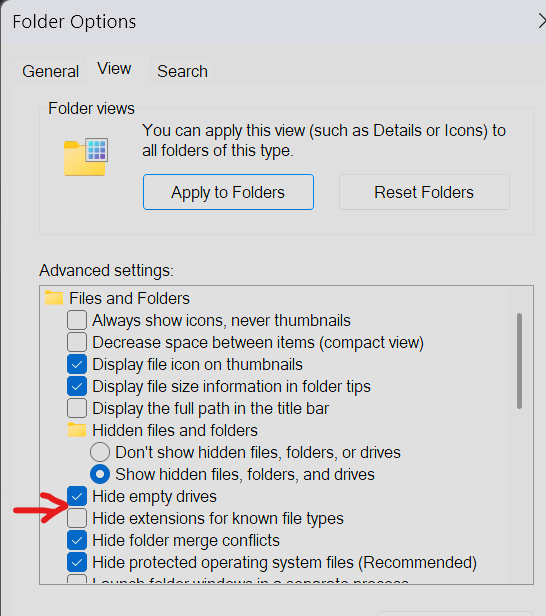
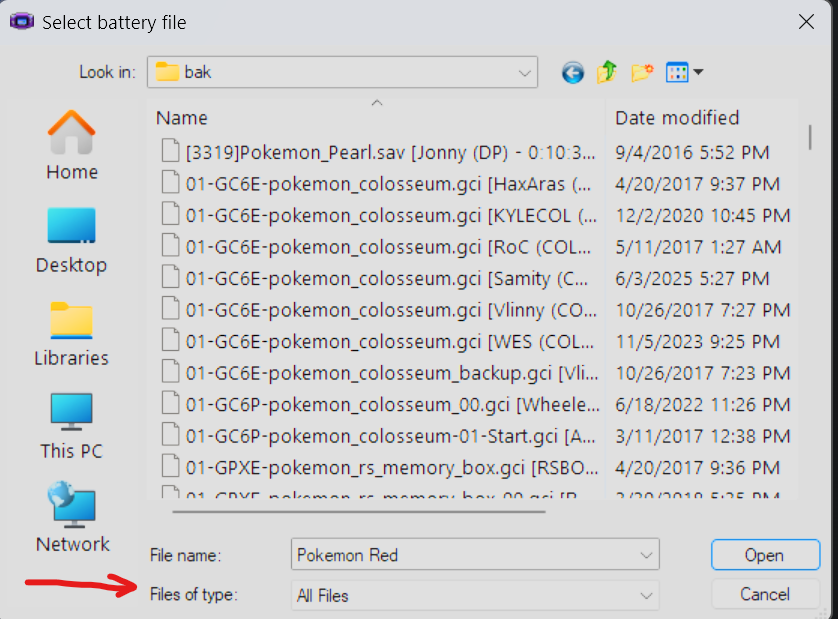
The difference is your operating system (windows) by default hides file extensions. VBA has an import backup memory dialog that can accept any file you tell it to import, btw.
-
It works just fine if you set it up correctly. You need .NET 9 instead of 8 to run the current PKHeX releases.
-
RS and FRLG have a bug where only the first 8 bits are saved for roamer IVs. HP 0-31, ATK 0-7, all others are 0. If you want a better Suicune, then Colosseum is your only option (ignoring events).
-
They're search filters, not application instructions. The program uses the `trainers` folder when generating a template to pk*, so create a pkm from that trainer and place it in the folder. Re-launch the program so that it initializes the trainer database with your updated data.
-
pkNX: Nintendo Switch ROM Editor & Randomizer
Kaphotics replied to Kaphotics's topic in ROM - Switch Research and Development
Read the error message. The first paragraph describes what you need to do. Dump the ROM as well as the latest game patches. The program only supports an updated game. -
Show a screenshot of what you are exporting, because you're likely doing it wrong. Saving it with the file filter of "All Files" does not prevent you from saving it with whatever file name you wish to save it as. The file extension doesn't matter at all unless the console needs a specific filename; for Gen3, there is no filename as you're restoring it to the cartridge SRAM chip. Emulators do not care about file names.
-
Item editor not working for lowest items in some lists
Kaphotics replied to regularwave's topic in PKHeX
Use the development build until the next release https://projectpokemon.org/pkhex-dev/ -
Powersaves does not back up your save file, neither does R4i. Use homebrew to dump your save file correctly.
-
You answered your own question.
-
Like I said: For encounters that can only be obtained in a separate set of games that can only reach your game via HOME, the only way to legally transfer them is to legitimately transfer them. Something from LGPE must be uploaded from LGPE into HOME legitimately, then downloaded from HOME to SWSH legitimately.
-
Use the encounter database. For encounters that can only be obtained in a separate set of games that can only reach your game via HOME, the only way to legally transfer them is to legitimately transfer them.
-
Mainline games do not have localizations for the side game met locations. They'll just display whatever the location ID is for the mainline game.
-
Using a save editor will not let you skip over game progress by flipping a few values. It is much more complicated than that, and it isn't worth the time figuring out because to do so would require playing the game anyway. Just play the game, or take someone else's save file.
-
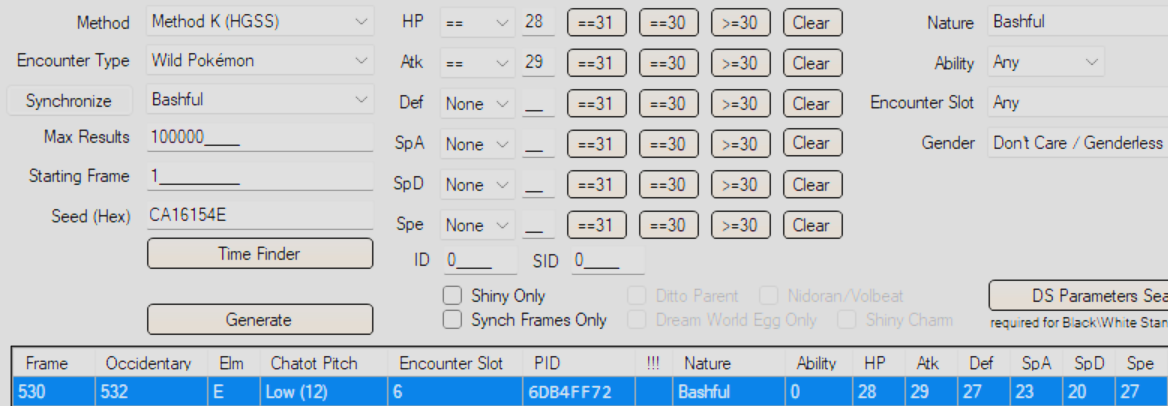
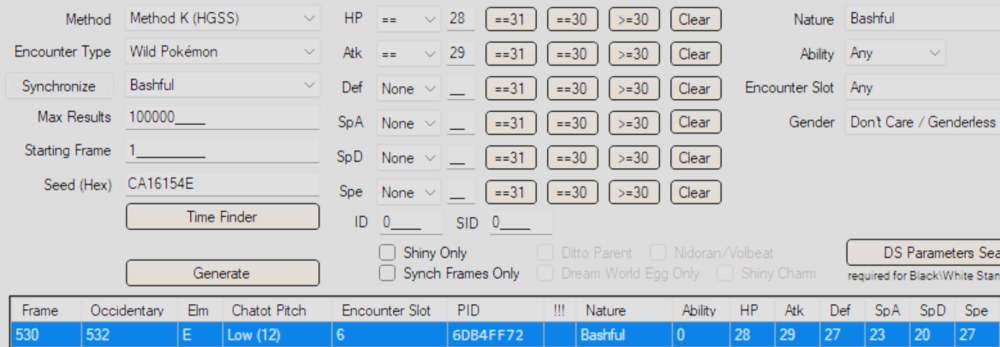
> I don't recall editing her stats or nature Look at its IVs. Seems pretty sus. Anyway; Route 32 Zubat is encounter slot 9 and 11. With Synchronize, there's only 1 opportunity to get those IVs, and it's not slot 9 or 11. I can't find anything to prove it was legitimately encountered, like PKHeX, therefore it's likely not legal.
-
"Proper" is subjective. You can refer to PKHeX's source code for how it verifies memory legality. There are far too many combinations of memories and values, not to mention restrictions or quirks, to be able to "write a guide". It's also not worth the time.