

All Activity
- Today
-

Pokemon Mystery Dungeon: Explorers of Fortune
RJD replied to WindchildWhimsy's topic in ROM - NDS ROM Hacks
Hey! I’m seriously freaking out with how good this game is. Huge congrats to you, it’s honestly incredible. But I wanna recruit new legendary ones like Arceus, Zekrom, etc., and I have no idea where to find them. Please help me out — if you can send me a list of them or something like that, you’d make my day Regards RJD -
Save uploads not for PLZA not allowed here, file removed. Are you on an emulator?
-

Managing GB/GBC Saves: Using Emulators
Eris250 replied to NinFanBoyFTW's topic in Saves - Guides and Other Resources
The .sav and .rtc files are in the same folder as your ROM zips. I store my Pokemon ROMs in a different folder and the .sav and .rtc files show up there. -
u would probably better using UPR for that or asking around rom hacking discords. the way it works is the game sets different teams for your rival based on the starter you choose, so to change that you would have to change the flag of which starter is chosen on your save file.
-
@run3 Thanks for the update! PKHeX 250518 looks great — it’s awesome to see continued improvements and bug fixes. Has anyone tested it with the latest games yet?
- Yesterday
-
Hello! I’ve used PKHeX before, but I still don’t fully understand how all of its systems work. I’m P_k1ba, and my goal is to clear every Pokémon game while putting in as little effort as possible. (I don’t cheat by generating items or boosting Pokémon levels — that’s not what I mean.) My problem is with Generation 1. Pokémon Red and Blue can use each other’s save files without any issues, but the rival’s starter Pokémon stays the same as the one chosen in the original version. For example: In my Red save file, I picked Charmander, so my rival uses Squirtle. However, when I load that same save file in Blue, I want my rival to use Bulbasaur, because I plan to use Squirtle for this playthrough. Is there any way to change the rival’s starter to Bulbasaur when using my Red save file on Blue? I hope someone in this community can point me in the right direction. Thank you! — P_k1ba
-
RJD changed their profile photo
-
Outdated version of Wine. If you googled the error message (DpiAwareness) you'd find discussion from over a year ago.
-
hello guy i am new here and i have an issues when using pkhex. whenever i am trying to access the file, the tool or the option windows it says: Exception Details: System.ComponentModel.Win32Exception (0x80004005): Failed to get thread's DpiAwareness context. at System.Windows.Forms.ScaleHelper.DpiAwarenessScope..ctor(DPI_AWARENESS_CONTEXT context, DPI_HOSTING_BEHAVIOR behavior) at System.Windows.Forms.ScaleHelper.EnterDpiAwarenessScope(DPI_AWARENESS_CONTEXT awareness, DPI_HOSTING_BEHAVIOR dpiHosting) at System.Windows.Forms.ToolStripManager.ModalMenuFilter.PreFilterMessage(Message& m) at System.Windows.Forms.Application.ThreadContext.ProcessFilters(MSG& msg, Boolean& modified) at System.Windows.Forms.Application.ThreadContext.PreTranslateMessage(MSG& msg) at System.Windows.Forms.Application.LightThreadContext.FPushMessageLoop(msoloop uReason) at System.Windows.Forms.Application.LightThreadContext.RunMessageLoop(msoloop reason, Boolean fullModal) at System.Windows.Forms.Application.ThreadContext.RunMessageLoopInner(msoloop reason, ApplicationContext context) at System.Windows.Forms.Application.ThreadContext.RunMessageLoop(msoloop reason, ApplicationContext context) at PKHeX.WinForms.Program.Main() Loaded Assemblies: -------------------- System.Private.CoreLib, Version=9.0.0.0, Culture=neutral, PublicKeyToken=7cec85d7bea7798e C:\Program Files\dotnet\shared\Microsoft.NETCore.App\9.0.11\System.Private.CoreLib.dll PKHeX, Version=25.12.2.0, Culture=neutral, PublicKeyToken=null C:\users\crossover\Temp\.net\PKHeX 2\IzJZYvvb93w-\PKHeX.dll System.Runtime, Version=9.0.0.0, Culture=neutral, PublicKeyToken=b03f5f7f11d50a3a C:\Program Files\dotnet\shared\Microsoft.NETCore.App\9.0.11\System.Runtime.dll System.Windows.Forms, Version=9.0.0.0, Culture=neutral, PublicKeyToken=b77a5c561934e089 C:\Program Files\dotnet\shared\Microsoft.WindowsDesktop.App\9.0.11\System.Windows.Forms.dll System.ComponentModel.Primitives, Version=9.0.0.0, Culture=neutral, PublicKeyToken=b03f5f7f11d50a3a C:\Program Files\dotnet\shared\Microsoft.NETCore.App\9.0.11\System.ComponentModel.Primitives.dll System.Windows.Forms.Primitives, Version=9.0.0.0, Culture=neutral, PublicKeyToken=b77a5c561934e089 C:\Program Files\dotnet\shared\Microsoft.WindowsDesktop.App\9.0.11\System.Windows.Forms.Primitives.dll System.Private.Windows.Core, Version=9.0.0.0, Culture=neutral, PublicKeyToken=b77a5c561934e089 C:\Program Files\dotnet\shared\Microsoft.WindowsDesktop.App\9.0.11\System.Private.Windows.Core.dll System.Drawing.Primitives, Version=9.0.0.0, Culture=neutral, PublicKeyToken=b03f5f7f11d50a3a C:\Program Files\dotnet\shared\Microsoft.NETCore.App\9.0.11\System.Drawing.Primitives.dll System.Collections.Specialized, Version=9.0.0.0, Culture=neutral, PublicKeyToken=b03f5f7f11d50a3a C:\Program Files\dotnet\shared\Microsoft.NETCore.App\9.0.11\System.Collections.Specialized.dll PKHeX.Core, Version=25.12.2.0, Culture=neutral, PublicKeyToken=null C:\users\crossover\Temp\.net\PKHeX 2\IzJZYvvb93w-\PKHeX.Core.dll System.Threading.Thread, Version=9.0.0.0, Culture=neutral, PublicKeyToken=b03f5f7f11d50a3a C:\Program Files\dotnet\shared\Microsoft.NETCore.App\9.0.11\System.Threading.Thread.dll System.Collections, Version=9.0.0.0, Culture=neutral, PublicKeyToken=b03f5f7f11d50a3a C:\Program Files\dotnet\shared\Microsoft.NETCore.App\9.0.11\System.Collections.dll System.Runtime.InteropServices, Version=9.0.0.0, Culture=neutral, PublicKeyToken=b03f5f7f11d50a3a C:\Program Files\dotnet\shared\Microsoft.NETCore.App\9.0.11\System.Runtime.InteropServices.dll System.Threading, Version=9.0.0.0, Culture=neutral, PublicKeyToken=b03f5f7f11d50a3a C:\Program Files\dotnet\shared\Microsoft.NETCore.App\9.0.11\System.Threading.dll System.Text.Json, Version=9.0.0.0, Culture=neutral, PublicKeyToken=cc7b13ffcd2ddd51 C:\Program Files\dotnet\shared\Microsoft.NETCore.App\9.0.11\System.Text.Json.dll PKHeX.Drawing.PokeSprite, Version=25.12.2.0, Culture=neutral, PublicKeyToken=null C:\users\crossover\Temp\.net\PKHeX 2\IzJZYvvb93w-\PKHeX.Drawing.PokeSprite.dll System.Drawing.Common, Version=9.0.0.0, Culture=neutral, PublicKeyToken=cc7b13ffcd2ddd51 C:\Program Files\dotnet\shared\Microsoft.WindowsDesktop.App\9.0.11\System.Drawing.Common.dll Microsoft.Win32.SystemEvents, Version=9.0.0.0, Culture=neutral, PublicKeyToken=cc7b13ffcd2ddd51 C:\Program Files\dotnet\shared\Microsoft.WindowsDesktop.App\9.0.11\Microsoft.Win32.SystemEvents.dll System.ComponentModel.EventBasedAsync, Version=9.0.0.0, Culture=neutral, PublicKeyToken=b03f5f7f11d50a3a C:\Program Files\dotnet\shared\Microsoft.NETCore.App\9.0.11\System.ComponentModel.EventBasedAsync.dll System.Linq, Version=9.0.0.0, Culture=neutral, PublicKeyToken=b03f5f7f11d50a3a C:\Program Files\dotnet\shared\Microsoft.NETCore.App\9.0.11\System.Linq.dll Microsoft.Win32.Primitives, Version=9.0.0.0, Culture=neutral, PublicKeyToken=b03f5f7f11d50a3a C:\Program Files\dotnet\shared\Microsoft.NETCore.App\9.0.11\Microsoft.Win32.Primitives.dll System.Memory, Version=9.0.0.0, Culture=neutral, PublicKeyToken=cc7b13ffcd2ddd51 C:\Program Files\dotnet\shared\Microsoft.NETCore.App\9.0.11\System.Memory.dll Accessibility, Version=4.0.0.0, Culture=neutral, PublicKeyToken=31bf3856ad364e35 C:\Program Files\dotnet\shared\Microsoft.WindowsDesktop.App\9.0.11\Accessibility.dll System.ComponentModel, Version=9.0.0.0, Culture=neutral, PublicKeyToken=b03f5f7f11d50a3a C:\Program Files\dotnet\shared\Microsoft.NETCore.App\9.0.11\System.ComponentModel.dll System.Collections.Concurrent, Version=9.0.0.0, Culture=neutral, PublicKeyToken=b03f5f7f11d50a3a C:\Program Files\dotnet\shared\Microsoft.NETCore.App\9.0.11\System.Collections.Concurrent.dll System.Resources.Extensions, Version=9.0.0.0, Culture=neutral, PublicKeyToken=cc7b13ffcd2ddd51 C:\Program Files\dotnet\shared\Microsoft.WindowsDesktop.App\9.0.11\System.Resources.Extensions.dll System.Drawing, Version=9.0.0.0, Culture=neutral, PublicKeyToken=b03f5f7f11d50a3a C:\Program Files\dotnet\shared\Microsoft.WindowsDesktop.App\9.0.11\System.Drawing.dll System.ComponentModel.TypeConverter, Version=9.0.0.0, Culture=neutral, PublicKeyToken=b03f5f7f11d50a3a C:\Program Files\dotnet\shared\Microsoft.NETCore.App\9.0.11\System.ComponentModel.TypeConverter.dll System.Numerics.Vectors, Version=9.0.0.0, Culture=neutral, PublicKeyToken=b03f5f7f11d50a3a C:\Program Files\dotnet\shared\Microsoft.NETCore.App\9.0.11\System.Numerics.Vectors.dll System.Runtime.Loader, Version=9.0.0.0, Culture=neutral, PublicKeyToken=b03f5f7f11d50a3a C:\Program Files\dotnet\shared\Microsoft.NETCore.App\9.0.11\System.Runtime.Loader.dll System.Collections.NonGeneric, Version=9.0.0.0, Culture=neutral, PublicKeyToken=b03f5f7f11d50a3a C:\Program Files\dotnet\shared\Microsoft.NETCore.App\9.0.11\System.Collections.NonGeneric.dll System.Net.Http, Version=9.0.0.0, Culture=neutral, PublicKeyToken=b03f5f7f11d50a3a C:\Program Files\dotnet\shared\Microsoft.NETCore.App\9.0.11\System.Net.Http.dll System.Net.Primitives, Version=9.0.0.0, Culture=neutral, PublicKeyToken=b03f5f7f11d50a3a C:\Program Files\dotnet\shared\Microsoft.NETCore.App\9.0.11\System.Net.Primitives.dll System.Diagnostics.Tracing, Version=9.0.0.0, Culture=neutral, PublicKeyToken=b03f5f7f11d50a3a C:\Program Files\dotnet\shared\Microsoft.NETCore.App\9.0.11\System.Diagnostics.Tracing.dll System.Diagnostics.DiagnosticSource, Version=9.0.0.0, Culture=neutral, PublicKeyToken=cc7b13ffcd2ddd51 C:\Program Files\dotnet\shared\Microsoft.NETCore.App\9.0.11\System.Diagnostics.DiagnosticSource.dll System.Net.Security, Version=9.0.0.0, Culture=neutral, PublicKeyToken=b03f5f7f11d50a3a C:\Program Files\dotnet\shared\Microsoft.NETCore.App\9.0.11\System.Net.Security.dll System.Security.Cryptography, Version=9.0.0.0, Culture=neutral, PublicKeyToken=b03f5f7f11d50a3a C:\Program Files\dotnet\shared\Microsoft.NETCore.App\9.0.11\System.Security.Cryptography.dll System.ObjectModel, Version=9.0.0.0, Culture=neutral, PublicKeyToken=b03f5f7f11d50a3a C:\Program Files\dotnet\shared\Microsoft.NETCore.App\9.0.11\System.ObjectModel.dll System.Private.Uri, Version=9.0.0.0, Culture=neutral, PublicKeyToken=b03f5f7f11d50a3a C:\Program Files\dotnet\shared\Microsoft.NETCore.App\9.0.11\System.Private.Uri.dll System.Windows.Extensions, Version=9.0.0.0, Culture=neutral, PublicKeyToken=cc7b13ffcd2ddd51 C:\Program Files\dotnet\shared\Microsoft.WindowsDesktop.App\9.0.11\System.Windows.Extensions.dll PKHeX.Drawing, Version=25.12.2.0, Culture=neutral, PublicKeyToken=null C:\users\crossover\Temp\.net\PKHeX 2\IzJZYvvb93w-\PKHeX.Drawing.dll PKHeX.Drawing.Misc, Version=25.12.2.0, Culture=neutral, PublicKeyToken=null C:\users\crossover\Temp\.net\PKHeX 2\IzJZYvvb93w-\PKHeX.Drawing.Misc.dll System.Text.RegularExpressions, Version=9.0.0.0, Culture=neutral, PublicKeyToken=b03f5f7f11d50a3a C:\Program Files\dotnet\shared\Microsoft.NETCore.App\9.0.11\System.Text.RegularExpressions.dll System.Threading.ThreadPool, Version=9.0.0.0, Culture=neutral, PublicKeyToken=b03f5f7f11d50a3a C:\Program Files\dotnet\shared\Microsoft.NETCore.App\9.0.11\System.Threading.ThreadPool.dll Microsoft.Win32.Registry, Version=9.0.0.0, Culture=neutral, PublicKeyToken=b03f5f7f11d50a3a C:\Program Files\dotnet\shared\Microsoft.NETCore.App\9.0.11\Microsoft.Win32.Registry.dll System.Net.Sockets, Version=9.0.0.0, Culture=neutral, PublicKeyToken=b03f5f7f11d50a3a C:\Program Files\dotnet\shared\Microsoft.NETCore.App\9.0.11\System.Net.Sockets.dll System.Threading.Overlapped, Version=9.0.0.0, Culture=neutral, PublicKeyToken=b03f5f7f11d50a3a C:\Program Files\dotnet\shared\Microsoft.NETCore.App\9.0.11\System.Threading.Overlapped.dll System.Net.NameResolution, Version=9.0.0.0, Culture=neutral, PublicKeyToken=b03f5f7f11d50a3a C:\Program Files\dotnet\shared\Microsoft.NETCore.App\9.0.11\System.Net.NameResolution.dll System.Runtime.Intrinsics, Version=9.0.0.0, Culture=neutral, PublicKeyToken=cc7b13ffcd2ddd51 C:\Program Files\dotnet\shared\Microsoft.NETCore.App\9.0.11\System.Runtime.Intrinsics.dll System.Security.Principal.Windows, Version=9.0.0.0, Culture=neutral, PublicKeyToken=b03f5f7f11d50a3a C:\Program Files\dotnet\shared\Microsoft.NETCore.App\9.0.11\System.Security.Principal.Windows.dll System.Security.Claims, Version=9.0.0.0, Culture=neutral, PublicKeyToken=b03f5f7f11d50a3a C:\Program Files\dotnet\shared\Microsoft.NETCore.App\9.0.11\System.Security.Claims.dll System.Runtime.Serialization.Formatters, Version=8.1.0.0, Culture=neutral, PublicKeyToken=b03f5f7f11d50a3a C:\Program Files\dotnet\shared\Microsoft.NETCore.App\9.0.11\System.Runtime.Serialization.Formatters.dll System.Diagnostics.StackTrace, Version=9.0.0.0, Culture=neutral, PublicKeyToken=b03f5f7f11d50a3a C:\Program Files\dotnet\shared\Microsoft.NETCore.App\9.0.11\System.Diagnostics.StackTrace.dll System.Reflection.Metadata, Version=9.0.0.0, Culture=neutral, PublicKeyToken=b03f5f7f11d50a3a C:\Program Files\dotnet\shared\Microsoft.NETCore.App\9.0.11\System.Reflection.Metadata.dll System.Collections.Immutable, Version=9.0.0.0, Culture=neutral, PublicKeyToken=b03f5f7f11d50a3a C:\Program Files\dotnet\shared\Microsoft.NETCore.App\9.0.11\System.Collections.Immutable.dll -------------------- User Message: An error occurred in PKHeX. Please report this error to the PKHeX author. PKHeX must now close. PLEASE HELP me i am using crossovers platform to emulate an. windows 10 x64 bits ON MY MAC and i did install the .net dot runtime 9.0.11 everything is going alright until i touch one of the option i mention before.
-
 I just repatched it and now it's working, I'm not sure what was off about my previous version but at least now it's fixed lol
 -
 Go through each option in the menus. It's under one of them.
 -
Where in the L-menu is that option? If you look at my first question about it I sent screenshots because the skip cutscenes option wasn't listed. Do I need to repatch my game or something?
-
owh, ok thanks for the information
-
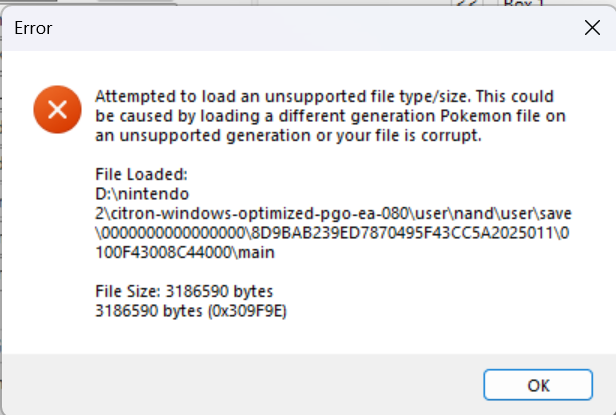
Hi, unfortunately version 2.0.0 of Pokemon Legends Z-A isn’t supported yet as this was just recently released. So it may take a few days till we get a new updated PKHex to support version 2.0.0. Hope this helps! Have a great day.
-
im using ryubing to play and i just update to 2.0.0, and i want to get mewtwo mission, when i open the sve file it give this error, its my first time using pkhex, can i do something about it? main
-
 Enable cutscene skip.
 -
Alredy found how thanks
-
Hi can ypu please explain how to put 14, I mean should I change the name to 14? How do I put the 14 that you found? I would really apreciate your help
-
Thank you once again! Have a great day. Also theres a ton of new items in this DLC, maybe it will take some time to update the PKHex because of this. But not complaining i love using PKhex in every Pokemon version i had, i can wait....
-
@Alphadaemon Just reaching out again for possibly some help with my game crashing when trying to start the Shaymin chapter. I've got my save file if that helps so the issue, not sure what I can do to fix it on my end PMD Alpha.dsv
-
I'm with the same issue :/
- Last week
-
(Forgive me if this is the wrong place to be posting this- First-time forum user here!) I have no idea how this happened, but my game has decided that I'm actually NOT allowed to play the DLC. I got as far as the cutscene where Corbeau calls you, but then the first of the Hyperspace side quests never got flagged and I can't continue. The game says the DLC is installed on the main menu, and Ansha is still in Hotel Z, but it's like the mission doesn't exist at all. Game runs completely fine otherwise. Is there any way to fix this? I'm absolutely devastated that I can't play on launch day, lol. Save file is attached for perusing. Would greatly appreciate any help on this issue!
-
We were thinking about it with the beta testing team and on my end I think what fits the description best is going to be Aipom + Chikorita. Both fit the second criteria, Aipom very much fits the first criteria while Chikorita helps it overcome its weaknesses as a very frail leader against tough enemies
-
 I don't expect a reply really, but what are some of the best starters now with all the changes made with the hack? I am a fan of DPS and pokemon that get better the more you work on them vs them just being strong to start.
 -
 angrynewraze changed their profile photo
 -
Pokemon Legends Z-A version 1.0.3 save files not supported?
angrynewraze replied to Kulotz's topic in PKHeX
I also got error with 2.0.0 update as soon as I applied it. R.I.P. Even the Dev build doesn't work with the 2.0.0 update.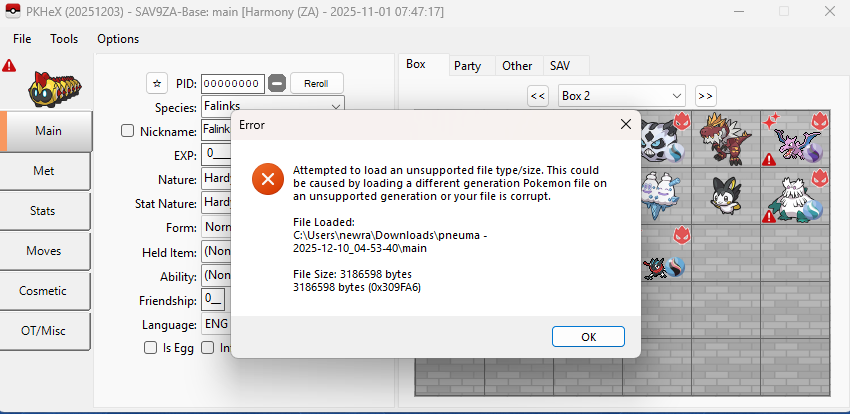
-
 Yup, that's correct. You need to be on the sysNAND to do that.






