



BlackShark
-
Posts
1759 -
Joined
-
Days Won
111
Content Type
Profiles
Pokédex
Portal
Technical Documentation
Pages
Tutorials
Forums
Events
Downloads
Gallery
Blogs
Everything posted by BlackShark
-
Your QR codes are probably wrong sized then. The way Citra loads images isn't optimized yet. I didn't think about this when I made my last post, sorry, but at the moment you still need to edit the image you want to scan a bit so it fits properly into Citra. If you want to scan the official Secret Bases you can use the codes from the package I attached below. I already edited them to fit into Citra. ORAS Secret Base QR Codes for Citra.zip
-
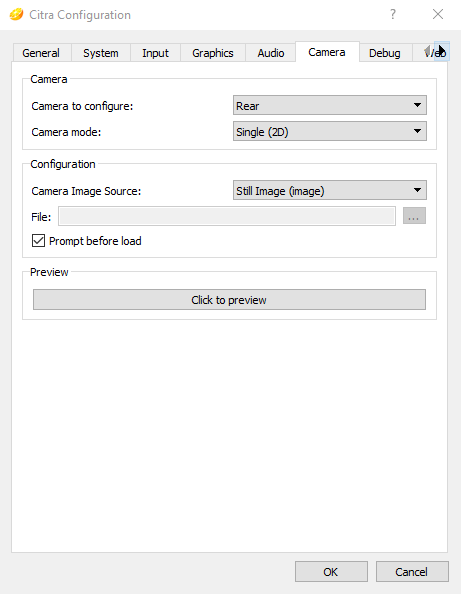
Can you see the code on the upper screen and the game just fails to read it? Or doesn't the code even appear on the screen? Just in case, this is how I configured my camera: Front Rear If you have checked prompt before load you will be asked to choose an image everytime the game uses the camera. Citra asks you twice because the 3DS has 2 rear cameras (left and right side), just choose the same image twice then. You can also uncheck this and choose a file name in the field above that checkbox.

-
Is this "Citra Camera" an unofficial build? Camera support was added to Citra Canary a while ago (settings can be found in Emulation > Configure > Camera) so there's no need to use unofficial builds for that. Update your Citra Canary to the latest release and try if that works. Keep a backup of your save files just in case.
-
This thread is about Battle Regulations that are available to download at the Festival Plaza in SM and USUM. They can be used for battles against friends. More details can be found here https://3ds.pokemon-gl.com/dl-regulation/ How do I use this? - export your games extdata with a save manager like Checkpoint or JKSM - in the extdata navigate to the folder /user/reg, this is where regulation files are stored - chose regulation files for your language and rename them to match the naming scheme (see below) - import the extdata back into your game Naming scheme You can have up to 12 regulations at the same time. The files get numbered in the order you downloaded them, starting with 012 and ending with 023. So any other file name that does not match 012, 013, ... , 023 will not be recognized by the game. Content Sun & Moon - 2017 World Championships Rules - Battle of Alola - Alola Friendly - Kanto x Alola Regional Rumble - tiny tourney - Weakness Cup - 2017 No Holds Barred - Mega Melee Ultra Sun & Ultra Moon - 2018 World Championship Rules - 3rd Pokémon Dragon Cup Preliminaries - Johto x Alola - Ultra Sinnoh Classic - Ultra Kalos Classic - Ultra No Holds Barred - PJCS2018スペシャルカップ (JAP only) - Let's Go! Cup - World Championships Friendly - Pokémon VGC 2019 Sun Series - Ultra Spooky Cup - Simple Symphony - Pokémon VGC 2019 Moon Series - Pokémon VGC 2019 Ultra Series - PJCS2019スペシャルカップ (JAP only) - Ultra Final Online Competition Download (updated: 2019/12/28) SM.zip USUM.zip
-
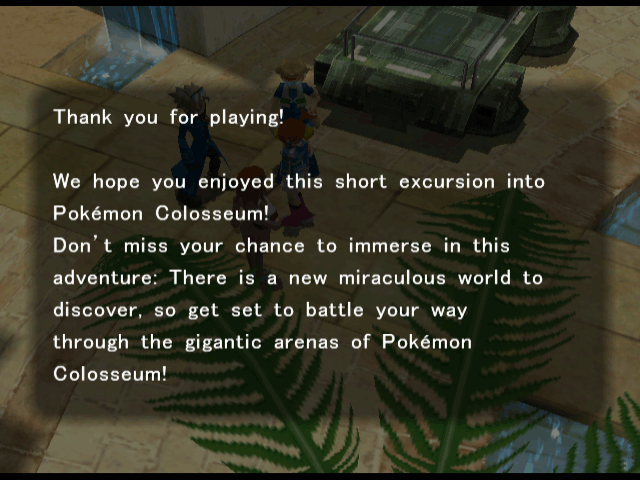
Here are the Pokemon from the Colosseum Demo, they might be the same as in the full game. You have to choose the characters name, I just named him Wes. After two battle the demo ends in Phenac City with this screen. Colosseum Demo PKM.zip
-
You don't need HxD for RAM dumping on Dolphin. Go to Config, Interface and check Show Debugging UI. Then go to View and check Memory. This will give you a memory viewer that has a button to dump the MRAM.
-
I have the European demo version but I think there are US versions as well. These demo discs where available in all regions. I got the XD demo from the disc SwagKey mentioned aboved, the Colosseum demo was found on the May 2004 demo disc.
-
It was on one of those demo discs as well. But I think it's the same as the full game, just cut. It ends after you arrived at Phenac City and saved the person who got kidnapped by Team Snagem.
-
I have the demo versions of XD and Collosseum so I could dump the Pokemon you need when I'm back home.
-
To begin try swapping your trainer gender. If this swaps Yancy/Curtis then there's no other way, if it doesn't then there's a flag somewhere that determines with whom you can trade.
-
Darkrai is not on the server yet. They already started giving away the codes but they won't be usable before June 6. So you still need to wait a few weeks until it appears on the servers.
-
 That is not really an error. Whoever contributed this wondercard just had his 3DS' system time set wrong when he received the card. Wondercard availability depends on server time not system time. So basically any date between 01/01/2000 and 12/31/2050 is valid. If you still care about the date though you can just change it in PKHeX.
 -
 I currently only have this German source, http://pokewiki.de/Pokémon_Colosseum_Kakuchō_Disc The first paragraph on this site says that the disc was available as pre-order gift only and that there are two different versions. The first one that was available through Pokemon Centers and the second one that was available through any other shops.
 -
Both discs came with pre-orders of Pokemon Colosseum. As far as I know it's just that one of them was available via Pokemon Center pre-orders while the other was available in other shops.
-
 Just use PKHeX and change it.
 -
Here's the full Zeraora Battle Video, I thought it would be good to preserve this as well. It goes into the extdata 00001B50\user\btvideo and can then be watched from the Battle Video menu. Zeraora-BattleVideo.zip
-
Gen 5 Save Tool should be able to edit the Avenue Rank to any value
-
Pokémon Battle Revolution save research thread
BlackShark replied to Tux's topic in Saves - Research
You can look them up in PKHeX. -
Pokémon Battle Revolution save research thread
BlackShark replied to Tux's topic in Saves - Research
@SubSora you need to decrypt the save file first. I've written a little step-by-step guide for you and everyone who is running into this same problem. For hex editing I would suggest using HxD https://mh-nexus.de/en/downloads.php?product=HxD but any other Hex Editor should work though. First of all, always keep a backup of your save file! get pbrsavetool from my post above extract pbrsavetool.exe into the same directory where your PbrSaveData file is located run pbrsavetool a command line window will open asking you whether you want to decrypt or encrypt your save data put in d to decrypt this will create two new files in the same directory, PbrSaveData_decrypted_backup (this is not an actual backup file!) and PbrSaveData_decrypted_current open PbrSaveData_decrypted_current in your Hex Editor get your TID and SID and convert them into hexadecimal (windows calculator has a programmers mode which can help you to do that or just use google) example: my TID is 12345 so in hex it is 0x3039, my SID is 54321 which is 0xD431 now navigate to the above mentioned offsets for the save slot you used how to do this depends on the programm you are using in HxD go to Search -> Goto..., in Hex Workshop go to Edit -> Goto... alternatively you could press Ctrl + G make sure it's set to hex and enter the offset you want to go to for the first slot go to offset 0x12867 and change the value at this location to the first byte of your TID (in my case it's 30) now go to offset 0x12860 and change it to the second byte of your TID (39 in my case) next is your SID, the first byte (D4) goes to offset 0x12866, the second one (31) goes to 0x12865 save your changes by overwriting PbrSaveData_decrypted_current run pbrsavetool to re-encrypt your save file this time choose e to encrypt your file and fix all the checksums your original PbrSaveData file in this directory will be updated PbrSaveData_decrypted_backup and PbrSaveData_decrypted_current are not needed anymore and can be deleted -
Pokémon Battle Revolution save research thread
BlackShark replied to Tux's topic in Saves - Research
@SubSora there is a solution for this, @Akunoko already posted it back in October. To unlock all the stuff like custom passes, your TID has to be written to the mentioned offsets. Unfortunately there's currently no tool for that yet so it needs to be done manually with the use of an Hex Editor. -
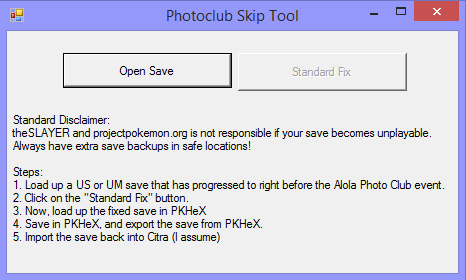 Actually the Photo Club issue has been fixed in the latest Canary and Nightly builds. Nice tool anyway!
 -
 @Zhakien The met date of event Pokemon is already set at the moment you received the wondercard. The date when you collect it from the delivery person doesn't affect it. Since the date can freely be changed in the system settings anything between 01/01/2000 and 12/31/2050 is valid even if it doesn't match the distribution period. Wondercard availability is based on server date only. Also once an event is released for a region, everyone with a game of that region can get it, no matter where he actually lives. So this wondercard could have been downloaded a few hours ahead by someone in the US who had a European game.
 -
 PKHeX can't do that. You have to use Gen 3 Mystery Gift Tool for Gen 3 wondercards.
 -
How far do you have to be in the story to unlock access to the Poke Pelago? If it's near the beginning I will try to help.
-
site Requesting feedback about the theme
BlackShark replied to evandixon's topic in Project Pokémon Feedback
@evandixonI always thought you were going to use @Jovie's banner from the Art Competition last year? https://projectpokemon.org/home/forums/topic/41821-the-official-art-competition-voting-thread/


