



theSLAYER
-
Posts
22855 -
Joined
-
Last visited
-
Days Won
1000
Content Type
Profiles
Pokédex
Portal
Technical Documentation
Pages
Tutorials
Forums
Events
Downloads
Gallery
Blogs
Everything posted by theSLAYER
-

Recover Pokémon Patinum Version save (Spanish version)
theSLAYER replied to Lt. Lynx's topic in Saves - Editing Help
@Lt. Lynx yes, because Pokesav is known for the being the authority of save data /s Elaborate on what you did to "damage the save". -
Read and follow the guide:
-
The shiny Xor needs to = to 1. It's either Ctrl + Click on the shiny button.
-
![More information about "[PKHeX Plugin] RSE Berry Plot Editor"](https://projectpokemon.org/home/uploads/monthly_2021_09/Capture.thumb.PNG.7aac46494c24b526387438b7fd2bfb1c.PNG)
Version 1.0.7
3665 downloads
PKHeX plugin to find and edit content of Berry plots in Ruby, Sapphire, Emerald. (In the image, the plot that the character model is facing, is the berry plot that is being focused on.) FYI: The e-Reader berries are not 'real' berries, in the sense that they don't have their own data programmed into the ROMs. They just usurped the slot for Enigma Berries. So if you have those activated in your save, and wanna plant them, just plant Enigma Berries. Originated from: attempting to resolve a glitch. As such, no immediate plans for other games. How to use Put the plugin into the plugins folder in your PKHeX directory, then access it from the Tools menu. Ruby, Sapphire and Emerald are supported. Note: Win 10 might block DLL files downloaded from the internet. In that case right click the plugin file, go to properties and check "unblock" (as seen here). [You may have to unblock, reblock, then unblock again to get it to work] Example of how to unblock: Credits Kaphotics for PKHeX. BlackShark for his meticulous work with the Feebas Locator [Full disclosure: I've never made a PKHeX plugin before, so had to look at his work to figure it out] All the wonderful team members involved in pret, for the amazing work regarding disassembly for RSE, which contained all the important structures. RodrigoTR and Mark_Eire, for providing support for giving the locations and getting all the images for various screenshots of plots. -
Just to be clear, you're not trying to make it roam before you defeated E4 right? In your original scenario, E4 was defeated and it was once roaming right?
-
Thanks for reporting. Do you have a "before roaming save" and a "after roaming save" that is directly after the before roaming we could use to document it?
-
So the matter has been resolved. Anyhow, I'm gonna use this to document my findings until I get I get a separate page done.
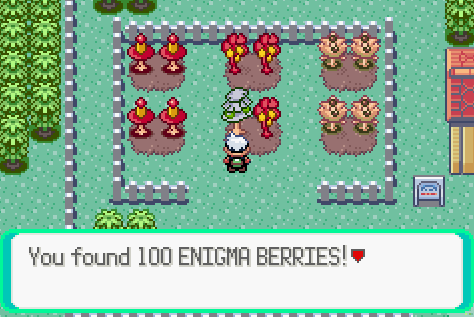
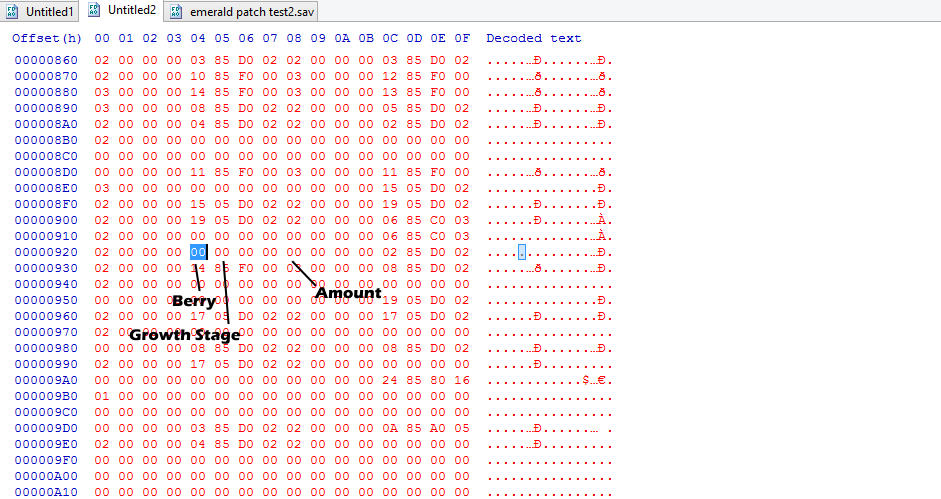
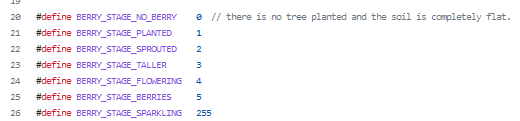
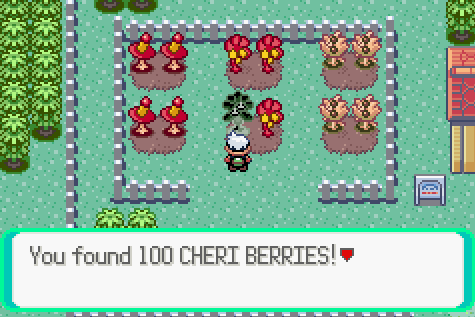
-
good plan, hopefully you get a cheap one in working condition :3
-
You're gonna have to install Homebrew on your Wii. (hack your Wii). Only after you do that, are you able to run the homebrew. Instruction on how to run this homebrew app (after you hacked your Wii) should be in the about me description of the page I linked.
-
I think you may need homebrew on your Wii, but there's a method to dump your GBA save via the link cable from the Wii. https://github.com/suloku/gba-link-cable-dumper/releases/tag/0.2
-
VC - stands for Virtual Console. The thing on the 3DS. Nothing do with the issue you have on hand. Also, just to ask, you got a Wii and also a link cable?
-
It's probably stored as a full encrypted Pokemon file (an ek5). So if you already know where the PID is, just rip out the section (the size of an ek5), save it as a ek5, and see if PKHeX would read it. Also, this tool rips out all pkx in your ram (if you need it):
-
mind showing me a picture which exact plot you're referring to? I can try to work it out in my free time.
-
I don't know how the berry planting system works, but if you have a save that is before planting the berry at that spot, and a save directly after planting a berry at the spot, we may be able to try to work something out.
-
that's not the issue you're having. For what issue they are having, they still have proper functioning saves, just in the wrong size. What you're getting doesn't even qualify as a save. It's just garbage data.
-
yeah the GB/GBC games needs memory batteries. Gen 3 games didn't need memory batteries. RSE only had batteries to keep the RTC running. No idea what a SI file is. It's just this small file: Maybe we need to scour the net to check anyone that got Flash Boy working on their FRLG game.

-
Could potentially be a thing. Where is Silver's save stored at again? Also, if you could find a friend with a GBA cart of a Pokemon game, maybe could try backing those up too. Could be used to prove or disprove the theories we have.
-
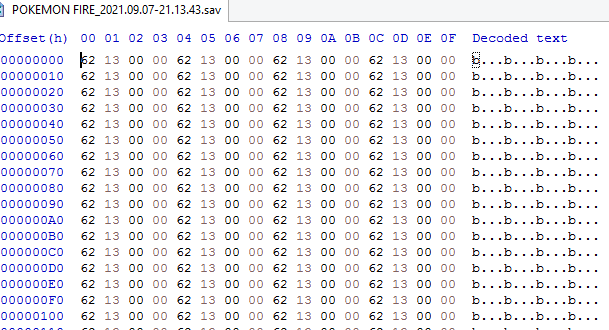
yup. and it's always the same line of repeating rubbish. either it's reading from somewhere it's not supposed to, or the program is hiccuping and panics and keeps sending out the same stuff. Also, this is a long shot, but cleaning the contacts with some non-corrosive cleaning alcohol and try again. If not, just gotta find a working program I suppose. We pretty much know the hardware is working, so we just need to supplement it with a working software I suppose.
-
Yeah it's a proper Silver save. Also, if you saved over the corruption, it means you're back to a proper working save, no need to worry. I still think the software is not handled to deal with version 1.1 saves. So far it reads GB saves just fine. If only you have a Version 1.0 FireRed cart we could test with.
-
try dumping those saves and view the file with a hex editor, see if the files are different from each other. no worries, catch ya when you're back.
-
well, that would explain why you had to buy this. Not that I'm recommending anything to buy, but I got a second hand NDS lite below $10 (before shipping costs shot through the roof due to the global situation), and a cheap NDS flashcart may be able to do the job. Basically to run homebrew to read, dump and restore saves on GBA carts. Anyhow, in yet another different direction, do you have other GB, GBC or GBA carts to test with this?
-
well maybe Flash Boy is a clone of GBx, but probably a clone of the other version. Firmware updates needed doesn't necessarily mean hardware issues.. Anyhow, this is taking things in a different direction. Do you have a NDS/NDS Lite and a NDS Flash cart?
-
yeah it does look real. I still think it's probably the program that is acting up, so just need to find one that works..
-
same deal, it's pulling up the same junk. Well, given that when you dumped the ROM and a game save couldn't be found. Plus the content of the "save" is different from what is normally dumped from bootlegs. As such, I have little reason to think it is fake right now. Maybe consider opening up the cart. If it's a real cart, there should not be a battery in it (for FRLG). Also, the innards should look like this: https://www.reddit.com/r/Gameboy/comments/ih3ctm/i_have_2_authentic_pokemon_fire_red_english/ As for the one I linked, maybe it wanted a different set of drivers or something. Given the upload date for that program is newer, may be worth a shot to do whatever it needs, as long as you kept the original drivers and program safe somewhere, in case it doesn't pan out.
-
I was wondering if it couldn't read the save properly, cause your cart is v1.1 (like perhaps an oversight caused it to be only programmed to deal with v1.0) Anyhow, I got a few ideas, since I'm getting desperate in terms of trying to help ya: 1. I've read the Flash Boy is a clone of GBxCart or something. Try the program here and see if it connects. 2. There's another user on site that also has a Flash Boy program (he's requesting for a Mac Port, but the program is here.) In terms of raw data, it looks slightly different. See if it yields anything. [use at your own risk] 3. In the link you showed me, there's a chinese version. Maybe use the chinese version (but have the english version also open as a guide to what the words mean), and see if it produces a different result. 4. Try searching the net for any other version of the program, preferably a newer one. edit: This link seems to contain a newer one (in terms of upload date) than the one you sent: https://app.box.com/s/nvme61lnm6chn3ludccto5fyy6rdvckt
