Leaderboard



Popular Content
Showing content with the highest reputation on 07/13/18 in all areas
-

Version .
2508 downloads
This gift was distributed to players via Infrared at the Pokémon Pop-up Store in Hyundai Department Store Shinchon, South Korea. Species Manaphy Nickname (default, save lang) OT 여름 TID 180713 Distribution Infrared Location a lovely place Dates Jul 13 to Jul 22, 2018 PID Cannot Be Shiny Games All Regions 3DS: SM USUM Lv. 15 Nature Random Ability Hydration (1) Item Mystic Water Bundled Item None Card Per Save Only One Allowed Moves (ITALIC means Relearnable) Water Sport Water Pulse Tail Glow Heart Swap WC ID 1146: 「환상의 포켓몬 마나피를 선물!」's receiving text 0x2B Thank you for coming to the Pokémon event! Please pick up your gift from the deliveryman in any Pokémon Center. Classic 환상의 포켓몬 마나피를 선물! 포켓몬을 즐겨주시는 여러분께 여름을 맞아 환상의 포켓몬 마나피를 선물합니다! Format Ver.1.0.6-3, Post Updated Date:20180713_15382 points -
(I hope I posted this in the correct forum) PMDe is an editor for Pokémon Mystery Dungeon: Red Rescue Team, that allows you to edit most aspects of the game; a full list of features can be found below. It is programmed in Java and developed using the Netbeans IDE. PMDe uses ini4j to store important offsets in the ROM. Additional icons were taken from various Pretty Office Icons sets. Tileset previews were created by SilverDeoxys563. Also, huge thanks to BRNMan and Crocodile91! They have already documented a lot about the game's data and ROM structure. More information, screenshots and download links can be found on the Github repo: https://github.com/SunakazeKun/PMDe Current features edit dungeon data (map positions, floors, layouts, Pokémon, traps, ...) edit friend area data edit general Pokémon data (types, stats, evolutions, ...) edit general item data view moves data edit available starter and partner Pokémon edit POKé money factors1 point
-
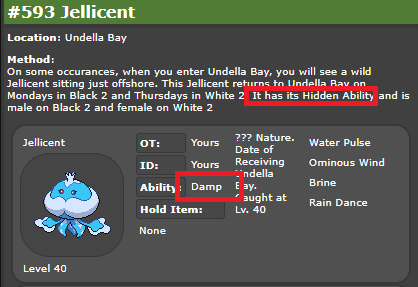
new EncounterStatic { Species = 593, Level = 40, Location = 71, Ability = 4, Version = GameVersion.B2, Gender = 0,}, // HA Jellicent @ Undella Bay Mon Only new EncounterStatic { Species = 593, Level = 40, Location = 71, Ability = 4, Version = GameVersion.W2, Gender = 1,}, // HA Jellicent @ Undella Bay Thurs Only Needs to have its hidden ability if it's the static encounter. However... there is a wild encounter with the same level. Boooooo. PKHeX finds a best-match by checking moves & evolutions, with the assumption that all other details should be compatible with this best-match. This is the only case known where two different encounter types share all details except for the ability ?
 1 point
 -
All of our Pokemon are legal. Whether the trade restriction was lifted, I don't know but I bet it has by now. It has been available for almost 2 weeks.1 point
-
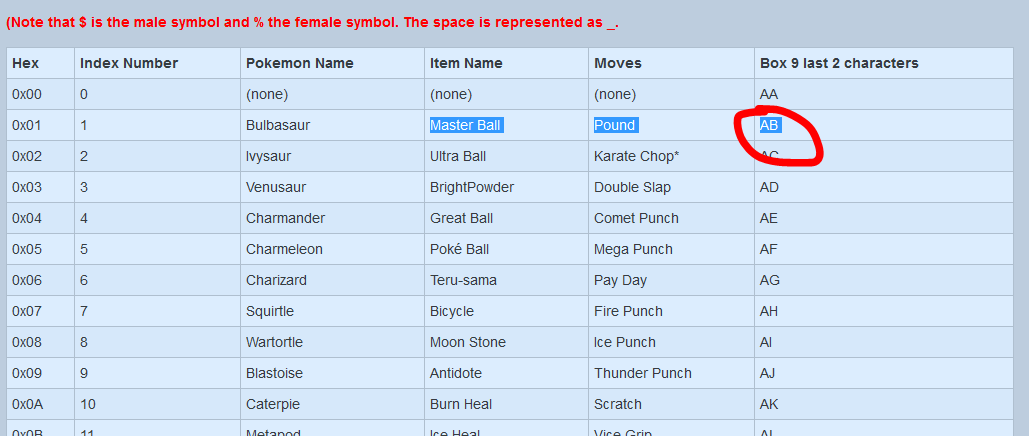
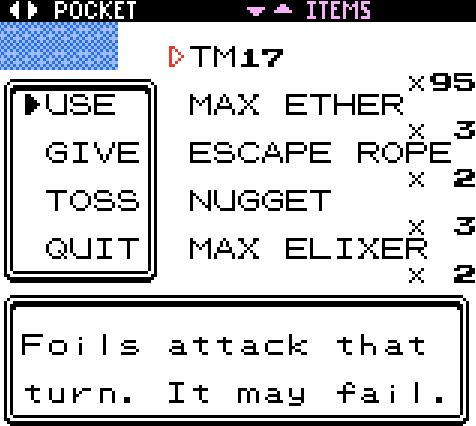
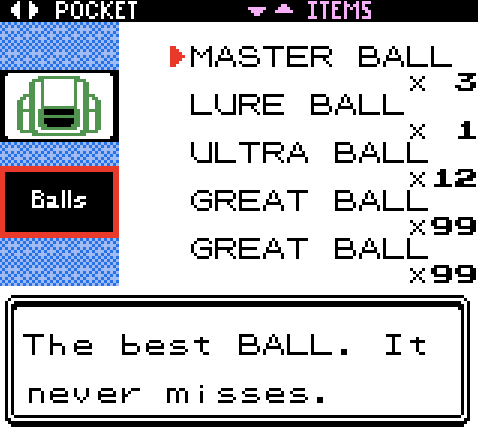
This page aims to educate users on how to change whatever values they want in their game. When you're modifying data during gameplay, you're actually modifying the data in your RAM. Hence, we'll be referring to Gold & Silver's RAM MAP, which is this page. Anything, ranging from Pokemon's DVs, to Shininess, to items, all that data can be found there. Box Name 1 data structure This is what it typically looks like: The address and value is converted from Hexadecimal to Box Name Encoding, via this table below (in the spoiler): Example on data modification Step 1: Find the new name needed for Box 1 This example is regarding changing the first ball in your bag's Ball Slot, to Master Balls. According to the ram map, this is the data address for the 1st Ball slot: $D5FD = Ball 1 $D5FE = Amount Now, the aim is to change 1st Ball Slot to Master Ball. Here's a look at what it is, before the change. Now, as per Data Structure, we need to change the address $D5FD (also commonly written as 0xD5FD) to the Box Name Encoding. First, we search for 0xD5 in the table. We will see that 0xD5 -> 'v9 Next, we will search for 0xFD on the table. We will see that 0xFD -> 89 Lastly, we know that we are changing the Item to Master Ball. We will see that Master Ball -> AB So the new name we acquired for Box 1, is 'v989AB Step 2: Change Box 1's name Step 3: Use TM17 that is in Item Pocket Step 4: Check if change was made! Following our example, it became Master Balls! Once you want to make other changes, just run through Step 1 to 4 again. For example, if you want to change the amount, Restart from Step 1, with $D5FE as the focus this time. View full tutorial
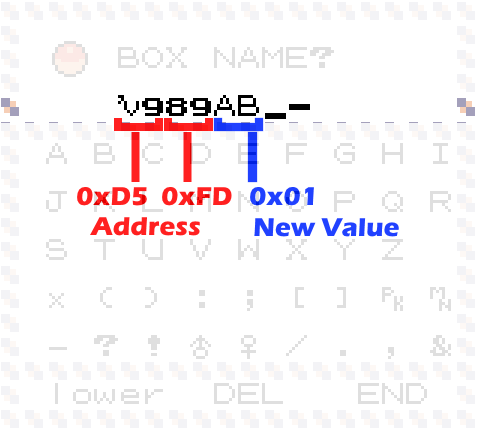
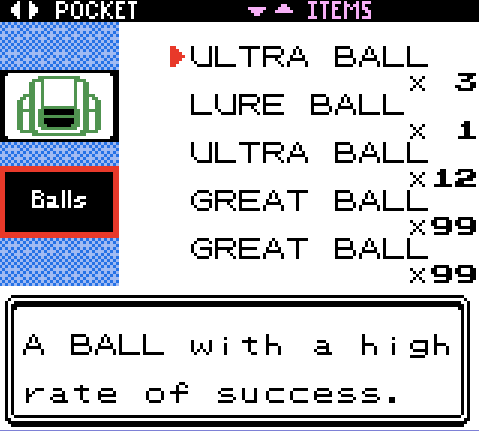


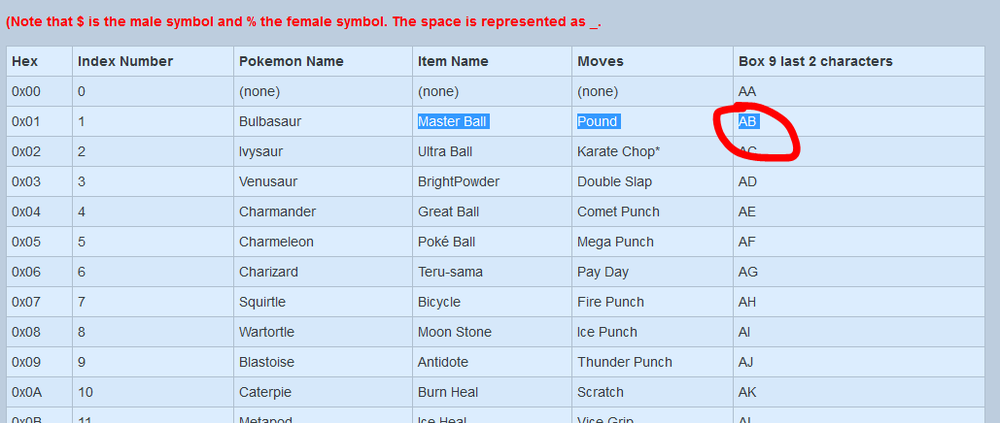
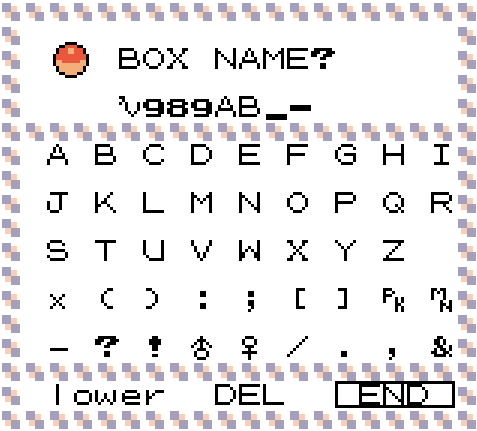
 1 point
 -
Version 1.0.0
1709 downloads
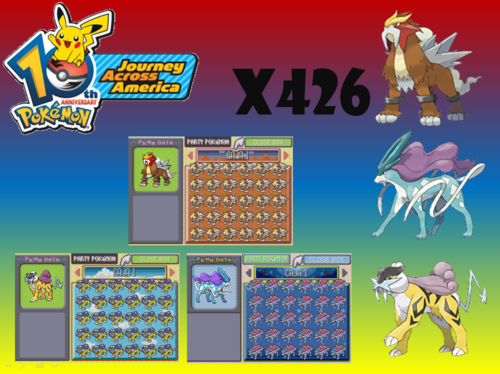
Español: Segunda parte del evento de Journey Across. Esta vez con el trío legendario de Johto. Cada archivo Sav es totalmente diferente en lo que respecta a PID, naturaleza y Iv's. Próximamente habrá una tercera parte. English: Second part of the Journey Across event. This time with Johto's legendary trio. Each Sav file is totally different in regards to PID, nature and Iv's. Soon there will be a third part.1 point -
Introduction Many of you might have heard of the Coin Case Glitch, and our sites even hold a tutorial for a version that we've adapted for common usage. This version, however, is better than the existing version as: 1. It would not need a complicated list of items in the PC, meaning it can be done as soon as players get hold of the coin case (to set-up). 2. Does not rely on being at a certain location to execute. It is important to note, however, that the setup to this requires the Coin Case (even if it doesn't require the huge amount of items). Additionally, this only works for the English versions of Gold & Silver. Before we go any further, I need to give my thanks to Crystal_, for coming up with a simpler method. If you're the type that thinks it's easier to learn and perform such a setup via videos, you can find Crystal_'s video here. Set-up This set-up is required, as it involves finding a way to get TM17 outside of the TMHM slot of the player's bag. Alternatively, users with access to PKHeX can use Hax mode and hack in TM17 into the Items slot. Even so, there are some other steps that are necessary to use this. Once this set-up is complete, future sets are as easy as: 1. changing Box 1's Name 2. Using TM17 to activate. Here we go: A1. Set up your party: - "Slide Pokemon": Third slot is low level Pokemon with low attack IVs (glitch may fail if this is incorrect) - Fourth slot is Quagsire with Sleep Talk as First Move, holding Protein. - A Pokemon with Fly (if you're not in Cherrygrove) Example below is a typical set-up. Ignore statement about Red Gyarados > Egg for now.: Examples of a good "Slide Pokemon", and additional notes about it: A2. Have the first item in the bag be an unwanted item (it'll be replaced by TM17) A3. Fly to Cherrygrove (if you're not already there) A4. Have your PC Boxes renamed as such: A5. Save the game before leaving Pokemon Center A6. Enter the mart, then leave the mart, then go 4 steps to the right. A7. Open Pokedex, and go to "Cry" to listen to Bellsprout's (or Machop's) Cry A8. Open Bag. Flip around pockets <- a must! Check Coin case. A9. Check if first item in Items Pocket is TM17. If yes, proceed, if not, redo everything, double check boxes names. A10. Shift the Slide Pokemon to the first slot, and Quagsire to the second slot. A11. Swap Quagsire's held item to TM09 (Psych Up), then save the game. A12. Lastly, rename Box 2 to Box 10 to these names, then save. (don't use TM17) Congratulations! Your set-up is now complete! You're now ready to change whatever data you want with ease! View full tutorial1 point
-
Just released v1.03b. This version adds in a new user interface and it fixes a bunch of bugs and problems. As usual, builds can be found here: https://github.com/SunakazeKun/PMDe/releases/tag/v1.03b1 point