Leaderboard



Popular Content
Showing content with the highest reputation since 08/02/26 in Files
-
Version 2.2.2
20980 downloads
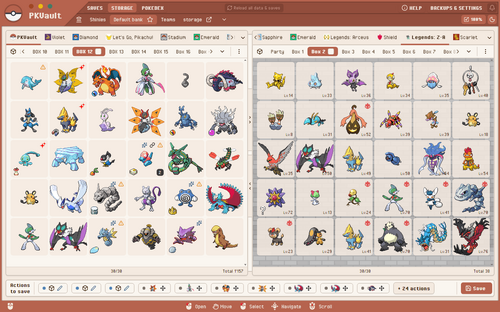
PKVault is a Pokemon storage & save manipulation tool based on PKHeX. This tool is similar to Pokemon Home, for an offline use. Don't wait and test it here -> https://pkvault-demo.chnapy.dev PKVault is available for multiple systems: Desktop app Windows Linux + SteamDeck: checkout Flathub or https://github.com/Chnapy/PKVault Web app Docker: checkout https://github.com/Chnapy/PKVault --- Features: Storage & save manipulation compatible with all pokemon games, from first generation to Pokemon Legends: Z-A transfer pokemons between saves convert pokemon to any generation (ex. G7 to G2) store pokemons outside saves using banks & boxes allow use of multiple "versions" for stored pokemons move/delete actions edit pokemon moves, EVs & nickname evolve pokemons requiring trade or trade + held-item (ex. Kadabra -> Alakazam) link a save pokemon with all his versions, sharing data like exp & EVs sort pokemons in storage & saves synchronize pokedex between storage & saves backup all saves & storage before any save action backups listing backups restore always possible Centralized Pokedex based on all listed saves views with forms & genders multiple filters: species name, seen/caught/owned, types, ... possible living dex possible shiny dex Dynamic saves listing based on paths & globs Dark mode & sprite sizing Checkout project-pokemon discussion ! This tool allows you to manage all your saves storage, moving pkm between banks, boxes, saves and local storage. You can also edit pkm, evolve them (when trade is required), create "version" of them for specific generations. All generations are supported, starting from Gen1 to Pokemon Legends: Z-A ! For example you can take a Kadabra from your save of Pokemon Black (Gen5), create a "version" for your save Pokemon Crystal (Gen2), then move pkm to it. PKVault allows you to bypass all generation constraints, you can move a pkm from Gen3 to Gen1, from Gen2 to Gen7, and so on. The app includes a centralized Pokedex with search filters (by name, games, types, etc), as well as living-dex and shiny-dex support. An auto-backup system prevents data loss. Saves & pkms are backed up before any write actions ! Saves are read from your file system, you don't have to upload them to PKVault, provide your saves paths and the app will get them itself. PKHeX is used under the hood, so all your stored pkm are in PKHeX format and can be manipulated by PKHeX directly. Compatibility & legality PKVault aims to be compatible with every save file supported by PKHeX. Creating a pkm "version" means converting a copy between generations, which may cause legality issues with origin, moves, etc. These issues are all displayed on the app, and you can use PKHeX to fix them. Currently, English + French + German are supported by the app. It can evolve depending on feedbacks. Bugs & issues A backup system exists to avoid any data loss even in case of bugs when writing save. You can still encounter bugs and other issues. Please report any issue on github or project-pokemon discussion to help improve the app. Why I made this app My good old first gens Pokemon games lost their saves due to empty internal battery. So I decided to replay the first games and continue through to the latest generations, with the goal of fully completing all the pokedex. I was frustrated about barriers between some generations (2->3, 4->3, ...), and by how difficult it was to get some pkms, like Slowpoke in Gen3 even though I already had one in my Crystal (Gen2) save. Also it's hard today to get all trade-only evolutions like Alakazam, and I didn't like the limited usability of TMs in the early generations. While PKHeX can fix all these issues and more, but I wanted something more tailored to my needs, and more restricted: PKVault restricts cheating possibilities. Finally I wanted something like Pokemon Home, but for the old games as well. For all these reasons I created PKVault. Please share your feedback --- Source code & license: https://github.com/Chnapy/PKVault2 points -
Version 26.08.26
13474159 downloads
Pokémon core series save editor, programmed in C#. Supports the following files: Save files ("main", *.sav, *.dsv, *.dat, *.gci) GameCube Memory Card files (.raw, .bin) containing GC Pokémon savegames. Individual Pokémon entity files (.pk*) Mystery Gift files (.pgt, .pcd, .pgf, .wc*) including conversion to .pk* Importing teams from Battle Videos Transferring from one generation to another, converting formats along the way. Data is displayed in a view which can be edited and saved. The interface can be translated with resource/external text files so that different languages can be supported. Pokémon Showdown sets and QR codes can be imported/exported to assist in sharing. We do not support or condone cheating at the expense of others. Do not use significantly hacked Pokémon in battle or in trades with those who are unaware hacked Pokémon are in use. FAQ Support Forum <-- Post here if you have questions or found bugs2 points -
Version February 19th, 2025 (FFFF)
218461 downloads
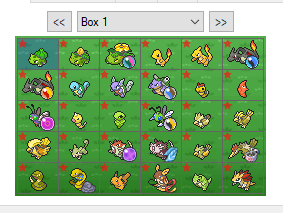
All of the 920+ Pokemon in this save file are legal and will through Bank and HOME. Every pokemon that can legally be obtained as a shiny has its shiny form in the save file, the other pokemon are there in non-shiny form. 90% of the Pokemon in this save file were hatched/captured in USUM meaning that they can be used on battlespot. The first evolutions of almost all of the Pokemon will be level 1; the middle evolutions are often level 70. A majority of the final stage evolution pokemon are a smogon set. I hope this save helps some people out there. All of the complete 806 pokemon sets I could find online were either completely riddled with illegal pokemon, or all of the pokemon only knew 1 move; that is not the case with this save file. Enjoy ! Youtube Video showcasing the savefile: https://youtu.be/-YBj6WgP_ro1 point -
Version 1.0.0
733 downloads
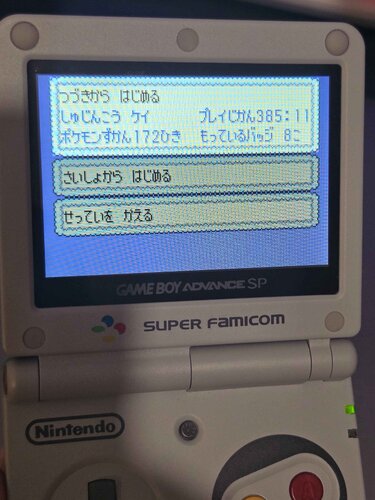
Bought a bunch of ds pokemon games and a gba game from japan on ebay to play through them all and didn't want to just delete the saves on them so I backed them up and put them in cloud storage but also looked for some archiving thing online found this site and thought people might like to explore some random old saves. The 3 screenshots from desmume are because I already deleted the saves on the carts. I have just bought the other GBA pokemon games from japan on ebay and when they arrive I will upload the saves on them too.1 point -
Version 15.4.2020
48679 downloads
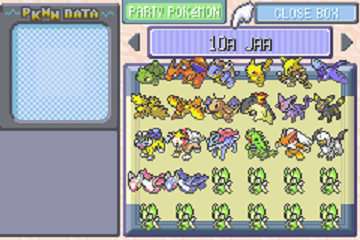
These are Pokemon FireRed savefiles which contain a compilation of legit event Pokemon for the Generation 3 games (Ruby, Sapphire, Emerald, FireRed & LeafGreen). These savefiles have been in development by several ProjectPokemon members since April 2016, but has been hosted exclusively on another website. As of now, these savefiles will be concurrently hosted on ProjectPokemon as well. The Genaration III Pokemon games had a ton of events, many of which are extremely hard to obtain today. The Gen III games predate any sort of internet trading, and the event Pokemon from this generation have often been migrated up to newer Pokemon games. These factors make it quite hard to find legitimate event Pokemon for Gen III. The only way we can expect to obtain more event Pokemon for Gen III is if others share their save/pk3 files, so please consider sharing if you happen to have some! To learn more about Pokemon events in Generation 3, you can look over the following pages: List of English event Pokémon distributions in Generation III List of Japanese event Pokémon distributions in Generation III List of Journey Across America event Pokémon distributions List of Party of the Decade event Pokémon distributions List of PCNY event Pokémon distributions in Generation III List of Gather More Pokémon! Campaign event Pokémon Pokémon Colosseum Bonus Disc ----- The main savefile contains the following event Pokemon in each box: Box 1 & 2: 10th Anniversary (Europe, Top 10 Distribution) + Aura Mew Here we have a full set of all European 10th Anniversary Pokemon, each of the ten Pokemon in English, French, German, Italian, and Spanish. The OT for each language is as follows: 10ANNIV (ENG), 10JAHRE (GER), 10ANNIV (FRE), 10ANNI (ITA), 10ANIV (SPA) These Pokemon were selected through a poll and later distributed at various locations in 2006 for the "Top 10" event throughout Europe to celebrate 10 years of Pokemon. We also have a full set of Aura Mew distributions from Europe, each in English, French, German, Italian, and Spanish. OT is the same for each language. Aura Mew was distributed at various locations in August 2007 throughout Europe. Note: The English 10ANNIV distribution rom and English Aura Mew distribution rom have been released to the public. Unlike the English 10ANNIV, the English Aura Mew will distribute all five languages of Aura Mew. Due to legality reasons, the roms can not be shared here, but a simple Google search should help. Box 1: 10th Anniversary (Europe), Part I Charizard (x5, one of each language) Pikachu (x5, one of each language) Articuno (x5, one of each language) Raikou (x5, one of each language) Entei (x5, one of each language) Suicune (x5, one of each language) ----- Box 2: 10th Anniversary (Europe), Part II + Aura Mew Lugia (x5, one of each language) Ho-Oh (x5, one of each language) Latias (x5, one of each language) Latios (x5, one of each language) Aura Mew (x5, one of each language) ----- Box 3 & 4: 10th Anniversary (United States, JAA + PotD Top 20 Distributions) Here we have both full sets of United States 10th Anniversary Pokemon. One set was distributed at the "Journey Across America" event, and one at the "Party of the Decade" event. Both sets are nearly identical, though have different Trainer IDs. JAA has the TID 00010, and PotD has the TID 06808. JAA has an extra distribution that makes this set unique, that being Celebi. PotD has a unique Pikachu that differs from the JAA counterpart, due to knowing the move Fly. Box 3: 10th Anniversary (United States), Journey Across America (10 ANIV, Trainer ID: 00010) Bulbasaur Charizard Blastoise Pikachu Alakazam Articuno Zapdos Moltres Dragonite Typhlosion Espeon Umbreon Raikou Entei Suicune Tyranitar Blaziken Absol Latias Latios Celebi (x10) ----- Box 4: 10th Anniversary (United States), Party of the Decade (10 ANIV, Trainer ID: 06808) Bulbasaur (x2, one evolved to Venusaur) Charizard Blastoise (x2, one with gained experience) Flying Pikachu Alakazam Articuno Zapdos Moltres Dragonite (x2) Typhlosion Espeon Umbreon Raikou Entei Suicune Tyranitar Blaziken Absol Latias Latios ----- Box 5: Pokemon Center New York (PCNY) Distributions These Pokemon were distributed at Gotta Catch 'Em All! Stations in the New York Pokemon Center between 2003 and its closing in January 2005. These PCNY sets are incomplete, however we have a good portion of them. Some of the Pokemon distributed here also were poorly documented, so we have some PCNY events that aren't listed on Bulbapedia. Due to this, there may be other PCNY events that we don't yet know about. Dragon Week Seadra Dragon Week Flygon Dragon Week Altaria Dragon Week Flygon Monster Week 2, Lv50 Exploud Monster Week 2, Lv100 Exploud Monster Week 2, Lv50 Aggron Monster Week 2, Lv100 Aggron Monster Week 2, Lv50 Wailord Monster Week 2, Lv100 Wailord Monster Week 2, Lv50 Crawdaunt Monster Week 2, Lv100 Crawdaunt Campaign 4 Zangoose Campaign 4 Seviper Campaign 4 Milotic Pokemon Box Promo Flygon Pokemon Box Promo Seviper Pokemon Box Promo Spite Absol Pokemon Box Promo Wish Absol Campaign 6 Machamp Spring Fling Tropius Spring Fling Gardevoir PCNY Wish Chansey Egg PCNY Wish Drowzee Egg PCNY Wish Exeggcute Egg PCNY Wish Farfetch'd Egg PCNY Wish Kangaskhan Egg PCNY Wish Lickitung Egg ----- Box 6: English Events This box contains the remaining English events not yet mentioned. Several JEREMY are still missing. Note: Several savefiles from FireRed carts that were officially used to distribute Mystery Mew by direct trade have been released to the public, which as a whole contain all 420 possible selections of the boxed Mews. If you wish to make your own selection from the 420 Mews, please see this page: MYSTRY Mew FireRed Distribution Cart Savefiles. The Doel Deoxys distributon rom, and the GBA cartridge version of the English Berry Glitch Fix Shiny Zigzagoon distribution used in the UK, have both also been released to the public. Due to legality reasons, the roms can not be shared here, but a simple Google search should help. Berry Glitch Fix Shiny Zigzagoon (x2, OTs RUBY and SAPHIRE) ROCKS Metang (x2) SPACE C Deoxys DOEL Deoxys MYSTRY Mew WISHMKR Jirachi (x2, Salac and Ganlon Berries) CHANNEL Jirachi (x2, Salac and Ganlon Berries) METEOR Jirachi (UNRELEASED, prototype distribution multiboot file found hidden alongside WISHMKR's multiboot file in US Bonus Disc) Shiny WISHMKR Jirachi (x9, every possible shiny Jirachi from US Colosseum Bonus Disc) Shiny CHANNEL Jirachi ----- Box 7: Japanese Events, Part I This box contains most Japanese events, excluding Egg distributions and GMPC(GCEA) events. A few are still missing, as noted by empty slots. Wishing Star (Negaiboshi) Jirachi (x2, Ganlon and Salac Berries) Berry Glitch Fix Shiny Zigzagoon (x2, OTs ルビー[Ruby] and サファイア[Sapphire]) 2004 Tanabata Jirachi (x2, Apicot and Petaya Berries) All Nippon Airways (ANA) Pikachu PokePark Meowth Yokohama Pikachu Hado Mew GW Pikachu 2005 Tanabata Jirachi (x2, Apicot and Petaya Berries) Festa Metang Sunday Wobbuffet Hado Regice Hado Registeel PokePark Mew PokePark Celebi 2006 Tanabata Jirachi (x2, Ganlon and Salac Berries) Mitsurin Celebi ----- Box 8: Japanese Events, Part II This box contains a complete set of all "Pokemon Center 5th Anniversary Eggs", a complete set of all "Egg Pokemon Present Eggs", and a complete set of all "PokePark Eggs". Wish Pichu Egg Teeter Dance Pichu Egg Shiny Wish Pichu Egg Shiny Teeter Dance Pichu Egg Wish Ralts Egg Charm Ralts Egg Wish Absol Egg Spite Absol Egg Wish Bagon Egg Iron Defense Bagon Egg Leech Seed Oddish Egg Petal Dance Meowth Egg Sweet Kiss Poliwag Egg Teeter Dance Bellsprout Egg Mud Sport Psyduck Egg Follow Me Pichu Egg Tickle Igglybuff Egg Mud Sport Corsola Egg FeatherDance Taillow Egg Mud Sport Surskit Egg Teeter Dance Whismur Egg Rollout Skitty Egg Water Sport Plusle Egg Mud Sport Minun Egg Uproar Spoink Egg Sing Spinda Egg Encore Cacnea Egg Water Sport Corphish Egg Tickle Wynaut Egg ----- Box 9: Japanese Events, Part III This box contains the first four campaign sets of the "Gather More Pokemon! Campaign" (aka "Gotta Catch Em All") distributions. First Campaign: Treecko Torchic Mudkip Second Campaign: Chikorita Cyndaquil Totodile Third Campaign: Ekans Pikachu Meowth Growlithe Bellsprout Slowpoke Shellder Chansey Kangaskhan Scyther Electabuzz Magmar Tauros Murkrow Misdreavus Qwilfish Sneasel Delibird Mantine Fourth Campaign: Bulbasaur Charmander Squirtle ----- Box 10: Japanese Events, Part IV This box contains the last two campaign sets of the GMPC (GCEA) distributions. Fifth Campaign: Pikachu Lotad Seedot Surskit Skitty Sableye Mawile Meditite Plusle Minun Roselia Zangoose Seviper Lunatone Solrock Chimecho Sixth Campaign: Pikachu Hoothoot Mareep Aipom Sunkern Wobbuffet Pineco Gligar Snubbull Shuckle Teddiursa Houndour Stantler Smeargle ----- Box 11: Special Pokemon from "Colosseum" and "XD: Gale of Darkness" for Nintendo GameCube This box contains all special pokemon from Colosseum and XD, such as the MATTLE Ho-oh which is very tedious to obtain. This also includes the unreleased English variants of the Japanese Bonus Disc's Celebi and Pikachu, and the Japanese e-Card exclusive Togepi, Mareep and Scizor. Lastly included is the Johto starters from XD, as they are also incredibly tedious to obtain. JP Ageto Celebi JP Colosseum Pikachu JP Mt. Battle Ho-oh JP e-Reader Togepi JP e-Reader Mareep JP e-Reader Scizor EN AGATE Celebi (UNRELEASED) EN COLOS Pikachu (UNRELEASED) EN MATTLE Ho-oh (x3) EN e-Reader Togepi (UNRELEASED, x3) EN e-Reader Mareep (UNRELEASED, x3) EN e-Reader Scizor (UNRELEASED, x3) XD Chikorita (x2, English and Spanish) XD Cyndaquil (x2, English and Spanish) XD Totodile (x2, English and Spanish) ----- Box 12: Special Egg Gifts from "Pokemon Box: Ruby & Sapphire" for Nintendo GameCube After a certain amount of Pokemon are deposited into Pokemon Box from one of you GBA games, you are gifted an egg that contains a Pokemon with a special move. False Swipe Swablu Egg (x5 + one hatched) (after first deposit) ExtremeSpeed Zigzagoon Egg (x5 + one hatched) (after 100 deposited) Pay Day Skitty Egg (x5 + one hatched) (after 500 deposited) Surf Pichu Egg (x2 + two hatched) (after 1499 deposited) ----- Box 13: In-Game Special Pokemon This box contains rare in-game Pokemon such as standard legendary Pokemon, and event-exclusive island legendary and mythical Pokemon. Several of these are also included as Shiny. Note: The American Aurora Ticket distribution rom has also leaked to the public. The American version of this rom only supports FRLG, not Emerald like the European version (not public). Due to legality reasons, this rom can not be shared here, but a simple Google search should help. FRLG Articuno FRLG Zapdos FRLG Moltres FRLG Mewtwo Southern Island Latias Southern Island Latios RSE Regirock RSE Regice RSE Registeel RSE Kyogre RSE Groudon RSE Rayquaza Faraway Island Mew (UNRELEASED, English) Navel Rock Ho-oh Navel Rock Lugia Birth Island Deoxys Shiny Regice Shiny Rayquaza Shiny JP Faraway Island Mew Shiny Navel Rock Lugia Shiny Navel Rock Ho-oh Shiny Southern Island Latias Shiny Southern Island Latios Shiny Birth Island Deoxys ----- Box 14: Helpful Pokemon & JEREMY Trade Events This box contains Pokemon that can be helpful in-game for the Battle Tower and for Pokemon Contests. Battle Tower: Salamence Suicune Snorlax Contests: Cool Swellow Cute Milotic Beauty Camerupt Tough Donphan Smart Banette JEREMY Toys R Us Trade Events: Ekans Vulpix Oddish Psyduck Growlithe Machoke (devolved) Machamp Haunter (devolved) Gengar Staryu Tauros ----- **POKEMON STILL NEEDED** Japanese: STAMP Absol STAMP Pichu Sapporo Pikachu Hadou Regirock (plus more Hadou Regice & Registeel for research) PokePark Jirachi English: More of any PCNY events JEREMY Sandshrew JEREMY Shellder JEREMY Slowpoke ----- The extra savefiles contain the following event Pokemon in each box: The extra savefiles provided contain overflow of the existing event pokemon from the main savefile. As the main savefile usually provided only one or two of each event, these overflow savefiles contain a larger selection of each event to choose from. However when it comes to Japanese events, there are far too many available to be necessary to include here. Most overflow of each Japanese event are included here, the only exception being the hundreds of event Pikachu. So if you want the full compilation of overflow Japanese events, please see this page: Ahiru's Wonderland Gen III Event Savefiles Event Savefile 2: Box 1 - 3: PCNY events (x83) Box 4: Journey Across America 10 ANIV events (x28) Box 5: 10 ANIV Celebi (x10) + Wishing Star (Negaiboshi) Jirachi (x11) + Doel Deoxys (x6) Box 6: German Aura Mew (x24) + Spanish Aura Mew (x1) + Shiny CHANNEL Jirachi (x5, one of each language) Box 7: Space C Deoxys (x30) Box 8: WISHMKR Jirachi (x18) + CHANNEL Jirachi (x10) Box 9: Ageto Celebi (x30) Box 10: Pokemon Box Eggs (x5 hatched, x9 eggs) Box 11: In-Game Island Captured Events (x14) Box 12: In-Game Unown full set (x28) Box 13: Debug distributions from the German Debug version of Pokemon Ruby (x30) Box 14: Debug Unown full distribution set from the German Debug version of Pokemon Ruby (x28) Event Savefile 3: Box 1 - 3: Ageto Celebi (x77) Box 4: Pokemon Center 5th Anniversary Eggs (x30) Box 5: JP Berry Glitch Fix Shiny Zigzagoon (x27) Box 6 - 7: Egg Pokemon Present Eggs (x48) Box 8 - 10: PokePark Eggs (x90) Box 11: Hadou Mew (x10) + 2005 Tanabata Jirachi (x2) + Festa Metang (x10) + Sunday Wobbuffet (x5) + PokePark Mew (x1) Box 12: PokePark Celebi (x6) + 2004 Tanabata Jirachi (x1) + PokePark Meowth (x1) + 2006 Tanabata Jirachi (x4) + ANA Pikachu (x18) Box 13: GW Pikachu (x15) + Yokohama Pikachu (x15) Box 14: Mitsurin Celebi (x30) Event Savefile 4: Box 1 - 5: GMPC (GCEA) (x139) Box 6 - 14: *empty boxes for potential future expansion* In-Game Trades Savefile: Box 1: Full set from Ruby & Sapphire - English, German, French, Italian, Spanish, and Japanese respectively Box 2: Full set from Emerald - English, German, French, Italian, Spanish, and Japanese respectively Box 3: Full English set (x2) from FRLG Box 4: Full German set from FRLG Box 5: Full French set from FRLG Box 6: Full Italian set from FRLG Box 7: Full Spanish set from FRLG Box 8: Full Japanese set from FRLG Box 9: Full English set from Colosseum and XD ----- Credits: Although @InsaneNutter started this project in 2016, and has put many hours into its development, it would have never grown this large without the massive contributions from the following people. If you contributed something that has made its way into these savefiles and you aren't credited below, please let us know! @vi3t - The original FireRed savefile this was built upon. @InsaneNutter - Started the compilation of events in this savefile, and continued developing it alongside HaxAras. @HaxAras - Continued help with developing this savefile, and has contributed many Pokemon from his personal collection. Big Mike - Contributed events to his friend HaxAras. @King Impoleon - Overflow Box of German Aura Mew, Overflow Box of Space Center Deoxys, and one Doel Deoxys. @Nigoli - 111 Ageto Celebi @Deoxyz - The English, French, German, Italian and Spanish Top 10 & Aura Mew in the main save, the 5 Doel Deoxys in the overflow save, as well as two of Mystery Mew distribution savefiles. Also the 10ANNIV, Aura Mew, BGF Shiny Zigzagoon, and Aurora Ticket distribution cartridges. Recently did the massive revamp of these savefiles to their current appearance and organization. @Misdreavus - The full set of JAA 10 ANIV Pokemon with two 10 ANIV Celebi, all in the main save. @Invader TAK - Three 10 ANIV Celebi in the main save. SWAMP.N - JAA 10 ANIV Articuno Zapdos, Raikou, Entei, Suicune, Celebi, Latias, Latios, and a Space Center Deoxys all in the overflow save. @arjun - The shiny Regice & shiny Rayquaza in the main save, and full set of Unown in the overflow save. Ahiru's Wonderland - A no longer existing website which actively archived tons of Japanese event pokemon from 2003 to 2006. @Sabresite - Legitimacy checking many of these event Pokemon with his currently unreleased tools. @Kaphotics - Developing PKHeX, the program which without would have made the massive revamp of these savefiles a complete nightmare. @Gridelin - The Shiny Channel Jirachi and providing a detailed guide on how it was obtained. @yamipoli - Two untouched ROCKS Metang. @XxPhoenix1996xX - Replacing suspect pokemon in the 'In-Game Trades" savefile, as well as adding a few missing in-game trade pokemon.1 point -
5261 downloads
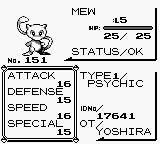
This page contains the first ever publicly available savefile that was dumped from an original Pokemon Red cart, which was used to distribute YOSHIRA Mew by direct trade. The distribution took place at Toys R Us stores in the United States from the 8th to 12th of December 1999. The players who were allowed to obtain a Mew were determined among the first 1500 customers at each Toys R Us store on 26 November 1999, where they were able to receive a special "Peel & Win" sticker card (pictured above). 200 of these cards at each store contained the text "Caught Me!" underneath the sticker of Mew. These Mew distribution carts are known to have been either a Red or a Blue cartridge, which were sealed into a GameBoy Pocket with official Nintendo non-tamper security tape. So far only two devices have publicly surfaced on the internet. The first one was a Blue cartridge still sealed into a silver GBP, of which pictures have been on the internet for several years (pictured above). This device is said to have been lost in shipping during ownership change in 2013. The second one is a Red cartridge that has since been cut loose from its GBP, but the Nintendo security tape is still intact on the cartridge (pictured above). This Red cartridge was first seen on Reddit several months back, which is owned by a former Toys R Us employee who personally distributed Mews from the cartridge back in 1999. I recently contacted this Redditor, and offered to ship her my cart dumper in order to get the savefile dumped and safely preserved. As save data in the first two generations rely on a low-power battery, after approximately 18 years it was clear that the savefile would not have survived much longer. Due to this and the extreme rarity of these devices, this may have very well been a one time opportunity to ever preserve save data from one of these carts. Every Mew has identical IV stats: 5 HP, 10 Attack, 1 Defense, 12 Speed, and 5 Special. Every Mew in this savefile has the Original Trainer name of YOSHIRA (none YOSHIRB). I can only speculate that perhaps those on the Blue cartridges contained YOSHIRB Mews. The Trainer IDs are all unique however, and imply the Mews were generated in groups of 5 (eg. 16385, 16386, 16387, 16388, 16389, then 16443, 16444, 16445, 16446, 16447, and so on). My theory is that the Mews were generated with a "Mew machine", which was a quicker method used at other event locations to distribute YOSHIRA/YOSHIRB Mews. We know these machines distributed Mews with TIDs that incremented by 1, so due to the Trainer IDs we see here, we could assume that each savefile had different Mews(or at least that several different savefiles may exist). So other than TID, the Mews on this savefile are all identical. The way I figure it, a cart was inserted in a Mew machine, a party full of 5 were generated, the cart was removed, and while someone manually placed those 5 Mews in a PC Box, another cart was in the machine having it's party filled. I don't figure it could have been practical to give every cart unique Mews, but multiple carts were filled to have a wider variation of existing TIDs. After a handful of carts were full of Mews, their savefiles were likely copied among the hundreds of carts send to Toys R Us stores. Keep in mind though, this is purely my speculation based of the information we have. All the traded pokemon from this savefile had been previously released, so only the Mews remain. Box 11 and 12 are totally empty. Box 5 and 10 are each missing one or two Mews. Boxes 1 to 4, and 6 to 9 remain fully untouched. I did return a few Mews from the party to their proper box slot, so the TIDs line up as they were originally. Any oddball TIDs that couldn't be matched up were placed in the Party. I also want to note that I did request the rom to be dumped as well, and it was 100% identical to any other retail Red cart. While we were 99% positive this was obviously the case, it's still nice to have that confirmation. In the past some people have speculated whether or not the rom was special and would have the PC filled with Mews if a New Game was started. Once again, I want to give special thanks to Jenn from Reddit, because without her generosity, we may have never been able to obtain one of these savefiles. She did promise to supply her personal experience/memory of the event and any details, so when she does, that will be shared here as well.1 point