

All Activity
- Past hour
-
 hanspeter280 changed their profile photo
 - Today
-
Windows says it can't verify who made the .dll so it refuses to run it. HELP.
-
 That's the correct amount. Refer to other websites on what events have been distributed over the years.
 -
 setting it to wc9 only gives 44 results which cant be right,how do i get it to show for certain game
 -

PKEdit - Cross-platform Pokémon save file editor
MatunaHakata replied to ramenu's topic in Saves - Tools
Hello, very nice project and works flawlessly in Unbound. Do u plan or work on making it compatible with Radical Red or other romhacks? -

Pokemon Mystery Dungeon: Explorers of Fortune
Nalmoth replied to WindchildWhimsy's topic in ROM - NDS ROM Hacks
Oh I didn't know that, thanks for the info ! Good luck with the update ! Can't wait to try it - Yesterday
-
Thanks! No hits so far, but this seems like something that can take years potentially.
-
 I’m trying to start a project where I need to view the buildings and other structures in 3D from Pokémon Ultra Sun. So far I’ve managed to dump the game and extract the RomFS, and now I have the folder called “a” with many numbered folders inside it. The problem is that I don’t really know what to do from this point. All the files I extracted appear as .bin, and Ohana3DS Rebirth can’t open them. Because of that, I’m not sure if I extracted the files correctly or if I’m missing a step. What I’m trying to do is: find the 3D models of buildings and map structures open them so I can view or export them The problem is that I have no idea: where the buildings or map models are located which files correspond to maps, towns, or objects how to properly open the .bin files If anyone could explain the process step-by-step, or even record a short tutorial video, that would help a lot. If that’s not possible, I would still really appreciate any advice about: what tools I should use how to identify the correct files where the map/building models are stored in the game Also, if this isn’t the correct place to ask about this, please let me know where I should post instead. Thanks in advance to anyone who can help!
 -

pk3DS: Pokémon 3DS ROM Editor and Randomizer
Kalebo replied to Kaphotics's topic in ROM - 3DS Research and Development
I'm currently trying to make Prismatic Moon, a rom hack of Ultra Moon easier. I have both the files for prismatic moon, and a clean dump of Pokemon ultra Moon open in two separate pk3ds windows. I tried dumping all of the tables for wild Pokemon encounters in Prismatic Moon, but it gives me an out of bounds index error. It must be converting it to a string that's too long, although I am very uninformed. I originally tried to modify the levels of the Pokemon with the files of the original hack, but something they did to the files made lowering the Pokemon's level below a certain level impossible in pk3ds. That's why I'm trying to copy over the tables to a clean dump. I saw the export tables button, but I don't know where it actually exports the tables. For all I know, it could just be a weird type of save button. Does anybody know how I can achieve my goal of making that rom hack easier? It doesn't necessarily need to be through the methods that I'm trying. -
Enhancement: Export "Alpha" checkbox value to Box Data Report
Kaphotics replied to jacksonm222's topic in PKHeX
Use the program settings to define extra properties you would like to include in the Report.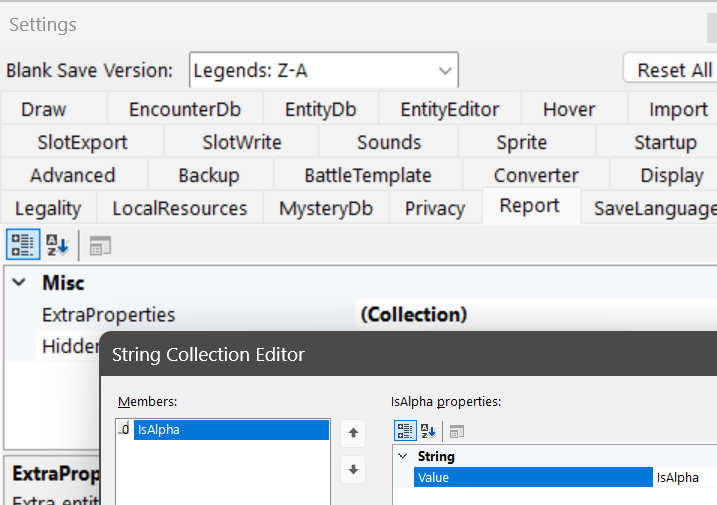
-
I have a script that consumes the box data report. Currently, I need to indicate whether a pokemon is an Alpha in the nickname. Could the Alpha value be exported in the Box Data Report?
-
 I was wondering if it is possible to hex edit an Omega Ruby/Alpha Sapphire like Sun/Moon and US/UM. By that I means porting the flags from 1 save to another. What are the Hex-values that I must copy/paste from the old save file to the new one? I found a save for Alpha Sapphire with the male player just before fighting Steven (Champion) but it's chocked full of hacked mons used for hacked events, so I don't want to use it directly. Yes, I know a bit about hex editing ORAS (like the Credits mons) but I don't know the offsets for the savefile and its flags... I just want to port them to my own save files. Can anyone help? P.S - Is it possible to convert an AS save to OR (and vice-versa) plus change the player's gender and house in Littleroot? EDIT - I totally forgot that I would also need the hex addresses in X and Y for importing/exporting flags from another save. Many thanks!
 -
 Shawnmichaels changed their profile photo
 -
 Hello everyone! This is my first post, so I hope I’m writing in the right section. I’ve been working on a ROM hack to make ORAS more difficult, so it’s more fun to replay and gives me a feeling closer to when I revisit RSE. One extra feature I thought would be cool is adding the Linking Cord to evolve trade Pokémon, in exchange for the Strange Souvenir. So far, I’ve edited all the text and the item’s in-game function, and everything works perfectly, so the feature itself is functional. The only thing I still need to change is the icon. I’d like to replace the Strange Souvenir’s icon with the Linking Cord icon from PLZA. I mean the image that appears in the Bag. I checked this list of the ORAS file system and saw that the graphic I’m looking for should be in a/0/9/2 inside my ExtractedRomFS. I’ve tried viewing and editing the files in that directory, but I can’t seem to find the correct texture. I attempted to decompress file “2” using both GARCTool and PK3DS (Tools → Misc Tools → (Un)pack + BCLIM), but when I open the extracted files in Ohana3DS, I only see what’s shown in the screenshot below. I’m a bit lost. This is my first time modding a 3DS ROM, and so far I’ve only used PK3DS to edit trainers and wild encounters. Text editing wasn’t too hard to figure out, but something as simple as changing an icon seems to require several different tools (GARCTool, Ohana3DS, SPICA, etc.), which is quite confusing coming from GBA hacking. Any help would be greatly appreciated. Thank you! Edit: Another quick question, if anyone knows the answer. Any ideas as to how I can edit that Feebas 100% encounter under the bridge in route 119? I can't seem to find it under Wild Encounters.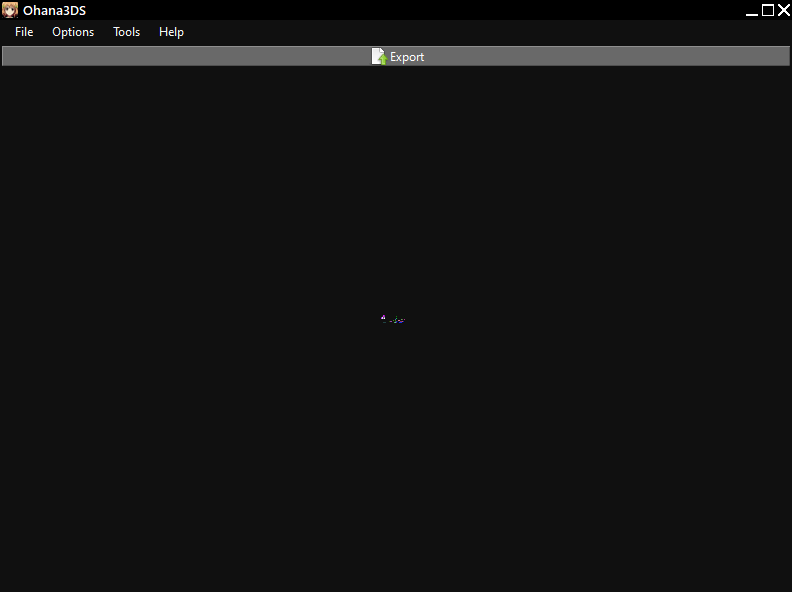
-
AlolanAlomomola changed their profile photo
-
Is there a way to decrypt the file using my 3DS/cartridge? Or must I take an entirely different approach? As I said before, both Checkpoint and PKSM spat out errors when attempting to create a backup, so I'm unsure how to continue. The encrypted .sav is the closest thing I've managed to get my hands on. I'm incredibly unfamiliar with the 3DS system outside of normal use as I'm brand new to 3DS modding. All I have going for me is decent tech literacy. I only got into this when I realized it might give me a chance to restore my beloved cartridge. Any tools or methods you could recommend to help put me on the right track?
-

Pokemon Mystery Dungeon: Explorers of Fortune
WindchildWhimsy replied to WindchildWhimsy's topic in ROM - NDS ROM Hacks
okay yeah that's kinda expected then. the game won't let you go to another dungeon afterwards while you have any jobs; this behavior can be seen in base Sky with multi-segment dungeons like Steam Cave or Amp Plains. I do have plans to rework the Zero Hoard idea for the next update, but for now uh...if you wanna access the Hoard, don't take any jobs for that dungeon. it's possible...hell, I could implement it within like 5 minutes. However, if I did, either it would be available to girls only, or the guys would be stuck with a starter that can't evolve. So I can't really see myself doing so unless, like, Tyrogue gets starter animations so I can keep the genders balanced. However, I *am* making the quiz easier to edit in the next update, so if you're willing to crack open SkyTemple yourself it should be pretty simple to do since Salandit is already available in this hack! -

PKHeX new update legality errors (contribution page)
JeongJeong replied to theSLAYER's topic in PKHeX
Hmm, actually it seems this is internally flagged in Sword and Shield itself. Attempting to trade this Alolan Raichu online fails. Still fully legal but probably best to leave the flag in PKHeX. -
 Are the held items for kyogre, groudon and rayquaza exist? Already rerun every dungeon in hardcore difficulty. I might've missed a dungeon so im probably gonna do another rerun.
 -
PKHeX new update legality errors (contribution page)
JeongJeong replied to theSLAYER's topic in PKHeX
Alolan Raichu is flagged as illegal for having Volt Tackle in Gen 8 when it's Battle Ready. Despite the Battle Ready mark making Alolan Raichu lose Volt Tackle, it can actually keep it if it's put from Pokemon Home into Scarlet and Violet first. Keeping the move on its move list. Move it to Sword and Shield, make it Battle Ready, put it back in SV, then put it back in Sword again and keep Volt Tackle on its move list. Pikachu and regular Raichu do not have this problem, but Alolan Raichu is flagged as illegal when this is done. -
Yep that fixed it. Thank you so much!
-
Yes I'm on Windows. I'm trying to find a folder that isn't automatically put in One Drive. I'll try to see about giving access. I tried running as an administrator before and it gave the same error.
-
Try running the program as administrator, or try moving it to a less restricted folder that isn't on the root of a hard drive. Otherwise, ensure that your user account has access to read/write the folder (right click the folder and select Properties => Security). I'm not sure why your paths listed are prefixed by \\?\; are you using a Windows operating system? If not, you'll need to configure whatever compatibility layer you're using to give proper paths.
-
So even moving it to my OS and Storage, it still gives a similar error. Exception Details: System.IO.IOException: Access to the path '\\?\C:\pk3ds\encdata' is denied. Exception Details: System.IO.IOException: Access to the path '\\?\D:\pk3ds\encdata' is denied.
-
 Simple question: If I take Pikachu from the starters, can It evolve into Alolan Raichu?
 -
Do not run the program from a OneDrive folder; place it on your computer's hard drive instead of a cloud folder.
-
Having an issue where PK3DS pops up with an "unhandled exception" error when randomizing Wild Encounters. I'm not sure why it doesn't have access to the path and I'm not sure how to fix this. I've looked everywhere for help. Exception Details: System.IO.IOException: Access to the path '\\?\C:\Users\megan\OneDrive\Desktop\pk3ds\pk3DS\net10.0-windows\encdata' is denied. at System.IO.FileSystem.RemoveDirectoryInternal(String fullPath, Boolean topLevel, Boolean allowDirectoryNotEmpty) at System.IO.FileSystem.RemoveDirectoryRecursive(String fullPath, WIN32_FIND_DATA& findData, Boolean topLevel) at System.IO.FileSystem.RemoveDirectory(String fullPath, Boolean recursive) at pk3DS.WinForms.Main.FileSet(IEnumerable`1 files, Boolean keep) in D:\a\1\s\pk3DS.WinForms\Main.cs:line 1110 at pk3DS.WinForms.Main.<B_Wild_Click>b__45_0() in D:\a\1\s\pk3DS.WinForms\Main.cs:line 841 at System.Threading.Thread.StartCallback() Loaded Assemblies: -------------------- System.Private.CoreLib, Version=10.0.0.0, Culture=neutral, PublicKeyToken=7cec85d7bea7798e C:\Program Files\dotnet\shared\Microsoft.NETCore.App\10.0.4\System.Private.CoreLib.dll pk3DS.WinForms, Version=1.0.0.0, Culture=neutral, PublicKeyToken=null C:\Users\megan\OneDrive\Desktop\pk3ds\pk3DS\net10.0-windows\pk3DS.WinForms.dll System.Runtime, Version=10.0.0.0, Culture=neutral, PublicKeyToken=b03f5f7f11d50a3a C:\Program Files\dotnet\shared\Microsoft.NETCore.App\10.0.4\System.Runtime.dll System.Threading.Thread, Version=10.0.0.0, Culture=neutral, PublicKeyToken=b03f5f7f11d50a3a C:\Program Files\dotnet\shared\Microsoft.NETCore.App\10.0.4\System.Threading.Thread.dll System.Windows.Forms, Version=10.0.0.0, Culture=neutral, PublicKeyToken=b77a5c561934e089 C:\Program Files\dotnet\shared\Microsoft.WindowsDesktop.App\10.0.4\System.Windows.Forms.dll System.ComponentModel.Primitives, Version=10.0.0.0, Culture=neutral, PublicKeyToken=b03f5f7f11d50a3a C:\Program Files\dotnet\shared\Microsoft.NETCore.App\10.0.4\System.ComponentModel.Primitives.dll System.Windows.Forms.Primitives, Version=10.0.0.0, Culture=neutral, PublicKeyToken=b77a5c561934e089 C:\Program Files\dotnet\shared\Microsoft.WindowsDesktop.App\10.0.4\System.Windows.Forms.Primitives.dll System.Private.Windows.Core, Version=10.0.0.0, Culture=neutral, PublicKeyToken=b77a5c561934e089 C:\Program Files\dotnet\shared\Microsoft.WindowsDesktop.App\10.0.4\System.Private.Windows.Core.dll System.Private.Windows.GdiPlus, Version=10.0.0.0, Culture=neutral, PublicKeyToken=b77a5c561934e089 C:\Program Files\dotnet\shared\Microsoft.WindowsDesktop.App\10.0.4\System.Private.Windows.GdiPlus.dll System.Drawing.Primitives, Version=10.0.0.0, Culture=neutral, PublicKeyToken=b03f5f7f11d50a3a C:\Program Files\dotnet\shared\Microsoft.NETCore.App\10.0.4\System.Drawing.Primitives.dll System.Collections.Specialized, Version=10.0.0.0, Culture=neutral, PublicKeyToken=b03f5f7f11d50a3a C:\Program Files\dotnet\shared\Microsoft.NETCore.App\10.0.4\System.Collections.Specialized.dll System.Collections.Concurrent, Version=10.0.0.0, Culture=neutral, PublicKeyToken=b03f5f7f11d50a3a C:\Program Files\dotnet\shared\Microsoft.NETCore.App\10.0.4\System.Collections.Concurrent.dll System.Collections, Version=10.0.0.0, Culture=neutral, PublicKeyToken=b03f5f7f11d50a3a C:\Program Files\dotnet\shared\Microsoft.NETCore.App\10.0.4\System.Collections.dll System.Runtime.InteropServices, Version=10.0.0.0, Culture=neutral, PublicKeyToken=b03f5f7f11d50a3a C:\Program Files\dotnet\shared\Microsoft.NETCore.App\10.0.4\System.Runtime.InteropServices.dll System.Threading, Version=10.0.0.0, Culture=neutral, PublicKeyToken=b03f5f7f11d50a3a C:\Program Files\dotnet\shared\Microsoft.NETCore.App\10.0.4\System.Threading.dll System.Configuration.ConfigurationManager, Version=10.0.0.0, Culture=neutral, PublicKeyToken=cc7b13ffcd2ddd51 C:\Program Files\dotnet\shared\Microsoft.WindowsDesktop.App\10.0.4\System.Configuration.ConfigurationManager.dll System.ObjectModel, Version=10.0.0.0, Culture=neutral, PublicKeyToken=b03f5f7f11d50a3a C:\Program Files\dotnet\shared\Microsoft.NETCore.App\10.0.4\System.ObjectModel.dll System.Linq, Version=10.0.0.0, Culture=neutral, PublicKeyToken=b03f5f7f11d50a3a C:\Program Files\dotnet\shared\Microsoft.NETCore.App\10.0.4\System.Linq.dll System.Drawing.Common, Version=10.0.0.0, Culture=neutral, PublicKeyToken=cc7b13ffcd2ddd51 C:\Program Files\dotnet\shared\Microsoft.WindowsDesktop.App\10.0.4\System.Drawing.Common.dll Microsoft.Win32.Primitives, Version=10.0.0.0, Culture=neutral, PublicKeyToken=b03f5f7f11d50a3a C:\Program Files\dotnet\shared\Microsoft.NETCore.App\10.0.4\Microsoft.Win32.Primitives.dll System.ComponentModel.EventBasedAsync, Version=10.0.0.0, Culture=neutral, PublicKeyToken=b03f5f7f11d50a3a C:\Program Files\dotnet\shared\Microsoft.NETCore.App\10.0.4\System.ComponentModel.EventBasedAsync.dll Accessibility, Version=4.0.0.0, Culture=neutral, PublicKeyToken=31bf3856ad364e35 C:\Program Files\dotnet\shared\Microsoft.WindowsDesktop.App\10.0.4\Accessibility.dll System.ComponentModel.TypeConverter, Version=10.0.0.0, Culture=neutral, PublicKeyToken=b03f5f7f11d50a3a C:\Program Files\dotnet\shared\Microsoft.NETCore.App\10.0.4\System.ComponentModel.TypeConverter.dll System.ComponentModel, Version=10.0.0.0, Culture=neutral, PublicKeyToken=b03f5f7f11d50a3a C:\Program Files\dotnet\shared\Microsoft.NETCore.App\10.0.4\System.ComponentModel.dll System.Numerics.Vectors, Version=10.0.0.0, Culture=neutral, PublicKeyToken=b03f5f7f11d50a3a C:\Program Files\dotnet\shared\Microsoft.NETCore.App\10.0.4\System.Numerics.Vectors.dll System.Diagnostics.FileVersionInfo, Version=10.0.0.0, Culture=neutral, PublicKeyToken=b03f5f7f11d50a3a C:\Program Files\dotnet\shared\Microsoft.NETCore.App\10.0.4\System.Diagnostics.FileVersionInfo.dll System.Memory, Version=10.0.0.0, Culture=neutral, PublicKeyToken=cc7b13ffcd2ddd51 C:\Program Files\dotnet\shared\Microsoft.NETCore.App\10.0.4\System.Memory.dll Microsoft.Win32.SystemEvents, Version=10.0.0.0, Culture=neutral, PublicKeyToken=cc7b13ffcd2ddd51 C:\Program Files\dotnet\shared\Microsoft.WindowsDesktop.App\10.0.4\Microsoft.Win32.SystemEvents.dll System.Runtime.Loader, Version=10.0.0.0, Culture=neutral, PublicKeyToken=b03f5f7f11d50a3a C:\Program Files\dotnet\shared\Microsoft.NETCore.App\10.0.4\System.Runtime.Loader.dll System.Private.Uri, Version=10.0.0.0, Culture=neutral, PublicKeyToken=b03f5f7f11d50a3a C:\Program Files\dotnet\shared\Microsoft.NETCore.App\10.0.4\System.Private.Uri.dll System.Security.Cryptography, Version=10.0.0.0, Culture=neutral, PublicKeyToken=b03f5f7f11d50a3a C:\Program Files\dotnet\shared\Microsoft.NETCore.App\10.0.4\System.Security.Cryptography.dll System.Xml.ReaderWriter, Version=10.0.0.0, Culture=neutral, PublicKeyToken=b03f5f7f11d50a3a C:\Program Files\dotnet\shared\Microsoft.NETCore.App\10.0.4\System.Xml.ReaderWriter.dll System.Private.Xml, Version=10.0.0.0, Culture=neutral, PublicKeyToken=cc7b13ffcd2ddd51 C:\Program Files\dotnet\shared\Microsoft.NETCore.App\10.0.4\System.Private.Xml.dll System.Net.WebClient, Version=10.0.0.0, Culture=neutral, PublicKeyToken=cc7b13ffcd2ddd51 C:\Program Files\dotnet\shared\Microsoft.NETCore.App\10.0.4\System.Net.WebClient.dll System.Text.Encoding.Extensions, Version=10.0.0.0, Culture=neutral, PublicKeyToken=b03f5f7f11d50a3a C:\Program Files\dotnet\shared\Microsoft.NETCore.App\10.0.4\System.Text.Encoding.Extensions.dll System.Runtime.Serialization.Formatters, Version=8.1.0.0, Culture=neutral, PublicKeyToken=b03f5f7f11d50a3a C:\Program Files\dotnet\shared\Microsoft.NETCore.App\10.0.4\System.Runtime.Serialization.Formatters.dll System.Xml.XmlSerializer, Version=10.0.0.0, Culture=neutral, PublicKeyToken=b03f5f7f11d50a3a C:\Program Files\dotnet\shared\Microsoft.NETCore.App\10.0.4\System.Xml.XmlSerializer.dll pk3DS.Core, Version=1.0.0.0, Culture=neutral, PublicKeyToken=null C:\Users\megan\OneDrive\Desktop\pk3ds\pk3DS\net10.0-windows\pk3DS.Core.dll System.Windows.Extensions, Version=10.0.0.0, Culture=neutral, PublicKeyToken=cc7b13ffcd2ddd51 C:\Program Files\dotnet\shared\Microsoft.WindowsDesktop.App\10.0.4\System.Windows.Extensions.dll System.Collections.NonGeneric, Version=10.0.0.0, Culture=neutral, PublicKeyToken=b03f5f7f11d50a3a C:\Program Files\dotnet\shared\Microsoft.NETCore.App\10.0.4\System.Collections.NonGeneric.dll Microsoft.Win32.Registry, Version=10.0.0.0, Culture=neutral, PublicKeyToken=b03f5f7f11d50a3a C:\Program Files\dotnet\shared\Microsoft.NETCore.App\10.0.4\Microsoft.Win32.Registry.dll System.Threading.ThreadPool, Version=10.0.0.0, Culture=neutral, PublicKeyToken=b03f5f7f11d50a3a C:\Program Files\dotnet\shared\Microsoft.NETCore.App\10.0.4\System.Threading.ThreadPool.dll System.Resources.Extensions, Version=10.0.0.0, Culture=neutral, PublicKeyToken=cc7b13ffcd2ddd51 C:\Program Files\dotnet\shared\Microsoft.WindowsDesktop.App\10.0.4\System.Resources.Extensions.dll System.Diagnostics.StackTrace, Version=10.0.0.0, Culture=neutral, PublicKeyToken=b03f5f7f11d50a3a C:\Program Files\dotnet\shared\Microsoft.NETCore.App\10.0.4\System.Diagnostics.StackTrace.dll System.Reflection.Metadata, Version=10.0.0.0, Culture=neutral, PublicKeyToken=b03f5f7f11d50a3a C:\Program Files\dotnet\shared\Microsoft.NETCore.App\10.0.4\System.Reflection.Metadata.dll System.Collections.Immutable, Version=10.0.0.0, Culture=neutral, PublicKeyToken=b03f5f7f11d50a3a C:\Program Files\dotnet\shared\Microsoft.NETCore.App\10.0.4\System.Collections.Immutable.dll System.IO.MemoryMappedFiles, Version=10.0.0.0, Culture=neutral, PublicKeyToken=b03f5f7f11d50a3a C:\Program Files\dotnet\shared\Microsoft.NETCore.App\10.0.4\System.IO.MemoryMappedFiles.dll -------------------- User Message: An unhandled exception has occurred. The program must now close.
-

Pokemon Mystery Dungeon: Explorers of Fortune
RyokoFennsune replied to WindchildWhimsy's topic in ROM - NDS ROM Hacks
I'm not sure if it's possible, but next update would it be possible to have Salandit as a starter?


