All Activity
- Today
-
 I don't know if this is an emulator issue or not, but, I just updated the game and now my save files won't work? I exported the ones I wanted before updating, but now when I import them, all I can do is walk around until I touch anything (button, load zone, etc.) and then nothing happens when something should, and I get softlocked. Also, the rom itself seems to work fine?, it just when I put my saves into it that it starts doing the softlock thing. Is this a thing I can fix?
 -
 Is Grimmsnarl avaiable on the new update?
 -
 I can understand the hate for Starmie, but I kinda dig them being silly with it XD
 -
 That's just a GF thing, I mean just look at what they did to Starmie
 -
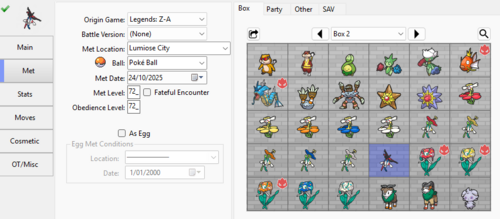 By definition of the word. If it is something you cannot change with a game mechanic, then it is set in stone and not able to mutate from what it originally was. You cannot change Ball in the games, therefore it is immutable.
 -

HOME Compatible Living Dex (Regular and Shiny)
VkChuDeAnh commented on theSLAYER's file in PKM Files
Hi in new to pkhex i just want to ask is the ball one of those immutable values cuz i want to edit my fav mon into the ball i like tks for ur help - Yesterday
-
Again. You are correct. I had the wrong level range. lol Lesson learned. Use serebii for all information. The gen process I'm using DOES work though. As long as I'm not an idiot. Thank you for bothering to respond in the first place. A more extensive answer to your first post. I would completely agree that asking someone to write a novel on how the process works would be unreasonable. My HOPE, was that the novel had already been written by someone and I'd just missed it in my extensive searching. But alas, I was able to find the answer on my own, which I was always willing to do. Just figured I'd put feelers out for any resources I'd missed.
-

Version 1.0.0
6 downloads
This is a full set of English localized Battle e: Series 2 e-Reader cards for Pokémon Ruby and Sapphire, including promotional cards. an English localization of the Decoration Present card is also included. To scan cards, Ruby or Sapphire must be inserted into one Game Boy Advance, and it must be linked via Link Cable to another Game Boy Advance containing an English e-Reader. Players must select 'MYSTERY EVENTS' from the CONTINUE menu (Unlocked by entering 'MYSTERY EVENT IS EXCITING' in the survey at the counter of Petalburg City Pokémon Center) in Pokémon Ruby or Sapphire and follow the on screen prompts to scan cards. If using emulation, mGBA is recommended. - Darkshade - Text Translation/Localization - hatschky - Reverse engineering - Paccy - Reverse engineering - Ryuzac - Text Translation Special thanks: Deokishisu -
 Hi, I came across this post while looking into how to modify my Pokemon White ROM hack. I think the "Frost Gen 5 Editor" tool might be the solution to your problems. With it, you can edit trainers—specifically by assigning them a particular trainer class—which changes the battle music to match the chosen class. I haven't verified this for the specific classes in question, but I imagine that assigning a Gym Leader their corresponding trainer class should trigger their specific music. For my part, I am looking to—among other things—make HMs deletable and change the moves contained in certain TMs. I’d appreciate it if you could share how you made these changes; I assume it involves hexadecimal data, but I’m struggling to figure out how to make precise edits (like vendor inventories—I read that this is located in the "overlay9_21" file, but I can't seem to find the specified coordinates; perhaps because I'm using a French ROM, though I'm not sure).
 -
 Hi, I've tried really hard to find a file like this, but without success. If anyone is able to share a .pk9 file of a Shiny Tyranitar or Larvitar from Colosseum/XD (6 IVs?), along with a valid HOME Tracker, I'd be very grateful! I noticed that the HOME-compatible Living Dex includes some Eeveelutions from CXD, so it should be possible. For those chasing the Earth/National ribbons, I think a database of .pkm files originating from CXD would be amazing ! Thank you guys
 -
Looks like I gotta bring this out again. Reminder to all, please read the content of the quote. Also, I've removed the offending posts
-
 Anpyron changed their profile photo
 -
you should be able to access Scizors movelist, including the activation/deactivation option, from your own Movemenu by then cycling sideways or by using CTC via start button and then open the move menu when you control scizor
-
 everything else applyed only the change to the move description didnt. also iam new to this what is the patches you are talking about Edit: didnt know the (patches) are the updates and deleted them and it worked fine. thanks
 -
till now no one there found a solution
-
.thumb.jpg.5b19b503e7dae63458e36436ebd1cb61.jpg) Howdy Howdy, just wanted to start off saying thank you for making this ROM, its been an absolute pleasure playing this and enjoying one of my childhood games with pokemon that deserve to be in this game. I love this. I have found just one typo as well as a potential bug regarding the Zacian Questline Once again, thank you for the addition to the ROM. I have been enjoying it like crazy.
Howdy Howdy, just wanted to start off saying thank you for making this ROM, its been an absolute pleasure playing this and enjoying one of my childhood games with pokemon that deserve to be in this game. I love this. I have found just one typo as well as a potential bug regarding the Zacian Questline Once again, thank you for the addition to the ROM. I have been enjoying it like crazy. -

Gen 3 : How to generate a PID to get a wanted size?
Kaphotics replied to Asia81's topic in Saves - Editing Help
Personality value - Bulbapedia, the community-driven Pokémon encyclopedia - Last week
-
pk3DS: Pokémon 3DS ROM Editor and Randomizer
Kaphotics replied to Kaphotics's topic in ROM - 3DS Research and Development
As is the case for rebuilt roms, you have to remove any installed patches otherwise the patch will override any changes to the base ROM. -

pk3DS: Pokémon 3DS ROM Editor and Randomizer
Kalebo replied to Kaphotics's topic in ROM - 3DS Research and Development
I'm not sure if that's because of the master table not being modified, because I'm not sure if there is a master table for text. If that is the case, then copying the file with the largest number in that same folder should fix it. Otherwise, I'm not sure. I would recommend going to the 3DS Pokémon ROM hacking discord server and asking. https://discord.gg/chrbDXtNn -
Hello, I pokemon ruby/sapphire, there is 2 npc that you must show a Shroomish and a Barboach of a certain size. However in gen 3, there is no modern size thing as in the latest gens (as m xs or xl) so it probably must be tied to the PID of these Pokemon. In this case, is there a tool to manipulate their pid to get the size I xwant ?
-
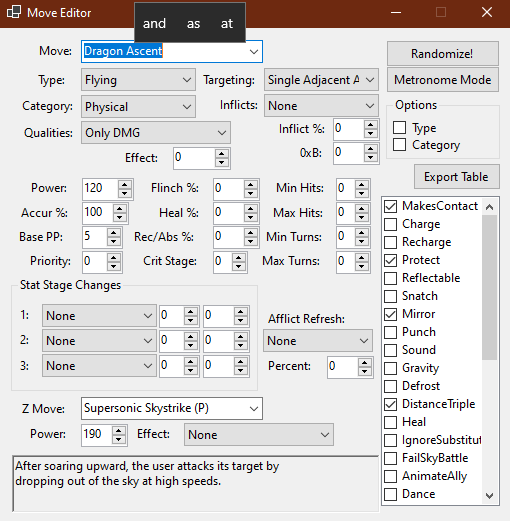
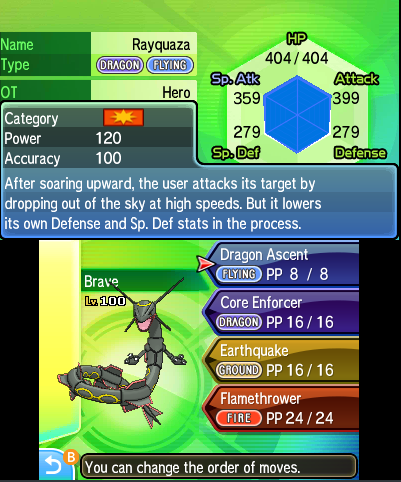
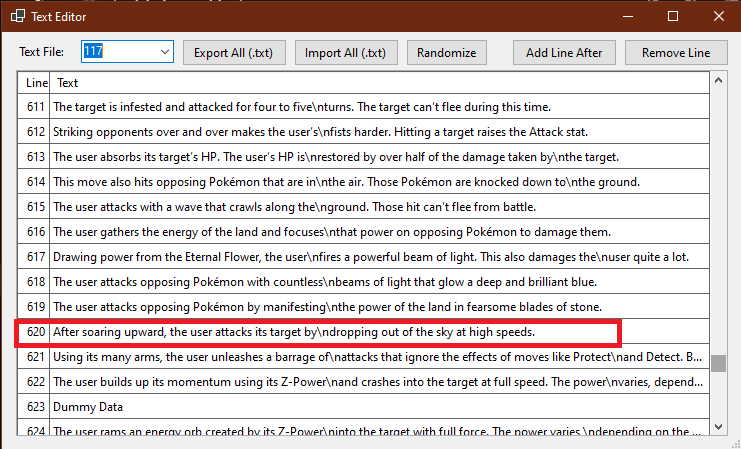
hi. i changed some of the move description from the game txt file117 in pk3ds .and it apperd fine on the move stats tab ,but after i rebuild the rom nothing changed whats the reason. here i changed the dragon ascent to be a no drawback dmg move . this how it show in the pk3ds and this is how it shows in the game i tried to create a mod folder in azahar and move the txt file there and it worked ,all the move description i made changed after i put the file in the mods folder but never works wgen i rebuild the rom (till now that only happend with move descriptions) someone told me that the pk3ds ( isn't doing is considering the gametext file when it rebuilds)
-

Pokémon Ruby - The save file has been deleted...
mofaxx posted a topic in Saves - Files and Requests
I'm hoping someone might be able to assist me in recovering this save file. This save file was running on an EZ-Flash Omega Definitive Edition flash cart, and everything has worked as expected until today. My Gamecube (Game Boy Player) froze in the middle of the berry blending minigame, and when I restarted the system, the flash cart booted into Safe Mode. I restarted again, and was able to boot it normally, and when I loaded up Pokémon Ruby again, I got this message: "The save file has been deleted..." And I am presented only with the New Game and Options selections on the menu. I pulled this save file off of the EZ-Flash, and it appears to have the exact same file size as the old save file I extracted off of my official Ruby cartridge (131 KB, 131,072 bytes), but it's listed as a "Unix Executable File" instead of a "Document" like my other save files. Is there any hope to restoring my save file? I expected to load the game right in front of the berry blender in Lilycove City. It's not the end of the world if I can't get this back, but I would really appreciate some help. The first file (.sav 2) is my deleted save that I am hoping can be restored, and the second one (.sav) is the "parent" save file that I started with a month ago. I'm just losing a month's worth of progress, but I was blending Nutpea Berry pokeblocks with 4-players and I'm losing about 140 Pokeblocks I made this way (and the Feebas I was feeding them to!) Pokemon - Ruby Version (U) (V1.1).sav 2Pokemon - Ruby Version (U) (V1.1).sav -
Hey there! I made a small Save Tool for Pokemon Insurgence. It's very simple and gives access to Money, Trainer Name Editing, Pokemon Editing/Adding, Bag Editing, and Shiny Odds. So I'd like to introduce DPISE! (Doxi's Pokemon Insurgence Save Editor, if you want the government name) Let me know if there's any bugs or anything and I'll fix 'em. 1. Extract the file wherever you would like to keep them. (Probably some save editor folder, or just leave it wherever it is, doesn't matter too much.) 2. Open DPISE.exe 3. Click "Open Save" in the Top left and locate your save file (listed under Game.rxdata in C:\Users\"User"\Saved Games\Pokemon Insurgence by default) 4. Click Load Game Data in the top left and locate your Game Data Folder (most likely found under C:\Program Files (x86)\Insurgence\Pokemon Insurgence 1.2.7 Core) and click select folder. DO NOT open the Data folder within the Core folder previously mentioned, this will not work. 5. Edit your save. 6. Save your data using the "Save As" Button and rename your old Game.rxdata to something like "Game_backup.rxdata" just to be safe, replace the old file with the new one and you're good to play. (Note: you may edit your save data without loading Game Data files, however you WILL NOT be able to edit your shiny odds (it's really only default and 1/1, so unless you REALLY want all them shinies, you can kinda just skip Step 4.) (Secondary Note: When editing your Shiny Odds, the program will automatically make a backup of your old Game Data so it can be reverted to at any time, simply just reload your game data, set your Mode to "Default shiny odds" under the Other tab, and click Apply/Restore. It will automatically remove the other Game Data file and replace it with the old one with normal shiny odds.) DPISE.zip
-
Got it done by directly using the wind stable app rather than whiskey
-
 HGPOfficial changed their profile photo
 -
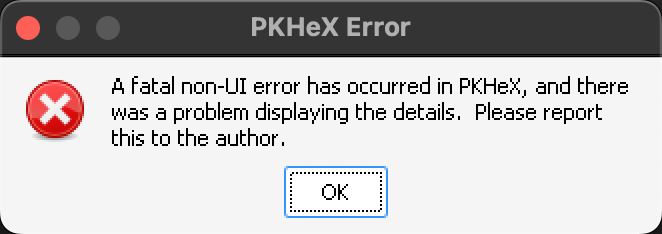
You need to install Wine as well, not something out of date. The error log you attached can be used with a Google search to see what versions of Wine are updated enough to expose the Operating System calls that the program needs to infer display resolution. https://forum.winehq.org/viewtopic.php?p=142603&sid=e72c577c65a41ca794479ade5ee55b2c#p142603
-
Using the latest version of Whisky to run the latest version of PKheX on M3 MacBookAir Installed the 10.0.8 something .net firmware and tried to restart MacBook but still didn't work Please help PKHeX_Error_Report 20260624231313.txt