theSLAYER
-
Posts
22961 -
Joined
-
Last visited
-
Days Won
1016
Content Type
Profiles
Pokédex
Portal
Technical Documentation
Pages
Tutorials
Forums
Events
Downloads
Gallery
Blogs
Everything posted by theSLAYER
-
well to be fair the people who got banned on their 3DS either pirated the games and went online early, or made mistakes with their saves. But yeah now they ban devices for just having CFW (if they detect it)
-
Probably not. If I'm not mistaken, back in the 3DS days, for installed versions of the game: 1. A small amount of data, akin to the checksum of the save is saved on the devices memory (nand) 2. The save is encrypted against console and stored on the SD card. The point 1. is to prevent users from restoring an older save (for cloning etc) The point 2. is to prevent users from sharing the save with other 3DS (once again for cloning reasons). So even if you find the encrypted save in the SD card and know where to copy it to, the #1 would be incorrect, and it would force the game to restart. of course, what I'm saying is based on your report on the OFW/emunand CFW save being disconnected. Since I don't use emunand on Switch, I didn't know about that, and haven't read about that so far.
-
Hmm, in that case I'm not sure anything can be done. After all, the whole point of emuNAND is to keep all the hacking stuff away from OFW, so that when you go online on OFW, it looks like you "don't hack".
-
Also to check, if your OFW and CFW user profile the same profile?
-
Not all CFW installed = emuNAND CFW. That's something you're gonna have to specify. Also, the data for CFW is separate from the data on stock firmware, so it appears that may be the same for saves as well. If you make progress in your OFW, save the game there, what happens to the save in CFW? Does it still have the genned mons, or is it overwritten by the progress made on OFW?
-

PokeFinder: Can't run program because of missing file.
theSLAYER replied to Iz.'s topic in Miscellaneous Help
It's a dll that's missing from your computer. -
are you on emunand or something?
-
What program/app are you using to import the save? I’m assuming you’re using EdiZon, instead of Checkpoint.
-
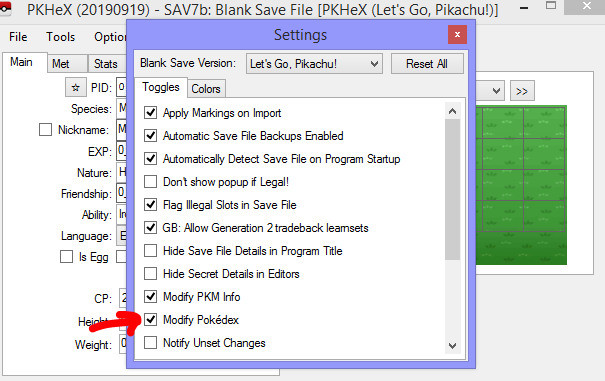
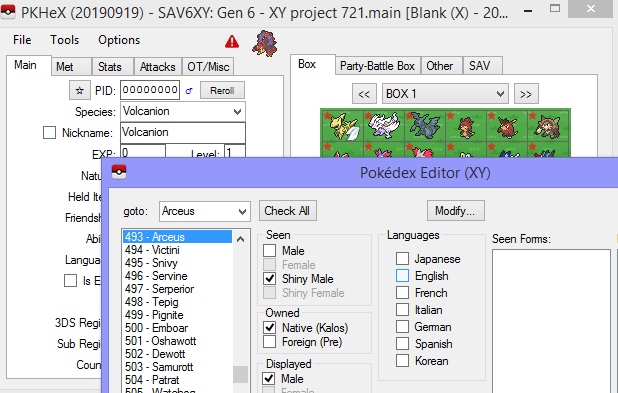
I don't know what to say.. My steps worked for me. My Pokédex was completely blank, and as you can see, Arceus is now seen and owned after I loaded boxes.
-
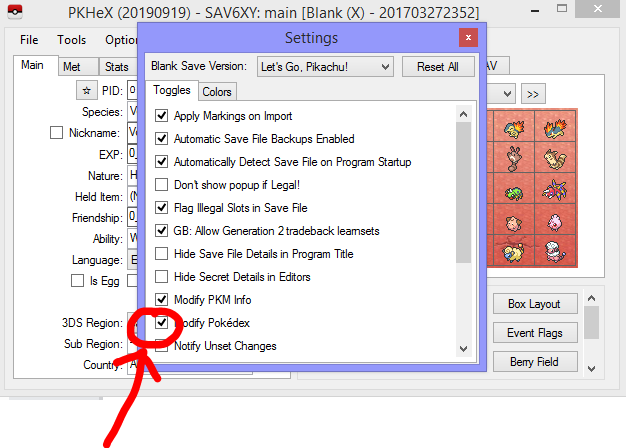
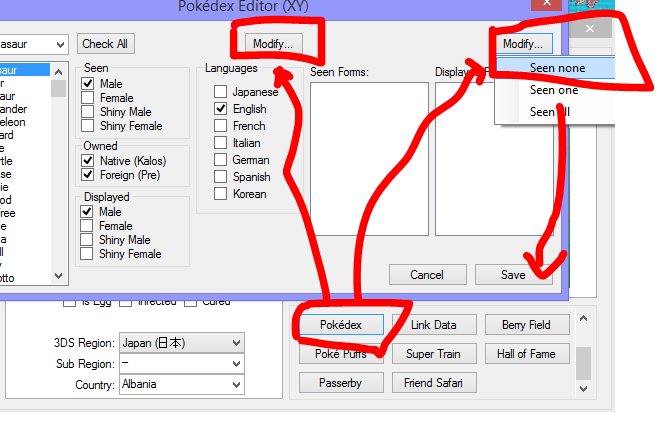
Don't make this more complicated than it is. I am telling you to do this. ON Modify Pokedex, THEN IMPORT the Pokemon data. When you do this, they will appear as SEEN AND CAUGHT in your Pokedex.
-
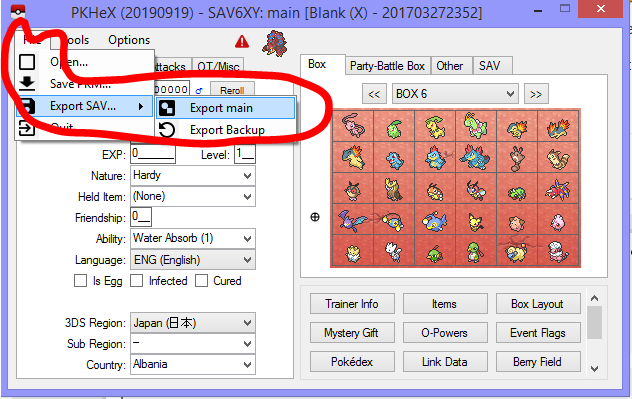
I'm slightly confused and concerned. Whenever you are done editing in PKHeX, you're supposed to do this: You make it sound like you've never done this before. Hopefully you're only referring to the exporting of Pokemon data. Erm. That means you didn't follow the steps. You were supposed to keep this there, THEN import the box data. ><
-
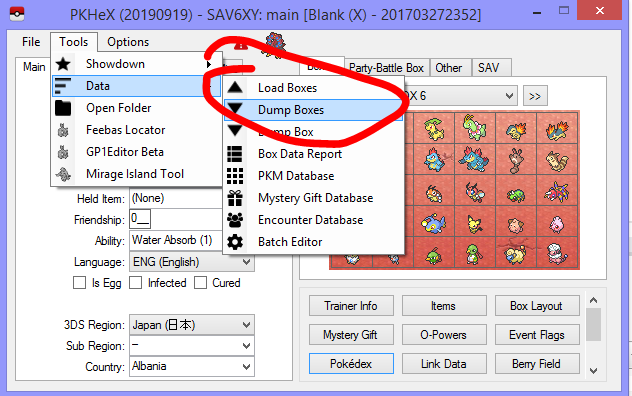
The left button, you need to select Seen None and Caught None. Dump Boxes allows you to store all Pokémon in the save into a folder on your computer. Load Boxes allows you to transfer all Pokémon from a folder on your computer into the boxes in the save. Use these options when mass transferring in and out of the save.
-
this means you won't be able to trade with yourself. At this point there's no advice I can give you Just do what you're most comfortable with.
-
Except you don't have to. You're treating this as though it is something that "needs to be fixed", but it doesn't have to be fixed, cause again, there's nothing wrong with your Pokemon. Any hatched mon from trade should have the text appear like that. Not sure if it's the same in ORAS. Save file, you know, when you save your game? Trade, as in 3DS send Pokemon to another 3DS.
-
I didn't change the text, you see. There are a few messages that display there, generally: (A) Met at Location (meaning you caught that Pokemon there) (B) Apparently met at location (meaning you received this Pokemon from trade, and the original trainer caught it at location) (C) Hatched at Location (meaning you hatched it there) (D) Apparently hatched at location (meaning this is from trade, and original trainer hatched it there) Basically, all (D) has the issue in GER XY. The translation team forgot to put a "." in between dates. If you read my Pikachu carefully, it was originally (C), and I change it to (D). (C) = hatched by me [has my OT, TID, SID], and (D) = received from trade [has someone elses OT, TID, SID] All I changed was who was the "Original Trainer" of the Pokémon, and the game displays different text based on who is the OT. I'm confused to why you keep calling this a PKHeX project? If I was in your position? I would use an unmodified save. Then trade over the modded Pokémon to the unmodified save.
-
There's no need to freak out man. Just import a living dex of non-shiny Pokémon No clue, maybe you used a different program that screwed up or something. Like I said before, we don't know how you did it. Hmm, check your Pokémon Bank's National dex with a different game, to see what has or hasn't been registered there. Honestly, it would be too many things to look through. I don't want to be responsible for such a massive undertaking. It is probably fine, since as far as you know none of your accounts are banned. If you're that worried, start a new save and play properly. Not this again. There is nothing wrong with your Noctowl data. It's just that the game displayed the text wrong. There is no dex error associated with it. Any hatched mon received from trade and hatched in GER XY has that. There's nothing wrong with your Pokémon.
-
It is fine if you don't intend to bring it for online trades and online battles against unsuspecting opponents. But if you do, then yeah we can drop it.
-
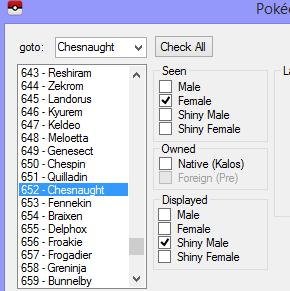
that only stops any future mods from being set to your Pokedex, doesn't remove existing entries. You should re-enable it, then: then re-import all the stuff in your box (so that those get set into the Dex) then disable it. probably because you cheated without knowing what you were doing For the Chesnaught, your Pokédex probably has it set like this: The displayed setting value isn't the same as seen value, so if you cheat badly, it's possible for that to occur. As I've said, no one ever reported this issue before. You probably screwed up your save somehow. Maybe you'll get banned, maybe your Bank subscription gets cancelled, maybe nothing happens. No one knows. For the record, back in Gen 4, when people had Arceus in their dex before it was officially released, those players get blocked from going onto GTS, so at the very least, we know that GF/Ninty has done stuff by checking the dex before. (tho, there is no indication they are doing that now)
-
To cut your long story short, you want a Bashful Flawless HGSS Articuno right? The PIDIV combination doesn't exist. Make one of the IVs 30, and try searching again. If you can't make that shiny, reply me with the PID value
-
Okay, let's start over: Did you use the program to find a PID that matches all 31 IVs, or were you using an existing PID on an Articuno you already have?
-
Pokémon Bank's Dex doesn't affect XYORAS/SMUSUM's dex. You probably used PKHeX's "Complete Dex" function and forgot, or imported in an entire shiny collection and forgot or something. I've been using PKHeX for years now and I don't see random shiny entries in my dex (that I don't own), nor have there been user reports of such a phenomenon. So far I think you're the only one.
-
the shiny tutorial has nothing to do with the ball, there's no need for you to bring that up. The legality of the correct ball has nothing to do with the legality with the PID/IVs. I know you want a special shiny in nice ball, but it's not relevant in this scenario. before I go ahead and answer your other questions, you haven't answered this question Please answer this question Modifying PID is significantly hacking a Pokémon, and using significantly hacked Pokémon online is against our forum rules. You can get banned for doing that. and also https://projectpokemon.org/home/guidelines/ Those hacked mons should only be used for private collections, or with people/friends who know you're cheating
-
It appears as #??? because that is how the game chooses to display it. The data of the Pokémon or the dex itself isn't any different. It's merely graphical. That I don't understand as well. If you didn't see the shiny version, didn't drag in a shiny version, no reason why it'll be shiny in the dex... any Pokémon you add or modify won't be added into the dex. However, do note that when you use such a mon in battle, Gen 6 onwards would add them into the dex. (when you bring the Pokémon into battle, it'll be added to Seen and Owned, unlike older games.)
-
Right at the end of Chikorita Community Day (September 22nd, 2018), a never-before-seen Pokémon took over every spawn in Pokémon GO. Since it was a mystery Pokémon being teased, the natural thing would be to try to encounter it! However, it's name was not revealed to players, and upon capture, players find out that apparently it was a Ditto masquerading as the mystery Pokémon! During the Pokémon GO teaser event, it appears that the devs was lazy being innovative and temporarily used the then-unreleased Kecleon's slot to hold the data for Meltan. If players were using tracking apps, this phenomenon would be evident, as trackers would show that Kecleon is the one that is in the wild. I didn't take a screenshot of my tracker (I actually saw it first hand myself), however I found an image from a user who experienced the same thing. However due to this temporary 3D model switch, and some users not having their games updated, it caused those players to instead encounter Kecleon. (Which also transformed into Ditto; it was supposed to be Meltan's model transforming into Ditto after all) (source: reddit and imgur) Another quirk of this event, was that Meltan-Kecleon (Ditto) actually replaced all existing spawns (they didn't despawn and spawn new mons), so as a result, if there was a shiny Chikorita that players ignored, when the spawns changed, it would appear as a Shiny Meltan! (though, when captured, it'll transform into a regular Ditto) (source: https://www.reddit.com/r/TheSilphRoad/comments/9hyxt6/anyone_found_not_caught_ofc_a_shiny_nutto/) In any case, this is the news report relating to it's official reveal. And anyhow, here is a picture of the then-unreleased Meltan (Ditto) with my Beast Ball.
-
There's something fundamentally wrong with that statement. Let me explain: the save only stores the data as 1 dex, which has everything. Then, the game splits it to show regional and national dex. In reality there's only 1 dex on the save, but it just displayed it as 2. In the save, there is no "Initial Pokedex" and no "National Dex". There is just: everything. So, everything that your trainer has ever met, ever sent out, and anything you ever created (provided that option in the image below is ticked) is added to the 1 dex.