All Activity
- Past hour
-

Creating saves with random information help
developer_butters replied to developer_butters's topic in Saves - Editing Help
that sucks. I had an idea for a series of videos where, because I would be blind to the save contents, i would explore the save status and try to finish the random save with limited extra pokemon or changes to the save (i.e. just continue leveling). I guess I'll just gen the text file and create the save as part of the vid instead. -
 Here you go. It works as expected. Pokemon Diamond.mp4 POKEMON D.sav
 -
Sorry I realized I may need to @theSLAYER you or it probably doesn't give you a notification! I have now completed all of the little changes, and am done translating the project into every language. I won't be updating it anymore. If you can remove all of the previous versions of the linked file below, as well as doing the same for all of the 5 other languages linked at the top of the description, I would be eternally grateful!! It would help so much to keep it clean and organized for all the people downloading it in the future. https://projectpokemon.org/home/files/file/5057-pokemon-battle-revolution-complete-savefile-all-fully-evolved-pokemon-competitive-builds-little-cup-custom-passes-for-iconic-trainers/ Thanksyou!
- Today
-
 Hi everyone! For years and years now, I’ve held onto one of my few remaining, non-transferred-everything-out saves. Whenever I load up my Pokemon Diamond save, be it from the cartridge or emulators, my save opens to a blank black screen. Rarely, I’ve been able to get to the journal screen. New games work, but haven’t been able to push the save file past the journal or black screen. Unfortunately, the save file has been compromised with light Action Replay use. As far as I remember, only for rare candies and BP - I originally made this game after I wanted to finish the Pokédex more “legitimately” after using AR heavily on my Pearl version. I’ve tried editing my position on the map, removing any supposedly illegal Pokémon, but I think my issue is more out of my realm than my research led me to believe. It would mean the world to me if someone is able to get it back to normal! Thank you so much for your time I’ve attached the unedited save to the post. POKEMON D.sav
 -
Switch Lite, but what you just told me has pretty much cleared up my question about online play with Home! (Sorry, I got a warning—I'll try to be much more careful with my language from now on.)
-
You'll need a Switch that can be hacked. Switch (launch revision) can undergo software hacking (easy) Later models (Switch Lite / Switch [mariko] / presumably OLD) will need hardware modification Switch 2 is currently unhackable. if you don’t own a model that has been hacked nor easy to hack, then there isn’t much we can say. What Switch do you currently own? For the record, hacked Switches can use HOME; it’s the Switches with pirated content that cannot go online.
-

Creating saves with random information help
theSLAYER replied to developer_butters's topic in Saves - Editing Help
I don't think every part of every save has been broken down and documented. You may be able to use ALM, but to some extent you're gonna have to "suffer" and do it one by one. Another option is (1) play the game fully, or (2) use "complete packs" that people have uploaded (at your own risk) -
 ryukazu changed their profile photo
 -
How can I transfer all my save data and Pokémon to the Switch (and HOME)? If anyone could walk me through this process in as much detail as possible, I'd really appreciate it.
- Yesterday
-
Creating saves with random information help
developer_butters posted a topic in Saves - Editing Help
Hey there, I'm trying to build some kind of program to create randomized save files for my ds/3ds games (as in fully legal game saves with pokemon at various levels based on progression). I've tried doing this by cloning a save and then using python to try to modify the save via pkhex. I've also tried creating a c++ program to create and modify .pk files so I could just dump boxes back onto created save files instead. Finally, I tried to do a plugin to pkhex that would use the encounter DB to automatically populate the save file. Long story short, all of these approaches failed to create actual saves for one reason or another. Is there a plugin for pkhex already that can do what I want, or is there a better approach to do this than the ones I've tried? Or is it just impossible to do with pkhex automatically and I'll just have to suffer through generating a list and creating pokemon one at a time? -
 Are Shiny Pokemon Evolution locked? I've got a level 100 shiny Buneary, with 8 star IQ, but Evo is still not possible?
 -
 Hello! Happy Easter! Bunny brought us HOME-ZA connection and a new atmosphere release! Uploading in this post (04/05/2026): Patrat Watchog Furfrou Natural Form Furfrou Pharaoh Trim Pansage Simisage Panpour Simipour Pansear Simisear These mons were obtained via GTS trading Enjoy! 0504 - Patrat - 5846CCCED116.pa9 0505 - ミルホッグ - 003CBD19F4E3.pa9 0511 - Pansage - FE92914154EC.pa9 0512 - 花椰猿 - 5DAC838BE135.pa9 0513 - Pansear - B817BDEB5886.pa9 0514 - Simisear - 6CAFB1542FEB.pa9 0515 - Panpour - 417DC8BBBF28.pa9 0516 - Simipour - 04826B9FA3F9.pa9 0676 - Furfrou - B60EEDDE6841.pa9 0676-09 - Furfrou - B5CEFD06B119.pa9
 -
I assume there'll be an update soon that includes legality for the new Home stuff, it just came out afterall
-
I tried $suggestAll but it only gave the plus moves for level up moves not the TM moves what command do I use for that?
-
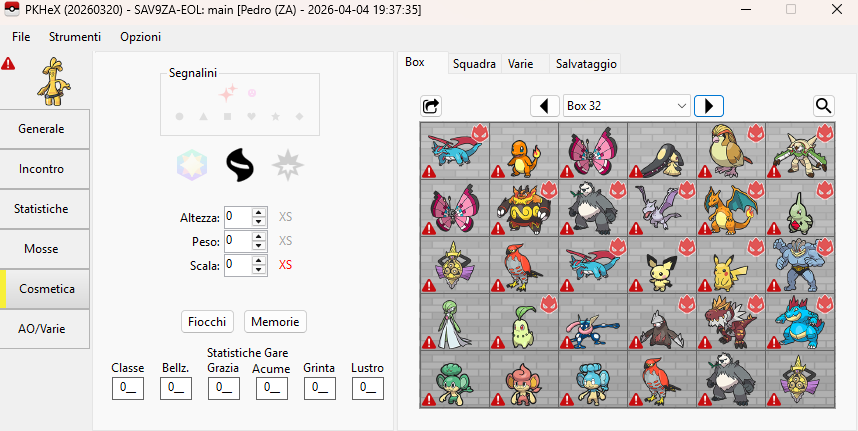
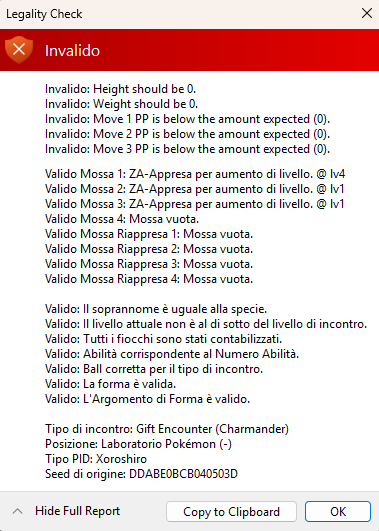
I encountered this same issue so I did some testing and here's what I observed: When connecting to HOME, all Pokemon regardless of whether or not they are actually moved will have all PP set to 0 and their Height and Weight adjusted to be equal to the Scale value (e.g. a Pokemon with Scale 137 will have both Height and Weight set to 137). This happens even if you immediately save and quit without moving any Pokemon. I don't know if there are any other changes, but these are the two issues that violate PKHeX's current legality check. The HOME tracker is still all 0s for Pokemon that were never put in HOME. After a save file is accessed in HOME and you start up the game, PP can be corrected under certain conditions. I haven't tested this extensively, but it seems to be automatically corrected for Pokemon in your party and for Pokemon in boxes if you alter their moves such as swapping move positions. Even if you swap just two of a Pokemon's moves, all their moves will have their PP fixed. But Pokemon that don't meet these conditions will still have 0s for their PP. In PKHeX, if you change a Pokemon's PP back to their normal values and set their Height and Weight back to 0, it will pass the legality check. If you then save and restore that save file, access it in HOME, and then open that save in PKHeX, that edited Pokemon will again have their Height and Weight set equal to the Scale value and PPs all set to 0. I don't know if editing a Pokemon this way will have any repercussions though (I used a separate basic account of HOME in just in case). After a save has been accessed by HOME, newly-caught Pokemon in Z-A will still have Height and Weight at 0 and non-zero PP values as long as HOME is not accessed again. The takeaway is that HOME seems to be altering certain values for all Pokemon in the save regardless of their origin and whether they were moved in HOME or not. The Height/Weight change is probably for future-proofing those values. iirc Legends Arceus had the opposite problem since Scale didn't exist back then, Pokemon transferred from that game simply had their scale set to 0 until a later HOME update. The PP issue might just be HOME ignoring PP values for Z-A (since the game doesn't utilize it) and just sets it all to 0 when it alters the save, especially since the game corrects it anyways under certain conditions. I haven't gone as far as comparing pa9 files for other possible alterations though.
-
Too vague.
-
Pokemon Mystery Dungeon: Explorers of Fortune
hushy replied to WindchildWhimsy's topic in ROM - NDS ROM Hacks
Sadly, that isn't possible unless a dungeon were to be recycled- as it is currently not known how to create dungeons. You may do this yourself if you'd like, however this would mean scrapping Freedom Coast. You can fashion this dungeon off of nectar meadows, a dungeon featured within super, which had either hero/partner face off against 2 beedrill & 2 combees. Similarly, it is not know how to import custom tilesets without completely reverse engineering the game yourself. If it means anything to you, you may edit your starters to be either vespiqueen and combee, then recruit an additional 2 more combees. -
Pokemon Mystery Dungeon: Explorers of Fortune
hushy replied to WindchildWhimsy's topic in ROM - NDS ROM Hacks
weird design choice on part of the team (then again explorers was kind of rushed) by this deoxys is recycled from the apparitions within meteor cave in rescue team for whatever.. odd reason. You must have a secret slab for this and it is also within the base game Regardless, it is possible to recruit this deoxys with use of an ASM patch that allows recruiting of pokèmon one typically cannot recruit within dungeons such as temporal tower. I have done this myself out of curiosity before, and, it quite literally is just a deoxys, having the same mechanic as it does within explorers (changing forms every floor) and will lose its transparency upon leaving the floor. However, I experienced an extreme amount of slow down upon recruiting this deoxys on my team and was only mended after transitioning onto another floor. - Last week
-
I have a similar problem. A scovillain I caught in ZA and shows as illegal in PKhex ZA. It's not an inbound transfer from another game so I'm confused, is it simply because the game version has updated? Will a future update to PKhex solve this problem?
-
 I would like to give an update, I found the solution! After looking up the glitch, I noticed the fourth slot bug affected Platinum but NOT HeartGold and SoulSilver. I decided to dig into the files for BOTH games to compare. I found my way to the right function by checking the script and functions, and which text messages they referenced (i.e. the dialog that lets you choose Pokémon, and the one that proceeds to the Battle Room). I found it in Platinum first. When I dug into SS, I noticed there appeared to be TWO functions for the Battle Tower. Also, one of the commands was named DayCareSanitizeMon in SS, unlike in Platinum where is had not been named. After comparing the ones for Platinum and SS, the Platinum file only had the one function that contained a certain segment of code 3 times, while the SoulSilver file for the Battle Tower had two functions, one with 3 segments and one with 4. I did a test to see if I was right about these segments being the code that checks selected Pokémon. I copied a segement and pasted it in Platinum's script file, fitting it to the 4th slot (value of 3). When I entered the Battle Tower in Doubles Format with Giratina Origin as the 4th pick, it reverted! So that little segment of code makes the game check a Pokémon. Basically, they made one function in Platinum for both Doubles and Singles, which only checks the first 3 Pokémon entered, and in HGSS, they made two separate functions that each check for 4 and 3 Pokémon. Therefore, I tried booting up the game after having REMOVED all instances of this code in the function, and voila, any alternate form entered no longer reverts. This applies to Giratina, Rotom and Shaymin. I then quickly found the same type of function for the other 3 facilties (this doesn't apply to the Factory because you rent Pokémon). Now you can unban all species AND forms in the Battle Frontier in Platinum. In order to make these changes yourself, open up your Platinum rom in DS Pokémon Rom Editor (I used the Reloaded version). I will show you which script file for each facility, which function handles checking party Pokémon, and the code you can delete to remove the check. I don't think this unbans legendaries and mythicals, you can look at the post I mentioned in the linked thread above for that. -------------------------- Battle Tower: Script 367 Doubles and Singles: Function 90 CMD_477 53 0 32780 CMD_798 32780 32780 CompareVarValue 32780 255 JumpIf EQUAL Function#111 CMD_477 53 1 32780 CMD_798 32780 32780 CompareVarValue 32780 255 JumpIf EQUAL Function#111 CMD_477 53 2 32780 CMD_798 32780 32780 CompareVarValue 32780 255 JumpIf EQUAL Function#111 Multi battles: Function 114 CMD_477 53 0 32780 CMD_798 32780 32780 CompareVarValue 32780 255 JumpIf EQUAL Function#111 CMD_477 53 1 32780 CMD_798 32780 32780 CompareVarValue 32780 255 JumpIf EQUAL Function#111 Battle Hall: Script 377 Function 79 CMD_798 16386 32780 CompareVarValue 32780 255 JumpIf EQUAL Function#86 CMD_798 16389 32780 CompareVarValue 32780 255 JumpIf EQUAL Function#86 Battle Castle: Script 378 Function 29 CMD_798 16386 32780 CompareVarValue 32780 255 JumpIf EQUAL Function#33 CMD_798 16389 32780 CompareVarValue 32780 255 JumpIf EQUAL Function#33 CMD_798 16390 32780 CompareVarValue 32780 255 JumpIf EQUAL Function#33 Battle Arcade: Script 379 Function 29 (appears to be identical to Battle Castle) CMD_798 16386 32780 CompareVarValue 32780 255 JumpIf EQUAL Function#33 CMD_798 16389 32780 CompareVarValue 32780 255 JumpIf EQUAL Function#33 CMD_798 16390 32780 CompareVarValue 32780 255 JumpIf EQUAL Function#33 Just open the rom in DSPRE, go to these script files, find the functions and delete the parts I list. Then save the scripts, save the rom and you're done. The function numbers might be different if the rom is altered, such as if the Following Platinum patch is applied. There is a small detail you should know about this: you can enter Origin Giratina in any of the facilties, but after entering the Castle or Arcade, your held items are removed. Giratina will enter as Origin, but will revert to Altered before the turn starts because it no longer holds the Griseous Orb. It will revert to Altered Stats, but will have Origin's ability (Levitate by default). Doesn't seem to break anything, and it will return to normal Origin when you leave.
 -
Challenge yourself to learn how hex editors work and the layout of the save file -- set the byte width to 0x1000, then you can corrupt the most recent save blocks so the game loads your backup instead. Save data structure (Generation III) - Bulbapedia, the community-driven Pokémon encyclopedia PKHeX does not allow loading of the backup portion, only the most recent part of the save. I guess you could debug the program to tell it to load the not-latest portion, but that isn't something worth explaining in detail.
-
PKHeX was last updated March 20th, which was ~2 weeks ago. HOME's update to allow inbound transfers was 2 days ago. PKHeX does not have handling for inbound transfers, because it does not have a future-predicting crystal ball to know exactly how GameFreak/ILCA will implement it.

-
I updated today as i noticed the new version. No i did not expect to be flawless, i just tought was the problem. But as i said this happen to mon that never touched home, unless opening the save file in home count as entering home. Then is just a false positive if that is the case.
-
When was PKHeX last updated? Why are you expecting HOME transfers in to be flawlessly recognized, which is "new" as of a couple days ago?
-
I premise that i never edit this Pokemon as this is the first time i can check them with Pkhex and aside from the Pokemon in the team all the boxes result not legal. But i have video proof for some that i catche them in game on the Switch 2, i assume this is a Pkhex problem becouse otherwise i don't know what caused this. I attach the screenshot and the problem is in the moves and the height/weight. For Alpha mon insted Pkhex also assign immediatly the Alpha mark, some i have a semi explanation as i deposited in home after the update, so maybe home give the alpha mark? But others have not touch home at all. So i don't know ware the problem is. Somebody can explain it to me?
-
As I understand it, there are two saves stored in a gen 3 save--the main one and a backup of the previous save. I accidentally saved my game after doing something I didn't mean to, and am wondering if it is at all possible to access the backup save and get a Pokemon back from there. I couldn't find any information in the editor about this, so forgive me if it isn't possible or if I'm misunderstanding how this works.