All Activity
- Today
-
Hi, I’m unsure about Virizion, however based on some research I did in PKHEX, I found the event flag with the name 0A01E6BBC84B5425 changed when I had caught my Latios. If you go to the event flag editor in PKHEX, and go to the “Event” tab when that pops up, and toggle this flag, it should do the trick :)
-
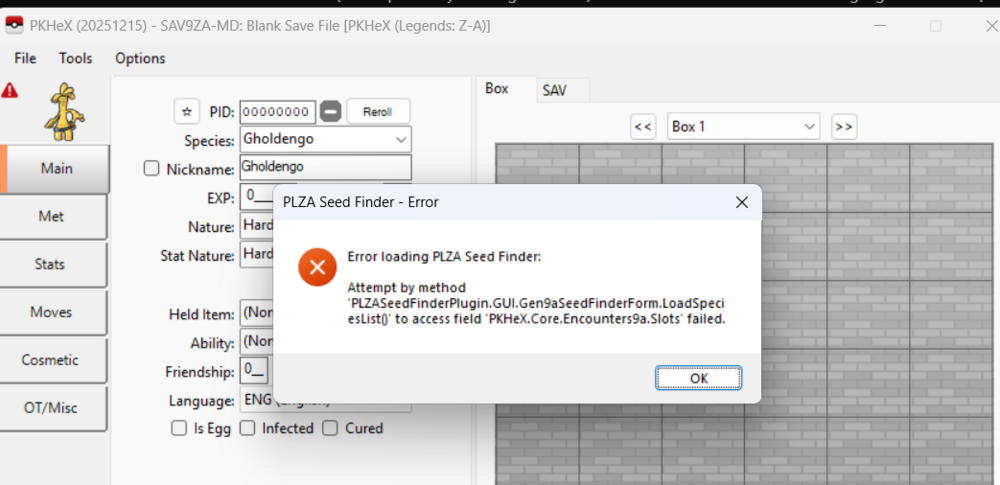
Does anyone know how to fix this PLZA Seed Finder Error
-
 Arceus is size 5. Check the menu.
 -
I have random team arceus and Gardevior but when I recruit team I can recruit is there anyway that can recruit more to make arceus size to 1 member instead 2? Or I have to wait certain mission to get 4 pokemon?

-
Should be fixed on the latest release.
- 1 reply
-
- 1
-

-
Transfer your save file correctly. It is not a valid save file (I have hidden your attachment of your save file). Assuming you used an FTP application to transfer it, be sure to turn on the Binary data type transfer setting (not ascii/text). Data Type - FileZilla Wiki If your save file is slightly too small, it should imply that it was truncated. This is not a PKHeX problem.
-
I followed this but it didn't work for me. I wanted the dark skin tone so I picked 4 and my character is still light skinned.
-
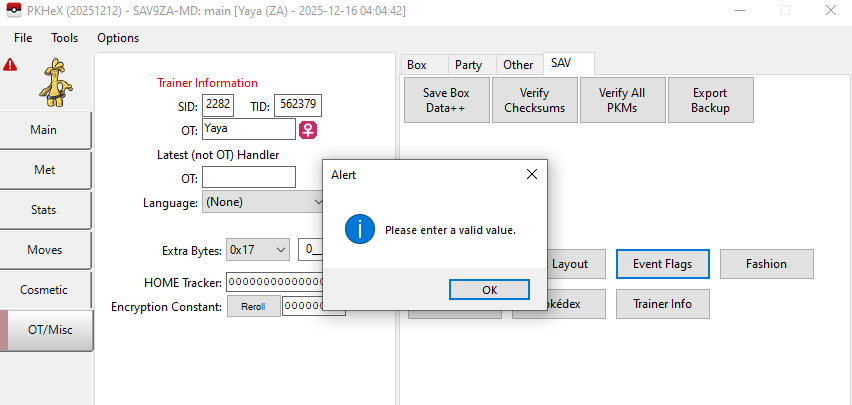
Hello, when I open event flat it does this, If you can help me.
-
Because my main file is 3,112kb, it cannot run on PKHeX. Please update PKHeX to support it or help me find a solution to run that main file.
-
I cannot do anything about it and also by doing manual edits you rigged your save...
- Yesterday
-
Did you originally open the zip file from a file/folder that you later removed from your computer?
-
Exception Details: System.IO.InvalidDataException: End of Central Directory record could not be found. at System.IO.Compression.ZipArchive.ReadEndOfCentralDirectory() at System.IO.Compression.ZipArchive..ctor(Stream stream, ZipArchiveMode mode, Boolean leaveOpen, Encoding entryNameEncoding) at System.IO.Compression.ZipFile.Open(String archiveFileName, ZipArchiveMode mode, Encoding entryNameEncoding) at PKHeX.Core.ZipReader.Update(String path, ReadOnlySpan`1 data) at PKHeX.WinForms.WinFormsUtil.ExportSAVInternal(ReadOnlySpan`1 data, String path, String exist) at PKHeX.WinForms.WinFormsUtil.ExportSAV(SaveFile sav, String path) at PKHeX.WinForms.WinFormsUtil.ExportSAVDialog(SaveFile sav, Int32 currentBox) at PKHeX.WinForms.Main.ClickExportSAV(Object sender, EventArgs e) at System.Windows.Forms.ToolStripItem.HandleClick(EventArgs e) at System.Windows.Forms.ToolStripItem.HandleMouseUp(MouseEventArgs e) at System.Windows.Forms.ToolStrip.OnMouseUp(MouseEventArgs mea) at System.Windows.Forms.ToolStripDropDown.OnMouseUp(MouseEventArgs mea) at System.Windows.Forms.Control.WmMouseUp(Message& m, MouseButtons button, Int32 clicks) at System.Windows.Forms.Control.WndProc(Message& m) at System.Windows.Forms.ToolStrip.WndProc(Message& m) at System.Windows.Forms.NativeWindow.Callback(HWND hWnd, MessageId msg, WPARAM wparam, LPARAM lparam) Loaded Assemblies: -------------------- System.Private.CoreLib, Version=9.0.0.0, Culture=neutral, PublicKeyToken=7cec85d7bea7798e C:\Program Files\dotnet\shared\Microsoft.NETCore.App\9.0.0\System.Private.CoreLib.dll PKHeX, Version=25.12.12.0, Culture=neutral, PublicKeyToken=null C:\Users\OFFLIN~1\AppData\Local\Temp\.net\PKHeX\JvLoeI-JGoW6\PKHeX.dll System.Runtime, Version=9.0.0.0, Culture=neutral, PublicKeyToken=b03f5f7f11d50a3a C:\Program Files\dotnet\shared\Microsoft.NETCore.App\9.0.0\System.Runtime.dll System.Windows.Forms, Version=9.0.0.0, Culture=neutral, PublicKeyToken=b77a5c561934e089 C:\Program Files\dotnet\shared\Microsoft.WindowsDesktop.App\9.0.0\System.Windows.Forms.dll System.ComponentModel.Primitives, Version=9.0.0.0, Culture=neutral, PublicKeyToken=b03f5f7f11d50a3a C:\Program Files\dotnet\shared\Microsoft.NETCore.App\9.0.0\System.ComponentModel.Primitives.dll System.Windows.Forms.Primitives, Version=9.0.0.0, Culture=neutral, PublicKeyToken=b77a5c561934e089 C:\Program Files\dotnet\shared\Microsoft.WindowsDesktop.App\9.0.0\System.Windows.Forms.Primitives.dll System.Private.Windows.Core, Version=9.0.0.0, Culture=neutral, PublicKeyToken=b77a5c561934e089 C:\Program Files\dotnet\shared\Microsoft.WindowsDesktop.App\9.0.0\System.Private.Windows.Core.dll System.Drawing.Primitives, Version=9.0.0.0, Culture=neutral, PublicKeyToken=b03f5f7f11d50a3a C:\Program Files\dotnet\shared\Microsoft.NETCore.App\9.0.0\System.Drawing.Primitives.dll System.Collections.Specialized, Version=9.0.0.0, Culture=neutral, PublicKeyToken=b03f5f7f11d50a3a C:\Program Files\dotnet\shared\Microsoft.NETCore.App\9.0.0\System.Collections.Specialized.dll PKHeX.Core, Version=25.12.12.0, Culture=neutral, PublicKeyToken=null C:\Users\OFFLIN~1\AppData\Local\Temp\.net\PKHeX\JvLoeI-JGoW6\PKHeX.Core.dll System.Threading.Thread, Version=9.0.0.0, Culture=neutral, PublicKeyToken=b03f5f7f11d50a3a C:\Program Files\dotnet\shared\Microsoft.NETCore.App\9.0.0\System.Threading.Thread.dll System.Collections, Version=9.0.0.0, Culture=neutral, PublicKeyToken=b03f5f7f11d50a3a C:\Program Files\dotnet\shared\Microsoft.NETCore.App\9.0.0\System.Collections.dll System.Runtime.InteropServices, Version=9.0.0.0, Culture=neutral, PublicKeyToken=b03f5f7f11d50a3a C:\Program Files\dotnet\shared\Microsoft.NETCore.App\9.0.0\System.Runtime.InteropServices.dll System.Threading, Version=9.0.0.0, Culture=neutral, PublicKeyToken=b03f5f7f11d50a3a C:\Program Files\dotnet\shared\Microsoft.NETCore.App\9.0.0\System.Threading.dll System.Text.Json, Version=9.0.0.0, Culture=neutral, PublicKeyToken=cc7b13ffcd2ddd51 C:\Program Files\dotnet\shared\Microsoft.NETCore.App\9.0.0\System.Text.Json.dll System.Text.Encodings.Web, Version=9.0.0.0, Culture=neutral, PublicKeyToken=cc7b13ffcd2ddd51 C:\Program Files\dotnet\shared\Microsoft.NETCore.App\9.0.0\System.Text.Encodings.Web.dll System.Memory, Version=9.0.0.0, Culture=neutral, PublicKeyToken=cc7b13ffcd2ddd51 C:\Program Files\dotnet\shared\Microsoft.NETCore.App\9.0.0\System.Memory.dll System.Text.Encoding.Extensions, Version=9.0.0.0, Culture=neutral, PublicKeyToken=b03f5f7f11d50a3a C:\Program Files\dotnet\shared\Microsoft.NETCore.App\9.0.0\System.Text.Encoding.Extensions.dll System.Runtime.Intrinsics, Version=9.0.0.0, Culture=neutral, PublicKeyToken=cc7b13ffcd2ddd51 C:\Program Files\dotnet\shared\Microsoft.NETCore.App\9.0.0\System.Runtime.Intrinsics.dll System.Numerics.Vectors, Version=9.0.0.0, Culture=neutral, PublicKeyToken=b03f5f7f11d50a3a C:\Program Files\dotnet\shared\Microsoft.NETCore.App\9.0.0\System.Numerics.Vectors.dll System.Collections.Concurrent, Version=9.0.0.0, Culture=neutral, PublicKeyToken=b03f5f7f11d50a3a C:\Program Files\dotnet\shared\Microsoft.NETCore.App\9.0.0\System.Collections.Concurrent.dll PKHeX.Drawing.PokeSprite, Version=25.12.12.0, Culture=neutral, PublicKeyToken=null C:\Users\OFFLIN~1\AppData\Local\Temp\.net\PKHeX\JvLoeI-JGoW6\PKHeX.Drawing.PokeSprite.dll System.Drawing.Common, Version=9.0.0.0, Culture=neutral, PublicKeyToken=cc7b13ffcd2ddd51 C:\Program Files\dotnet\shared\Microsoft.WindowsDesktop.App\9.0.0\System.Drawing.Common.dll System.ObjectModel, Version=9.0.0.0, Culture=neutral, PublicKeyToken=b03f5f7f11d50a3a C:\Program Files\dotnet\shared\Microsoft.NETCore.App\9.0.0\System.ObjectModel.dll Microsoft.Win32.SystemEvents, Version=9.0.0.0, Culture=neutral, PublicKeyToken=cc7b13ffcd2ddd51 C:\Program Files\dotnet\shared\Microsoft.WindowsDesktop.App\9.0.0\Microsoft.Win32.SystemEvents.dll System.ComponentModel.EventBasedAsync, Version=9.0.0.0, Culture=neutral, PublicKeyToken=b03f5f7f11d50a3a C:\Program Files\dotnet\shared\Microsoft.NETCore.App\9.0.0\System.ComponentModel.EventBasedAsync.dll System.Text.RegularExpressions, Version=9.0.0.0, Culture=neutral, PublicKeyToken=b03f5f7f11d50a3a C:\Program Files\dotnet\shared\Microsoft.NETCore.App\9.0.0\System.Text.RegularExpressions.dll System.Linq, Version=9.0.0.0, Culture=neutral, PublicKeyToken=b03f5f7f11d50a3a C:\Program Files\dotnet\shared\Microsoft.NETCore.App\9.0.0\System.Linq.dll Microsoft.Win32.Primitives, Version=9.0.0.0, Culture=neutral, PublicKeyToken=b03f5f7f11d50a3a C:\Program Files\dotnet\shared\Microsoft.NETCore.App\9.0.0\Microsoft.Win32.Primitives.dll Accessibility, Version=4.0.0.0, Culture=neutral, PublicKeyToken=31bf3856ad364e35 C:\Program Files\dotnet\shared\Microsoft.WindowsDesktop.App\9.0.0\Accessibility.dll System.ComponentModel, Version=9.0.0.0, Culture=neutral, PublicKeyToken=b03f5f7f11d50a3a C:\Program Files\dotnet\shared\Microsoft.NETCore.App\9.0.0\System.ComponentModel.dll System.Resources.Extensions, Version=9.0.0.0, Culture=neutral, PublicKeyToken=cc7b13ffcd2ddd51 C:\Program Files\dotnet\shared\Microsoft.WindowsDesktop.App\9.0.0\System.Resources.Extensions.dll System.Drawing, Version=9.0.0.0, Culture=neutral, PublicKeyToken=b03f5f7f11d50a3a C:\Program Files\dotnet\shared\Microsoft.WindowsDesktop.App\9.0.0\System.Drawing.dll System.ComponentModel.TypeConverter, Version=9.0.0.0, Culture=neutral, PublicKeyToken=b03f5f7f11d50a3a C:\Program Files\dotnet\shared\Microsoft.NETCore.App\9.0.0\System.ComponentModel.TypeConverter.dll System.Collections.NonGeneric, Version=9.0.0.0, Culture=neutral, PublicKeyToken=b03f5f7f11d50a3a C:\Program Files\dotnet\shared\Microsoft.NETCore.App\9.0.0\System.Collections.NonGeneric.dll System.Runtime.Loader, Version=9.0.0.0, Culture=neutral, PublicKeyToken=b03f5f7f11d50a3a C:\Program Files\dotnet\shared\Microsoft.NETCore.App\9.0.0\System.Runtime.Loader.dll System.Net.Http, Version=9.0.0.0, Culture=neutral, PublicKeyToken=b03f5f7f11d50a3a C:\Program Files\dotnet\shared\Microsoft.NETCore.App\9.0.0\System.Net.Http.dll System.Net.Primitives, Version=9.0.0.0, Culture=neutral, PublicKeyToken=b03f5f7f11d50a3a C:\Program Files\dotnet\shared\Microsoft.NETCore.App\9.0.0\System.Net.Primitives.dll System.Diagnostics.Tracing, Version=9.0.0.0, Culture=neutral, PublicKeyToken=b03f5f7f11d50a3a C:\Program Files\dotnet\shared\Microsoft.NETCore.App\9.0.0\System.Diagnostics.Tracing.dll System.Diagnostics.DiagnosticSource, Version=9.0.0.0, Culture=neutral, PublicKeyToken=cc7b13ffcd2ddd51 C:\Program Files\dotnet\shared\Microsoft.NETCore.App\9.0.0\System.Diagnostics.DiagnosticSource.dll System.Net.Security, Version=9.0.0.0, Culture=neutral, PublicKeyToken=b03f5f7f11d50a3a C:\Program Files\dotnet\shared\Microsoft.NETCore.App\9.0.0\System.Net.Security.dll System.Security.Cryptography, Version=9.0.0.0, Culture=neutral, PublicKeyToken=b03f5f7f11d50a3a C:\Program Files\dotnet\shared\Microsoft.NETCore.App\9.0.0\System.Security.Cryptography.dll System.Private.Uri, Version=9.0.0.0, Culture=neutral, PublicKeyToken=b03f5f7f11d50a3a C:\Program Files\dotnet\shared\Microsoft.NETCore.App\9.0.0\System.Private.Uri.dll System.Windows.Extensions, Version=9.0.0.0, Culture=neutral, PublicKeyToken=cc7b13ffcd2ddd51 C:\Program Files\dotnet\shared\Microsoft.WindowsDesktop.App\9.0.0\System.Windows.Extensions.dll PKHeX.Drawing, Version=25.12.12.0, Culture=neutral, PublicKeyToken=null C:\Users\OFFLIN~1\AppData\Local\Temp\.net\PKHeX\JvLoeI-JGoW6\PKHeX.Drawing.dll PKHeX.Drawing.Misc, Version=25.12.12.0, Culture=neutral, PublicKeyToken=null C:\Users\OFFLIN~1\AppData\Local\Temp\.net\PKHeX\JvLoeI-JGoW6\PKHeX.Drawing.Misc.dll System.Threading.ThreadPool, Version=9.0.0.0, Culture=neutral, PublicKeyToken=b03f5f7f11d50a3a C:\Program Files\dotnet\shared\Microsoft.NETCore.App\9.0.0\System.Threading.ThreadPool.dll Microsoft.Win32.Registry, Version=9.0.0.0, Culture=neutral, PublicKeyToken=b03f5f7f11d50a3a C:\Program Files\dotnet\shared\Microsoft.NETCore.App\9.0.0\Microsoft.Win32.Registry.dll System.Net.Sockets, Version=9.0.0.0, Culture=neutral, PublicKeyToken=b03f5f7f11d50a3a C:\Program Files\dotnet\shared\Microsoft.NETCore.App\9.0.0\System.Net.Sockets.dll System.Threading.Overlapped, Version=9.0.0.0, Culture=neutral, PublicKeyToken=b03f5f7f11d50a3a C:\Program Files\dotnet\shared\Microsoft.NETCore.App\9.0.0\System.Threading.Overlapped.dll System.Net.NameResolution, Version=9.0.0.0, Culture=neutral, PublicKeyToken=b03f5f7f11d50a3a C:\Program Files\dotnet\shared\Microsoft.NETCore.App\9.0.0\System.Net.NameResolution.dll System.Security.Principal.Windows, Version=9.0.0.0, Culture=neutral, PublicKeyToken=b03f5f7f11d50a3a C:\Program Files\dotnet\shared\Microsoft.NETCore.App\9.0.0\System.Security.Principal.Windows.dll System.Security.Claims, Version=9.0.0.0, Culture=neutral, PublicKeyToken=b03f5f7f11d50a3a C:\Program Files\dotnet\shared\Microsoft.NETCore.App\9.0.0\System.Security.Claims.dll System.IO.Compression, Version=9.0.0.0, Culture=neutral, PublicKeyToken=b77a5c561934e089 C:\Program Files\dotnet\shared\Microsoft.NETCore.App\9.0.0\System.IO.Compression.dll System.Runtime.Serialization.Formatters, Version=8.1.0.0, Culture=neutral, PublicKeyToken=b03f5f7f11d50a3a C:\Program Files\dotnet\shared\Microsoft.NETCore.App\9.0.0\System.Runtime.Serialization.Formatters.dll System.Diagnostics.FileVersionInfo, Version=9.0.0.0, Culture=neutral, PublicKeyToken=b03f5f7f11d50a3a C:\Program Files\dotnet\shared\Microsoft.NETCore.App\9.0.0\System.Diagnostics.FileVersionInfo.dll System.Diagnostics.TraceSource, Version=9.0.0.0, Culture=neutral, PublicKeyToken=b03f5f7f11d50a3a C:\Program Files\dotnet\shared\Microsoft.NETCore.App\9.0.0\System.Diagnostics.TraceSource.dll System.IO.Compression.ZipFile, Version=9.0.0.0, Culture=neutral, PublicKeyToken=b77a5c561934e089 C:\Program Files\dotnet\shared\Microsoft.NETCore.App\9.0.0\System.IO.Compression.ZipFile.dll System.Diagnostics.StackTrace, Version=9.0.0.0, Culture=neutral, PublicKeyToken=b03f5f7f11d50a3a C:\Program Files\dotnet\shared\Microsoft.NETCore.App\9.0.0\System.Diagnostics.StackTrace.dll System.Reflection.Metadata, Version=9.0.0.0, Culture=neutral, PublicKeyToken=b03f5f7f11d50a3a C:\Program Files\dotnet\shared\Microsoft.NETCore.App\9.0.0\System.Reflection.Metadata.dll System.Collections.Immutable, Version=9.0.0.0, Culture=neutral, PublicKeyToken=b03f5f7f11d50a3a C:\Program Files\dotnet\shared\Microsoft.NETCore.App\9.0.0\System.Collections.Immutable.dll -------------------- User Message: An error occurred in PKHeX. Please report this error to the PKHeX author.
-
 Well I got it to open by editing the first script I could find that I could trigger to force it open. Found the Clefairy script and added a single line to open Thundercap Mt. I still have no idea how the bug pointing to World Abyss instead of Thundercap Mt. happened. I have no idea how to view and edit requests and even if I edited this one I still wouldn't be able to accept it since it is already baked into my save that I accepted it and I don't know how to change that.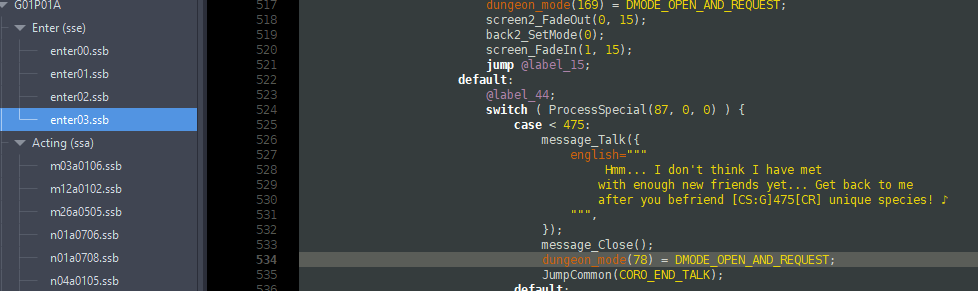
-

Pokemon Mystery Dungeon: Explorers of Fortune
oatmealo replied to WindchildWhimsy's topic in ROM - NDS ROM Hacks
hi!!! thanks for making fortune, i love playing it! i was wondering if you had any plans to update the game too add more pokemon? lots more have sprites since the last update, including a lot of the starters evolutions! (as well as, selfishly, the deerling line, which i think would make a great starter) thanks for your hard work!! -

OneShot Mystery Dungeon: Veil of Darkness (FINAL UPDATE)
Klag replied to Rayman2001's topic in ROM - NDS ROM Hacks
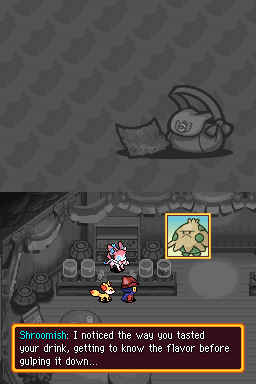
How do I apply Pancake update patch? Completed main Veil of Darkness story, but when I try to apply Pancake patch, it gives me checksum error. I tried applying it over both clean US version and already modified with main patch game, with same results. Also, as minor bug, cafe sometimes gives you recruit dialogue, has no gameplay effects.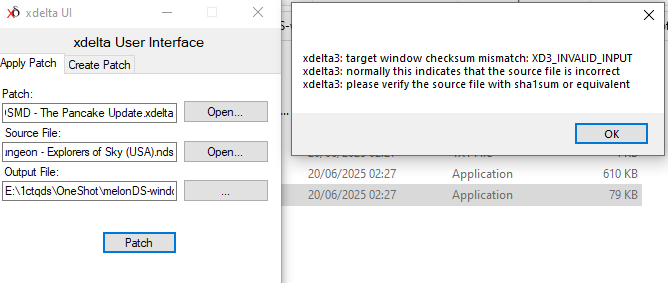
-

Save file keeps reverting to base state after editing and saving
Antonirecser replied to Antonirecser's topic in PKHeX
It actually worked, i cant believe it was something that simple, thanks a lot. -

Pokemon Black – looking for early-game save with full Pokédex
adrianagraaf replied to carlom01's topic in General Gaming
You probably won’t find an exact save like that very often, but you can get really close. I’d recommend checking Project Pokémon – there are a lot of shared save files and useful tools there. Another good option is to start a fresh save and use PKHeX to import all Pokémon into your PC while keeping zero badges and untouched story progress. That way you get full control and everything stays clean. I’ve done something similar before for a replay and it worked perfectly, especially if you enjoy experimenting and taking breaks between sessions. When I’m not tweaking saves or replaying older Pokémon games, I usually relax on other platforms too — lately I’ve been spending some downtime on mostbet download, which is an easy way to switch off and have a bit of fun between gaming sessions. Hope that helps ! -

Save file keeps reverting to base state after editing and saving
Kaphotics replied to Antonirecser's topic in PKHeX
Try saving again in-game in a separate play session. That way both halves of the save data are populated correctly. Web editors using PKHeX are the same backend code. -

Pokemon Mystery Dungeon: Explorers of Fortune
biscuitygoodness replied to WindchildWhimsy's topic in ROM - NDS ROM Hacks
Hi!! You can get there with an All-Terrain Hiker, Absolute Mover (max IQ Palkia), or with a Mobile Scarf. What it is: It seems to be a very intentional inclusion. -
 Hey, I’m planning to replay Pokémon Black and wanted to start with a slightly customized save. Ideally, I’m looking for a save file where: the game is at the very beginning (no badges), all Pokémon are already available in the PC (either level 1 or level 100 is fine), story progression is untouched so I can play normally. I’ve checked a few places but haven’t found anything that really fits this setup. If anyone has a save like this or knows a reliable place where I could get something close, I’d really appreciate it. Thanks in advance for any help or suggestions!
 -
 Lazy to clean the Game Sync ID (or whatever they call it in later gens). The save I upload has never gone online, but now it has.
 -

RoC's PC - Collection through the Ages [U: 20251027]
foohyfooh replied to ReignOfComputer's topic in Event Contributions
You go back and add more Pokemon when you do the DLC but how come you don't update the save file you upload? -
Im just posting this here out of curiosity to see if anyone can solve the issue, because im having a really strange situation with PKHex v25/12/12 (last avaliable) when trying to edit a Pokemon Platinum regular save (not modded or edited previously). The save its functioning and working, i can edit it with PKHex web perfectly (so the save itelf is not the issue) and ive been all afternoon checking anything PC related that could be stopping PKHex to work properly, but i can say confidently ive checked almost eveything (.NET being properly installed, UAC not interfiering, Administrator privileges etc) and it still goes back to the "base" state as it is was frozen in time. Im of couse not using the save as the same time as the emulator and the basic stuff, that is also discarded, it must be something application related, but i cant figure out why is this happening, as i said i can use PKHex Web perfectly so in the meantime ill go that way. cfg.json PKHeX.exe Pokemon Edicion Platino (ES).sav
-
but i do use an emulator