All Activity
- Past hour
-

Fire red - save file has been deleted...
Danielmanasama replied to BigMac's topic in Saves - Files and Requests
Ei, amigo, você conseguiu recuperar meu arquivo de jogo salvo? É do Black 2. - Today
-
I'm pretty sure the Resort slots show up in the Other tab, shouldn't need another tool to access their data.
-
It works!! Oh my god, I can't believe I was just about to sit down and manually recreate 30 Pokemon in PKHex. It would have taken days. This is really amazing, thank you both so much for your help. Seems silly since we know they're just bits of data, but I lost Pokemon from as far back as when I was in high school playing Platinum and was really heartbroken about it. Thank you for helping me bring them back to life. To the best of your knowledge, is it risky to bring these up into Home? Of course the data is as vanilla as possible now, but given that I've already imported these Pokemon into Home in the past, I imagine it's feasible for Home to say 'wait, weren't these exact same guys sent off to Scarlet? How are they appearing now from Poke Transporter?'. I know we don't know the full extent of exactly what Game Freak looks for, but does this pattern match any stories of bans you've heard?
-
Thank you! I was actually just about to ask if there was a way to pull the resort pokemon. I'd like to know the data is practically identical, it'd reduce my anxiety about being banned (even if PKHex is saying the mons are legal). I'm assuming the difference in checksum is from more obscure data like the memories/medals/ribbons, since they aren't captured in the CSV extract and I can't recreate them without some guesswork. Hopefully this helps.
-
And a change in any data can influence the checksum. Anyhow, since I do not know how to extract Resort data from PKHeX, I'll recommend something else: This may work, even if you're using a save as opposed to a ram dump.
-
A checksum is a checksum, nothing more. In this case, it's a quick indicator that the data is not the exact same as the other file.
-
Sure, so it being different indicates that there are parts that do not match the original data. But not necessarily that there's an issue that would mark the Pokemon as being illegitimate/illegal?
-
It's a checksum of the data.
-
Thank you so much for responding so quickly and helping resolve this! Do you mind if I ask as well, when I'm saving these Pokemon as .pk7s, the file name that is automatically generated doesn't match the one that the CSV is reporting. For instance, Golem - EDE9DAF9D8AC.pk7 is what's listed in the csv, but the one I've recreated is saved as Golem - 6DB0DAF9D8AC.pk7 I can see the back half is accurate, which seems to just be the PID. But the 'EDE9'is being replaced with '6DB0'. Is that a reflection that I'm missing some key part of the recreation?
-
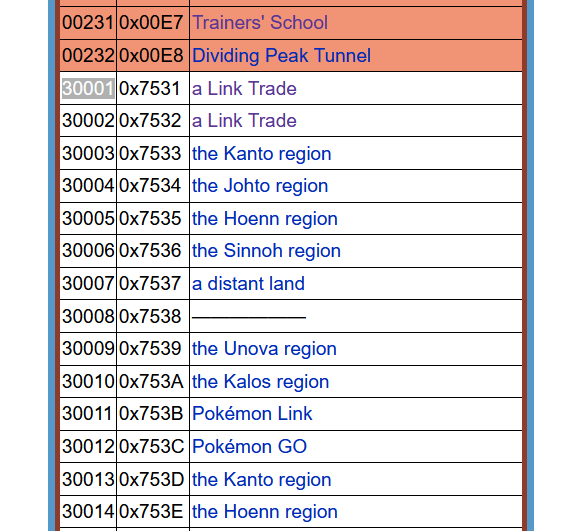
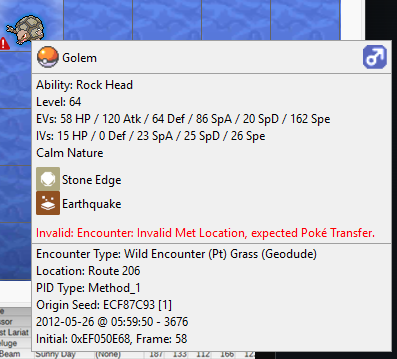
Okay I figured it out. When you Poké transfer a Pokémon into Gen 5, it is assigned the met location ID 0x30001. That number for Met Location then doesn't get modified as a mon is transferred further up. (read Gen 5 ID list here) The CSV generated by PKHeX apparently didn't take that into account; it took the ID and displayed a name based on Gen 7 locations, which would be link trade (read Gen 7 ID list here) So it is merely a display issue (I asked about PKSM cause it had display issues for some transfers and it reminded me of that). In any case, fixing the Met Location to what PKHeX suggests would fix the issue.

-
No, I didn't. This is the first time I've modified any of my save files in any way, beyond official software for trading up Pokemon. I can't easily share a table in a post, so I've just chucked the header and golem's line into a drive document quickly: https://docs.google.com/spreadsheets/d/1w5rZWXE2lzx3YrqsfBXkkWQv3sJLoQNmjolpLxX1m1A/edit?usp=sharing
-
Did you previously use PKSM or some other third party app to shift the Golem up into Gen 7? Also, are you sure it was met location you're looking at? what does the full line for Golem in that CSV look like?
-
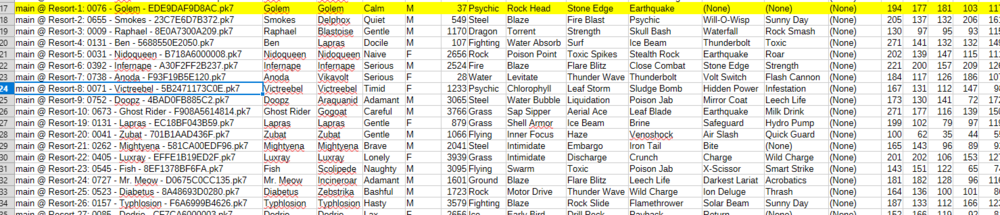
Hi, hope I'm posting this in the right place. I'm new to the community, need a little help to essentially just clarify that I'm doing things correctly. I'll try and be concise but there's a few moving parts here, so bear with me. I'm using PKHeX to restore some mons I sadly lost when my Scarlet save data was wiped. Luckily the mons in question were all from Sun or earlier, so my plan is to just recreate them in my Sun save file and then use Poke Transporter to restore them to Home. As is probably well known, there's an issue with the way Sun/Moon clears data out of the Resort. Due to this, you can use the 'Dump Box' feature in PKHex on a Sun save file and get a CSV with seemingly all of the Pokemon you previously had in your boxes, even if you've since used Poke Transporter to move them into home. This is really lucky for me, since it gives me a way of accessing the data of all the mons who I'm trying to recreate. In this screenshot for instance, none of these pokemon are actually in my boxes in my Sun save file, and I can't access them looking through the boxes in PKHex either. They just exist as ghost data from when they were loaded into the resort. My issue is that when I try to recreate the data as it is listed in this CSV, PKHex flags it as illegal. The Golem I have highlighted in the screenshot, his MetLoc in the csv is 'a link Trade (NPC)', and his origin game is Platinum. When I set those parameters in pkhex, though, I get this error: But it can't be invalid. Because it's the data that is apparently stored by my original, totally unmodified and legit, save file from Pokemon Sun. So what I'm ultimately asking is, am I misunderstanding some part of this, or is there a mistake in the legality checker here, such that it believes data is illegal when it isn't? I hope this all makes sense. Please ask away if I can provide more clarifying info. Thank you!
-
 STikER changed their profile photo
 -
 Any chance of finding the cheat codes of Boost maximum for Ruby/Sapphire? I have it for emerald 3786AD92 11D29E36 and boost minimum for opponent 1804DDD8 E6DDCDF8
 -
 Starry_Bunny changed their profile photo
 -
To get there: Open PKHeX Open your save file Navigate to the SAV tab Click Event Flags At the top, click Work Paste 60416F9A89DB0499 into the search bar Edit the Value Note: Altering Event Flags may impact other story events. Save file backups are heavily recommended.
-
For those looking for an answer, it's not in Block Data, it's Event Flags. To get there: Open PKHeX Open your save file Navigate to the SAV tab Click Event Flags At the top, click Work Paste 60416F9A89DB0499 into the search bar Edit the Value Note: Altering Event Flags may impact other story events. Save file backups are heavily recommended.
- Yesterday
-
 QicOnline changed their profile photo
 -
How to fix poke transporter gb error in emulator
Soul DS replied to LOLcoder's topic in ROM - GBA Discussion & Help
If I'm not mistaken, Poké Transporter GB is not supported by emulators, since it uses the link cable in an unusual way for emulators to be able to communicate between a GB/GBC game and a GBA game. I suppose your only lucks would be either doing it on real hardware (though it would require actual hardware and ruin your challenge), or use external softwares like PkHeX to do the transfer. -

What does the (X) mean in the Origin seed? and How can I remove it?
theSLAYER replied to Crescent Hunter's topic in PKHeX
legal only if you match all details, such as encounter slot. When we talk about encounter slot, an example is to imagine a table with all the possible grass encounters for a route. It is possible for the encounter slot for your PIDIV, relates to a different encounter (could also be different species). -

What does the (X) mean in the Origin seed? and How can I remove it?
Klayde replied to Crescent Hunter's topic in PKHeX
so you mean even if its X its still legal right? -
PKMDS Update — March 18–25, 2026 New Features One-touch evolve — An Evolve button now appears in the Pokémon editor when the selected Pokémon can evolve. Single-path evolutions happen immediately; branching evolutions (Eevee, Slowpoke, etc.) open a picker showing each option with its sprite and method. Evolving Nincada into Ninjask will offer to place a Shedinja in your next empty box slot. Gen 2 trade evolutions now show which held item is required. Box pop-out dialogs — Two new buttons in the box navigation bar let you pop out the current box into its own dialog window, or open a full all-boxes grid view. The all-boxes view lets you swap adjacent boxes with a single button click. Generation-specific editor tab — A new “Gen-Specific” tab appears in the Pokémon editor when relevant, covering fields that only exist in certain games: Shadow Pokémon status and purification (Colosseum/XD), Shiny Leaves and walking mood (HGSS), PokéStar Studios fame (B2W2), GO Park spirit/mood and received timestamp (Let’s Go), and more. Pokédex: Legends Arceus research task editor — You can now open a per-species research task editor from the Pokédex tab in LA saves. Buttons to complete or clear all research for all species are also available. Spinda spot preview — The Pokémon editor now displays Spinda’s unique spot pattern based on its PID / EC. Trash bytes auto-fixer — Added a one-click trash bytes cleaner to the Legality tab for quickly resolving legality flags caused by leftover junk bytes in name fields. Origin mark shown in Met tab — The origin mark sprite (Pentagon, Clover, Galar mark, etc.) now also appears in the Met tab alongside the existing display in the Cosmetic tab. Improvements Loading a .pk* or mystery gift file now places it into your currently selected slot (or the first empty slot if none is selected) and navigates you directly to the box view — no more hunting for where it landed. The Pokédex tab now has a filter to show only seen or only caught species, and the box selector dropdown shows the box count. The Bag tab renders noticeably faster on large saves thanks to grid virtualization. Bug reports submitted through the in-app report dialog now require a name and email address. Bug Fixes Fixed bottom UI elements being cut off on iPad screens. Fixed several crash reports from Sentry (duplicate key crash, file-abort error noise, empty file load crash). Fixed held item autocomplete not being clearable; also prevents a crash when held item data is missing. Fixed pager visibility and filter button clipping in data grid views.
- Last week
-
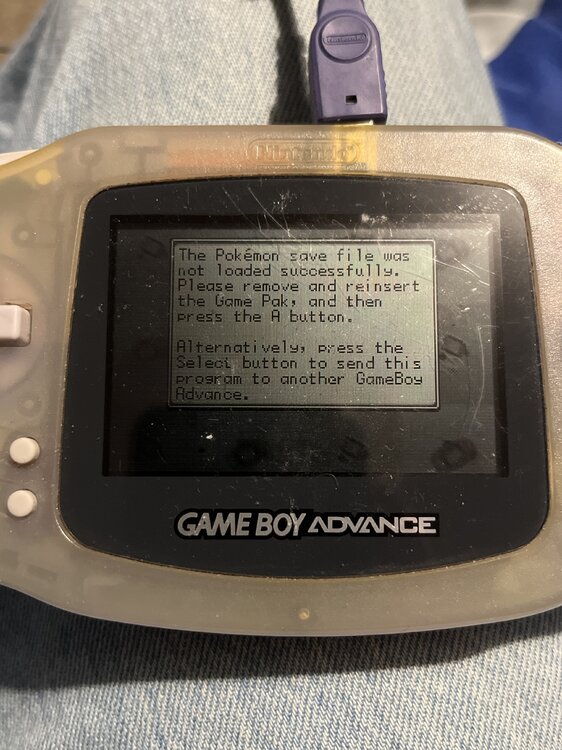
I’m getting this message from the cartridge of GB transporter I need help to either reset it or am I cooked and need another one? I have another GBA I’m trying to transfer over from my gen 1&2 games to emerald sorry I’m new to this if I need an update where do I send it to? lol
-

pkNX: Nintendo Switch ROM Editor & Randomizer
Botuni replied to Kaphotics's topic in ROM - Switch Research and Development
Hi! Is it possible to randomize ground items and hidden items in Pokémon Sword/Shield? I've tried a million ways but I can't figure it out. I'm not referring to the effect of the items, but rather, for example, on route 1 there's a potion and I'd like it to be a different random item instead. -

Pokemon Mystery Dungeon: Explorers of Fortune
Crocodoinurmom replied to WindchildWhimsy's topic in ROM - NDS ROM Hacks
Dumb question probably but would it be possible to get some kind of updated Wondermail Generator for this Rom Hack? -
Error Mons w/ NPC Editor Plugin in PKHeX (26.03.20)
theSLAYER replied to Pocket Monsters's topic in Saves - Editing Help
Probably related to some PKHeX.Core change, will look into it later -
 So I'm trying to get my Pokemon all over the gens of pokemon only using emulators but I've hit a roadblock on the first day when I use poke transporter gb so I can transfer my Pokemon from gen2 to gen3 on mgba for some reason it doesn't work but actually everything is going fine except for when it's transferring time they tell u to press a when ur ready BLA BLA BLA well I've done everything they said but they that the game boy color was disconnected for some reason and in the tab of the pokemon gold they say that ur friend is not connected what can I do I really want to do this challenge so I would really appreciated any help that would actually help me