

Leaderboard



Popular Content
Showing content with the highest reputation on 02/06/25 in all areas
-
A few months ago, a Japanese Youtuber talked about the Stamp Pichu and Stamp Absol distribution: This caused a lot of people in the comments section to reminisce about the distribution, and a few people in the comments say they had either gotten an Absol or a Pichu, and most of them didn't have it anymore or couldn't find it. One person in the comments took a look at his own cartridge and tried to find a Pichu that matched what the video talked about because he remembers winning the distribution, but he couldn't find it. Instead he found a Pichu with an OT of カイチョウ. Kaichou, as in the Daisuki Club President. After this video was posted, a few other people went to Twitter to post about a Pichu they had won directly from the distribution, and how the OT was カイチョウ and the TID is 31031. I believe these Pichu are authentic and real, coming from the official Stamp Pichu distribution. Technically I'm unsure of the second tweet's legitimacy because of their further tweets, but they posted their OT and ID before many others. Through my own research in the past year for Stamp Pichu and Absol, the Pichu in those tweets closely match what I have found to be real. There has never been a source for the OT スタンプ and the TID 30821. From what I can tell, it was posted on a Japanese event wiki first and was sourced from there. August 21, 2003 is not a day that has any specific meaning to both Stamp Absol and Stamp Pichu. The Stamp Absol application period was between August 2 to September 1, 2003, so you could say August 21 is in the middle of that, but there's no specific meaning to Absol. During my research, I had theorized a few possible TIDs for both Absol and Pichu. I'm still uncertain about Absol's true TID, but one TID I theorized for Pichu was 31101 (November 1, 2003) to signify the first day of the application period for Pichu. The application period for Pichu was between November 1 and November 28, 2003. The TID 31031 (October 31, 2003) is the day before that, so my theorized TID is very close. Another misconception about the Stamp Pichu is that there were 300 total Pichus given out, not 50. It is true that the magazine it was offered in shows 50 Pichus given out: (Source: 4th Grade December 2003 issue of Shogakukan School Year Magazine) But whoever originally looked at this image didn't realize that the Pichu distribution was offered in 6 grades of magazines. 1st, 2nd, 3rd, 4th, 5th, and 6th Grade of the Shogakukan School Year Magazine. And in each grade they offered 50 Pichus each. You can see the total number of 300 offered here: https://web.archive.org/web/20040606033512/http://www.netkun.com/pokesta/11.html Even in the video the Japanese Youtuber made, they also said 50 Pichu were distributed because of the Japanese Pokemon Wiki site not having been updated in 15 years. In a followup video they made, they said they were contacted by 20 supposed winners of the Pichu and couldn't trust or believe them because he thought only 50 Pichu in total were distributed. I am under the impression that when people buy used Japanese gen 3 games and back up the save files that no one would have paid any attention to a random Pichu with an OT of カイチョウ because that has never been known as an event OT. What I would like to request, is if you have bought Japanese gen 3 games and have backed up save files to find events, please look for a Pichu with an OT of カイチョウ and an ID of 31031! If you have one, feel free to post it in this topic or message me. The Stamp distribution has been a focus of my research in May, and it seemed that no one else was really looking for source material, so I was able to find a lot of source material for this distribution.2 points
-
This ROMhack has been removed due to personal reasons. There will not be any future updates or releases for Klonoa Mystery Dungeon: Gateway to Dreams.1 point
-
The latest development build has a Hall of Fame editor for Gen1. Try it out: https://projectpokemon.org/home/files/file/2445-pkhex-development-build/1 point
-
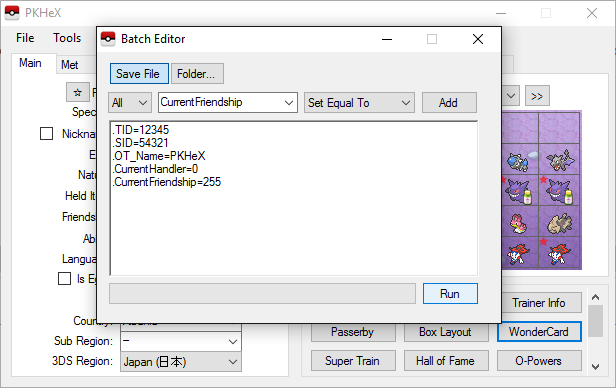
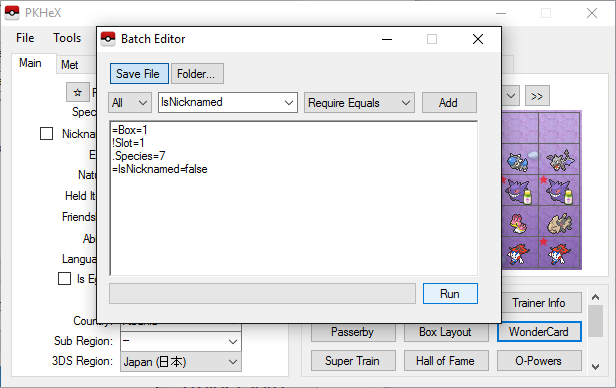
Using the Batch Editor Caution: When using the Batch Editor, there is no UNDO. If you modify the contents of a Folder, the changes are permanent to those files. If you modify the contents of a Save File, the changes are permanent unless you re-load the Save File. The Batch Editor is a powerful tool in which the user can make mass modifications to Pokémon in either their save file or supplied folder. By using the built in 'script builder', you may select from properties to either 'set' them or 'filter' according to its value. The script in the image above is an example of how to redefine the trainer and friendship details of the Pokémon, effectively 'stealing' it from another trainer. There are three types of 'script commands' that may be entered: . This sets the property of the Pokémon equal to the value = This requires the property to be EQUAL to the value ! This requires the property to be NOT EQUAL to the valueIf a 'filter' (=,!) is not satisfied, the Pokémon is skipped. Other filters exist, similar to = and ! -- refer to the GUI command builder. The script interpreter is smart enough to understand the difference between numbers, strings, and booleans; quotation marks are interpreted literally and should not be used. A hint of the value type is provided beneath the dropdown. Empty or invalid slots are skipped by default. A slot / file must have a valid Pokémon in order to be modified. An advanced modification script is demonstrated in the following image: =Box=1 !Slot=1 .Species=7 =IsNicknamed=false Filters are interpreted first. Even though the "=IsNicknamed=false" appears after the ".Species=7" command, the batch editor will require all filters to be satisfied before any modifications are made. To explain what the above script does, it requires the Pokémon to be in the first box, but not in the first slot, and to be not nicknamed. It then sets the Species ID to 7 (Squirtle). Special Tricks The Batch Editor window references the PKM that is currently viewed in the editing tabs. If you select a property name, the Batch Editor will indicate whether or not the tabs PKM has that property. If the tabs PKM has that property, the Batch Editor will display the property's current value as well as the data type (number, text, etc). To Randomize a PID, use ".PID=$rand". To Randomize EncryptionConstant, use ".EncryptionConstant=$rand" To Randomize a value within a range, use ".Nature=$x,y" for an inclusive range of [x,y]. To make a Pokémon Shiny: use ".PID=$shiny". To copy the Encryption Constant to the PID, use ".EC=PID" To delete a Pokémon, use ".Species=0" To set a date (Met / EggMet), use yyyyMMdd for the string. Example: ".MetDate=20160409" will set the Met Date to April 9th, 2016. Suggestions can be automatically applied for Moves, RelearnMoves, and Met_Location. Example: "Moves=$suggest" will retrieve and apply suggested moves from the legality interpreter, same as if you clicked on the Moves groupbox in the tabs editor. Legality can be used as a filter. Use "=Legal=false" to only modify illegal Pokémon. A full up to date list is available by reading the source code (BatchEditor.cs, ProcessPKM method). Remember that certain formats/generations do not always have future properties. There are many applications of the Batch Editor including mass hatching, deleting, making everything shiny, or clearing EVs from all applicable Pokémon.
 1 point