Search the Community
Showing results for tags 'PBR'.
Found 3 results
-
I Need That Version For Edit My SaveData Of Pokemon Battle Revolution. Please the Version 20181202, I found a compiled version but it didn't compile and I don't want to continue downloading more stuff. put a download link that does work.
-
Hi Everyone, I downloaded PBR today and playing it in Dolphin. I do not have any Wii or DS console. I tried to search the net but could find a way to ADD pokemon to storage in PC Dolphin emulator. Can anyone kindly help me? Thank you
-
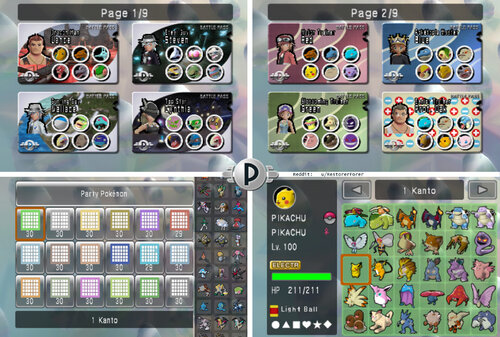
Version SMOGON OU LITTLE CUP COMPETITIVE
11474 downloads
> MASSIVE CHANGES: 23 May 2026 reddit post if you want to comment > 日本語 (Japanese): ダウンロード > ESPAÑOL (Spanish): DESCARGAR > FRANÇAIS (French): TÉLÉCHARGER > ITALIANO (Italian): SCARICAMENTO > DEUTSCH (German): HERUNTERLADEN >>> IF YOU ARE PLAYING ON DOLPHIN EMULATOR <<< Battle passes will not display correctly (The Trainer avatar will be missing). In Dolphin settings go to Graphics -> Hacks and at the top turn "Store EFB Copies to Texture Only" OFF. This fixes it. >>> I ALSO RECOMMEND THIS CHEAT CODE TO BOOST GRAPHICS AND REDUCE BLUR <<< USA: 0462A0F0 00000000 EUR: 04641E88 00000000 Simply go to "Cheats Manager" while PBR is open, and input the Gecko Code. >>> VIDEO GUIDE HOW TO PLAY ONLINE thanks to Big! - If you are gonna play online, edit the file in PKHex first: go to SAV tab, then Trainer Info, and type in a random TID, SID, and change the Trainer name! This way it definitely won't register you as someone else who used the file. NOTE: THIS IS NOT ILLEGAL OR PIRACY. It is a savefile I created myself, NOT A ROM. It's to help people who want to play the game they LEGALLY bought without having to grind for everything before being able to battle. (very legally!!) I want to share it with people, so they can use it for single-player playthroughs of the game, local-play with friends, or for online play! CONTENTS OF THIS GUIDE: About the File About the Pokémon How to Install (Wii) How to Install (Dolphin) 4.5. How to Install (Android Dolphin) How to edit the Pokemon/ Savefile/ Create Custom Team TROUBLESHOOTING LAGOON COLOSSEUM WITHOUT ONLINE??? (Cheat Code!) 1. About the File: This save file comes with: all Fully Evolved Pokemon, Competitive VGC Pokemon, Every SMOGON Format Pokemon of all tiers, all Little Cup Pokemon, and all battle passes and fashion items unlocked; as well as 87 teams I have made of characters from across the series, such as Red, Cynthia, Jasmine, May, Giovanni, Paul and more! > For shiny Leader costumes, you can now use the new version of PKHeX to enable them, thanks to abcboy! But they mess with the costumes I made, hence I turned them off. ▸ The game has 4 UPDATED Savefiles: "PKTOPIA", "OU/ VGC", "All 493", "Lil Cup". You can rename these (see: 5. Editing Savefile). >>> "PKTOPIA" is a complete file with all Colosseums unlocked and completed at Rank 8. It has 104 pre-made battle passes. »»» This file is for for having battles with friends/ in singleplayer when you do not want to make your own teams, but for example want to have a themed battle like Misty VS Ash, or Lance VS Cynthia! »»» You can delete the passes, but I recommend using the other files if you want to make lots of teams, as editing the passes in PKTOPIA too much may lead to them glitching. (See: 6. TROUBLESHOOTING) >>> "OU/ VGC" is a complete savefile with everything unlocked and Colosseums Level 8, and has some sample ZU/NU/UU/OU/Ubers teams, with space to make your own as well. It has 540 Pokemon based on competitive Smogon Sets, and the boxes are ordered by the Smogon Tiers. »»» There are also 6 2008/09 VGC winner Teams, in the Rental Passes! »»» This is the best file for making your own teams for COMPETITIVE battles with friends, or against the Colosseums! The Pokemon are grouped by SMOGON tier, but were made with VGC in mind as well. (If you only want to play VGC, in PKHeX, RIGHT-CLICK the "Box" tab, then you can click "Sort by Pokedex no." while holding in SHIFT to sort all boxes!) >>> "Lil Cup" has 459 competitively-built Little-Cup Pokemon, and also includes Little-Cup versions of 67 of the Friend Passes! They are for Singles or Doubles! >>> "All 493" has all 493 Pokemon INCLUDING MIDDLE STAGES AND BABIES, all at level 100. This is designed for playing through the Colosseums, but also for battling with friends / family who may be unfamiliar with Pokemon. I urge you to check this one out, it's the most fun for relaxed battles! »»» The Pokemon have balanced sets, so Monferno has Brick Break, whereas Infernape has Double Kick, for example. This is so, if you want to play with randomly-generated teams, it's more fair even if it's Dialga VS Bulbasaur. The babies will feel like they actually do something. The sets are similar to the old Stadium Rentals. »»» The Custom Passes and Rental/Friend Passes have prebuilt teams which simply use the balanced Pokemon from the boxes. You can just delete them to make room for your own. »»» It has all Colosseums unlocked at Level 1, but not completed yet. You can still play through the game as if it were your first playthrough, simply leave Stargazer Colosseum for last. You can edit the Colosseums to be like normal in PKHeX, in SAV => Trainer Info tab. Just leave the first 2 Colosseums checked. »»» Boxes are ordered by EVOLUTION FAMILY. So Elekid, Electabuzz, and Electivire are all together in Gen 1. This is so unfamiliar players can see how the Pokemon evolves! When you go to Storage, and click the Search Magnifying-Glass in the top-right corner, the Pokemon are in a very satisfying order to scroll down. I had to move a couple Pokemon to make it line up: - Heracross and Miltank are with Pinsir and Tauros in Kanto - Chansey line is in Johto - Skarmory & Mantine are in Hoenn (as everyone thinks they are from Hoenn) - Regigigas is in Hoenn - Snorlax is in Sinnoh with Munchlax 2. About the Pokémon - I have now made databases of the Pokemon. If you want to find a specific move/ sort the Pokémon by Speed stat, for example, now you can! - In "PKTOPIA" and "All 493" I chose not to give many Pokemon "Choice" items (except ones using Trick) and was sparing with Life Orbs, so that when playing with friends, sets aren't too complicated or powerful, and speed tiers are more predictable. Some of the unevolved-Pokemon will still use them to become stronger though. There is also no Hidden Power. - However in the competitive files, "OU/ VGC" and "Lil Cup" there are many Choice items. I tried to make the Pokemon with Choice Items the Shiny version. There is also Hidden Power in these files. ALL Pokemon are in standard Poké-Balls, EXCEPT ones using Hidden Power. The ball color and Trainer Name on those Pokemon match the Hidden Power. A guide image is at the top of this download page. - In terms of Pokemon's legality, all Pokemon have fully legal Generation 4 movesets except these 5 cases: » Unown has... a special moveset. Just for fun! (he still sucks) » Kecleon knows Copycat. It suits him. » Pachirisu has Follow Me. Useless without it; learns it in Gen 5. » Magikarp has Hydro Pump. Useless without it; learns it in Gen 5. »» Rotom may know the Appliance-Forme moves. You can replace these Rotom with the ones included in the download, that have the stats of his various formes, and then use the included cheat code to allow using Hacked Pokemon in battles. - ONLY in "PKTOPIA" & "All 493": » Mewtwo (Psybeam), Mew (Psybeam), and Kyogre (Aurora Beam) have weaker versions of Psychic and Ice Beam, to balance them. » Mothim has Nature Power, to make him stand out from all the other Butterflies. » In 493, Chingling has Psywave. For some reason Chimecho can learn it but he cannot. » In 493, Combusken has Blaze Kick. Grovyle and Marshtomp learn Leaf Blade and Muddy Water respectively, so I think it's fair. » In PKTOPIA, the extra Arceus all know the moves that were not used in the file, in case you need to see the animations for them. » In PKTOPIA, Misty's Politoed has Drizzle, Brock's Onix has Solid Rock, and Brock's Blissey has Trick Room. These Pokemon are not accessible in the storage and are only on their friend-passes. - Otherwise all Pokemon have legit statspreads and EVs. » I finally found a way in PKHeX to go through all the moves flagged as illegal, so I think I finally got rid of all of them, except maybe a couple in the premade passes in "PKTOPIA". 3. How to Install (Wii) - importing the save to Wii REQUIRES Homebrew because PBR is locked to not allowing a save to be imported; using Homebrew with SaveGameManagerGX bypasses this. First, unzip the downloaded file, open it >> open your game region >> open "PBR SAVE FILES" folder >> open "(MAIN GAME SAVE FILE)" folder, and copy the "0001000052504245" or similar named folder to the root of your SD card. You CAN NOT just place the game save on its own, you must put the ENTIRE "0001000052504245" FOLDER in! Then, insert SD card to Wii. Then; Using SaveGameManagerGX on Homebrew, on the top menu, navigate to the SD card. Find the icon for PBR. Click the PBR icon and click install. This will overwrite any data you have on PBR so make sure you back it up first if you want to keep an old file. Done! » IF THIS DOES NOT WORK/ HAS ERROR "unable to copy datas", delete the "0001000052504245" folder from your SD card. » Now try the folder BELOW the "(MAIN GAME SAVE FILE)" folder, "[BINARY]" - Put the"data.bin" file onto root of SD card. Now try installing this in SaveGameManager. » And if this does not work, then in SaveGameManagerGX you might have to click the .bin file, click "Decompress" and it will create a new file in SGMGX and THIS file should finally work. To extract the save file for editing, like say you play for 20 hours but now want to edit a Pokémon without losing your progress, go to SaveGameManagerGX, on the top menu navigate to the Wii icon, click PBR’s icon and click Extract to Custom and navigate to your SD card. Once editing is complete re-inject the save file. 4. How to Install (Dolphin) First, create a new save game on PBR, by saving after creating a save slot. Then close the game. This creates folder structure. In the game-select menu of Dolphin, right click PBR and click “Open Wii Save Location”. In the "GeniusPbr" folder, replace the "PbrSaveData" file with mine. To find my PbrSaveData file go to PBR SAVEFILE COMPLETE\(REGION)\PBR SAVE FILES\(MAIN GAME SAVE FILE)\0001000052504245\GeniusPbr and it will be in the GeniusPBR folder. Now open Dolphin and play! ONE SETTING YOU WILL NEED TO TURN OFF IN DOLPHIN: Battle passes will not display correctly (The Trainer avatar will be missing). In Dolphin settings go to Graphics -> Hacks and at the top turn "Store EFB Copies to Texture Only" OFF. Should fix it and won't affect anything in other games. 4.5. How to Install (Android Dolphin) Make sure you have gone into the game, and SAVED at the reception desk first, or else the folders will not have been created! Go to Config ==> User Data ==> Open User Data Folder Then navigate to Data ==> GeniusPBR, and inside this folder is where you put the new save by replacing the old pbrSaveData. 5. How to edit the Pokémon/ Savefile/ Create Custom Team >>> VIDEO GUIDE HOW TO INSTALL DOLPHIN AND PBR AND EDIT POKEMON IN PKHEX thanks to WooperEnjoyer! Open the "PbrSaveData" file in PKHex. It's pretty self-explanatory how to edit Pokémon. One tip I have is, Pokémon will sometimes not work correctly if they have no Met Location/ OT info. You can take any existing Pokémon, copy it to a few slots, and now these slots will have that data, now you can edit that Pokémon into whatever you want, or import a Pokémon from Showdown on top of it by using Ctrl+T when the text from Showdown is copied to clipboard and then Shift-Click to replace the old Pokémon with the new one. You can edit your savefile name in PKHex by going to SAV --> Save Slot: (select the file you want to edit) --> Block Data, and simply edit the value of Current OT. This will be your online display name if you choose to do online play. I also added the Binary "PCDATA" file in the "RAW POKEMON DATA" folder. If you open your own savefile in PKHex and drag-and-drop this file into the PKHex window, it will replace all the Pokemon in your save with my Pokemon. This can bypass a region lock but will NOT import complete save game data, custom battlepasses, etc., and you will retain your savefile, just with all my Pokemon. In case you are dragging these Pokemon into a new file, for them to work, in PKHEX you need to go to “block data” in the SAV tab, and you need to input some trainer information. The save file needs any Trainer ID + Secret ID or the Pokémon won’t be accessible. Also for those of you who edit the savefile, a small guide on how I convert to .bin: You'll need to download Dolphin on PC, then have a copy of PBR on Dolphin. Put your current PbrSaveData file from PKHex into the Dolphin Save folder "GeniusPbr" (right click PBR in Dolphin Loader, then click "Open Wii Save Folder"). Then in the Dolphin loader, right click PBR, and click "Export Wii Save" and it will save the file in the save folder into a .bin - you can now import this .bin to your Wii (if you have problems with the original file). 6. TROUBLESHOOTING There's one main glitch that can occur (only in PKTOPIA slot) that will lock your passes so I will explain it. In order to have the passes the way they are, I have marked some of them as "Friend Passes" despite them not actually being in the friend-pass menu. If you somehow end up with one of these passes at the front of the Passes menu on page 1, it will lock all other passes from being editable. If you delete all the passes in the Custom Pass page to make your own, you will be unable to create edit ANY passes! To fix it: 0. Just don't make a new pass, simply edit an existing one on page 1 or 2 into your own character. 1. Make sure you delete every pass EXCEPT one that is NOT a friend pass like Lance (You cannot edit the Pokemon or Trainer of a friend pass, so it's easy to tell). 2. If you already deleted all the passes, either just reinstall the save file, or go into PKHex and edit the battle pass to NOT be a friend pass, and it will fix it. 6. TROUBLESHOOTING (Wii) Ensure you install the entire "0001000052504245" folder to your SD card INCLUDING the "0001000052504245" folder, and do not rename it as this is the game code for PBR. Do not rename ANY FILES or edit the file structure or it may not work. Make sure you're using the matching region PBR game (USA, EUR or JAP). ENSURE SAVEGAME MANAGER GX IS ON THE NEWEST UPDATE VERSION!!! Link: https://sourceforge.net/projects/savegame-manager-gx/ simply go into the "apps" folder on your WII SD card, delete SaveGameManagerGX folder, replace it with the new one (unzipped). If the error message "unable to copy datas" still occurs, try the following: Ensure my "0001000052504245" folder is NOT on your SD card. Move it to anywhere else on your PC for now. Go into the basic Wii home menu, settings, and go to your game save data. Delete PBR. (Backup your current save with SGMGX if you don't want to lose it). Open PBR, this will create a fresh save file. Now close out of PBR. In SaveGameManagerGX, download this new savefile from the Wii to your SD card. This will now create the exact folder structure you need on your SD card. Go to your PC and on the SD, replace MY "PbrSaveData" file with the one you just installed from your Wii in the exact same location. Install using SGMGX and play! - IF NONE OF THIS WORKS, you may not have installed CIOS correctly when setting up homebrew. You need the latest version. Look up a tutorial online or on YouTube, and redo CIOS installation for Homebrew. This fixes the issue for a lot of people. 7. NEW CHEAT CODE TO UNLOCK LAGOON COLOSSEUM IN FREE BATTLE!!! This is all thanks to abcboy! He made the PKHex version that can now edit Battlepasses and dialogue directly in PKHex! »»» All the codes are included in the download! To use the code, in Free Battle mode, when you select any Colosseum, hold in the PLUS (+) button while clicking the (A) button to select any Colosseum. This turns it into Lagoon Colosseum for the next battle! To install the code, on Wii: Install Ocarina in Homebrew. Put the Gecko Code folder "codes" in the download on the root of your SD card and make sure cheats are turned on in the game settings on the screen before you load PBR. on Dolphin: While PBR is open, go to Tools -> Cheats Manager and go to Gecko Codes, then add new code and put in the code! USA CODE: 02135150 00004181 2851DD12 FFEF0010 02135150 00004800 E0000000 80008000 EUROPE CODE: 0213028c 00004181 285356d2 FFEF0010 0213028c 00004800 E0000000 80008000 JAPANESE CODE: 021288c8 00004181 28507292 FFEF0010 021288c8 00004800 E0000000 80008000 As a bonus for all the Battle Revolution Maniacs, my custom USBLoaderGX Pokemon Battle Revoluton homescreen theme is here: https://projectpokemon.org/home/files/file/5726-pokétopia-usbloadergx-theme/ Just drag that folder to your SD card. You can go to the theme settings in USBLoaderGX on the Wii to select the PBR music track that is there to play on the Wii menu! Ennnnnjoy! And let me know how it goes or if there are any errors!