squall1989
-
Posts
9 -
Joined
-
Last visited
-
Fire red - save file has been deleted...
squall1989 replied to BigMac's topic in Saves - Files and Requests
Hello, i have similar problem, when i start the catridge, the error "The save file has been deleted" appear. I dumped the save file and can open it with pkhex to see that there is data of my party, my pc box and my trainer. I tried save with pkhex to fix the check sum and copy block B over replace block A with HxD, but when tried out the result with emulator, the error "The save file has been deleted" still appear, can you take a look and help me please, thank you very much. I attached 2 file, 1.sav is the one that i tried to fix, POKEMON_FIRE_BPRE01.sav is the original one that i dumped from the catridge. -
Recently i got the same problem, after a bunch of mess arround with HxD i finally found the way to solve this. The problem seem to appear if you use the "Bootleg Pokémon GBA Save Extractor and Injector 2.0.4" tool to extract the save from the rom, edit the file and then inject the edited save right back to the rom, your save will appear not edited, your change does not apply. Here is how i solve it: after i edited the save file that got extracted from the rom, i use an emulator, open the original rom, import the save file, confirm that your change indeed applied to the save, save in game one time, then export the save back out. After that, i use the tool again to inject the newly exported save from the emulator out into the rom from the bootleg catridge, then use burn2slot to write that rom back to the catridge, and it work. Not sure what's goes wrong that make the problem apppear and how does this way fix it, but if you really want to edit your save on your bootleg catridge, you can do as i do :).
-
PKHeX new update legality errors (contribution page)
squall1989 replied to theSLAYER's topic in PKHeX
it was caught on emulator and about when it was generated (when you chose blue/red on tv), i can't remember if it was on console or emulator since it was like, 6 months ago or so -
PKHeX new update legality errors (contribution page)
squall1989 replied to theSLAYER's topic in PKHeX
I recently caught a latias in pokemon emerald, this save file originally play on a gba, then dumped save and continue to play on VBA, it's not edited in anyway, i just use pkhex to check iv and ev quickly, skip the calculator + rare candy hassle, and today i just notice that pkhex marked my latias as ilegal, not sure why, so i think i should throw it here so you can look over and found out what is wrong in the calculation that marked this as ilegal. I can guarantee you that this pokemon is generated by the game itself without any edit from outside, so it should not be mark as ilegal. 0380 - LATIAS - A0677E7261A0.pk3 -
Able to restore (parts of) a bootleg save file?
squall1989 replied to Chonke's topic in Saves - Files and Requests
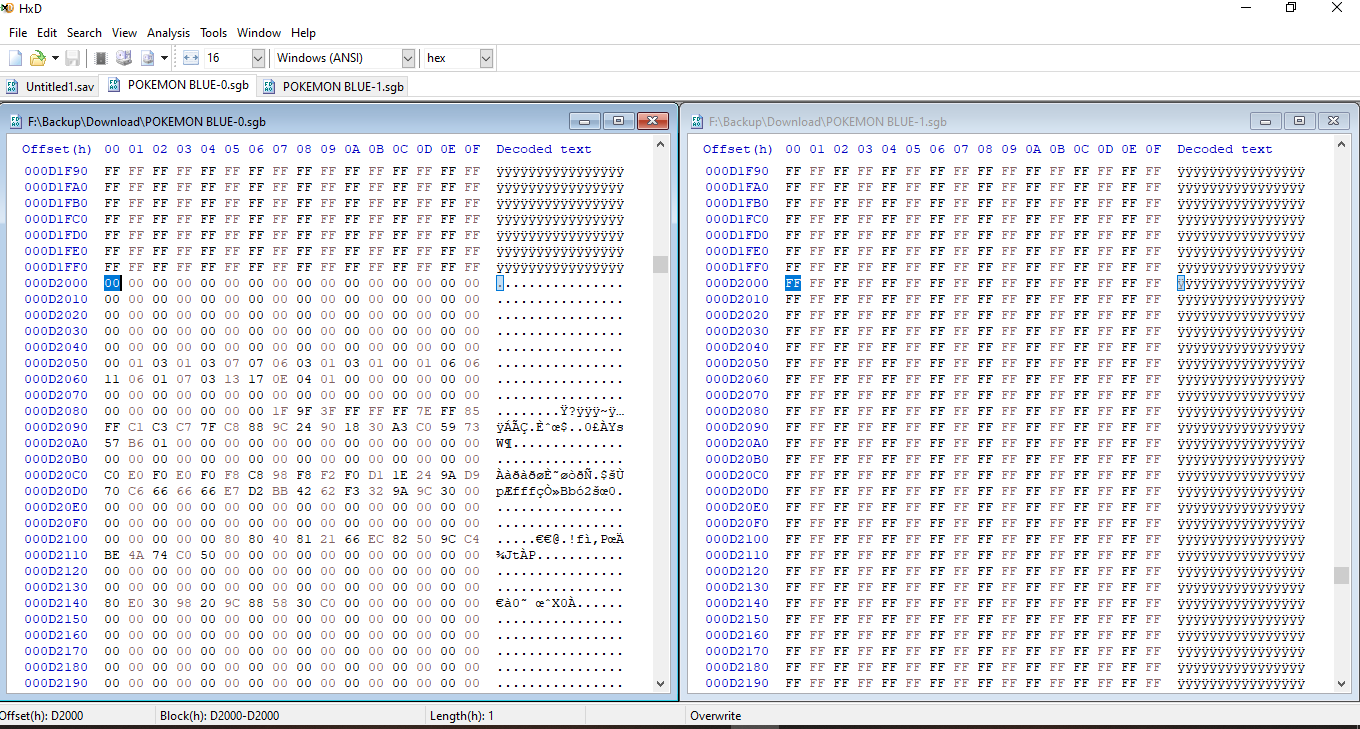
ok, i just found another way, which is better in my opinion, you can dump the rom, load the rom into a emulator, for example, i just gba link, when the rom run, the emulator will execute the batteryless code in it and load up the save inside the rom, all you need to do is export the battery, and you got your save out of there. However, if you want to insert your save into the catridge, you will have to go through the process that i did, compare each of the 4 save bank (2000 length each) of the save to the dumped rom to find out where the save is in the rom, then split your new save and manually insert them to the correct place, you can try your new modified rom in your emulator to make sure your new save work, before flash the new rom back to the bootleg catridge. -
Able to restore (parts of) a bootleg save file?
squall1989 replied to Chonke's topic in Saves - Files and Requests
through trial and error i finally found out where the save on my rom is, it's writen into the rom seperately, here is the address i found out: 1st bank: 000D2000 2nd bank: 000D6000 3rd bank: 000DA000 4rd bank: 000DE000 all 4 bank has length of 2000 so to extract the save have to manual extract the data, paste all 4 part into a new file, then after save it can be read by PKHeX i tried to insert another old save file i have in by, well, insert 1 part each into their place, then save change to the rom file, use flashgbx to write the modified rom back to the catridge, and it work. Honestly, i shoudn't have been able to find these, without the help of BennVenn, he create a tool, which can extract the save file out of the rom, which i use it to look back into the rom and find where those 4 bank are stored, and can insert other save into it, without his program, i woudn't have any way to find out those address -
Able to restore (parts of) a bootleg save file?
squall1989 replied to Chonke's topic in Saves - Files and Requests
thank you very much i will try this -
Able to restore (parts of) a bootleg save file?
squall1989 replied to Chonke's topic in Saves - Files and Requests
Hello, i would like to ask, since your tool won't work on gb/gbc file, what should i do to extract the save file out of the rom of gb/gbc file ? i got 2 bootleg pokemon red and blue, and the situation is the same as the gba catridge, the save seem to be inside the rom, i tried extract the rom with the save inside it, then erase the save, then dump the rom again, compare the 2 file, and they are different, the thing is, i don't know how to extract the save file out of there, write it to a normal save file that can be write to authentic catridge or store up to backup, could you please give me some guide on this
-
This tool is really good, but it doesn't work on gb and gbc file, are there any tool that work like this for the gb and gbc file ? i got a bootleg pokemon blue and gold that work the same way as these gba rom, i don't know how to get the save out or flash new save back in, i do have access to a gbflash to dump the rom and write the modified rom back in
-
Pokedex Displays Shiny Version Of Transfered Pokemon
squall1989 replied to loonix200's topic in PKHeX
Attach file: (1) main - Y save file: the file i transfer pokemon from. (2) main - X save file before transfer: the new X save file, save after get fennekin as starter and get pokedex. (3) main - X after transfer using drag and drop: file (2), after transfer a few pokemon using drag and drop, i also compress the pokemon file that used in the transfer - Pokemon transfer with drag and drop.rar (4) main - X after load boxes folder: file (2). after import box all pokemon export from file (1), i also compress the folder with winrar and attach in - PKM folder.rar main - Y save file main - X save file before transfer main - X after transfer using drag and drop main - X after load boxes folder PKM folder.rar Pokemon transfer with drag and drop.rar -
Pokedex Displays Shiny Version Of Transfered Pokemon
squall1989 replied to loonix200's topic in PKHeX
I just test it just now: Case 1: i drag and drop my normal charizard from my Y save file to a new X save file which is just get the starter and pokedex => The charizard dex entry is normal, work perfectly. Case 2: i export my normal charmelion and my normal Charizard from my Y save file to the new X save file that i mention in case 1 (it is used to test case 1 first, so it already have the charizard entry saved) => the charizard entry stay fine, but the new charmelion dex entry's spite become of a shiny one. About the file: i will make a new file and begin the test again, will attach later. -
Pokedex Displays Shiny Version Of Transfered Pokemon
squall1989 replied to loonix200's topic in PKHeX
Here is my case: I did use pkhex to transfer pokemon from my pokemon Y save to my pokemon X save, and when i look at my X's pokedex, suddenly the default spite become of a shiny (altho i never have seen or caught that specie 's shiny yet) - example: the image on charizard entry become of a black charizad. When i acess the entry and check the spite, it will show that i didn't actually have the shiny spite registered (since i never have a shiny charizard ever) and only after that the pokedex display the normal spite without showing a shiny spite. If i want my pokedex to back to normal i will have to check the spite of all the pokedex entry again. -
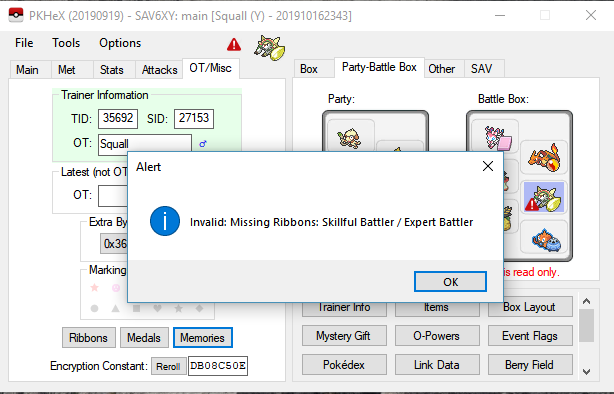
Hi i want to report the problem with the battle maison memory: when you battle in the battle maison, you can interupt your progress after any battle and continue later with different pokemon without reset your streak, so here is the problem: when you use a pokemon before in the streak, but stop before defeat the battle chatelaine, for example: stop at like 7 win streak then later you continue the streak, defeat the battle chatelaine (in my example, it's the single battle mode, 20th battle) your pokemon currently on the team that win again her get the ribbon, but the one that is in the streak before also get the memory of defeating her but didn't get the ribbon. This result in pkhex mark my pokemon as ilegal. main 652 - Chesnaught - 9937DB08C50E.pk6