



Poke J
-
Posts
554 -
Joined
-
Last visited
-
Days Won
63
Content Type
Profiles
Pokédex
Portal
Technical Documentation
Pages
Tutorials
Forums
Events
Downloads
Gallery
Blogs
Posts posted by Poke J
-
-
11 hours ago, WhiteITR said:
Ive gotten my shiny Charmander in the switch version of fire red, ive started bulba. id rather just take the easy way.. is it possible to edit saves without a modded switch?
It is not possible to modify saves on a none modded Switch. This is due to the save files being encrypted and the save managers you would install on a modded Switch can break the encryption. Your options here is either be shiny Bulbasaur the old fashion way, set up the ACE glitch on your save, or find someone in you local area with a modded Switch to trade with. My suggestion is do the ACE glitch since it will give you results closer to what you are wanting without a lot of effort.
-
2 hours ago, Lloydman2001 said:
Hello,
A few years ago I dropped and damaged my Pokemon Leaf Green Cartridge. I accidentally knocked the flash memory chip off the board. I tried resoldering it but ended up making a mess. I just sent it to get repaired professionally and got it back. Although the game atleast now boots up, I receive the message "The Save File Has Been Deleted..." I backed up the save on Epilogue but got the message "Save Integrity Check Failed!," it does not run on the program. I don't know if it even downloaded any save data in the first place or whether there is anything capable of being recovered. I have attached what I believe is the corrupted save file data for anyone to try and figure out if there is anything salvageable. It would mean so much to me if someone could fix this to the best of their ability. I got it back around 2006 when I was about 5 years old. This save file means a lot to me. Thank you.
I've looked through your save and it looks like it can be salvaged. There are a few Bad Eggs in the PC and one in the your Parties 6th slot. It seems like most of the corruption are in the save sections 0 and 1, with the exception 5 of your party members should be savable. I don't have time now to fix it, but I will try to fix the sections later if no one else fixes it first.
Also, it is against the law to share the games ROM on this forum as the site is hosted out of Canada. I suggest removing the ROM from your post.
-
 1
1
-
-
@mrtylersquaredhave you tried to dump the save again? How far did you make it into the save before you tried to dump the save? Because right now the save block index order is 8, 9, 0, 1, 2, 3, 0, 1, 2, 3, 8, 9, 10, 11 which the expected for your save would have the save block have the following order 8, 9, 10, 11, 12, 13, 0, 1, 2, 3, 4, 5, 6, 7. The long short of the block order is blocks 0-13 need to be present to be a valid save and they rotate by 1 each time you save so that is why block 8 is the first block which is normal. However, in you dump blocks 4, 5, 6, 7, 12, 13 are missing and multiple blocks are repeating. In order for a save to be valid all 14 blocks need to be present in a rotating numerical order. So my suggestion is since it is a new save file is to make sure that the save does load on the cart, save 2 times in game, and then try to dump the save again. In terms of the cart itself it looks like all of the images of a FireRed cart board that I can find online so I believe its a real cart.
-
For myself I spliced the save into 3 parts: save A, save B, and then the reset of the save. To get a grasp of the situation I spliced both saves into their 14 data blocks. Then I checked the save index of each of the 14 block to see if they were all the same. Save A had 10 matching blocks that had the same save index and Save B had 12 matching blocks that had the same save index. Meaning that save A had 4 blocks that was a duplicate of an existing block in the save and save B had 2 blocks that was a duplicate in the save. For either of the saves to be valid the save will need all 14 blocks and not missing any section ID numbers from 0-13. Do note the blocks are not aways 0-13 and rotate each time you save. So after the first time you save the block order will be 13, 0, 1, 2, 3, 4, 5, 6, 7, 8, 9, 10, 11, 12 but all must be present in a rotating numerical order. In your case you were lucky as blocks 0-4 were intact which include trainer info, team/items, game state, misc data, and rival info. If any of those blocks were missing that block would have to be provided from a doner save and you would have to use PKHeX to modify the data to match what you had before. In addition you PC box A was intact with the rest of them being empty. So then I stitch save A back together in numerical order 0-13 to make sure I didn't miss anything and the missing blocks were just PC boxes which I duplicated one of you empty boxes to fill out the save. After that I made sure all the section IDs were in the correct order and updated the section IDs of the added box blocks so all 14 sections were present. Then I placed the save into the save A spot and duplicated it into the save B spot that way both saves were valid and then stitch on the rest of the save that I spliced off. Afterwards I opened it in PKHeX to make sure it loaded and used it to export the save to update the checksums. Then loaded the save on an emulator to make sure it was good to go. For the record this is the first time I did a fix where I had to fix the save blocks so I was learning while I was doing this. All of these steps can be condensed and made more simple.
Edit - Use this to help understand how the save is structured. https://bulbapedia.bulbagarden.net/wiki/Save_data_structure_(Generation_III)
-
1
-
-
Looked like the there was an interruption while saving so there where duplicate blocks in the save. There may be a bit of data loss but unless you had things in your last boxes then there shouldn't be too much loss.
-
1
-
-
@AnneVM the bad news is there seems to be a lot of corruption in the save. When opened it in a hex editor there are large chunks were the data is just repeating values where there should be data, and trying to fix that manually is currently beyond my current understanding for gen 3 save file. The good news I was able to extract about 70 Pokémon from the file. I'm not sure if that is all of the Pokémon since the tool I used wasn't designed with Pokémon extraction from save files in mind. If there are important ones missing let me know and I can take another look. I've sent you them in a private message.
-
1 hour ago, baconnguy39 said:
firstly sorry if this has been asked before, so as you can see in the screenshot, i simulated a trade evo of alakazam by changing the species, and in any gen, even in gen 7 (which is also a 3ds game) there has never been problems, and this happens not just for pokemon xy but i tested and it also happens for oras too. i even tried doing a legit self trade with emulator and it was still flagged the same. if there's any way to fix this, that'd be great
Without more information I think I know what might be going on. That Alakazam, I'm assuming you caught it in your gen 6 game and to simulate the trade you just changed the species to Alakazam. You are just missing a step to properly simulate a trade. On the "OT/Misc" tab you will find a section labeled "Latest (not OT) Handler". Put a word or letter into the textbox so it is not empty. Then set the "Current handler" drop down menu to "OT". The reason it is working in gen 7 when you move the Kadabra over then change the species is because the Pokémon is no longer in it's original game so the "Latest (not OT) Handler" information is filled in. The "Latest (not OT) Handler" shows that the Pokémon has been traded or transferred at some point in the past. However, do note that on the gen 7 game the "Current handler" drop down menu will be set to "HT" and that is because the Pokémon is not with its original trainer anymore.
-
41 minutes ago, Dana owo said:
Hii! I'm also trying to get the Pokémon amie decorations, BUT I CAN'T.
I'm pretty sure I changed the quantities correctly in the HxD hex editor, but when I save the file and insert it into the 3DS, that's where I get an error (it says the game data is corrupted).
Just changing one number gives me the error. When I set it back to 00, the game works again. How did you get it???When you do any edits in HxD you’ll save it and then open the save in PKHeX and save it with PKHeX. The edit with HxD causes the checksum to be invalid and saving the file again with PKHeX will fix the checksum. That’s why when the value is changed back to the original value the save works again because the checksum is correct t once again.
-
@Miguel B I looked at the saves in a hex editor and unfortunately there is absolutely nothing there to recover. The file is filled with repeating FF hex values so there is nothing that can be done.
-
1
-
-
1 hour ago, Beanboy0043 said:
Yeah I want to know the natures and stat distribution of all the participants Pokemon on Bulbapedia it does it for most of the post game facilities. All I know is that the gym leaders for most tournaments have 20 IVs or in the case of champions they have 25 IVs, but I have no other information about the trainers Pokemon. The only Pokemon I’ve been able to someone test is via the mix tournament and seeing their stat distribution but that’s only limited to Unova leaders (and their world tournament variations).
If you’re just wanting to know the natures and abilities you might want to check out speed running communities and talk to people who run categories that include the World Tournament. I’ve been told that they have information like that for gen 3 and 4 games so there is a chance they have gen 5.
-
11 minutes ago, Beanboy0043 said:
Hey, I know Black 2 and White 2 aren’t the most revelvant games right now. But I’ve been searching for the data on various postgame facilities in the series and the one I’ve always had trouble finding is for the World Tournament. I know their was a post from awhile ago that featured all of this information but I went back to that post and the links to that information has since between unavailable (it was once a Dropbox link but when I tried clicking it led to nothing). So I was wondering if anyone here has a listing of the stats and such for the various tournaments ; (Kanto, Johto, Unova, Worlds, etc). I’m not an expert on searching through the code of the games, so if anyone could make a document or something that features all this information that would be appreciated.
When you say stats are you wanting to know natures and IVs or the raw stat at numbers? Are there particular trainers you’re wanting to know about or is it the entire facility? Are you trying to recreate certain trainers Pokémon? Have you checked out the Bulbapedia page for the World Tournament? Some of your answers might be there in the trivia section.
-
18 minutes ago, PLAFiles said:
I noticed for Method, it lists "Channel," but when in the profile manager, Channel isn't an option to even use. Does this matter or would XD/Colo work the same, or what? Also, wasn't sure where to post about this.
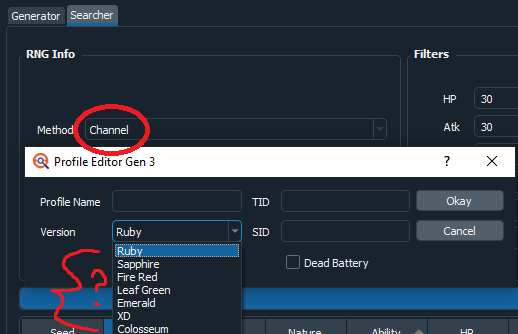
You’ll want to select the game that the Jirachi is being sent to. You do not do RNG manipulation on Pokémon Channel or edit the Pokémon in Channel (Channel doesn’t have any Pokémon). The Pokémon is generated in the target game that gets the Jirachi. The Channel option is there so the right method to use for Jirachi information.
-
25 minutes ago, PLAFiles said:
I want a European or Japanese Pokemon Channel save file and I found the thread below. When importing the .gci file to PKHeX, though, it says it's unsupported.
From the looks of it that save file you’re trying to load is a Pokémon Channel save file. PKHeX does not support that game. Even if it can open the save file there are no Pokémon to edit in the file. You’ll need to load the save file and transfer the Jirachi to a GBA game.
-
@Benjamin. without opening the files I can see the Lugia, Salamence, and Snorlax are not legal. All XD Pokémon have the faithful encounter flag so the summary would state it’s from a faithful encounter. I’m not at my computer so I can’t say what’s wrong with the first 2, but I’ll go out on a limb and say they are not legal either. Did you modify all 5 of these in some way?
-
17 hours ago, eloscar23 said:
Hello, you can remove the hard drive and put it on another pc with windows and take the files or install windows over that windows without deleting the files and accessing the previous session.
Computers do not let you remove hard drives from one computer and up it into another and have it work on that computer. That is a security feature to prevent data theft.
-
@jojo12100 I’ve been thinking about this this past weekend. I think there is a good chance it’ll work. All someone has to do is try it out. If it doesn’t I just need to get my hands on a RAM dump for the target generation and I can get it working.
For the record I don’t have these builds and don’t plan on tracking them down. If the application needs updating I’ll need someone to donate a RAM dump of the target build.
-
10 hours ago, shinygroudon said:
Yeah, I used the save file uploaded here and it didn't pull anything.
I tried to do a RAM dump using Task Manager and Dolphin(but it was like 60 gigs and it didn't really) all the guides are for an ancient version of Dolphin and specifically Mario Kart.
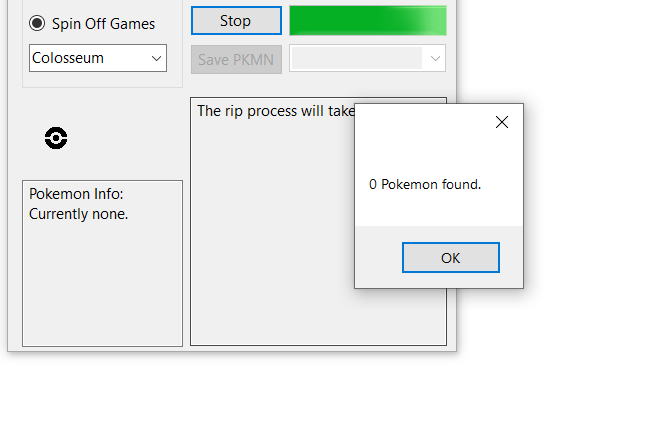
You need to dump the RAM from within Dolphin. I can give you a better answer tomorrow.
-
1
-
-
11 hours ago, SkyLink98 said:
Analyze the save file before and after modifications to the mt battle team. Search for pkm-like data.
If you just want to dump your mons, you may also try this ram dumper
Dolphin should allow ram dumps if I remember correctly.
@shinygroudonif you use the application and it is missing Pokémon or it didn’t find any let me know. There is a bug with extracting Colosseum Pokémon. I just haven’t put out the fix yet.
-
@Dragazaif you can dump the games RAM while you’re battling the trainer you can use this application to extract the Pokémon.
-
1
-
-
4 hours ago, just2jake said:
I used a Gameshark way back when and it ruined the overworld! I'm in the top of the pokemon center but when I go down my character sprite is stuck in a black void. Is there anything I could do to undo the damage?
You're in luck I was fixing my Silver save today and had to fix my map location. Here you go just rename the file and you should be good to go!
-
 1
1
-
-
56 minutes ago, GarchompTrainer said:
First off I want to say thank you to the OP and users who have contributed to this post, I have some questions so I made an account.
For Pokémon hatched from eggs in gen 3 that were transferred to gen 4, once transferred to gen 5 do those Pokémon's date change, or is the one kept from gen 4? Does the egg data even stay when Pokémon are transferred to gen 4? As well as gen 4 to 5.For gen 3/4/5 Pokémon that are transferred in gen 6/7 games, what is the met location? Is it supposed to be Poke Transfer or the Region it is from?
Is it possible to make pk7 files to pk1-2 files, specifically for Pokémon that were transferred from the 3DS VC Games? Or might it just be better to recreate the Pokémon in PKHeX if not possible?
I might have asked a question that has already been answered, so if that's the case I apologize. There is a lot of information to take in here.
Thank you in advance to whoever may respond!

1) Refer to this post:
On 8/23/2021 at 2:25 PM, Poke J said:A gen 3 Pokémon transferred to gen 4 will get a met date when it is transferred (after the Pal Park catching mini game). Pokémon that are transferred to gen 5 will get a new met date of when they were transferred to gen 5. The met date is not modified after that. In terms of an accurate met date any date from January 1, 2000 onwards is valid since the met date is based on your counsel which could be set incorrectly.
2) Pokémon from gens prior to 5 will have Poke Transporter as the location.
3) Just recreate the Pokémon. All that is preserved from gen1/2 to 7 is the species, nickname, OT, trainer ID, gender, current level, and if it was shiny.
-
1
-
-
10 minutes ago, ShadowDecidueye said:
Hello! So I used to have a Pokémon Sun Cartridge until someone stole my game. However I owned a code junkies Powersave for my 3ds and added cheats all the time. Every time it created a backup. I recently modded my new 2ds (old one broke) and I realized that maybe if I find the old files perhaps I could get my first pokémon game, (besides Yellow), first starter, first shiny, and first event pokémon back. I found the old files and copied the backup to my hshop pokémon sun's checkpoint save. I renamed the new backup and deleted the one that was already there. When I loaded the game, it said the file was corrupted. I'll also say that the backup restored suspiciously fast. I decided maybe I could load the file on PkHex but after renaming it to main, it just said that my file was too big. I was told that I need to decode the file as it's linked to a specific save. Maybe that has something to do with it. I really need your guys' help; I won't stop till my file is restored in some way. Below are two files, the original latest back up and a slightly modified one where I changed the bytes I believe I replaced all the bytes in the copy past 0x9C with FF, as that was something I was told I should do at one point. (Not sure if that'll really help). Thank you!
The unfortunate part of Powersaves is it encrypts the backup save file and that file is backed up is a way that it has to be to the same game card and not another of the same game. So to make it work in the first place you will need to break the Powersave encryption. I've been around here for quite some time and seen similar requests and unfortunately all of those requests remain unfulfilled. What I'm trying to say is don't get your hopes up that someone is going to be able to get your save into a workable state.
-
8 hours ago, FishCybil said:
Excuse me, what will happen to the egg obtained date and link trade date if I tansfer it(gen4) to gen6? How will the date change?
What ever date is the egg met date field will remain unchanged. Only the met date changes when transferring to gen 5. The dates do not change from gen 5 to gen 6. So if you’re using PKHeX to go from gen 4 to gen 6 the met location and met date will change to simulate that the Pokémon went to gen 5, but the egg met location and egg met date do not change.
-
 1
1
-
-
9 minutes ago, jteamjason said:
Yeah, I should take down that second photo - it's distracting and not helpful.
As you made this post I made an edit to my post that you might want to see.
[DSPRE] Removing Form Restrictions In Pokémon Platinum's Battle Frontier [Solved]
in ROM - NDS Discussion & Help
Posted
I don’t make ROM hacks and I don’t know the actual answer to your question, but in Platinum there is a programming oversight that does allow for the Rotom forms to be used in the battle frontier. In double battles if Rotom is in the fourth party slot the game does not do the form check allowing it to be permitted. It isn’t an exact answer, but it could help lead you to your desired results. I see people ask questions like this on occasion here and they don’t usually get answered so this is probably the best answer you’re going to get on this forum.