All Activity
- Today
-
 -1 is the magic number for "can be random".
 -
 DUH. Didn't even realize all of the stats were pre-populated. Was only messing with natures and shininess. Reset seems to work...why are the default values (zero indexed) all 1 less than what is legitimate?
 -
If you are too specific with your request, like having 6IV adamant for a gen3 wild encounter, then it will fail to find anything. When it can't find anything to satisfy your specific request, you need to be less specific. Click the Reset button to see what an unspecified criteria is -- IVs are frequently a reason why a criteria is impossible to satisfy.
-
 Hello! I saw that you posted cheats to disable the illusion turning you into a Kecleon, where do I input those cheats? I wanna play as a Zoroark!
 -
Ah, Criteria Tab is a new feature then. Thanks! Okay, I've selected the Random Nature (that's what I want) and I am trying a bunch of different fringe cases. I am just selecting a pokemon and CTRL clicking repeatedly to see if the PID/Nature changes. It looks like anything of type 'Static Encounter' or 'Gift Encounter' does not work. Here are some notes... 1. With UseTabsAsCriteria set to TRUE, Static Encounters always default to Modest with PID 0A354D3C with Random Nature set; Gift Encounters and XD Shadow Encounters always default to Bashful with PID 12ED01C0 with Random Nature set. 2. Wishmaker Jirachi is not being Generated as shiny with the Shiny flag set to Always (I know there are only like 9 legal Wishmakers) 3. Similarly, e-Reader Colosseum Pokemon are also not working for Shininess and in this case generate invalid pokemon (but have known fixed Nature/IV weirdness too); are there a set number of Shiny PID's for these 3 guys? 4. Setting UseTabsAsCriteria to FALSE will allow CTRL Clicking for Random PID/Natures for Static/Gift Encounters like I want. Random appears to be default behavior, and specifying a Nature and Shininess will work as expected So I have figured out how to use it; perhaps these are bugs or just known limitations/WIP's.
- Yesterday
-

PKVault - Centralized pkm storage management & Pokedex app
chnapy replied to chnapy's topic in Saves - Tools
Hi, new release 1.4.3 with several fixes & app new way of use. First, critical bug found by @zavage00 should be fixed. If somehow anyone has his save broken, no need to panic: just restore your latest backup (in Settings). Multiple other bugs are also fixed with pkm move action. With a homelab, or any similar setup using Docker, PKVault can now be pulled as a Docker image, from `ghcr.io/chnapy/pkvault`. If you feel interested, checkout GitHub repo. -
Use the Criteria tab and ensure it is filled out the way you want. Hardy is the 0th nature, and it is the default nature of the Pokémon when you launch the program. It seems you're not specifying your criteria, thus the program is always trying to match the initial default from tabs since you forgot to specify it.
-
For me, This bug has appeared and disappeared throughout the various versions last year. I save each version I use due to this bug and revert to older versions if it appears. The last version where this doesn't occur is in 2025-09-25; I am using the Santacrab2 fork for the plugins (official doesn't seem to be getting any love). The bug specifically is as follows: 1. Open a Gen III Save 2. Open the Encounter Database 3. Select a Pokemon from encounter database (Nature will be Hardy as default) 4. I change the nature to the desired nature (Pokemon now is illegal) 5. I go back to the Encounter Database and Select the Pokemon again 6. Nature reverts back to Hardy; this does not happen on 2025-09-25, which would normally reset the PID to something legal Only way around this is to use ALM - Legalize Active Pokemon...which isn't ideal. It is possible I am not setting up PKHeX plugins correctly...but I don't think so. From what research I've done this bug has apparently already been fixed...Is the Santacrab2 fork to blame? Let me know what to try. Thanks
-
apologies, i missed this. truthfully i dont know but based on what i was doing at the time it is likely
- Last week
-

Pokemon Mystery Dungeon: Explorers of the Spirit
sooni.exe replied to MaxSchersey's topic in ROM - NDS ROM Hacks
This is happening for me as well :< hoping there's a way around it -

[PLZA] Find the flag that disables the camera mode
Alegria replied to Alegria's topic in Saves - Research
The flag you mentioned was indeed turned off, but I can confirm when I changed to get the events, this was not one of the affected flags; now I can access my camera mode though so thank you. -
You do not need NSO to receive the gift online.
-
 Wondering can you do this, and if so, how? You can only get precatched Mewtwos from the mystery gift database from what I can see. Just wanting to do this for fun’s sake. Sorry if this is a dumb question. I’m basically brand new to save editing.
 -

How to actually read value changes between 2 Save files?
ATEMVEGETA replied to ATEMVEGETA's topic in PKHeX
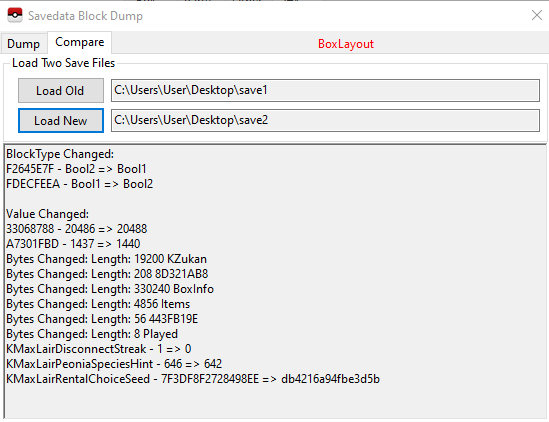
I had lost some Max Lair progress of my save file and wanted to replicate the progress manually via PKHeX. I have the exact Pokemon that I claimed in those Max Lairs as .pk8 files. 1. So I added them manually those .pk8 in the Boxes (I noticed this also registers them into the Pokedex) 2. The Dynite Ores were already at 999 before those Dynamax Adventures so no changes there. 3. I "discarded" all the Pokeballs used for those caught Pokemon. 4. I updated the Played Time that passed. 5. Updated manually the Pokedex's "Battled" value for all the encountered Pokemon that didn't get caught. 6. Changed the "*Bool KCaptured" of the caught Legendary Pokemon so they wont appear again in Max Lairs. 7. I consider any other encountered Pokemon in the Max Lairs as "not attempted to be caught". So, no Ball use for them. Just their Pokedex "seen" counter +1. I think these cover everything unless I'm missing some hidden values not visible in-game. Anything else Max Lair relative I should change? -
[PLZA] Find the flag that disables the camera mode
Kaphotics replied to Alegria's topic in Saves - Research
Please check the status of the event flag I listed at the end of my message. I am still skeptical that you didn't accidentally change the flag's state when trying to activate Mewtwo. -
[PLZA] Find the flag that disables the camera mode
Alegria replied to Alegria's topic in Saves - Research
I only changed things for the Mewtwo event so I think there's a glitch involved. Plus lots of things haappened in the meantime on my game, I don't really want to go back. -
 Started playing this mod last week and I've been having a blast with it so far! I have been deeply humbled by this game tearing me a new one and it's such a refreshing and hilarious experience for me personally. I made an account (just now...) mainly to ask a question here for confirmation. I've been having occasional crashes when transitioning between dungeon floors. It doesn't happen too often, but tonight it's been happening very frequently while trying to complete Mt. Horn during the expedition chapter so I wanted to get a little insight on if this is a romhack issue or an emulator issue I'm playing on BizHawk v2.9.1 for reference. If there's a recommended emulator in the initial notes for best performance, I will admit!! ...I skimmed most of the notes...... I'm sorry! I've restarted and played up to Mt. Horn on DeSmuME and can confirm that it was almost certainly a BizHawk emulator issue. I'm now in Foggy Forest on DeSmuME and have only experienced maybe 2 or 3 crashes the entire time replaying from the beginning compared to the much more frequent crashes on BizHawk. Soooo I'll say problem self-solved!
 -
SoftestPuffss changed their profile photo
-
[PLZA] Find the flag that disables the camera mode
Kaphotics replied to Alegria's topic in Saves - Research
Then restore a backup from before you cheated, and don't modify the event flags. PKHeX mentions this at the bottom of the event flag editor: You probably turned off `FLAG_PHOTOMODE_ENABLE` (032AD99537C6091F). You really shouldn't have contacted Nintendo/Pokémon support for help after cheating. -
[PLZA] Find the flag that disables the camera mode
Alegria replied to Alegria's topic in Saves - Research
I did, but I was able to take pictures after getting Mewtwo and Diancie, it happened afterwards. I literally have a save file from after I caught both that still has the camera mode, and I didn't play with file editor afterwards. -
[PLZA] Find the flag that disables the camera mode
Kaphotics replied to Alegria's topic in Saves - Research
Did you cheat to unlock Mewtwo, or use any cheats/save edits on the file previously? -
How to actually read value changes between 2 Save files?
Kaphotics replied to ATEMVEGETA's topic in PKHeX
Welcome to research. Save files are just bytes of data, nothing is labeled unless a human figures out what a block is for and adds it to the accessor label list. There is no plugin, it is a black box where the onus is on you to figure out new labels. You repeat actions in games to see what changed, then you go look at individual blocks to see if it was storing a value somewhere. Use the Dump tab to inspect individual blocks in the currently loaded save file. -
![More information about "[PKHeX Plugin] Shiny Stash Map plugin"](https://projectpokemon.org/home/uploads/monthly_2026_02/517915625-30e14f4b-95d5-495c-8d1d-37502bceaada.thumb.png.473bc9a4b8e37cecd7ab708ca863c1df.png)
Version 26.02.02
26 downloads
Have you ever wondered where that shiny fletchling or pidgey that is shown on the misc tab for Pokémon ZA is located? Then this plugin is for you! In Pokémon ZA the game stores shinies that spawn in the overworld into their own block. This plugin reads that block and shows you the approximate location of these spawns. How to use Put the plugin into the plugins folder in your PKHeX directory, then access it from the Tools menu. Note: Win 10 might block DLL files downloaded from the internet. In that case right click the plugin file, go to properties and check "unblock" (as seen here). [You may have to unblock, reblock, then unblock again to get it to work] Example of how to unblock: Usages Can be used with either a ZA save file loaded into PKHeX or via a live read using sys-botbase. Connecting is optional. Click on the sprites in the plugin to have their locations shown on the map. Support for support or bug issues please utilize github -
 You go to the listed dungeons, and at the end they'll give you enough items to trade for the globes.
 -
How to actually read value changes between 2 Save files?
ATEMVEGETA replied to ATEMVEGETA's topic in PKHeX
I did one more test. I did the exact same Dynamax Adventure but didn't catch any Pokemon this time and here's the result: I reallly have no idea what's going on! Random Booleans switch values and other unamed random values increase/decrease or whatever. Can someone explain please? Is there any plugin maybethat can read/edit all those things properly?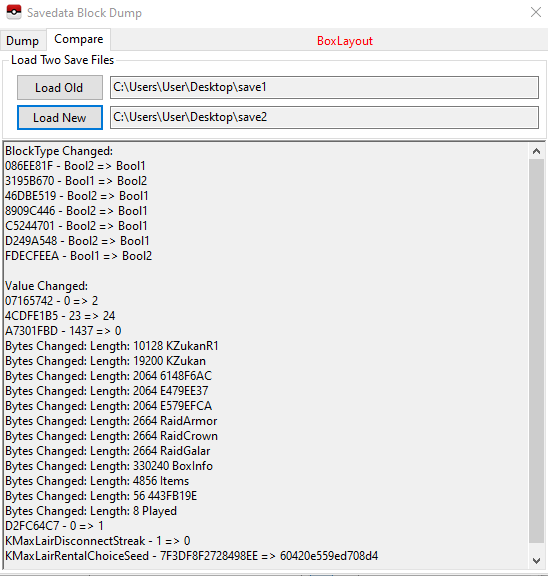
-
I was trying to alter the "Pokemon Caught" value in my League Card of Pokemon Shield (64 -> 62), but I couldn't find where that value is stored. I tried to find it in the "Block Data" section but nowhere I could see a "64" value. So, I decided to catch a Pokemon and see which value will change. I had saved in front of the Max Lair lady, so I entered a Dynamax Adventure, caught 1 Pokemon, (reached to the Legendary then lost to it), the game saved right after I exit and below (pic) is the comparition between the 2 files. I thought I would see clearly a value increasing by +1 but I see very random byte changes, etc. What are all these values anyway? Ok, I can understand the last 3 plus the "Items" value increase (probably the -1 Pokeball and the amount of Dynite Ores gained) and the "Played" value (probably the extra played time). But what are all the other unamed values? How can I read them properly?