All Activity
- Today
-
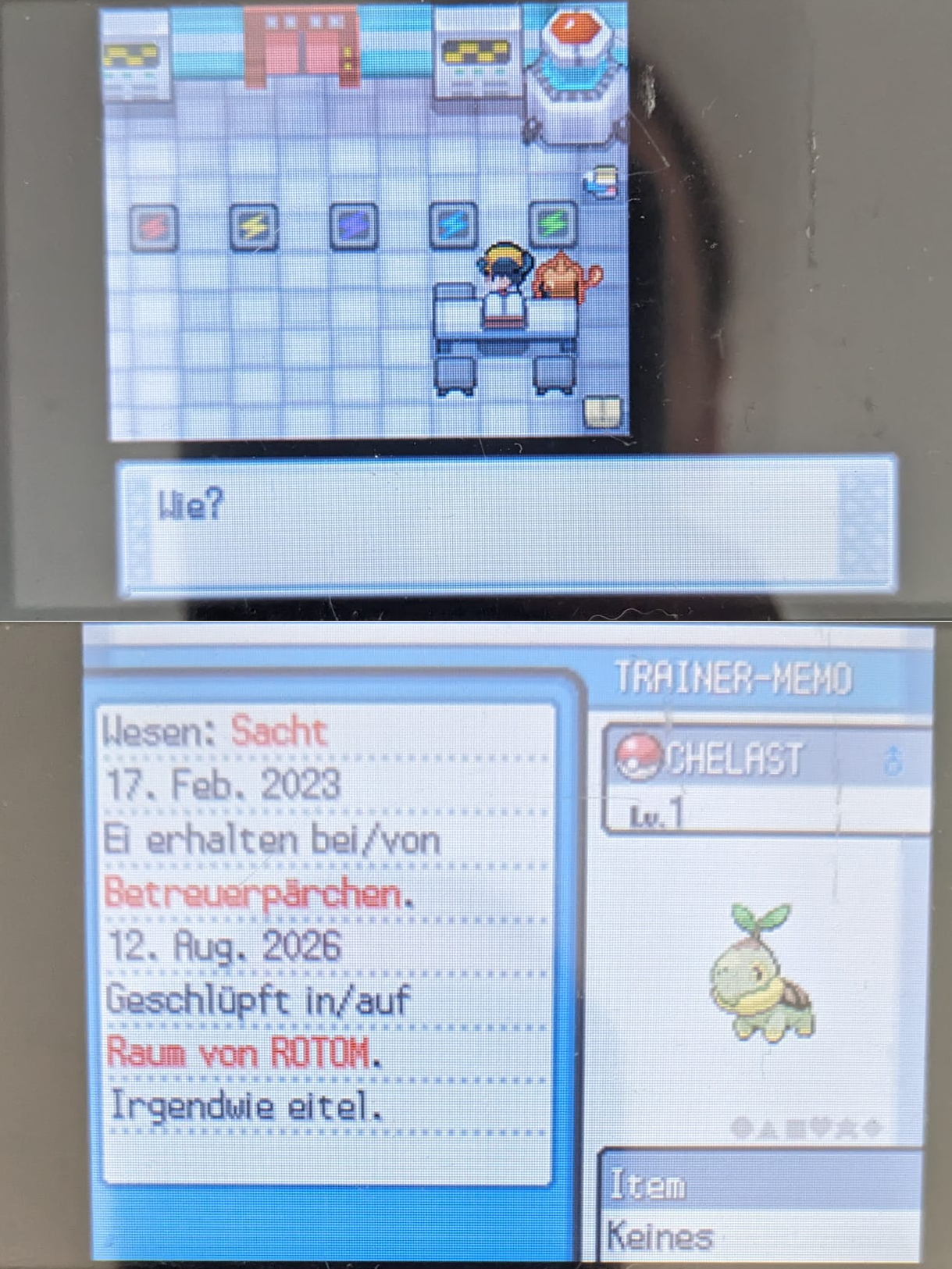
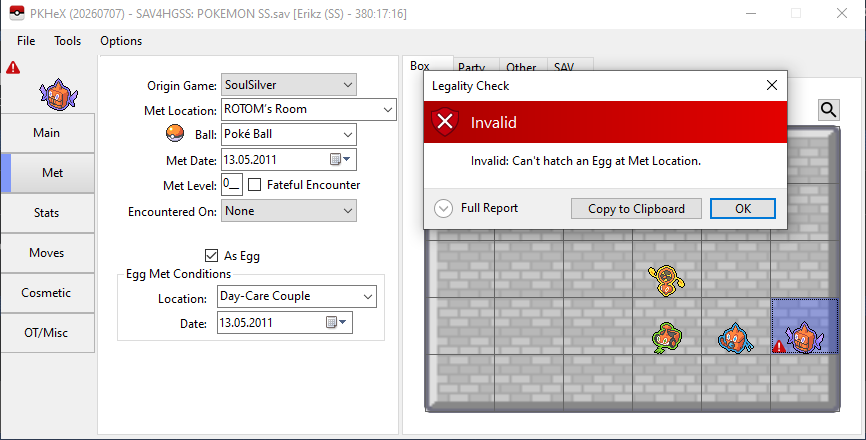
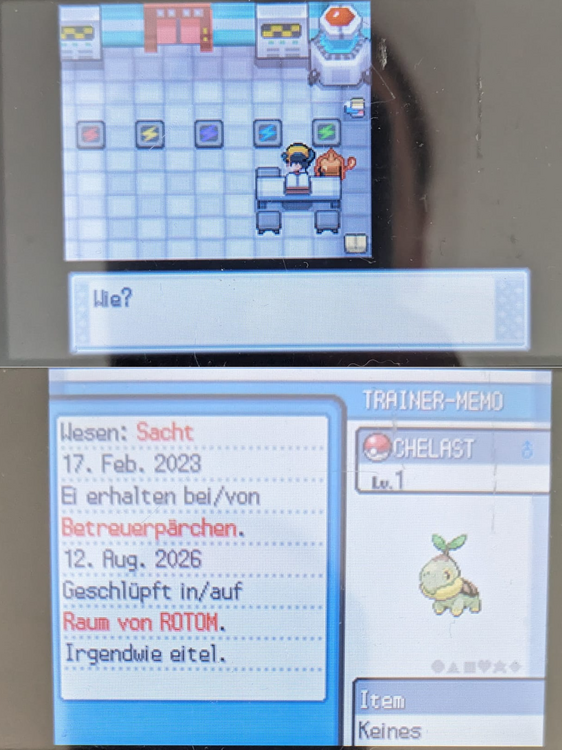
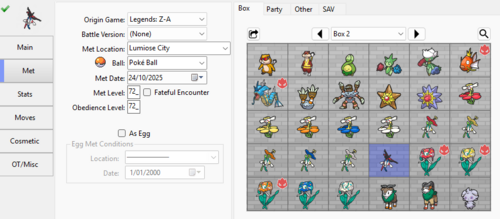
but it is possible. Maybe the problem is that pkhex thinks ROTOM's Room is a location only in Sinnoh. Hatched a random egg for proof.
-
.thumb.png.ca8e9e4355f093a47a67376165bf6fed.png) Red the Hedgehog268 changed their profile photo
Red the Hedgehog268 changed their profile photo -
 Lolbit2026 changed their profile photo
 -
 ah, didn't realize it doesn't work with dark mode. I'll think of something.
 -
Is it possible to generate a Gyarados from Shield that is the max height and has the Fishing mark?
-
just to make a slight correction, the offset 170B4 should also be changed to '03' in addition to this. previously only 32 out of the 34 were unlocked using the original message
-
That error came after cloning the very last doughnut #999 to the rest of them, however I cloned the first empty slot to all of the spots and the error did not show up. So all is well now thank you.
-
Ok I tried that and this is the error that I got. Exception Details: System.IndexOutOfRangeException: Index was outside the bounds of the array. at System.Windows.Forms.ItemArray.GetItem(Int32 virtualIndex, Int32 stateMask) at System.Windows.Forms.ListBox.get_Text() at System.Windows.Forms.Control.OnHandleDestroyed(EventArgs e) at System.Windows.Forms.Control.WmDestroy(Message& m) at System.Windows.Forms.Control.WndProc(Message& m) at System.Windows.Forms.NativeWindow.Callback(HWND hWnd, UInt32 msg, WPARAM wparam, LPARAM lparam) Loaded Assemblies: -------------------- System.Private.CoreLib, Version=10.0.0.0, Culture=neutral, PublicKeyToken=7cec85d7bea7798e C:\Program Files\dotnet\shared\Microsoft.NETCore.App\10.0.11\System.Private.CoreLib.dll PKHeX, Version=26.7.7.0, Culture=neutral, PublicKeyToken=null C:\Users\DOMINI~1\AppData\Local\Temp\.net\PKHeX\yakX1qu0NE2W\PKHeX.dll System.Runtime, Version=10.0.0.0, Culture=neutral, PublicKeyToken=b03f5f7f11d50a3a C:\Program Files\dotnet\shared\Microsoft.NETCore.App\10.0.11\System.Runtime.dll System.Windows.Forms, Version=10.0.0.0, Culture=neutral, PublicKeyToken=b77a5c561934e089 C:\Program Files\dotnet\shared\Microsoft.WindowsDesktop.App\10.0.11\System.Windows.Forms.dll System.ComponentModel.Primitives, Version=10.0.0.0, Culture=neutral, PublicKeyToken=b03f5f7f11d50a3a C:\Program Files\dotnet\shared\Microsoft.NETCore.App\10.0.11\System.ComponentModel.Primitives.dll System.Windows.Forms.Primitives, Version=10.0.0.0, Culture=neutral, PublicKeyToken=b77a5c561934e089 C:\Program Files\dotnet\shared\Microsoft.WindowsDesktop.App\10.0.11\System.Windows.Forms.Primitives.dll System.Private.Windows.Core, Version=10.0.0.0, Culture=neutral, PublicKeyToken=b77a5c561934e089 C:\Program Files\dotnet\shared\Microsoft.WindowsDesktop.App\10.0.11\System.Private.Windows.Core.dll System.Private.Windows.GdiPlus, Version=10.0.0.0, Culture=neutral, PublicKeyToken=b77a5c561934e089 C:\Program Files\dotnet\shared\Microsoft.WindowsDesktop.App\10.0.11\System.Private.Windows.GdiPlus.dll System.Drawing.Primitives, Version=10.0.0.0, Culture=neutral, PublicKeyToken=b03f5f7f11d50a3a C:\Program Files\dotnet\shared\Microsoft.NETCore.App\10.0.11\System.Drawing.Primitives.dll System.Collections.Specialized, Version=10.0.0.0, Culture=neutral, PublicKeyToken=b03f5f7f11d50a3a C:\Program Files\dotnet\shared\Microsoft.NETCore.App\10.0.11\System.Collections.Specialized.dll PKHeX.Core, Version=26.7.7.0, Culture=neutral, PublicKeyToken=null C:\Users\DOMINI~1\AppData\Local\Temp\.net\PKHeX\yakX1qu0NE2W\PKHeX.Core.dll System.Threading.Thread, Version=10.0.0.0, Culture=neutral, PublicKeyToken=b03f5f7f11d50a3a C:\Program Files\dotnet\shared\Microsoft.NETCore.App\10.0.11\System.Threading.Thread.dll System.Memory, Version=10.0.0.0, Culture=neutral, PublicKeyToken=cc7b13ffcd2ddd51 C:\Program Files\dotnet\shared\Microsoft.NETCore.App\10.0.11\System.Memory.dll System.Collections.Concurrent, Version=10.0.0.0, Culture=neutral, PublicKeyToken=b03f5f7f11d50a3a C:\Program Files\dotnet\shared\Microsoft.NETCore.App\10.0.11\System.Collections.Concurrent.dll System.Collections, Version=10.0.0.0, Culture=neutral, PublicKeyToken=b03f5f7f11d50a3a C:\Program Files\dotnet\shared\Microsoft.NETCore.App\10.0.11\System.Collections.dll System.Runtime.InteropServices, Version=10.0.0.0, Culture=neutral, PublicKeyToken=b03f5f7f11d50a3a C:\Program Files\dotnet\shared\Microsoft.NETCore.App\10.0.11\System.Runtime.InteropServices.dll System.Threading, Version=10.0.0.0, Culture=neutral, PublicKeyToken=b03f5f7f11d50a3a C:\Program Files\dotnet\shared\Microsoft.NETCore.App\10.0.11\System.Threading.dll System.Text.Json, Version=10.0.0.0, Culture=neutral, PublicKeyToken=cc7b13ffcd2ddd51 C:\Program Files\dotnet\shared\Microsoft.NETCore.App\10.0.11\System.Text.Json.dll System.Text.Encodings.Web, Version=10.0.0.0, Culture=neutral, PublicKeyToken=cc7b13ffcd2ddd51 C:\Program Files\dotnet\shared\Microsoft.NETCore.App\10.0.11\System.Text.Encodings.Web.dll System.Text.Encoding.Extensions, Version=10.0.0.0, Culture=neutral, PublicKeyToken=b03f5f7f11d50a3a C:\Program Files\dotnet\shared\Microsoft.NETCore.App\10.0.11\System.Text.Encoding.Extensions.dll System.Numerics.Vectors, Version=10.0.0.0, Culture=neutral, PublicKeyToken=b03f5f7f11d50a3a C:\Program Files\dotnet\shared\Microsoft.NETCore.App\10.0.11\System.Numerics.Vectors.dll PKHeX.Drawing.PokeSprite, Version=26.7.7.0, Culture=neutral, PublicKeyToken=null C:\Users\DOMINI~1\AppData\Local\Temp\.net\PKHeX\yakX1qu0NE2W\PKHeX.Drawing.PokeSprite.dll System.ObjectModel, Version=10.0.0.0, Culture=neutral, PublicKeyToken=b03f5f7f11d50a3a C:\Program Files\dotnet\shared\Microsoft.NETCore.App\10.0.11\System.ObjectModel.dll Microsoft.Win32.Registry, Version=10.0.0.0, Culture=neutral, PublicKeyToken=b03f5f7f11d50a3a C:\Program Files\dotnet\shared\Microsoft.NETCore.App\10.0.11\Microsoft.Win32.Registry.dll System.Text.RegularExpressions, Version=10.0.0.0, Culture=neutral, PublicKeyToken=b03f5f7f11d50a3a C:\Program Files\dotnet\shared\Microsoft.NETCore.App\10.0.11\System.Text.RegularExpressions.dll System.Linq, Version=10.0.0.0, Culture=neutral, PublicKeyToken=b03f5f7f11d50a3a C:\Program Files\dotnet\shared\Microsoft.NETCore.App\10.0.11\System.Linq.dll System.Drawing.Common, Version=10.0.0.0, Culture=neutral, PublicKeyToken=cc7b13ffcd2ddd51 C:\Program Files\dotnet\shared\Microsoft.WindowsDesktop.App\10.0.11\System.Drawing.Common.dll System.Security.Cryptography, Version=10.0.0.0, Culture=neutral, PublicKeyToken=b03f5f7f11d50a3a C:\Program Files\dotnet\shared\Microsoft.NETCore.App\10.0.11\System.Security.Cryptography.dll Microsoft.Win32.Primitives, Version=10.0.0.0, Culture=neutral, PublicKeyToken=b03f5f7f11d50a3a C:\Program Files\dotnet\shared\Microsoft.NETCore.App\10.0.11\Microsoft.Win32.Primitives.dll System.ComponentModel.EventBasedAsync, Version=10.0.0.0, Culture=neutral, PublicKeyToken=b03f5f7f11d50a3a C:\Program Files\dotnet\shared\Microsoft.NETCore.App\10.0.11\System.ComponentModel.EventBasedAsync.dll Accessibility, Version=4.0.0.0, Culture=neutral, PublicKeyToken=31bf3856ad364e35 C:\Program Files\dotnet\shared\Microsoft.WindowsDesktop.App\10.0.11\Accessibility.dll System.ComponentModel, Version=10.0.0.0, Culture=neutral, PublicKeyToken=b03f5f7f11d50a3a C:\Program Files\dotnet\shared\Microsoft.NETCore.App\10.0.11\System.ComponentModel.dll System.Resources.Extensions, Version=10.0.0.0, Culture=neutral, PublicKeyToken=cc7b13ffcd2ddd51 C:\Program Files\dotnet\shared\Microsoft.WindowsDesktop.App\10.0.11\System.Resources.Extensions.dll System.Drawing, Version=10.0.0.0, Culture=neutral, PublicKeyToken=b03f5f7f11d50a3a C:\Program Files\dotnet\shared\Microsoft.WindowsDesktop.App\10.0.11\System.Drawing.dll System.ComponentModel.TypeConverter, Version=10.0.0.0, Culture=neutral, PublicKeyToken=b03f5f7f11d50a3a C:\Program Files\dotnet\shared\Microsoft.NETCore.App\10.0.11\System.ComponentModel.TypeConverter.dll Microsoft.Win32.SystemEvents, Version=10.0.0.0, Culture=neutral, PublicKeyToken=cc7b13ffcd2ddd51 C:\Program Files\dotnet\shared\Microsoft.WindowsDesktop.App\10.0.11\Microsoft.Win32.SystemEvents.dll System.Collections.NonGeneric, Version=10.0.0.0, Culture=neutral, PublicKeyToken=b03f5f7f11d50a3a C:\Program Files\dotnet\shared\Microsoft.NETCore.App\10.0.11\System.Collections.NonGeneric.dll System.Runtime.Loader, Version=10.0.0.0, Culture=neutral, PublicKeyToken=b03f5f7f11d50a3a C:\Program Files\dotnet\shared\Microsoft.NETCore.App\10.0.11\System.Runtime.Loader.dll System.Net.Http, Version=10.0.0.0, Culture=neutral, PublicKeyToken=b03f5f7f11d50a3a C:\Program Files\dotnet\shared\Microsoft.NETCore.App\10.0.11\System.Net.Http.dll System.Net.Primitives, Version=10.0.0.0, Culture=neutral, PublicKeyToken=b03f5f7f11d50a3a C:\Program Files\dotnet\shared\Microsoft.NETCore.App\10.0.11\System.Net.Primitives.dll System.Diagnostics.Tracing, Version=10.0.0.0, Culture=neutral, PublicKeyToken=b03f5f7f11d50a3a C:\Program Files\dotnet\shared\Microsoft.NETCore.App\10.0.11\System.Diagnostics.Tracing.dll System.Diagnostics.DiagnosticSource, Version=10.0.0.0, Culture=neutral, PublicKeyToken=cc7b13ffcd2ddd51 C:\Program Files\dotnet\shared\Microsoft.NETCore.App\10.0.11\System.Diagnostics.DiagnosticSource.dll System.Net.Security, Version=10.0.0.0, Culture=neutral, PublicKeyToken=b03f5f7f11d50a3a C:\Program Files\dotnet\shared\Microsoft.NETCore.App\10.0.11\System.Net.Security.dll System.Private.Uri, Version=10.0.0.0, Culture=neutral, PublicKeyToken=b03f5f7f11d50a3a C:\Program Files\dotnet\shared\Microsoft.NETCore.App\10.0.11\System.Private.Uri.dll System.Windows.Extensions, Version=10.0.0.0, Culture=neutral, PublicKeyToken=cc7b13ffcd2ddd51 C:\Program Files\dotnet\shared\Microsoft.WindowsDesktop.App\10.0.11\System.Windows.Extensions.dll PKHeX.Drawing, Version=26.7.7.0, Culture=neutral, PublicKeyToken=null C:\Users\DOMINI~1\AppData\Local\Temp\.net\PKHeX\yakX1qu0NE2W\PKHeX.Drawing.dll PKHeX.Drawing.Misc, Version=26.7.7.0, Culture=neutral, PublicKeyToken=null C:\Users\DOMINI~1\AppData\Local\Temp\.net\PKHeX\yakX1qu0NE2W\PKHeX.Drawing.Misc.dll System.Threading.ThreadPool, Version=10.0.0.0, Culture=neutral, PublicKeyToken=b03f5f7f11d50a3a C:\Program Files\dotnet\shared\Microsoft.NETCore.App\10.0.11\System.Threading.ThreadPool.dll System.Net.Sockets, Version=10.0.0.0, Culture=neutral, PublicKeyToken=b03f5f7f11d50a3a C:\Program Files\dotnet\shared\Microsoft.NETCore.App\10.0.11\System.Net.Sockets.dll System.Threading.Overlapped, Version=10.0.0.0, Culture=neutral, PublicKeyToken=b03f5f7f11d50a3a C:\Program Files\dotnet\shared\Microsoft.NETCore.App\10.0.11\System.Threading.Overlapped.dll System.Net.NameResolution, Version=10.0.0.0, Culture=neutral, PublicKeyToken=b03f5f7f11d50a3a C:\Program Files\dotnet\shared\Microsoft.NETCore.App\10.0.11\System.Net.NameResolution.dll System.Runtime.Intrinsics, Version=10.0.0.0, Culture=neutral, PublicKeyToken=cc7b13ffcd2ddd51 C:\Program Files\dotnet\shared\Microsoft.NETCore.App\10.0.11\System.Runtime.Intrinsics.dll System.Security.Principal.Windows, Version=10.0.0.0, Culture=neutral, PublicKeyToken=b03f5f7f11d50a3a C:\Program Files\dotnet\shared\Microsoft.NETCore.App\10.0.11\System.Security.Principal.Windows.dll System.Security.Claims, Version=10.0.0.0, Culture=neutral, PublicKeyToken=b03f5f7f11d50a3a C:\Program Files\dotnet\shared\Microsoft.NETCore.App\10.0.11\System.Security.Claims.dll System.Runtime.Serialization.Formatters, Version=8.1.0.0, Culture=neutral, PublicKeyToken=b03f5f7f11d50a3a C:\Program Files\dotnet\shared\Microsoft.NETCore.App\10.0.11\System.Runtime.Serialization.Formatters.dll System.Reflection.Metadata, Version=10.0.0.0, Culture=neutral, PublicKeyToken=b03f5f7f11d50a3a C:\Program Files\dotnet\shared\Microsoft.NETCore.App\10.0.11\System.Reflection.Metadata.dll System.Diagnostics.StackTrace, Version=10.0.0.0, Culture=neutral, PublicKeyToken=b03f5f7f11d50a3a C:\Program Files\dotnet\shared\Microsoft.NETCore.App\10.0.11\System.Diagnostics.StackTrace.dll System.Collections.Immutable, Version=10.0.0.0, Culture=neutral, PublicKeyToken=b03f5f7f11d50a3a C:\Program Files\dotnet\shared\Microsoft.NETCore.App\10.0.11\System.Collections.Immutable.dll -------------------- User Message: An error occurred in PKHeX. Please report this error to the PKHeX author.
-
View an empty donut then clone it to all other slots.
-
Hi! I'm also having problems with PKHeX. Exception Details: System.IndexOutOfRangeException: Index was outside the bounds of the array. at System.Windows.Forms.TaskDialogPage.GetBoundButtonByID(Int32 buttonID) at System.Windows.Forms.TaskDialog.HandleTaskDialogCallback(HWND hWnd, TASKDIALOG_NOTIFICATIONS notification, WPARAM wParam, LPARAM lParam)L I get that error when I try to save the file or when I try to check the Pokémon's legality.
-
Please change the font coloring of the last one (number 7). It does not work well and is incredibly hard to read
-
I would like to request help with editing the doughnuts. I hit the button to randomize all which worked great but now I would like to clear my inventory of doughnuts but I don't see a button to do that. Nor do I know of a key combo to do that either. So maybe a feature could be added in the next update.
-
 I want to know for my living dex. Please, if anyone knows how, help.
 - Yesterday
-
I'm trying to save the SAV file, but it won't let me and an error pops up; I need help Exception Details: System.IndexOutOfRangeException: Index was outside the bounds of the array. at System.Windows.Forms.TaskDialogPage.GetBoundButtonByID(Int32 buttonID) at System.Windows.Forms.TaskDialog.HandleTaskDialogCallback(HWND hWnd, TASKDIALOG_NOTIFICATIONS notification, WPARAM wParam, LPARAM lParam)
-
Thanks
-
 They're in Temporal Tower, inside walls and monster houses. I use One-Room Orbs to find them since Trawl Orbs can't grab items that are inside walls. I don't know how far you are into the game, but I'd suggest recruiting Dialga if you haven't already, since after you do, you can go straight to Temporal Tower without having to go through the Hidden Land every time.
 -
 I found one once in Amp Plains, but I think it was pure luck. It's random
 -
Great job man !!!
-

PKVault - Centralized pkm storage management & Pokedex app
onyx3242 replied to chnapy's topic in Saves - Tools
Hi Sorry, I’ve been using your program since yesterday, but I’m having some issues managing my save paths in Docker. Currently, I have them configured as follows: - /srv/dev-disk-by-uuid-75350116-06ce-4d31-9975-2c539bde1f99/D-BACKUPS/saved-games/saved-emulators/roms-gba:/data/saves - /srv/dev-disk-by-uuid-75350116-06ce-4d31-9975-2c539bde1f99/D-BACKUPS/saved-games/saved-emulators/roms-nds:/data/saves-nds The problem is that these folders do not appear in the PkVaul interface, so I cannot access them through the application. I currently have to manually copy my save files. My idea was to use Syncthing on my local server and point it to the folder that is synchronized with Docker. Is there a way to make these folders accessible through the PkVaul interface? -

PKVault - Centralized pkm storage management & Pokedex app
chnapy replied to chnapy's topic in Saves - Tools
Minor update 2.1.0. A long-awaited major fix addressing the duplicate Pokémon that prevented transfer of certain Pokémon to PKVault storage (G5 games, and Ninjask/Shedinja) @axeil @Andrebarrzz91 @yeyizo Multiple Pokédex adds: moves/evolutions/locations in details, and Mega. Some bugs fix post-2.0, and a new language: Brazilian Portuguese ! -
 roxas7234 changed their profile photo
 -
Not sure if there is a batch fix, but doing this manually to everything effected worked for me. I was having this issue and was scratching my head because I've always played on cartridges and was only getting the error on some old mons, but anything I caught recently was fine. Looks like it was caused by using the batch editor to change your Pokemon OT, the blank name bytes weren't applied if your new name is shorter so you get the invalid termination error. I did this a few years ago, so the batch editor may not cause this issue anymore. I'm using my childhood save, and I changed it at some point to my real name instead of something I wrote when I was 10.
-
 noire06 changed their profile photo
 -
Hello everyone ! I recently wanted to play Pokemon Moon and I noticed that my battle team was still locked for another tournament. The problem is that the online doesn't work anymore. Is there any ways to fix it? I tried multiple things to no avail. I included my save in case it might be useful. Thank you for reading and I hope everyone will have a nice day ! main
-
I wonder where do I get Time Cogs?
- Last week
-
Would you mind if I use this rom hack as a base game to my own rom hack?
-
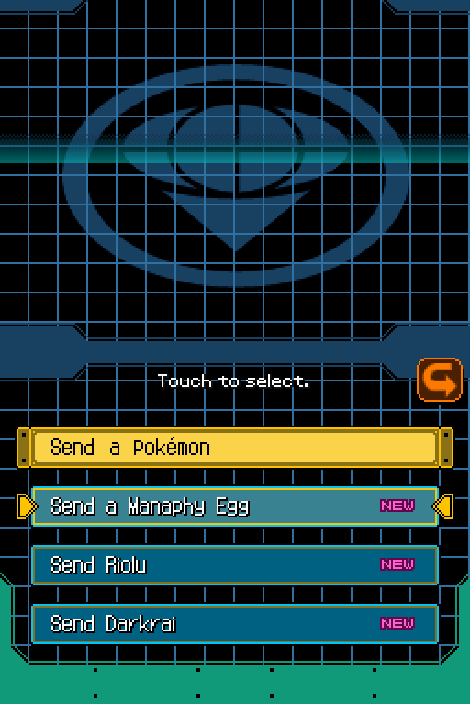
Howdy! I noticed that plenty of folks where looking for a way to reset the manaphy egg in ranger 2, but for the USA Version. I decided to take a crack at it and I was able to find the memory addresses on emulator that track the manaphy egg, along with Kyle’s riolu and Darkrai. Don’t know how to make them AR codes, but I was successful in resetting these flags using save states & a hex editor. 0xAF60C - Manaphy Egg 00 - Ready to Send 01 - Sent 0xAF620 - Kyle's Riolu 00 - Ready to Send 02 - Sent 0xAF634 - Darkrai 00 - Ready to Send 04 - Sent
-
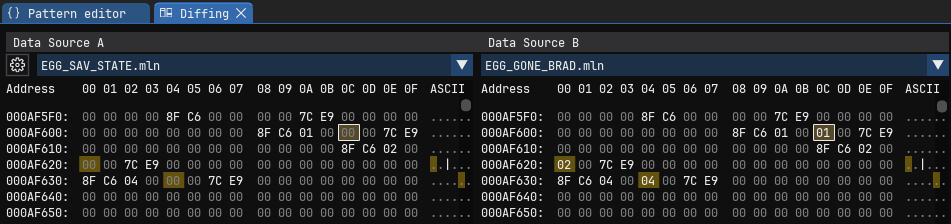
 After some tinkering, I was able to locate where "Sent pokemon" is tracked in pokemon ranger 2 (USA) within RAM (emulator). On the left is a Save file with all event pokemon ready to be sent (Thanks to InsaneNutter for providing the save). On the right is my OG save file that already transferred all event pokemon. I made multiple ranger > pearl transfers on emulator, then analyzed save states made before & after each transfer. From this I was able to narrow down the memory address that tracks the transfer status of each event pokemon. 0xAF60C - Manaphy Egg 00 - Ready to Send 01 - Sent 0xAF620 - Kyle's Riolu 00 - Ready to Send 02 - Sent 0xAF634 - Darkrai 00 - Ready to Send 04 - Sent I tried making some emulator cheat codes, though I'm very new to all this, and the ones I tested didn't work (memory address looks like it's offset?). However, if you want to reset these events for yourself WITHOUT wiping your save data: 1) Load your save file into an emulator. 2) Make a save state on the main menu (BEFORE SELECTING RANGER NET). 3) Upload your save state into a hex editor (ex: https://web.imhex.werwolv.net/). 4) Set the addresses listed above to (00) and save the changes. (if using imhex, it'll download as "file.bin", just change the extension to ".mln" or whatever format your emulator uses.) 4) Load your save state into an emulator, and the changes should take effect. 5) If you want these changes to be permanent on your save file, select your profile to enter the game, and immediately save at one of the in-game save points. Also attached my now restored save to this post as well. Hope this helps others too attached to wipe their save! POKE_RANGER2_YP2E01_00.trim.sav