Leaderboard




Popular Content
Showing content with the highest reputation since 12/19/25 in all areas
-
@BilKoChal thanks for your feedback, your point about pokedex will be fixed in next release. I keep in mind the rest. @AnHeroGold thanks, your battle-revolution save should be displayed, it's just wrong named (as "Pokemon") and has a grey neutral icon. This point will be fixed in next release. Please check if your save is present in save list, otherwise share it so I can see the issue. About your issue related to Gen 4 I'm not sure to understand, can you share any screenshot to see what's wrong ? @Vladcik thanks for your report, I'll try to fix these issues.2 points
-
there's one more update planned, no more major ones beyond that however: 1.2 - but it's taking awhile... like, a long while >.>
 1 point
 -
Absolutely love the new bank & expanded storage update, it's just what I always needed! Amazing work! The one suggestion I would make is that it would be cool if you could choose the size the boxes are displayed at, perhaps a toggle in the settings? So instead of having a scrollbar and a very long box, you could choose to have the bigger boxes just be displayed as bigger square boxes. Say if you have a box that's 120 slots large, it could be displayed as if you took four regular sized 30 slot boxes, and put them together to form a larger square 10x12 box, instead of the current 20x6 long box with a scroll bar we currently have. A box this large might be hard to display on smaller screens, but those people could simply use the regular scrollbar boxes. However for people with larger screens, the ability to display the the entire boxes as large squares would be a godsend!1 point
-
PKHeX already provides a list of stashed Shinies in the "Other" tab. If you want more detailed information, like coordinates, use this plugin (no support provided for it on this forum): https://github.com/santacrab2/ShinyStashMap1 point
-
Don't attack Skarmory with a stat lowering move, it's a known bug on Mirror Armor1 point
-
Hello everyone, I'm theSLAYER, your events moderator and forum manager here! First of all, I'll like to thank everyone for their past contributions and co-operation thus far! Foreword My hopes aside, I expect SWSH's events to be similar to LGPE, namely being non-injectable. As there are distributions for items and clothings/outfits, our contribution system would slightly differ from previous generations. Please please please read the entire section below, especially before you redeem your gift. How to contribute We need both of these: 1. Data that contains the event Provide a before redemption save and after redemption save (you could upload it here or PM it to me) [You're gonna need a modified/hacked Switch in order to extract the saves] or Alternatively, you may PM me and donate to us the serial code, if it's a items or clothings/outfits event. [Do note that with this, I will not be able to return you the code] 2. Details relating to the event If possible provide as much of below as possible: Pictures of the event location, the distribution device etc (if it's a local distribution) Photo/screengrab of receiving screen Serial code card (you can blank out the last 12 digits of the code; we only need the prefix, and a nice look at the card)1 point
-
Hi everyone, Backstory: Ive always wanted to play Pokemon US/UM in my native language, there was a Vietnamese fan translation group called DevilCatTeam who worked on these games. Sadly, they stopped working and went inactive about 3 years ago. Since then, no new Vietnamese patch has come out, so ive decided to try and finish or redo the translation myself but i havent had much luck with it. I would really appreciate your help or guidance. TL;DR: id love to try and do it myself, even if it takes time. What I have done so far: Right now, I’ve only taken the very first step: I used HackingToolkit3DS to extract the ROM of Pokémon Ultra Sun, and now I have folders like: ExtractedRomFS, ExtractedExeFS, ExtractedBanner, etc. Im kinda lost right now, I havent edited anything yet, I dont know which files contain the game’s dialogue, how to open or modify them, or how to handle fonts for Vietnamese characters. Any tips, links, or tools you can recommend would help me? Thank you in advance for any advice or tool suggestions!1 point
-
![More information about "[PKHeX Plugin] Mons with NPC editor (For Legends Arceus)"](https://projectpokemon.org/home/uploads/monthly_2022_02/Capture1.thumb.PNG.18def4fbd4ad12220471c5a54ee6e045.PNG)
Version 1.0.7
6123 downloads
In Pokémon Legends Arceus, the player is able to give or loan mons to the NPCs, and those mons will show up in the overworld. Even for permanent gifts, the data of the given mons are actually fully intact. This plugin allows you to modify the mons that were given/on loan. How to use Put the plugin into the plugins folder in your PKHeX directory, then access it from the Tools menu. Note: Win 10 might block DLL files downloaded from the internet. In that case right click the plugin file, go to properties and check "unblock" (as seen here). [You may have to unblock, reblock, then unblock again to get it to work] Example of how to unblock: Usages Used to modify the mons in NPC/farm block in the save. Always back up your saves before you perform any edits. Support Pokémon Legends Arceus For help and bug reporting, go here. Credits Kaphotics for PKHeX.1 point -
Version 1.0.0
4339 downloads
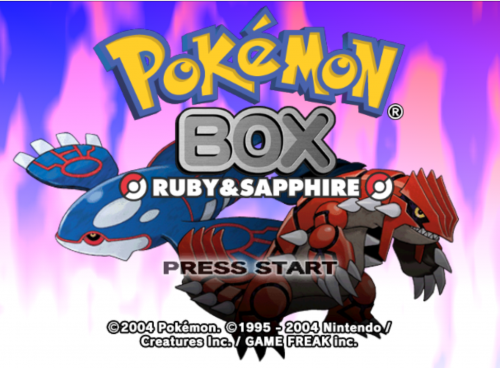
A weekend project that got really out of hand turned into this. DISCLAIMER: THERE IS A LOT THAT CAN POTENTIALLY HAPPEN WITH THIS, AND THOUGH I DID DO RIGOROUS TESTING, THERE IS STILL NO GUARANTEE THAT THIS WON'T POTENTIALLY DO DAMAGE TO YOUR GBA SAVE FILES. I AM NOT LIABLE FOR POSSIBLE DATA CORRUPTION HERE. PLEASE HAVE SAVE BACKUPS BEFORE USING THIS UTILITY TO BE SAFE! Pokemon Box: Ruby & Sapphire is a cool storage utility, but it has some pretty big drawbacks... so I fixed 'em. (This is also 100% compatible with original Box Ruby/Sapphire save files!!) CHANGES: -compatible with all language Gen 3 Pokemon games on the same save file (official cartridges only) (R/S/E/FR/LG) -in the original game, you can ONLY withdraw Pokemon you didn't deposit if your save file has caught 100 Pokemon in the Pokedex. This limitation has been removed -in the original game, in FR/LG and Emerald, a certain flag was checked on the save file that only gets set if you handed the Sapphire to Celio (FR/LG) or beat the Elite Four (Emerald). This prevents you from withdrawing OR depositing Pokemon until the postgame on both of these games. This limitation has been removed CURRENT BUGS: (may or may not get fixed in the near future) -currently all Ruby/Sapphire games are detected as Ruby. This is purely cosmetic and should not affect usage of the storage utility. This WILL cause only Ruby to be booted in Adventure mode, but there is a Gamecube Action Replay code you can run to make it Sapphire instead: USA: Force Sapphire Version [Ralf, Absol] 0403009C 38000000 040300A0 28000000 040300AC 38000001 PAL: Force Sapphire Version [Ralf, Absol] 040310C0 38000000 040310C4 28000000 040310D0 38000001 JP: Force Sapphire Version [Ralf, Absol] 0402F788 38000000 0402F78C 28000000 0402F798 38000001 -in the PAL version, Adventure mode will only boot the English Ruby/Sapphire despite whatever version you are actually using - I may look into this feature to restore the multi-language adventure mode files eventually. -the boot screen on the GBA will always display the Japanese splash screen - that is because in order to make this all possible, modifications were made to the JP multiboot GBA file HOW TO APPLY PATCH: 1. download the appropriate .xdelta patch for the version of the game you wish to run (usa, jp, or pal). You will also need a Pokemon Box iso for the appropriate version of the game you are looking for (obviously, not provided here). If your file is a .nkit.iso, you will need to convert it from that to a .iso file before patching it. 2. use delta patcher (https://www.romhacking.net/utilities/704/) to apply the patch to your .iso 3. You will now have a new .iso file to run on your modded Wii/modded gamecube and will be able to use all the new features1 point