Leaderboard




Popular Content
Showing content with the highest reputation since 12/16/25 in all areas
-
@BilKoChal thanks for your feedback, your point about pokedex will be fixed in next release. I keep in mind the rest. @AnHeroGold thanks, your battle-revolution save should be displayed, it's just wrong named (as "Pokemon") and has a grey neutral icon. This point will be fixed in next release. Please check if your save is present in save list, otherwise share it so I can see the issue. About your issue related to Gen 4 I'm not sure to understand, can you share any screenshot to see what's wrong ? @Vladcik thanks for your report, I'll try to fix these issues.2 points
-
PKHeX already provides a list of stashed Shinies in the "Other" tab. If you want more detailed information, like coordinates, use this plugin (no support provided for it on this forum): https://github.com/santacrab2/ShinyStashMap1 point
-
Don't attack Skarmory with a stat lowering move, it's a known bug on Mirror Armor1 point
-
@Vladcik new release 1.3.2, fixing display of resized boxes (>30 slots), and adding pkm move to another bank1 point
-
Should be fixed on the latest release.1 point
-
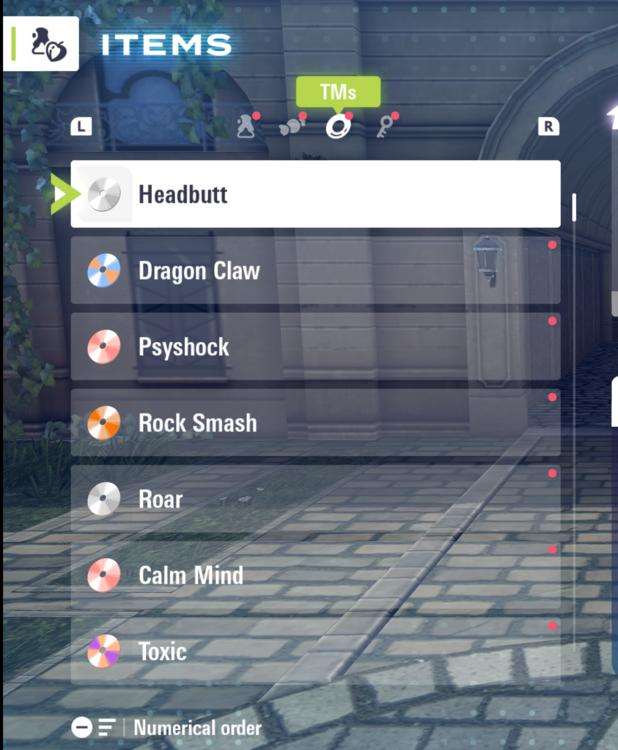
Hi everyone, I’m using PKHeX for the first time with Pokémon Legends ZA, and I’ve run into a problem. I’m currently stuck at the part where you need a Mega Evolution stone for Absol. I tried to add the stone through PKHeX, but my Inventory only shows four tabs: Medicine TMs Other items Key Items Originally, only two sections were visible, then TMs appeared later, and now I still can’t get the other item categories to show up. Because of this, I can’t add the Mega Stone, and since Absol can’t hold items i can't move on from this mission Has anyone run into this issue? Is there a way to unlock the missing inventory categories or force-add the Mega Stone so I can progress? Any help would be greatly appreciated!
 1 point
 -
Version 2.0.1
11983 downloads
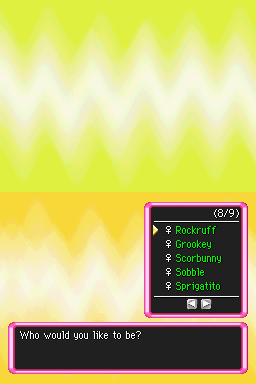
This is a rom hack of Pokémon Mystery Dungeon: Explorers of Sky that adds in all starter Pokémon from across gens 5-9! On top of just adding the standard starters, Zorua, Axew and Rockruff have also been made starters, Eevee can evolve into Sylveon, and all partner pokémon across all rescue team and explorers games are available. New portraits and animations have been added to existing starters. Alolan Raichu, Alolan Marowak and Hisuian Typhlosion have also been added as branch evolutions for their respective base starters (as of v1.3.0). Hisuian Samurott and Hisuian Decidueye have been added as per 2.0.0. Implements the fairy type, updating all fairy pokemon and moves to have the correct typing. Disarming Voice and Moonblast have been added. Note that if you had a Pokémon with one of these moves in an existing save on MIDDAY or MIDNIGHT and have upgraded to DUSK version, you may see Milk Drink or a move with a name comprised of symbols in your moveset. This can be fixed by going to the Electevire Link Shop and relearning Disarming Voice/Moonblast. Due to limitations to the amount of partners in the game, the mod used to be split into two separate patches, MIDDAY version and MIDNIGHT version, separating out starter choices and gender-locking each starter. As of DUSK version (2.0.0), these restrictions are no longer in place, and all starters from all PMD games are available as well as a few new ones, with no gender-locking! Applies several quality of life patches that come bundled with skytemple - such as exp share, move shortcuts, mass-appraisal of boxes and fairy gummies. A full list with credits can be found in the document included in the zip file and by talking to a new NPC on the Crossroads. A copy of XDeltaUI has been included in the zip file for ease of patching. Instructions for patching the game can be found in the document included in the zip file. XDeltaUI might not work if you're on a mac - if not, I've been told this tool works instead: https://www.romhacking.net/utilities/746/ UniPatcher works well for Android devices. This is purely a starter modification hack - there are no story changes. More starters are on the way in the next update - such as Hisuian Zorua, Yamper and Espurr! Learnsets, IQ Groups and evolution info can be found in this spreadsheet: https://docs.google.com/spreadsheets/d/1Spq9U_TCTqxT-NTovtm_c9Mzv1kTuTujd-BpPp0jj4U/edit?usp=sharing Updates! NEW 10/09/25: Small hotfix! It was pointed out to me that Moonblast and Disarming Voice no longer did anything due to some missing data after moving their move ids. This has now been fixed. Additionally, both moves have shiny new animations and Moonblast now affects all enemies in the room. Be especially sure to update if using a pokémon that learns these moves, like Popplio or Sylveon! NEW 25/08/25: DUSK VERSION IS HERE! Gender-locking and hero/partner restrictions have been lifted, and all heroes and partners can now be accessed in the same version, at the cost of the personality test at the start of the game. All starters can now evolve and all current regional evolutions have been implemented. (Quaxwell doesn't have sprites in the sprite repository at this time, and has been omitted - Quaxly evolves into Quaquaval for now). No additional starters have been added yet, but stay tuned for the next update. 23/05/24: A lot of you reported issues with Grovyle's sprite not behaving as intended. This has now been fixed. A bug causing the game to occasionally freeze when advancing floors should also now be resolved. 10/03/24: Axew and Grookey added as starters, replacing Shinx and Riolu respectively. Shinx and Riolu are still available as partners in MIDNIGHT, to use them as heroes use version 1.2.1 or below. Additional portraits/sprites have been added for evolutions of all playable heros/partners where applicable, and sleep animation has been copied over to EventSleep where missing. Greninja's moveset has been updated and Sobble's full evolution line is now implemented. Alolan Raichu, Alolan Marowak and Hisuian Typhlosion are now available for evolution (see ingame evolution help via new cyndaquil NPC on the crossroads, alongside sprite/portrait/patch credits, or check learnset spreadsheet linked above. 15/06/23: The evolution flag for Litten and Froakie was erroneously still set to false in the previous update, but this is fixed as of 1.2.1, so be sure to update if you have either of those two. Despite doubts expressed in the changelog I can now confirm the update DOES work for existing save files! 08/06/23: Litten now evolves into Incineroar - and Froakie evolves into Greninja (mid-stages aren't available yet). Now includes a version compatible with Melon, RetroArch and DraStic emulators. Fairy gummis can now be bought or received as mission rewards, and existing pokémon that learn moonblast and disarming voice in sun and moon now learn it here. (Accidentally said Dazzling Gleam in the txt and changelog, but this is what I meant!). Several other bugfixes and improvements included - check the changelog for details! 17/05/23 Sobble is now available as a starter! This means Skitty had to be removed as a hero unfortunately (but is still a partner) - if you'd like Skitty as a hero, be sure to download version 1.0.0 of this mod instead of the latest version. Sobble is also now available as a partner in MIDNIGHT version. For full list of heroes and partners, check the last two preview images for this hack. Updated the rescue team partners (Cubone, Psyduck, Machop) to use additional sprites and portraits created for the PMD Sprite Repository. Splashscreen credits for the artists have been swapped over to the title screen for readability and visibility. Disclaimers: All portraits and sprites are the work of artists contributing to the pmd sprite repository (Spreadsheet of individual credits with links when provided is here). Because work on the repository is ongoing, evolutions for Chespin, Fuecoco, Spritgatito and Quaxly are unimplented as of now, as are Torracat and Frogadier. Certain portraits may not show up in-game for the same reason. A set of exclusive items have been added and set across all new pokémon (Enigma bow, brooch and scarf, and ultima prism) - but I've not yet figured out how to modify the functionality of these yet so they're likely pretty useless as of now. Due to the size of the expanded starter list, all starters are sadly gender-locked. Check the document to verify what gender to select in the quiz in order to get your preferred hero. I've not ran into any issues so far with this, but feel free to message me here if you notice anything. I'm also contactable on tumblr (pyromaniac-cynadquil) and bluesky(@pyrocyndaquil.bsky.social). I'm currently looking into a potential version 2.0.0 featuring a third version with extra new starters as well as an overhaul to stats and patches used, but this is up in the air right now. Sprite and portrait credits (Detailed fully here) Chunsoft, Emmuffin, Garbage, 0palite, Bwappi, Grimlin, Emboarger, Miju, baronessfaron, PhillipsYoung, felis_licht, Audino, JFain, ShyStarryRain, dmDash, Vynnyal, Ginnie, NeonCityRain, lemongrass, NOLASMOR, C_Pariah, Caitemis, Deeshura, Noo, Luna-Alex, Blanky, Murpi, XModxGodX, lovefulpup, Smalusion, NeroIntruder, Noivern, NikolaP, 3P1C, Gust, ◥θ┴θ◤, TopKec, Soulja, MilesFarber, Ichor, FrivolousAqua, Pink_no_tori, Jhony-Rex, Azifel, TawnySoup, Reimu\_needs\_$$$, CamusZekeSirius, Kawaiitron, avalancheman, mixy:3, Fable, JustAGunk, RelicCipher, EzerArt, HopeBurnsBright2008, distress, LazerBlitz, pi3.14, and various anonymous contributors.1 point -
Hi everyone, Backstory: Ive always wanted to play Pokemon US/UM in my native language, there was a Vietnamese fan translation group called DevilCatTeam who worked on these games. Sadly, they stopped working and went inactive about 3 years ago. Since then, no new Vietnamese patch has come out, so ive decided to try and finish or redo the translation myself but i havent had much luck with it. I would really appreciate your help or guidance. TL;DR: id love to try and do it myself, even if it takes time. What I have done so far: Right now, I’ve only taken the very first step: I used HackingToolkit3DS to extract the ROM of Pokémon Ultra Sun, and now I have folders like: ExtractedRomFS, ExtractedExeFS, ExtractedBanner, etc. Im kinda lost right now, I havent edited anything yet, I dont know which files contain the game’s dialogue, how to open or modify them, or how to handle fonts for Vietnamese characters. Any tips, links, or tools you can recommend would help me? Thank you in advance for any advice or tool suggestions!1 point
-
![More information about "[PKHeX Plugin] Mons with NPC editor (For Legends Arceus)"](https://projectpokemon.org/home/uploads/monthly_2022_02/Capture1.thumb.PNG.18def4fbd4ad12220471c5a54ee6e045.PNG)
Version 1.0.7
6118 downloads
In Pokémon Legends Arceus, the player is able to give or loan mons to the NPCs, and those mons will show up in the overworld. Even for permanent gifts, the data of the given mons are actually fully intact. This plugin allows you to modify the mons that were given/on loan. How to use Put the plugin into the plugins folder in your PKHeX directory, then access it from the Tools menu. Note: Win 10 might block DLL files downloaded from the internet. In that case right click the plugin file, go to properties and check "unblock" (as seen here). [You may have to unblock, reblock, then unblock again to get it to work] Example of how to unblock: Usages Used to modify the mons in NPC/farm block in the save. Always back up your saves before you perform any edits. Support Pokémon Legends Arceus For help and bug reporting, go here. Credits Kaphotics for PKHeX.1 point