


SkyLink98
-
Posts
1271 -
Joined
-
Last visited
-
Days Won
93
Content Type
Profiles
Pokédex
Portal
Technical Documentation
Pages
Tutorials
Forums
Events
Downloads
Gallery
Blogs
Posts posted by SkyLink98
-
-
If you're willing to do modifications with PKHeX or any other third party software, your Pokémon can not be legit. Legal at best. Legit is something obtained legitimately in game, that remains unedited.
Anyways, this should be the tutorial you're looking for.
-
 1
1
-
-
Theoretically yes, but in practice there's no public tool available.
-
A banned switch should still be able to be updated through the official settings, as far as I can tell. I'd say update it to the latest firmware and use Atmosphere CFW on it. https://nh-server.github.io/switch-guide/
To trade on Scarlet & Violet the games must be on the same game update.
-
Save states are not save files. Save in-game to generate a proper save file (again, not a save state!) and follow this tutorial
-
Not that I know of, but you can eventually perform RNG Abuse to hunt your raids:
https://projectpokemon.org/home/tutorials/gameplay_150/max-raid-rng-manip/-
1
-
-
The proper way would be to redeem the cards in the order you want in the first place. If you already redeemd them, I think you can only try to manually hex edit the wonder records block. As far as I can tell there's no public documentation for that tho.
-
Homebrew emulators (those who needs to be run through the homebrew launcher, not those that needs installation in the home screen), are generally considered safe to be used even when the console is connected online. We don't have ban reports for using those in SysNand. As always, we don't take any responsability if anything happens.
-
Not that I know of, but you take your own risks if you do it.
-
20 hours ago, genderneutralnoun said:
I'm mainly trying to understand what the reality is, because things like this can get overblown on the Internet out of fear.
Indeed what happened in some online communities.
20 hours ago, genderneutralnoun said:2. Actual Pokemon-specific bans have historically only been done in more extreme cases of hacking (hacked raids, home accounts with tons of illegal mons), and 3. Full NNID bans (as opposed to Pokemon-specific) have historically only been done in the cases of Switch modification and/or piracy. Please correct me if I seem to have misunderstood anything.
Correct.
20 hours ago, genderneutralnoun said:1. Since PKHeX's legality checks are so robust, there's (essentially) no chance of any pokemon that passes PKHeX's checks being detected as illegal by official legality checks
Not necessarily. PKHeX does a great job in legality checking the actual PKM data, but It has some limitations. For example, it can't "guess" details associated with an Home Tracker. Pokémon Home has tons of server side data added to the stored PKM data.
Let's say I were to generate a Zubat in my Brilliant Diamond game. Let's say I generate this Zubat to be originated from Pokémon Platinum. If were to deposit the Zubat in my Pokémon Home account, Gamefreak/Nintendo could easily tell it's genned/edited due to missing details related to its Home tracker, or due to a completely missing Home Tracker for a Pokémon that was supposed to have a valid Tracker since when it was first sent from Bank to Home.
Home Tracker case a part, generally if something is valid for PKHeX, then it's valid for Gamefreak/Nintendo.
-
In addition to what is said above, Pokemon-specific bans in Switch so far were only for Hacked raids (unobtainable species) and/or Home account sharing with tons of illegal mons (this was probably done to specifically target the Pokemon online resellers).
Even if the suggestion is to always gen something that is in the legal boundaries, they usually don't care if users have illegal stuff for their offline play. Using illegal stuff online is prevented anyways, during the Pokemon selection for the online trades/online competitions/online raids/any other online stuff.
Of course, official legality checks are shitty at best. PKHeX does check a lot more stuff compared to the official checks. For example, the official ones doesn't check RNG feasability. Heck, they also allow some Shiny Locked mons to pass through trades and stuff.
They also have PLA save file verification, which Iirc needs to be linked to one and only one NNID simultaneously. But as far as I can tell, those were only preventing the game to connect if there was another player already connected with the same Sync ID. I could be wrong in that tho.
-
Requirements:
- Windows PC
- An hacked Switch with Atmosphere CFW running on the system
- Latest version of Tera Finder
Steps:
-
Load your game on your switch, save in-game and export your save file (guides here).
N.B: It is important to save in-game during the same day you want to to the editings. Not doing so may results in outbreak re-rolls when opening the game. Users can alternatively do RAM edits to Outbreaks (guide here). - Make a backup of your save file before doing any editings to it. This is important for safety purposes, in the case you want to roll back to the original state.
- Launch Tera Finder and load your save file in, either by clicking Load Save File, or by drag & drop the file itself into the application. The file you have to load is named main.
-
Click on the Mass Outbreak Viewer/Editor button (if using Tera Finder as a PKHeX plugin, it's located under Tools -> Tera Finder Plugin -> Mass Outbreak Viewer/Editor).
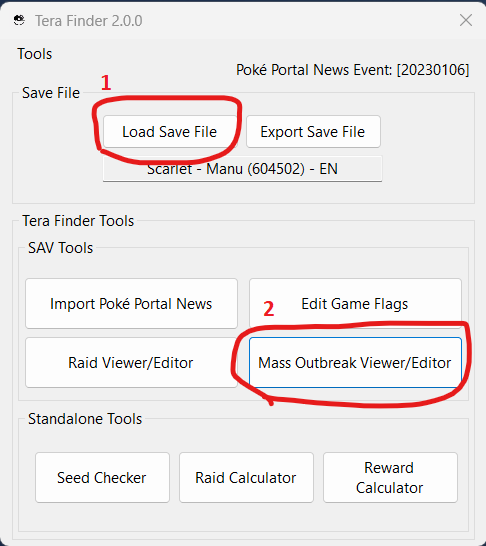
Fields Explanation:-
Max Spawns - The max number of spawns the outbreak can produce.
-
Num. KO - The number of defeated enemy in the outbreak.
-
Enabled - Whether the Outbreak is enabled or disabled. While the game always generates 8 outbreaks, only a random amount of them will actually be enabled. If an outbreak is disabled, all the subsequent ones will be disabled too. If an outbreak is enabled, all the previous ones will be enabled too.
-
Found - Whether the player has entered into the Outbreak radius.
-
World Coordinates - Coordinates for the Outbreak center.
-
Dummy Coordinates - Currently unknown what these coordinates are for. Usually only slightly different than the World Coordiates.
-
Max Spawns - The max number of spawns the outbreak can produce.
-
To make editings, select the wanted Species on the Species box.
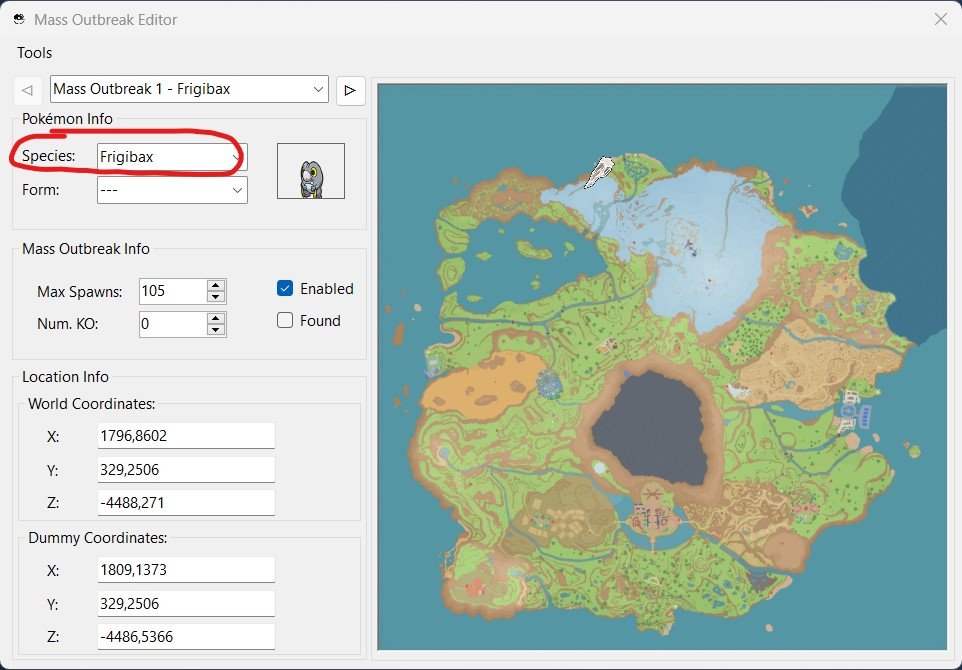
- Any illegal outbreak (invalid Species or invalid Coordinates for said species) will result in the icon appearing on the map, but no spawns.
- Users can use this Serebii page to check the available Outbreak Species.
- When selecting a Legal outbreak species, a pop-up should appear asking to load default values. Click Yes to correctly load a legal outbreak for the species.
-
If the pop-up does not appear, either the Species is invalid (not available in outbreaks), or Tera Finder does not have it in its Database. Users can check the currently missing entries in this page. Feel free to contribute missing data if you encounter a legit Outbreak for one of those missing Species!
- Close the Mass Outbreak Editor window and Export the edited save file. You can now restore the save with JKSV or any other save manager.
How to Export and/or Restore Outbreaks:
-
To Export Outbreak Data:
- Select the Outbreak you want to save/export.
- On the top of the Outbreak Editor window, click on Tools -> Dump to JSON.
- Select the path where you want to save the data, and click Save.
-
To Import Outbreak Data:
- Select the Outbreak you want to replace.
- On the top of the Outbreak Editor window, click on Tools -> Import from JSON.
- Select the Outbreak file you want to restore and click Open.
Notes:
- When editings Outbreaks while using the Remote Connection, the device MUST be connected while the game is on the Title Screen. Any editings made past the Title Screen will have no effect.
- The game does basic integrity check on Outbreaks data. Invalid/Illegal data results in no spawns at all.
- Mass Outbreaks are re-rolled every day. This means that if users were to edit an old save file, they would not be able to have the wanted outbreaks. Users must use a Save File exported from the same day they want to inject/modify outbreaks. This same logic also applies to those who use the Connect to Remote Device feature. Please save in-game in the same day before connecting to the program.
-
1
-
No implications in doing it locally. It can happen legitimately in the game (eg. users not connecting online, thus keeping old events on their save files).
-
You can't host event raids online by injecting the event data into the save file. For transparency I have to say It's probably possible through BCAT injection, but it's not something we're interested in testing/developing, nor we encourage people to do so. Even if the event data we have in the gallery is legitimate (dumped from legit BCAT data), hosting it online outside its official period of distribution would be basicaly the same as hosting hacked/impossible raids. Doing so online can be dangerous to both hosts and guests. We do not intend to promote methods that defy intended game behaviour, especially if it's done online (with the risk of unaware people to join such hacked raids/worlds).
-
Users can find a variety of Poké Portal News / Raid Events in our Event Gallery.
Here are some methods users can use to import these events into their save files.Manual importing with the PKHeX Block Editor:
Spoiler- Download the latest PKHeX Stable release
- Import your save file into PKHeX (File -> Open -> select your main file)
- If the event files were downloaded from this site's gallery, extract the Zip file. The files that are needed for this tutorial are located in the Files folder.
-
Follow the Block Editing tutorial to import the event files, mapped as following
- event_raid_identifier -> *Object KBCATRaidIdentifier
- fixed_reward_item_array -> *Object KBCATRaidFixedRewardItemArray
- lottery_reward_item_array -> *Object KBCATRaidLotteryRewardItemArray
- raid_enemy_array -> *Object KBCATRaidEnemyArray
- raid_priority_array -> *Object KBCATRaidPriorityArray
Importing with Tera Finder:
Spoiler- Dowload the latest Tera Finder Stable release
- If you want to use Tera Finder as a PKHeX plugin, place all the DLLs into the plugins folder next to the PKHeX executable (create the folder if not already existing) and run PKHeX, otherwise run the TeraFinder.Launcher executable.
- Import your save file into the program (either by drag & drop, or by clicking the Load Save File button)
-
Import the event into the save file:
- If you have the Event ZIP file downloaded from this site's gallery, drag & drop the ZIP file into Tera Finder (or into PKHeX if using Tera Finder as PKHeX Plugin).
- If you have extracted files (either from extracting the ZIP or from downloading the files from our GitHub gallery), click on Import Poké Portal News, select the folder containing the Identifier.txt file and click Open.
- Export your save file, you can now restore it with any save manager.
Importing with PKHeX Plugin Pile:
SpoilerDisclaimer: the following Plugin is not developed by us, if you have any question or need some help with it, please use the foohyfooh's post.
- Download the latest Plugin Pile release
- Place the DLLs into the plugins folder next to the PKHeX exectuable (create the folder if it's not already existing)
- If the event files were downloaded from this site's gallery, extract the Zip file
- Run PKHeX and import your save file (either by drag & drop or click on File -> Open)
- Click on Tools -> Import Raid -> select the folder containing the Identifier.txt file and click Open.
- Export your save file, you can now restore it with any save manager.
After importing users may need to advance one day from the console System Settings, to reroll the dens.
-
1
-
Yes, you can use the block editor. The block should be labeled "KUnlocked6Star" or something similar, not at my PC to double check in this moment.
Alternatively, you can use Tera Finder that has an user friendly flag editor for anything related to Tera Raids.
-
Right click on the Box tab -> Sort Box -> Pokédex No.
Hold Shift to sort all boxes.
-
2
-
-
Follow our tutorial:
-
Yes, it'll keep the shinyness.
-
 1
1
-
-
I started to research bcat injection only in 2022, so yeah that post (made in 2021) is now outdated. All the wondercards for all the switch games can now be injected with Switch Gift Data Manager.
-
7 hours ago, Extricated said:
Would it be as simple as using the .wa8 file provided on the GitHub in comparison with this tool and then opening the game?
Follow the tutorial step by step and you'll be able to redeem the Gifts you want, yes.
7 hours ago, Extricated said:And if yes - and I think I know the answer - will I be banned? From what I can tell, the answer is likely no, but just confirming I've read everything correctly before proceeding.
Read FAQ 5:
QuoteQ) Do I risk a ban by using faked BCATs?
A) Who knows. As of now we don't have any ban reports but, as always, we don't take any responsability in case your console, game or savefile gets banned. The method is similar to save file backup / restoration, and as of now we don't have ban reports for that either. If anyhow you're too worried to proceed, just avoid following this tutorial.
Things are not changed since when the post was written.
-
Instructions are in the readme in the Repository page.
-
If by archives you mean wondercards, see here
-
9 hours ago, Andreaette said:
Oh, so I have a 100% chance of getting banned. Thanks for the answer!
No one has ever been banned so far for editing saves and bcats for legit pokemon games in SysNand. If you'll be banned, chances are you did something fishy like piracy and went online with it.
9 hours ago, Andreaette said:One final question, if there was a way to emulate the servers would doing this still work?
Probably yes. The game checks the internet connection to
A) Assign a Sync ID if not already assigned
B) Init BCAT data if not already initialized
If the emulated servers can manage to handle these two points, then yes, it would work.
-
1
-
-
5 hours ago, Andreaette said:
The game is stuck at Connecting... Please stand by.
Pokemon Shining Pearl. Does it has something to do with beaing on incognito and blocking nintendo servers?
Yes, it has. Read the FAQs.
Switch Gift Data Manager v1.3.1 / v1.3.2
in Event Pokémon News
Posted
This tool aims to make past Mystery Gift event contents back again in all the Pokémon games for Nintendo Switch. Since those games won't allow event injection in the SAV file, this tool creates a forged BCAT package, injectable with homebrews like JKSV. This allows wondercards to be redeemed through the In-Game Mystery Gift Menu.
What's New:
Download | FAQ | Guide and Support Thread
View full article