Leaderboard




Popular Content
Showing content with the highest reputation since 07/16/26 in Files
-
Version 26.07.07
13414463 downloads
Pokémon core series save editor, programmed in C#. Supports the following files: Save files ("main", *.sav, *.dsv, *.dat, *.gci) GameCube Memory Card files (.raw, .bin) containing GC Pokémon savegames. Individual Pokémon entity files (.pk*) Mystery Gift files (.pgt, .pcd, .pgf, .wc*) including conversion to .pk* Importing teams from Battle Videos Transferring from one generation to another, converting formats along the way. Data is displayed in a view which can be edited and saved. The interface can be translated with resource/external text files so that different languages can be supported. Pokémon Showdown sets and QR codes can be imported/exported to assist in sharing. We do not support or condone cheating at the expense of others. Do not use significantly hacked Pokémon in battle or in trades with those who are unaware hacked Pokémon are in use. FAQ Support Forum <-- Post here if you have questions or found bugs3 points -
Version 2.3.21
61142 downloads
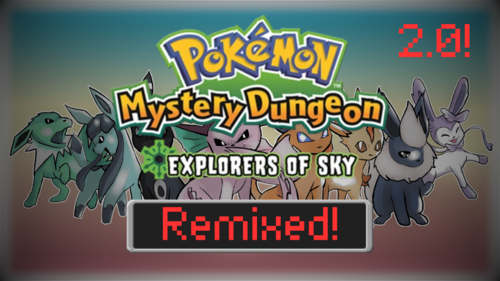
This is a ROM Hack of Pokémon Mystery Dungeon: Explorers of Sky that adds an entirely new starter roster, new mechanics, as well as tweaking the expressions and dialogue of the entire main story! Hey, my name is Gala and I wanted to share a hack I created! This hack has been in the works since October of 2023, and is a very big feat of mine. The game’s plot itself is largely unchanged, but bits of everything else have been altered in minor or major ways. I’ll go into some of the more important changes below, but there is an in-depth spreadsheet here. If you don’t feel like reading a wall of text, that’s okay! Download it for yourself and enjoy! Join the Discord to keep up to date on the latest news regarding PMD: Explorers Remixed! You can also check out my YouTube! This hack alters aspects of the game’s story. Some characters look different and have new names. The entire game's script has edited dialogue to remedy poor translations and poorly conveyed emotions. The portraits of characters are more expressive where possible. However, that is the extent of my meddling. This isn’t EoS rebuilt from the ground up, it’s more-so a modified experience that allows me to learn the ropes of making an EoS ROM Hack! We are planning to rework the post-game in a later update, but for now, the majority of our changes land in the main storyline before you graduate the guild. All of the pre-graduation dungeons have had their spawn tables revised with our new Pokémon. You are able to evolve your starter and partner as soon as you discover the Luminous Spring! Thanks to an amazing skypatch, ‘StarterMenuTool’ (credits to Chesyon, Adex, HeckaBad, Irdkwia), we have been able to expand the starter list drastically. Our community has voted on 85 Pokémon to be included as starters! There are even some unique picks such as Golett, Wimpod, and even Cosmog! We have also included every single traditional starter from the mainline games! We’ve worked hard to modernize all our starter learnsets. This hack includes the Fairy type, along with 39 added moves and 22 added abilities! We've included many Mega Pokemon! You evolve into them at Luminous Springs. It is not a temporary form like in the mainline games, however, you can devolve back into your previous form. The following Pokemon unfortunately didn't receive animations in time, so we are using the Shiny versions as a placeholder: Mega Venusaur, Mega Blastoise, Mega Meganium, Mega Dragonite, Mega Blaziken, Mega Swampert, Mega Froslass, Mega Metagross, Mega Golurk, Mega Chesnaught, Mega Delphox, Mega Greninja, Iron Treads, Mega Sceptile, Mega Scizor, Mega Pinsir, Mega Heracross, Raging Bolt, Mega Absol Z, Gouging Fire, Mega Golisopod, Mega Emboar, Mega Chandelure, Mega Raichu X, Mega Raichu Y, Mega Gyarados, Mega Meowstic, Mega Lucario Z, Mr. Rime, and Toedscruel. We have added most SkyTemple community patches, which includes things such as Manual Team Control, the Move Growth system from modern PMD titles, Non-interruptive Weather, and many more! It all comes together to make the experience fresh and exciting! We’ve also included the necessary applications to apply this patch to an untampered, US ROM of Pokémon Mystery Dungeon: Explorers of Sky. Assets were provided by many people through places such as the PMD Sprite Repository, so check it out to give the artists some love! Due credit is on the spreadsheet. (Hack Created by Gala1D, with Darkpawra & TinchoX)2 points -
Version 2.1.1
19974 downloads
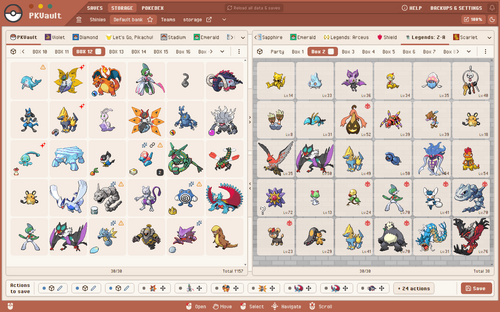
PKVault is a Pokemon storage & save manipulation tool based on PKHeX. This tool is similar to Pokemon Home, for an offline use. Don't wait and test it here -> https://pkvault-demo.chnapy.dev PKVault is available for multiple systems: Desktop app Windows Linux + SteamDeck: checkout https://github.com/Chnapy/PKVault Web app Docker: checkout https://github.com/Chnapy/PKVault --- Features: Storage & save manipulation compatible with all pokemon games, from first generation to Pokemon Legends: Z-A transfer pokemons between saves convert pokemon to any generation (ex. G7 to G2) store pokemons outside saves using banks & boxes allow use of multiple "versions" for stored pokemons move/delete actions edit pokemon moves, EVs & nickname evolve pokemons requiring trade or trade + held-item (ex. Kadabra -> Alakazam) link a save pokemon with all his versions, sharing data like exp & EVs sort pokemons in storage & saves synchronize pokedex between storage & saves backup all saves & storage before any save action backups listing backups restore always possible Centralized Pokedex based on all listed saves views with forms & genders multiple filters: species name, seen/caught/owned, types, ... possible living dex possible shiny dex Dynamic saves listing based on paths & globs Dark mode & sprite sizing Checkout project-pokemon discussion ! This tool allows you to manage all your saves storage, moving pkm between banks, boxes, saves and local storage. You can also edit pkm, evolve them (when trade is required), create "version" of them for specific generations. All generations are supported, starting from Gen1 to Pokemon Legends: Z-A ! For example you can take a Kadabra from your save of Pokemon Black (Gen5), create a "version" for your save Pokemon Crystal (Gen2), then move pkm to it. PKVault allows you to bypass all generation constraints, you can move a pkm from Gen3 to Gen1, from Gen2 to Gen7, and so on. The app includes a centralized Pokedex with search filters (by name, games, types, etc), as well as living-dex and shiny-dex support. An auto-backup system prevents data loss. Saves & pkms are backed up before any write actions ! Saves are read from your file system, you don't have to upload them to PKVault, provide your saves paths and the app will get them itself. PKHeX is used under the hood, so all your stored pkm are in PKHeX format and can be manipulated by PKHeX directly. Compatibility & legality PKVault aims to be compatible with every save file supported by PKHeX. Creating a pkm "version" means converting a copy between generations, which may cause legality issues with origin, moves, etc. These issues are all displayed on the app, and you can use PKHeX to fix them. Currently, English + French + German are supported by the app. It can evolve depending on feedbacks. Bugs & issues A backup system exists to avoid any data loss even in case of bugs when writing save. You can still encounter bugs and other issues. Please report any issue on github or project-pokemon discussion to help improve the app. Why I made this app My good old first gens Pokemon games lost their saves due to empty internal battery. So I decided to replay the first games and continue through to the latest generations, with the goal of fully completing all the pokedex. I was frustrated about barriers between some generations (2->3, 4->3, ...), and by how difficult it was to get some pkms, like Slowpoke in Gen3 even though I already had one in my Crystal (Gen2) save. Also it's hard today to get all trade-only evolutions like Alakazam, and I didn't like the limited usability of TMs in the early generations. While PKHeX can fix all these issues and more, but I wanted something more tailored to my needs, and more restricted: PKVault restricts cheating possibilities. Finally I wanted something like Pokemon Home, but for the old games as well. For all these reasons I created PKVault. Please share your feedback --- Source code & license: https://github.com/Chnapy/PKVault1 point -

Version 1.0.0
825 downloads
Contents: 1) Intro 2) Installation Guide 2.1) Disclaimers 2.2) Downloading & Applying the Patch to My Pokémon Ranch 3) Connecting to the Nintendo DS 3.1) Cartridge Methods 3.2) ROM File Methods 4) Call for Translators 5) Contact 6) History 7) Credits 1) Intro: My Pokémon Ranch is a game released for the Nintendo Wii in 2008 as a downloadable WiiWare title. It was developed by Ambrella and published by Nintendo. The game acts as a playground/sandbox for interacting and watching various different Pokémon on a Ranch, as well as storing them. Players can move Pokémon around, have Pokémon play with toys, take photos of them, or have them interact with one another. Each day, Hayley brings a new Pokémon to add to the Ranch. The original version of My Pokémon Ranch has the capability of connecting to the Nintendo DS mainline Pokémon games of that era, Pokémon Diamond & Pokémon Pearl. This connectivity allows them to transfer Pokémon to and from My Pokémon Ranch, allowing it be used for additional box storage, not dissimilar to Pokémon Box: Ruby & Sapphire on the Nintendo GameCube. After certain capacity milestones have been reached, the player can be rewarded with special event Pokémon, such as Phione or Mew. On November 5, 2008, an update to My Pokémon Ranch was released in Japan that allowed it to connect to Pokémon Platinum. Not only did this update boast additional connectivity, but it also included an increased storage capacity, support for (at this time) Platinum-specific Pokémon forms, new toys and ranches to visit, new music, new Pokémon interactions, updated Platinum-related encounter information and more. Unfortunately, this update was never officially released outside of Japan, so international players were unable to enjoy the full My Pokémon Ranch experience... ...Until now. Introducing the My Pokémon Ranch: Platinum Version English fan localization patch! 2) Installation Guide: 2.1) Disclaimers: This patch is a non-profit fan project that is not associated with Nintendo, Game Freak, The Pokémon Company, or Ambrella Co. Ltd. Please make sure you read these instructions carefully! This guide does not take any responsibility for user error or damaged consoles. This guide requires the USA version of My Pokémon Ranch as a base to apply a patch. The patched version, like the original USA version, only supports connecting to English copies of Pokémon Diamond, Pearl, and Platinum (other languages may be supported in a future update). Included in the patch is the ability to receive guest visitors to the ranch via WiiLink, which may come at a later date. A modded Wii console is required to be able to install this patch. For information on how to Homebrew your Wii, see the guides on wii.hacks.guide. Installing this patch will upgrade any existing USA My Pokémon Ranch saves to work with the Platinum version of the game. This format change is irreversible, so it is recommended to back up your save file. To do this, you can use SaveGame Manager GX. This patch can connect to Pokémon Diamond, Pearl, and Platinum (English) versions. However, due to signature changes in the data sent to the cartridges, special methods are required to connect to the cartridges going forward for all versions. They can be found in the Connecting to the Nintendo DS section. 2.2) Downloading & Applying the Patch to My Pokémon Ranch: Two different base WAD files are options to apply the patch to: the original USA release, and the updated USA release, which fixed a typo. These must have the correct SHA-1 hashes, listed below. You can verify you have the correct hash using a tool such as this one. 0f318003a97a99858c2ab4ef5da70f588bc90969 (Original USA) 7a7e059bcb5f91bbdcaf68e98540b86e7df62542 (Updated USA v256) To patch your WAD: Download the applicable patch file for your base WAD (Included in the above zip) and save it to a convenient location on your computer. We recommend using Rom Patcher JS to patch your game. Upload the .wad file as the ROM file, and the file from the first step as the Patch file. Click Apply patch, and save the patched .wad file your browser downloaded to your SD card or USB Drive. Use YAWM ModMii Edition to install the patched My Pokémon Ranch WAD file. Follow this guide from wii.hacks.guide for more details. Open My Pokémon Ranch on the Wii Menu and launch the game. If everything was done correctly, the game should boot up without any issues. If updating from an existing Ranch, Hayley will have a new introduction sequence acknowledging the update. 3) Connecting to the Nintendo DS: Now that we have installed the My Pokémon Ranch WAD, the next step is to patch or trick Pokémon Diamond, Pearl, and Platinum to connect to it. This is required because the DS does a digital signature check on the secondary ROM file the Wii sends, ensuring it’s signed by Nintendo. Because the patch has made changes to the secondary ROM, it is no longer properly signed by Nintendo, and so the signature check has to be removed. There are various methods available in order to patch your game. 3.1) Cartridge Methods: If you would like to use a physical copy of Pokémon Diamond, Pearl, or Platinum, you can use the MPR Connect app. This is not guaranteed to work with counterfeit copies of the game. TWiLight Menu++ (3DS HOME Menu): If you have not done so, follow these instructions to install TWiLight Menu++ onto your modded 3DS system. Download mpr-connect.nds from this GitHub link and save it to the roms/nds folder on your 3DS SD card. Launch the patched My Pokémon Ranch game on your Wii, and initiate a connection to the DS from the main menu. From the HOME Menu, launch TWiLight Menu++. Navigate to the MPR Connect application, then press A to boot it up. Insert a cartridge of Pokémon Diamond, Pearl, or Platinum into the cartridge slot. Press Start, and this should prompt the system to start a connection search to the Wii. If everything was done correctly, you should be now able to deposit and withdraw Pokémon on My Pokémon Ranch! TWiLight Menu++ (DSi Menu / Unlaunch): If you have not done so, follow these instructions to install TWiLight Menu++ onto your modded DSi system. Download mpr-connect.nds from this GitHub link and save it to the roms/nds folder on your DSi SD card. Launch the patched My Pokémon Ranch game on your Wii, and initiate a connection to the DS from the main menu. From the DSi Menu, launch TWiLight Menu++. Navigate to the MPR Connect application, then press A to boot it up. Insert a cartridge of Pokémon Diamond, Pearl, or Platinum into the cartridge slot. Press Start, and this should prompt the system to start a connection search to the Wii. If everything was done correctly, you should be now able to deposit and withdraw Pokémon on My Pokémon Ranch! Flashcard and Cartridge Swap: If you have a Slot-1 DS flashcard (R4, etc.), this can also be used to run MPR Connect on a DS Lite or DS Phat console. This method will not work on DSi or 3DS/2DS consoles, unless your flashcard is a DSpico. Download mpr-connect.nds from this GitHub link and save it onto your flashcard’s microSD card. Launch the patched My Pokémon Ranch game on your Wii, and initiate a connection to the DS from the main menu. Boot your flashcard on your DS, navigate to MPR Connect, and launch it. While MPR Connect is running, eject your flashcard from your DS and replace it with your Pokémon cartridge. Press Start, and this should prompt the system to start a connection search to the Wii. If everything was done correctly, you should be now able to deposit and withdraw Pokémon on My Pokémon Ranch! Wii DS ROM Sender: If you don’t have a flashcard or DSi/3DS system, or simply do not want to mod your system, Wii DS ROM Sender can be used to send MPR Connect to your DS over DS Download Play. To set up Wii DS ROM Sender: Download Wii DS ROM Sender from this GitHub link and extract the contents of the zip file onto the root of your Wii’s SD Card. Save a copy of DS Download Station - Volume 1 (USA) onto your SD Card’s root as haxxstation.nds. The SHA-1 of this ROM must be: f18b55f3e1259c03e10d0ecb549693b42905ceb5. Download mpr-connect.nds from this GitHub link. If it does not exist already, create the folder srl on the root of your SD card, and copy mpr-connect.nds into it. Insert the SD Card back into your Wii. Then, to use it to run MPR Connect: Boot up your Wii and use the Homebrew Channel to launch Wii DS ROM Sender. Select mpr-connect.nds as the ROM to send, and begin sending it. Insert a cartridge of Pokémon Diamond, Pearl, or Platinum into the DS cartridge slot and boot up your DS (it is important to do this before downloading the ROM from the Wii). Launch the DS Download Play app. If you are using a 3DS/2DS, it will ask you if you want to download Nintendo DS or Nintendo 3DS titles. Select Nintendo DS. The option to download from the Wii should appear. The DS should download the HaxxStation ROM and start running it. Select the title in the list and download MPR Connect from the Wii (a dummy name will be shown in its place). The MPR Connect splash screen should appear on the DS. At this point, return to the Wii Menu, launch the patched My Pokémon Ranch game, and initiate a connection to the DS from the main menu. Press Start on the DS, and this should prompt the system to start a connection search to the Wii. If everything was done correctly, you should be now able to deposit and withdraw Pokémon on My Pokémon Ranch! 3.2) ROM File Methods: Backups of ROM files of Pokémon Diamond, Pearl or Platinum that are launched via a flashcard or TWiLight Menu++ can also be used if you'd prefer to play from those. We recommend using nds-bootstrap or pico-loader to load the game in order to guarantee connectivity with the Wii. Patching: The ROM file can be patched to remove the signature check. We recommend you use a ROM with one of the SHA-1 hashes below. You can verify this using a tool such as this one. Pokémon Diamond: a46233d8b79a69ea87aa295a0efad5237d02841e (USA Rev 5) 66d2fbfb0dbc1f86a3d726971196989b950092bc (EUR English Rev 5) Pokémon Pearl: 99083bf15ec7c6b81b4ba241ee10abd9e80999ac (USA Rev 5) b5652db288c75417de159d93d297689c885dbbd1 (EUR English Rev 5) Pokémon Platinum: ce81046eda7d232513069519cb2085349896dec7 (USA Rev 0) 0862ec35b24de5c7e2dcb88c9eea0873110d755c (USA Rev 1) 8d15cd443d4e83e20493c79d3f9dc408c4f51ae0 (EUR English Rev 10) To patch your ROM: Download the applicable patch for your ROM (included in the above zip) and save it to a convenient location on your computer. We recommend using Rom Patcher JS to patch your game. Upload the .nds file as the ROM file, and the file from the first step as the Patch file. Click Apply patch, and save the patched .nds file to your SD card you use with your flashcard or DSi/3DS system. If everything was done correctly, you should be now able to deposit and withdraw Pokémon on My Pokémon Ranch using the ROM file you have patched! AR Codes: AR cheat codes may be used to remove the signature check. This method working is dependent upon the ROM loading software, and is not guaranteed. Patching the ROM file is recommended over this, if available. Pokémon Diamond/Pearl: 5230F824 E24DDE12 0230F820 E3A00001 0230F824 E12FFF1E D2000000 00000000 Pokémon Platinum: 5230ED00 E24DDE12 0230ECFC E3A00001 0230ED00 E12FFF1E D2000000 00000000 4) Call for Translators: This release only includes a patch for the USA version of the game, and not the European version. The USA version only has English text in-game. The European version also has French, German, Italian and Spanish. To release a European patch, we are asking for translators to help us. If you are fluent in French, German, Italian or Spanish, are interested in volunteering, are able to actively test your work, and understand what a “variable” is, please reach out to us via Discord. 5) Contact: If you would like to contact us, visit our website at pokewii.net to join our Discord or contact us by email. 6) History: Development on this patch began in early 2023, but was envisioned even earlier in 2020 when working on a translation patch for the Pokémon Mystery Dungeon WiiWare games. The first big hurdle of this patch was reverse engineering a custom variant of the proprietary compression format (called ASH) which is used in this game. When that was figured out, the project began development shortly after. Localizing this patch was the easy part. The hard part, by far, was getting non-Japanese copies of the game working with this patch. Not only does the game perform a series of checks to make sure it’s connected to the right version, English Platinum and Japanese Platinum are very different, and lots of small things had to be fixed. This project was struggling to devise a solution to the signature issue, and often months went by without it being worked on. Many of the people who tried to reverse engineer this were scratching their heads. Several times during the development process, we had considered just releasing the game as-is, essentially giving up on Platinum connectivity. But, we persevered, and thanks to the help of several people, we were able to get a nice solution. Thank you for all the support. After 3 and a half years of development, we are excited to finally have it finished. - The Platinum Patch Team 7) Credits: - Abel5498 Beta Testing - Absol Special Thanks - Antonio231102 Development Support, Beta Testing - Bloombuds Special Thanks - Bob A Linx Beta Testing - Bubblblobb Special Thanks - Conanac ASH Compression Tools - Darkshade Project Management, Title Screen, English Translation - Droomish English Trailer Voiceover - Fillo Development Support, Spanish Translation - Finn Special Thanks - Friendsxix Special Thanks - Funaoe24 Special Thanks - Garhoogin Technical Tools & Scripts - Gensarde Reverse Engineering - idkwhereisthisname Italian Translation - JaneRandom Special Thanks - Jonko Reverse Engineering - Joshiki Special Thanks - Larsenv Development Support, Mod Compilation Script - Le gamer 66 French Translation - Le JARB French Translation - Lyn Special Thanks - Maple Special Thanks - Matthack Special Thanks - Mow Platinum Support Coordination - Mutty Italian Translation - Netcutae Special Thanks - NWPlayer123 Technical Tools & Scripts - Pistonfish German Translation - Prayag Special Thanks - Psi-Hate Reverse Engineering - RETIRE Reverse Engineering - Rush2802 Beta Testing - Ryuzac English Translation - scj643 Special Thanks - SirToastyToes Beta Testing, English Trailer, Ranch Evangelist - Soulo Beta Testing - Specialagentape Special Thanks - Speedy77 Beta Testing - St4tch Special Thanks - Starlightfish Beta Testing - The12thGripper Special Thanks - Valentino Beta Testing - Vanny Beta Testing - Venusupreme Special Thanks - Voidkrieger Beta Testing - wertercatt Development Support - wowjinxy Reverse Engineering - Zazsona Reverse Engineering, PKHeX Support1 point -
Version 1.0.0
512 downloads
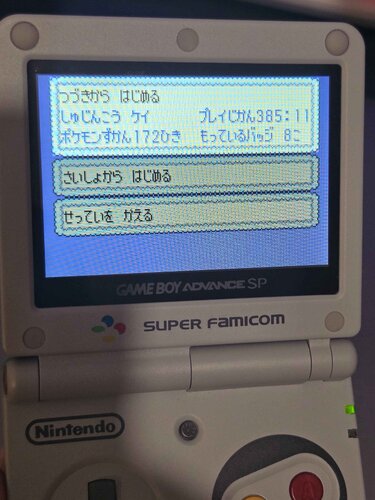
Bought a bunch of ds pokemon games and a gba game from japan on ebay to play through them all and didn't want to just delete the saves on them so I backed them up and put them in cloud storage but also looked for some archiving thing online found this site and thought people might like to explore some random old saves. The 3 screenshots from desmume are because I already deleted the saves on the carts. I have just bought the other GBA pokemon games from japan on ebay and when they arrive I will upload the saves on them too.1 point -
Version 1.0.0
62 downloads
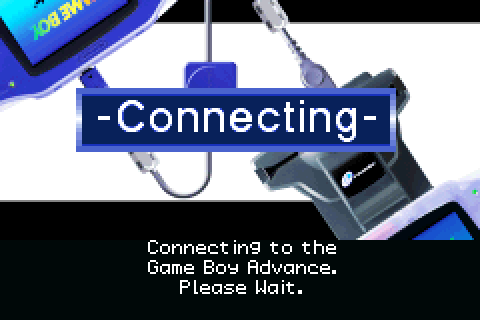
This is a full set of English localized Battle e: Series 2 e-Reader cards for Pokémon Ruby and Sapphire, including promotional cards. an English localization of the Decoration Present card is also included. To scan cards, Ruby or Sapphire must be inserted into one Game Boy Advance, and it must be linked via Link Cable to another Game Boy Advance containing an English e-Reader. Players must select 'MYSTERY EVENTS' from the CONTINUE menu (Unlocked by entering 'MYSTERY EVENT IS EXCITING' in the survey at the counter of Petalburg City Pokémon Center) in Pokémon Ruby or Sapphire and follow the on screen prompts to scan cards. If using emulation, mGBA is recommended. - Darkshade - Text Translation/Localization - hatschky - Reverse engineering - Paccy - Reverse engineering - Ryuzac - Text Translation Special thanks: Deokishisu1 point -
Version 1.0.1
135 downloads
This is a feature-complete patch for Pokémon FireRed & LeafGreen that restores all e-Reader content cut from non-Japanese releases of the game. Using these cards, players are able to battle new trainers within the Trainer Tower on Island Seven of the Sevii Islands. Up to 8 cards can be scanned at a time, and the order in which they are scanned determines which Trainer Tower floors the trainers occupy, as well as their teams. Scanning these cards also provides new items rewarded upon clearing the Trainer Tower in the target time. To scan cards, FireRed or LeafGreen must be inserted into one Game Boy Advance, and it must be linked via Link Cable to another Game Boy Advance containing an English e-Reader. Players must select 'MYSTERY GIFT' from the CONTINUE menu (Unlocked by entering 'LINK TOGETHER WITH ALL' in the survey at the counter of any Poké Mart) in Pokémon FireRed or LeafGreen and follow the on screen prompts to scan cards. If using emulation, mGBA is recommended. This patch was designed to be as faithful as possible to a hypothetical official release that included e-Reader compatibility, so we've made sure that the game connects to the English version of the e-Reader, and both the cards and the ROM loaded into the e-Reader have also received full localization. A full set of localized card files are included within the download in the 'Card Files' folder. How to patch: The .GBA files for FireRed and LeafGreen can be patched using FLIPS: https://www.romhacking.net/utilities/1040/ Currently the patch is only available for US versions of the game. Extract the contents of this download. Run FLIPS Select 'Apply Patch' Select the Patch for your chosen game (located in the 'Patch Files' folder) Select the Source File Either an unpatched .gba file of English FireRed: MD5: e26ee0d44e809351c8ce2d73c7400cdd English FireRed (Rev 1) MD5: 51901a6e40661b3914aa333c802e24e8 English LeafGreen: MD5: 612ca9473451fa42b51d1711031ed5f6 or English LeafGreen (Rev 1) MD5: 9d33a02159e018d09073e700e1fd10fd Select a location for the Output File and press 'Save'. Credits: - Darkshade - Localization/Reverse engineering - Youpileouf - Various tweaks - Paccy - Reverse engineering/Patch Oversight - Ryuzac - Text Translation An e-Reader restoration patch for Pokémon Colosseum can be found here: https://projectpokemon.org/home/files/file/5773-pokémon-colosseum-usa-e-reader-restoration-patch/ An e-Reader restoration patch for Pokémon Emerald is in the works, and patches for localizations of other languages may come at a later date but are reliant on decompilations of those languages. Enjoy!1 point -

Version .
18887 downloads
The Old Sea Map was only available as an event Key Item exclusively for players with a Japanese GameBoy Advance retail copy of Pokémon Emerald, which allowed players to reach the Faraway Island, and ultimately battle the Mythical Mew. For GBA players who rather not use the Mystery Gift to activate the event, simply use PKHeX's Event Flags > Research, and For Pokémon Emerald: Check Flag 0316 and 2262, then proceed to add a Old Sea Map into the Key Items of the Bag. This is the only Mew that can be encountered shiny legitimately. (excluding hacks or glitches) ウルトラ Mew was a regular encounter, non-shiny. ポケパ-ク Mew was RNG obtained by @suloku and @St. GIGA (and the OT was meant to mimic the PokePark event, and also Flawless IVs) アイコ Mew was RNG obtained by @InsaneNutter Species Mew Nickname (default, in ) OT (recipient) TID (recipient) Distribution In-Game Encounter Location Faraway Island Dates (Various) PID Chance of Shiny Games Emerald Lv. 30 Nature Random Ability Synchronize Item None Moves Pound Transform Mega Punch Metronome Format Ver.1.0.6-2, Post Updated Date:20180512_08571 point -

Version 1.1
432876 downloads
Summary Pokémon Blaze Black 2 & Pokémon Volt White 2 are essentially the sequels to my Black & White hacks known as Blaze Black and Volt White. The usual rules with my hacks apply; the main feature is that all 649 Pokémon are available for capture somewhere in the game, and the trainers have all had their rosters changed in order to maintain a much harder challenge than the original game, as well as having an increased variety of opponents to fight. There's also a large amount of alternative features these hacks offer, which range from differences to the Pokémon themselves to the presence of a couple new TMs. If I'm not mistaken, these are also the first Black 2 and White 2 hacks on offer. Additionally, the two versions only differ in terms of their aesthetic differences, such as the appearance of Opelucid City, the title screen, etcetera. So basically, just pick whichever colour takes your fancy! Thread1 point