Leaderboard




Popular Content
Showing content with the highest reputation on 06/04/19 in Posts
-
Hello everyone. I started playing Pokemon games during Generation 3 and have been playing them ever since. I like collecting event Pokemon, and I am interested in trying to collect other event Pokemon and even a few distribution cartridges. It's nice to be a part of the community!2 points
-
So I know it's weird to be talking about the 3ds at this day and age, but for some reason, none of my PkHex pokemon are showing up when I follow the directions clearly, mainly because all of the tutorial videos use the old JKSM, and I guess I'm using a newer one. For starters, there is now import save, or export save which is leading me to believe that that is what's causing the problem. I thought I was doing everything correctly in PkHex, I had a completely legal Shiny Celebi, then I exported the Save, and overwrote my first one, and then I went back to JKSM, and that's when I just clicked on my pokemon file, and it asked if I should overwrite the first save. Now in all the videos, it shows a different menu, with the option to import the file, but that's not there. So I clicked yes, and it loaded for a split second, and then said "Complete". After that, I open up my Ultra Sun game, (eshop version on home menu), and nothing was there. Idk if I'm doing something wrong, but it didn't work for my Game Cartridge either, leading me to believe that it's the new JKSM, and there are no videos on youtube about the new JKSM, so I'm confused. I know that no one uses the 3ds anymore, but I do, and I need help!!!! Thank you,1 point
-
Welcome to the forums, Rockman_96!1 point
-
@HenboBaggins as opposed to following video tutorials, I say read one that we have. In any case, throw everything you think you've watched so far out the window. Here's an alternative take, if you're displeased with the one we already have: 1. Play game on 3DS, save twice in-game. 2. Enter JKSM, Refresh Titles/Refresh Games (if the option is there); This only needs to be done if game title doesn't appear. Note: I'm not sure if you trying to edit the e-shop version or cart, since you mentioned both, so I'm listing it as e-shop/cart version. Stay consistent with which option you choose. 3. Go to the e-shop/cart version (depending on which one you want to backup) 4. Export save (it dumps the save from e-shop/cart version), and give it a recognizable name. For this example, I'll be referring to it as My save 01 5. Open your SD card on your Computer 6. In the JKSM folder location for the game, copy the folder of My save 01 and paste it there. If you did that, it should show something like My save 01 - Copy 7. Open My save 01 - Copy 's main in PKHeX. Make a simple edit (give yourself Shiny Celebi, for example). 8. Export Sav in PKHeX, overwrite My save 01 - Copy's main. (note. the file MUST be called main. Make sure there's no other file in the folder.) 9. Re-insert SD card in your 3DS, open JKSM, Import Save back into e-shop/cart version With this: (i) You have a backup of an unedited save (My save 01) [can be imported back into the games at any time] (ii) You have a modified save (My save 01 - Copy) (iii) You have imported the modified save into e-shop/cart version. (iv) As a word of caution, never Export Save over an existing file. Thus, name a folder/create a new file. Also, in your next reply, if it doesn't work, specify what CFW you're on, and what's the entrypoint used to enter the CFW. Also show screenshot of what's in the folder for My save 01 - Copy1 point
-
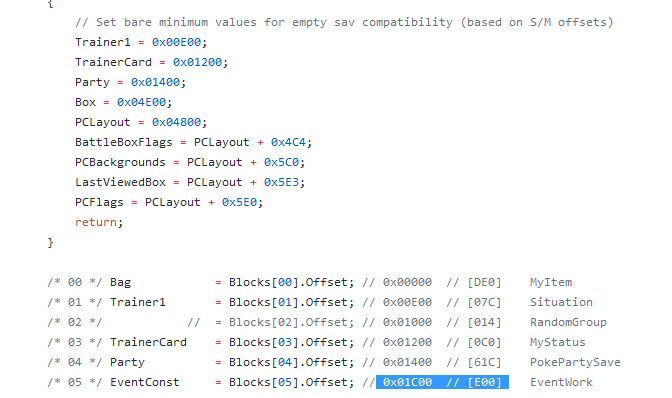
@Hasim normally one has to play through the entire story, but I get a nagging feeling you aren't doing that. As nobody documented the individual event flags related to them, an alternative would be to copy all event flags from a complete save into yours. (Notable downsides: all story events on your save would become completed, obviously) Here's what you could do. 1. Check PKHeX github to see which offsets of the save control event flags and constants. [For SM and USUM, they're the same: the block starts from 0x01C00, size 0xE00] 2. Find a complete save (look for one in this category) 3. Open your save and complete save in a Hex editor (eg: HxD) 4. Copy the block (as described in point 1) from complete save into your save 5. Save your save in the Hex Editor 6. Open your save in PKHeX. Move a mon around. Save in PKHeX (this fixes the save's checksum; prevent game from recognizing save as corrupted) It's now done.
 1 point
 -
does any 1 know how to give yourself all ride pager pokemon ultra sun using pkhex?1 point
-
Trainer Animations.1 point
-
I'll like to clarify, are these move animations?1 point