



Taku86
-
Posts
41 -
Joined
-
Last visited
-
Days Won
8
Content Type
Profiles
Pokédex
Portal
Technical Documentation
Pages
Tutorials
Forums
Events
Downloads
Gallery
Blogs
Everything posted by Taku86
-
I've just tried a clean prefix with Wine 11.9 and Wine Staging 11.9. Everything's working fine. WINEPREFIX=/home/anon/Games/Pokémon/PKHeX/test wine windowsdesktop-runtime-10.0.6-win-x64.exe WINEPREFIX=/home/anon/Games/Pokémon/PKHeX/test wine PKHeX.exe 11.4 works as well, as stated in the OP. WINEPREFIX=/home/anon/Games/Pokémon/PKHeX/test /home/anon/Games/Pokémon/PKHeX/wine-11.4-1-x86_64.pkg/usr/bin/wine windowsdesktop-runtime-10.0.6-win-x64.exe WINEPREFIX=/home/anon/Games/Pokémon/PKHeX/test /home/anon/Games/Pokémon/PKHeX/wine-11.4-1-x86_64.pkg/usr/bin/wine PKHeX.exe There must be something wrong with your prefix or with the way you’re creating it.
-
You can, just like people have always been able to use a virtual machine. But I don’t really see the point of using an environment that eats up gigabytes of RAM, CPU cores, and disk space just to install another operating system for software that already works with two simple commands through Wine, which is native anyway. On top of that, we don’t even know how long Winboat will be maintained, whereas Wine is here to stay. And I don’t think anyone would prefer buying a Windows license just for PKHeX.
-
I mean, did you try to delete your current wineprefix and repeat the procedure on a completely clean one?
-
@ExBurningRaptor Did you try a clean wineprefix? Upgrading/downgrading/changing Wine version can break the wineprefix
-
You can easily downgrade packages with downgrade. That's exactly what I'm doing right now.
-
I am aware of this. Starting from Wine version 11.5, there is currently a regression due to a new language code added to ICU, which for some reason is not recognized. There is already an open bug tracking this issue, hopefully someone will see and fix it. For now, use version 11.4, which is the latest safe version.
-
Yes, I can also confirm this bug. I was aware of it, but for some reason I forgot to write it. Added to the OP, thanks @WonderSquid
-
This user above has spammed his project in every Linux-related forum thread. I would like to point out that, besides the fact that his script is extremely convoluted (ridiculously so), the source of PKHeX is not the official one, but rather a reupload on archive.org. I have nothing to do with him, let alone his project with my thread. Be careful.
-

Advice needed on CFW and using PKHex.
Taku86 replied to RadientBloo's topic in Systems, Flashcards, and Emulation
That's a different process. You either: - install CFW and load homebrew applications (such as Save Managers) on sysNAND: simple but risky - or import/export save files by manually mounting partitions (this doesn't require CFW, just Hekate and a dump of your Switch's prod and bis keys): more advanced but safer -
Advice needed on CFW and using PKHex.
Taku86 replied to RadientBloo's topic in Systems, Flashcards, and Emulation
All homebrew-related activities should be done on emuNAND, not on sysNAND. Leaving even a single trace can get you banned. That said, there’s no clear definition of what actually does or doesn’t leave traces. Using a save manager to import/export save files doesn’t seem to, but I still wouldn’t recommend it. A safer approach is to mount the sysNAND partitions via Hekate using ninfs, manually export the save files from /save and /saveMeta folders, decrypt them with hactool, edit them with PKHeX, and then import them back by doing the reverse process. -
Do you mean with Wine 10.20? Because I've tried the latest Wine 11 and PKHeX starts just fine as always. Definitely a Wine 10.20 issue. Everything that is not Wine 10.20 should work out of the box.
-
The thread has been updated with the latest PKHeX version, which is now based on .NET 10. Fortunately, there are no major regressions, unlike what happened during the transition to .NET 9. Just manually install the latest .NET Desktop Runtime 10 and you should be good to go (it's not available on Winetricks yet). I’m not sure whether this is an Arch-specific issue, but the latest Wine release (10.20) prevents the program from starting. I’m currently using version 10.19.
-
You can use a NDS and a flashcard with this tool.
-
Oh, great article! It’s a shame that no player is willing to preserve those Pokémon...
-
So... we know for sure that someone has a legitimate copy of this Pichu but no one has dumped it? EDIT: it seems there’s a tweet from 2014 where a user shows an Absol with OT カイチョウ and TID 31031. At this point, I believe your assumptions are correct and that this Absol could indeed be the genuine one. Source: https://pokemonhistorian.com/heroic-hoenn/stamp-absol/
-
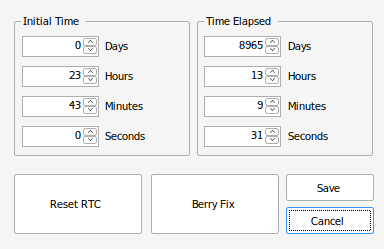
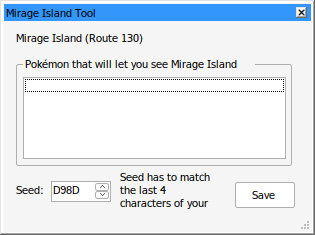
On my Pokémon Sapphire cartridge (live battery), the two bytes generated for Mirage Island don’t seem to match the progression of the RTC. According to my save file, 8965 days should have passed, and based on this list, Mirage Island should show the value FD00. However, I’m seeing D98D instead. In the past, I used this save file on an emulator, and I think that may have desynchronized the RTC-related data on the cartridge (cartridge's RTC is currently set to today's/thread date, by the way). In fact, I know for certain that I started this playthrough on September 9, 2023, and I shouldn't be seeing 8965 days. Is it possible to resync the RTC values to reflect the actual passage of time and make it so that, as of today (the date of writing this post) exactly 680 days have passed (from September 9, 2023) and the correct Mirage Island value appears?
-
@autofire372Yes, I have, but it's such a minor problem that I've never looked into it to be honest.
-
@Alex_Tanuki That doesn't seem to be the full log
-
@Kaworu Considering that Winetricks installs first the 32 bit version and then the 64 bit version of .NET, if Fedora doesn't have the 32 bit libraries the process probably gets stuck there at the beginning. PKHeX only needs the 64 bit version. Try to manually install it, it's also in the OP
-
Could you be more specific? What error do you get? Post the logs.
-
Thanks, I've added this to the OP. If anyone else can confirm this fixes the problem, that would be great.
-
I'm using PKHeX on two machines, one with LXQt+OpenBox (running on X) and one with KDE Plasma (running on Wayland). I've never experienced this issue and I'm unable to reproduce. I've also tried to move them to different desktops, but it still works. Wine version 10.2 and .NET 9.0.2 here.
-
@Blood-PawWerewolfThread updated with the latest version! And yes, it works indeed
-
@ErFuyl What new version are you referring to? If you mean the development build then you need to install the 9.0 version of .NET Desktop Runtime, as it looks like PKHeX has been ported to it (I'll update the OP only when the stable version will be out).
-
9.17 is higher. In the third log file there's a line which shows the path of an Arabic font. My question is: did the installation of .NET work? Was it on a clean Wine prefix? Also, post a screen of the empty title bar please.

