



BlackShark
-
Posts
1758 -
Joined
-
Days Won
109
Content Type
Profiles
Pokédex
Portal
Technical Documentation
Pages
Tutorials
Forums
Events
Downloads
Gallery
Blogs
Posts posted by BlackShark
-
-
Update PKHeX
-
Your save opens without any problems. Make sure you are using the latest release.
-
1 hour ago, tombthrowaway said:
I cannot find a .zip anywhere to save my life for PKHex. Where is the download for it? The only version I can see is an older version from 2022? Will it be updated at all to encompass what this post is about?
-
The post of me that you linked there already has Surskit codes for Emerald. Do they not work?
-
That file is empty (filled with FF).
-
3 hours ago, iChaos92 said:
Sorry for asking; what are the Ball Id's for the Legends Arceus Balls? I tried looking for them in the Github Repo but I couldn't find anything.
27 Strange Ball
28 Poké Ball
29 Great Ball
30 Ultra Ball
31 Feather Ball
32 Wing Ball
33 Jet Ball
34 Heavy Ball
35 Leaden Ball
36 Gigaton Ball
37 Origin Ball
https://github.com/kwsch/PKHeX/blob/master/PKHeX.Core/Game/Enums/Ball.cs
-
 1
1
-
-
Save states are not save files and are not supported, save in game and open your save file.
Besides that your PKHeX is very outdated, it even tells you there's a newer version available. You can follow the link in the program or get it from here:
-
 1
1
-
-
31 minutes ago, Kaphotics said:
Since the file loads as a "Japanese" save with 0 played time / OT name, it indicates there was corruption in Block 0 that stores your trainer data.
Seems like the Box/Party data is intact though.
Block 0 is intact at 0xA000 but unfortunately the recovery tool seems to clear it. Block 14 is the real issue it's missing/filled by FF.
Here's the fixed save:
-
On 8/19/2025 at 1:55 PM, Panda_ said:
So is it working like a normal game how the shinies work?
21 hours ago, Panda_ said:Is it same odds and can I still get shiny pokemon?
Yes.
-
1
-
-
21 hours ago, jojo12100 said:
If we reverse engineering that patch or try to make it compatible for japanese version (because the 2002 demo was in japanese) we may get more fidelity for results; then all we have to do is a RAM dump to get that Sharpedo and Kecleon.
That patch for what I know is based upon leftovers in final game of the demo.
Well, the download for the patch from that site is expired.
Maybe it's possible to just point the exit of Petalburg Woods to direct to the demo route instead.
I don't know how complete it is or if there's more to restore.From what I have seen at least the trainers are there but Sharpedo and Kecleon are in your own party and I haven't seen any code for them.Ok, from what I have seen in the decompilation only the events (trainers, warps, signs) are still there. Anything else was deleted, even the map layout which was a bit different to the final one. You could use the final layout and move the events up by 6 to "restore" the route. There is no code related to Sharpedo or Kecleon left. I doubt that the Japanese RS has more code left.
-
Depends on what exactly you are trying to use. You can check how other projects are using PKHeX, for example:
-
5 minutes ago, SHmonkey said:
oh and i obviously changed it to PKHaX so it shouild work for rom hacks
If the ROM hack changed the save structure even PKHaX won't help. The best you could do is asking the hack author to provide a way to edit their saves.
-
PKHeX.Core.dll is on NuGet, so in Visual Studio you can just go to Project > Manage NuGet Packages. A window will open where you can search for PKHeX and install it.
-
14 hours ago, Jiasen said:
Hi, I am also very new to all of this. I went through these steps: compiling PKHeX and making a folder called "plugins" to put the WC3 2.2.2 into.

I had an issue when running "Build" initially, but I fixed it (I think) based off previous responses in this thread. I rebuilt it and it did it successfully. I opened my save of emerald through PKHeX as well.
However, I am now getting this issue when I try to access the Mystery Gift or Mystery Event option in the plugin:
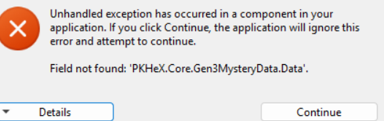
I'm a bit confused. I get that it's saying that the file isn't there, but I was wondering if someone could provide some advice as to what I should do. Let me know if I need to provide more screenshots or anything.
Thank you!
Why are you compiling PKHeX? There is really no reason to do that.
One of the latest commits a few days ago broke the compatibility with WC3 plugin v2.3.0. I am working on it but I will not release an update before the next PKHeX release.
So if you want to use the plugin please wait for the next release or go back to the latest stable PKHeX 25.06.09 which is still compatible with v2.3.0.
-
You need to search for a specific species, you can't leave that box blank.
-
HOME trackers can not be generated, only HOME can do that, So yes, you have to put them into HOME.
-
 1
1
-
-
PKHeX is a save editor, it does not "connect" to the games. You get your save from the emulator and open it in PKHeX.
Read this:
-
36 minutes ago, userudhdd said:
how do i use it? I cant use it
Check the tutorials. There are different ways depending on if you want to use this on your 3DS or emulator: https://projectpokemon.org/home/tutorials/save-editing/managing-3ds-saves/
-
No.
You can't directly transfer between PLA and SV. The Pokemon would have to go through HOME, which would assign a tracker. If the tracker is missing HOME will know that it didn't arrive in SV legally and reject it.
Pokemon need to enter HOME from the game they originate from to get a tracker.
-
There is a button to unlock all fashion items in the Misc tab of the Trainer Info editor.
-
This save is missing every block, except blocks 0, 12 and 13 which are repeated multiple times.
Block 0 is Trainer Data which contains your Trainer Name, TID/SID, Pokedex data and a few other minor things (no flags or progress related things)
Blocks 12 & 13 are the last box slots (which are empty here) and your box names and wallpapers.
So there is not really something to rescue in there.
-
In the Trainer Info editor look into the Misc tab, there should be a button that unlocks all fashion items.
-
Uploading Scarlet/Violet saves is not allowed.
Sharing saves could get you banned.
There was a bug related to Gen 9 inventory that got fixed last week: https://github.com/kwsch/PKHeX/issues/4496
You can use the development build. Try and see if that works.
-
13 minutes ago, Rotaryguy6708 said:
With the change to .NET Desktop Runtime 9.0 do I still need to do the compile step in the tutorial? The tutorial is a little out of date using Visual Studio 2017. Currently Visual Studio is up to 2022 and ask you what Workloads you want to install. I don't know witch of them we need for PKHeX, if we even need to do that step now.
You don't need to compile anything, that was never necessary. Just install the .NET 9 runtime and download PKHeX from here:
BlackShark's PKHeX Plugin Support Thread
in Saves - Editing Help
Posted
Hi, please check the downloads. I have uploaded new releases a few days ago.