


evandixon
-
Posts
5912 -
Joined
-
Last visited
-
Days Won
89
Content Type
Profiles
Pokédex
Portal
Technical Documentation
Pages
Tutorials
Forums
Events
Downloads
Gallery
Blogs
Everything posted by evandixon
-
 When dealing with R4 clones, it's hard to say. Just make sure Wood R4 runs on it. Also note that the only thing a flashcart like this would do for backing up your Soul Silver save is let you use a MicroSD card with storage from 2GB to 32GB. The card itself does more than the ARDSi, but little more for this particular task.
 -
Pokedoc's tool is your best bet: http://projectpokemon.org/forums/showthread.php?12405-A-tool-to-backup-HG-SS-saves If your Action Replay GBA Duo can run homebrew (it most likely can't), then that's the easiest way If the MicroSD in your ARDSi is 2GB or less, you don't need anything else but Wi-Fi (unsecured or WEP; WPA won't work). You just need to DLDI patch Pokedoc's tool with the Games 'n Music patch. If you don't know how to do that, you can use DS Organize. Run DSOrganize-gnm.nds, then use that to run the tool I linked to above. DS Organize is a bit unstable when writing to the MicroSD, so I don't recommend doing anything but use it to DLDI patch things. If you don't have compatible Wi-Fi, then you could consider a USB adapter, like the NDS Backup Tool Plus, SMS4, or R4i Backup Adapter. Keep in mind those devices don't play nicely with 64 bit Windows, and will require some bypassing (see the cons in the OP). I have had little luck using them recently, so either Windows 8 changed something making it no longer work, or I'm doing something wrong. If you have soldering experience and are brave, you can look at this guide, but I don't recommend it. If none of the above apply to you or you don't have enough hardware, you have a few options: -Get unsecured or WEP Wi-Fi. For security purposes, if you do this, you should only leave it running when you need it for your saves. -Get an EZ Flash 3in1. -Get any slot 2 flashcart that can run NDS homebrew. -Get a usb adapter, like the NDS Backup Adapter Plus, SMS4, or R4i Backup Adapter. (If you're on a 64 bit Windows OS, you'll have to do some extra steps, which may or may not work.)
-
This looks pretty good. I'm not usually one to try out a ROM hack, but I'll have to give this a try once I beat vanilla Alpha Sapphire.
-
@Pinkolol @Pinkolol I've updated the beta to show an error message where an error may occur, so please try again and report any error messages given.
-
Should we remove the poll?
-
Injecting Hacked ROMs into NDS Cartridges
evandixon replied to wundrweapon's topic in RAM - NDS Help
Edited ROMs can only be run on a flashcart, which is basically a MicroSD adapter for the DS. ROM stands for Read Only Memory, and as the name implies, legit cartridges cannot be altered to run edited ROMs. -
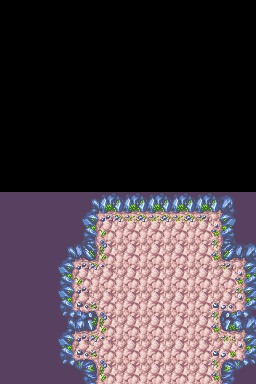
Have you played around with the debug menu in Explorers of Time/Darkness? There's a map visualizer that may come in handy for this. I've attached a picture of D00P01 as shown by the debug menu. I've looked at some of the others and for each map that's not an actual dungeon, one of these maps exist. It may be harder to reverse engineer this format because not only is there (probably) collision data, there's also some animated frames. Looking at the bpc file, it looks like there's some extra data starting somewhere at the bottom that doesn't store image data (it doesn't display as nicely in YY-CHR). Maybe it's collision data, although I wouldn't know what that looks like. In case you don't have it, here's the Debug Menu code for Explorers of Time: 0202A09C A3A01000 92FFFFA8 FE7F0000 0202A09C E3A01008 D2000000 00000000 The source wherever it was said "R + Down for Debug Menu", but I never have to hold R, just scroll down to the bottom of the main menu.
-
Are you using a flashcart, emulator, or a legit cartridge?
-
Were you given any error messages?
-
The BGP file format is used in Pokémon Mystery Dungeon: Explorers of Time/Darkness/Sky to store full-screen background images, most notably the various images that appear in the background of the main menu. It is stored using AT4PX compression. Overview Offset Length Name Description 0x0 20 Header Currently unresearched 0x20 1024 Palette Stores 64 colors for use by the tiles. 0x420 620 Tile Mapping For each 8x8 region of the screen, identifies which tile, palette, and transform to use. 0xC40 Unknown/Varies Tiles Consecutive 8x8 4bbp tiles for use in the tile mapping. Palette The palette consists of 1024 bytes, representing 256 colors. Each color has 4 bytes: Red, Green, Blue, and a 4th unknown byte which is always set to 0x80. Tile Mapping The Nintendo DS screen is 256x192 pixels. Because each tile is 8x8, this leaves a grid of 32x24, leaving 768 possible tiles. At two bytes per tile mapping, this region is 1536 (0x600) bytes long. Each spot for a tile is given two bytes, which stores the index of the tile data (10 bit unsigned integer), the index of the palette (4 bit unsigned integer), and whether or not to perform an X or Y transform. Bit Length Description 10 Tile data index 1 Flip X 1 Flip Y 4 Palette Index For each spot on the screen that needs a tile, the 4bpp 8x8 tile given by the Tile Data Index is used, transformed on either axis if applicable, and its palette is 16 consecutive colors from the Palette above, after skipping 16 times the Palette Index colors. Tiles Tiles are simple. They are simply 4bpp tiles of 8x8 pixels referenced by the Tile Mapping.
-
I've updated the public beta. Hopefully it works better for you. http://dl.uniquegeeks.net/SkyEditorBeta/setup.exe
-
In the bgp format, there's a section that tells what 16x16 (or was it 8x8?) tile goes with what portion of the screen. There's also a few bits that are the offset of the palette. So there's 64 colors in the overall palette. Each tile can only use 16 colors. The offset bits say to use 16 consecutive colors after skipping the first x colors in the overall palette. I'll try to make time today to look at my source code and document this better. [Edit] Here's a rough wiki article on it. If you have any questions, let me know. http://projectpokemon.org/wiki/Pmd2_BGP
-
Unless there's a more recent version I missed, the best I know of is linked to in this post: http://projectpokemon.org/forums/showthread.php?40199-Pokemon-Mystery-Dungeon-2-Psy_commando-s-Tools-and-research-notes&p=192061&viewfull=1#post192061
-
@Pinkolol @Pinkolol Fixed it. I didn't properly read unknown bits (and without a list of dungeons I don't see how I could have really found the correct structure). I shouldn't have assumed that I was reading it right. So, here's an updated version. It correctly reads the met at location, and includes a list of dungeons. Sky Editor Debug.zip
-
Exploits are hard to find. It could be years before another exploit is found. Additionally, this forum is for PKHeX discussions, not injection.
-
The important number is the -22 or -23 at the end of the version. If you have 9.5.0-22 it should work, but not 9.5.0-23. I read somewhere that the last number is the version of the web browser, so the newer browser blocks the exploit.
-
Did you convert from NO$GBA and to Raw?
-
The new 3DS has a newer browser, which the browser exploit doesn't work on.
-
Try this converter. http://www.shunyweb.info/convert.php
-
Welcome to the forums, JamesTheRedEngine! This forum focuses on Pokémon games. Specifically hacks of save files, ROMs, and the game's memory (aka cheat codes), but we also have forums for general Pokémon discussion and trading. If you want to contribute, I'd recommend asking on IRC.
-
You need to make sure No$GBA is saving to Raw save files. Although I would recommend using DeSmuMe. Then all you have to do is use File -> Export/Import Backup Memory, before/after editing the save.
-
General question about save editing (3DS games)
evandixon replied to ShinyMeganium's topic in Saves - Editing Help
For your physical cartridge (Pokémon X): 1. Yes, you can swap saves as long as they stay on the same cartridge. 2-3. I don't know, but if you started a new game, then unless Pokebank is specifically checking the cartridge ID, Pokebank will probably consider each save a different game. So I'd say this would probably work, but the unlikely worst-case scenario is being banned from the Pokebank. That probably won't happen, but I can't say for sure. For your digital cartridge: 1. Because of Anti Savegame Restore, switching between two save files is not as straightforward. It would probably work if you had two SD cards, each with a copy of the game from the eShop, swapping them when you want to swap saves. 2-3. My concern with the physical cartridge was that the only way to swap save files required unauthorized devices to do so. Having two SD cards isn't unauthorized, so everything should work fine when you switch SD cards to switch saves. -
pk3DS: Pokémon 3DS ROM Editor and Randomizer
evandixon replied to Kaphotics's topic in ROM - 3DS Research and Development
I would actually recommend Visual Studio 2013 Community Edition, because it's built by the same company that made .Net in the first place, but either should work. -
Are you using an original 3DS or a New 3DS?
-
Check the sorting you're using? I have no idea why they aren't showing up. I can take another look later. ----------- On a development note, I have a general idea of how the checksum for Pokémon Mystery Dungeon: Gates to Infinity works, and I've successfully changed my held money (with a hex editor). No idea how long it will be until there's progress on putting it in Sky Editor, but it's actually a possibility now (assuming you have access to Savedatafiler, through Gateway or Palatine CFW). For anyone interested, the last two bytes contain the sum of all bits from index 0 to some unknown end point (0d43869 for one of my saves, still working on this), truncated to what will fit in 8 bits. The data is shifted by two bits, so 6 bits of the sum are in the next to last byte, and the other two in the last one.