Jump to content

7 Screenshots

About This File

Pre-HOME HOME
Non Shiny Living Dex | Shiny Living Dex
 
Switch Core Living Dex
(Regular and Shiny)
Pokémon GO Transfers


Key Description:
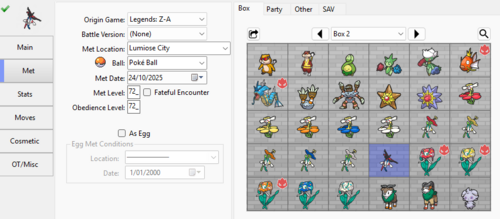
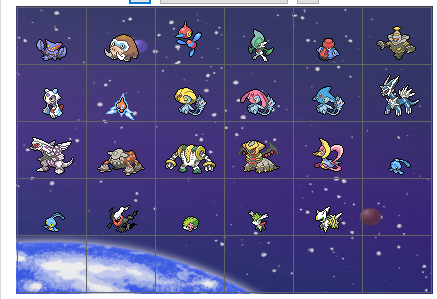
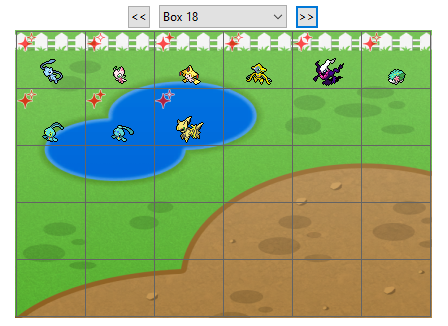
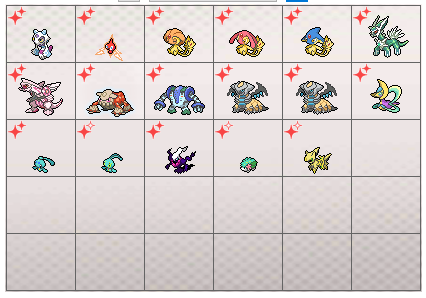
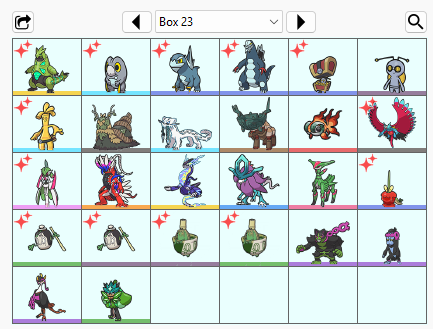
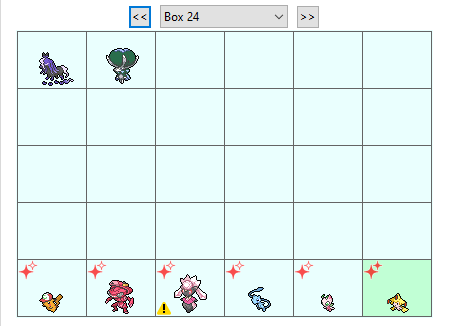
This page hosts several pcdata.bin files, that have stored all available Pokemon in the Boxes.
Just drag the pcdata.bin onto a save of that file's version-pair.
(For example: drag SWSH pcdata.bin into a SW save or SH save.)


The Pokémon in these files are compatible with Pokémon HOME. As long as you don't change any of the immutable values (EC, PID, IVs, shininess, etc), it can be transferred across games via HOME, and would have the correct stats, regardless of whichever HOME compatible Switch title you inserted it into first.

If you want to have a brief understanding of why you should not change immutable values, check here. (you'll also find an example there)


Files you will find:

Files Description Potential Uses
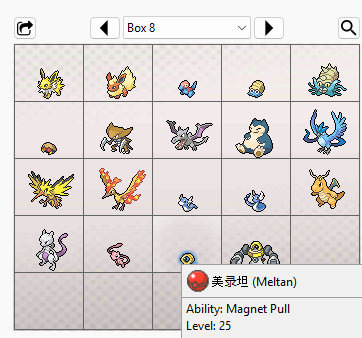
Origin - Sword & Shield Full living dex of every non-shiny Pokémon originating from Sword or Shield Could be used to receive the gift Shiny Keldeo from completing Pokémon HOME's Pokédex for the Sword & Shield games.
Origin - Brilliant Diamond & Shining Pearl Full living dex of every non-shiny Pokémon originating from Brilliant Diamond & Shining Pearl Could be used to receive the gift Shiny Manaphy from completing Pokémon HOME's Pokédex for the Brilliant Diamond & Shining Pearl games.
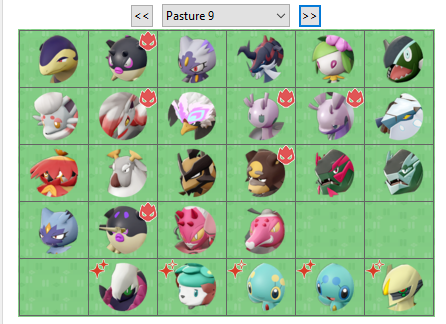
Origin - Legends Arceus Full living dex of every non-shiny Pokémon originating from Legends: Arceus Could be used to receive the gift Shiny Enamorus from completing Pokémon HOME's Pokédex for the Legends: Arceus game.
Origin - Scarlet & Violet Full living dex of every non-shiny Pokémon originating from Scarlet & Violet Could be used to receive the gift Shiny Meloetta from completing Pokémon HOME's Pokédex for the Scarlet & Violet games.
Origin - Lets Go Pikachu & Eevee

Full living dex of every non-shiny Pokémon originating from Let's Go Pikachu & Let's Go Eevee

Note: LGPE Pokémon format do not store HOME trackers. When deposited into HOME, it temporarily gains a tracker, and if said mon was transferred to other Switch games, it will permanently retain the tracker.
All entries with a tracker is in the second folder.

(Reminder that when LGPE mons enter another game, it can no longer be transferred back into LGPE)

Could be used to receive the gift Shiny Meltan from completing Pokémon HOME's Pokédex for the Let's Go Pikachu & Let's Go Eevee games.
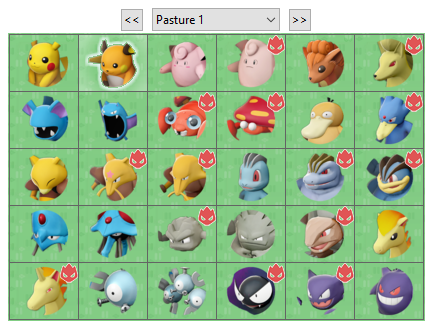
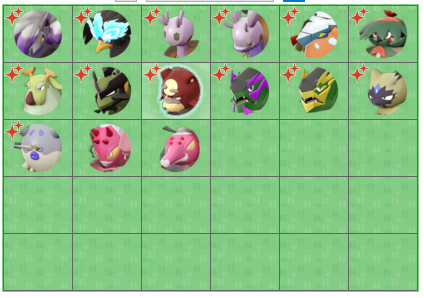
HOME Living Dex 3.1.2 Contains a non-shiny folder, and a shiny folder, with separate folders spanning across the games for Sword & Shield, Brilliant Diamond & Shining Pearl, Legends: Arceus, Scarlet & Violet.
Game origins (version caught in) not specific to any of the games.
For players to inject a Pokémon into the respective game as the pcdata.bin (even if it isn't the origin game of said Pokémon) and be able to use Pokémon HOME to transfer said Pokémon across games [reminder to not modify the immutable values]

Extra note: together with having all the Origin sets above in your HOME account, if you can also get the following (via others methods such as from GTS or Bank transfer or GO transfer), you'll be able to get the HOME Magearna gift:
Spinda, Patrat, Watchog, Pansage, Simisage, Pansear, Simisear, Panpour, Simipour, Furfrou, Diancie.
(Diancie can both be extracted out of the HOME Living Dex 3.1.2 archive)


Exceptions:

- Spinda is missing; while Spinda exists in BDSP, its implementation was bugged thus it cannot be deposited from BDSP into HOME (and vice versa)
- Any Pokémon that cannot be transferred out of HOME are missing from this living dex; we gotta wait for games that can support those species.


Last Word:
Despite these Pokemon being legal, I still need to say this:
ProjectPokemon.org is not liable, if you somehow managed to get yourself banned with these Pokemon. :)

Also, don't be stupid or don't do stupid things.
I can't possibly give every directive or comment on every possibility. Be reasonable, alright :3


What's New in Version 3.1.2-6   See changelog

Released

Added: Origin - Lets Go Pikachu & Eevee

  • Like 3
  • V-Wheeeeeel!!! 4
  • Amazed 1

User Feedback

Recommended Comments


angelus kun

Posted

Idk if I'm doing something wrong but it seems electivire is missing from hisui origin dex hehe because when I transfer pokemon boxes to home, electivire didn't appear on home hisui pokédex 


IMG_20250505_165050.jpg

theSLAYER

Posted

11 hours ago, angelus kun said:

Idk if I'm doing something wrong but it seems electivire is missing from hisui origin dex hehe because when I transfer pokemon boxes to home, electivire didn't appear on home hisui pokédex 


IMG_20250505_165050.jpg

you're right, I am missing Electivire, will add it when Atmosphere updates.

Davi

Posted

Can someone upload a save file from a different game with all pokemon obtained on LGPE? I dont have Lets Go and need the Home trackers

theSLAYER

Posted

5 hours ago, Davi said:

Can someone upload a save file from a different game with all pokemon obtained on LGPE? I dont have Lets Go and need the Home trackers

If it’s not clear at a glance, I do have the mons uploaded.

LGPE data (pb7) itself doesn’t hold tracker information, so the mon gotta be transferred out for the trackers to be retained.

IMG_3827.png

So for all Kanto mons (excluding Alolan variants), they’re in a BDSP pcdata.bin. All you gotta do is load a BDSP save in PKHeX, then drag the bin file into the PC portion of the BDSP sav, then all the mons in that file will show up.

If you don’t have a BDSP save, you can first drag into BDSP blank save (PKHeX has the setting which can load a blank save for you), then drag the mons over to another save of yours.

As most of Alolan variants, they’re scattered to other games, so look at the file description and follow as such.

Alolan Rattata and Alolan Raticate doesn’t have a Switch game yet, so for now I’ve dumped the ph3 and are waiting for games to have them. Ph3 can be imported by PKHeX so it should work when they become available in any Switch game.

I won’t be uploading saves as it’s a hassle with all the different combinations of mons available, and people will always want something different. Additionally, this isn’t the place to ask for other people to make saves for you. For certain Switch games, it’s not even a good idea to ask for saves, as there’s online save validation which can lead to bans, so asking for those are not allowed on this forum.
 

Good luck 🤞 

Davi

Posted

On 6/13/2025 at 10:42 PM, theSLAYER said:

If it’s not clear at a glance, I do have the mons uploaded.

LGPE data (pb7) itself doesn’t hold tracker information, so the mon gotta be transferred out for the trackers to be retained.

IMG_3827.png

So for all Kanto mons (excluding Alolan variants), they’re in a BDSP pcdata.bin. All you gotta do is load a BDSP save in PKHeX, then drag the bin file into the PC portion of the BDSP sav, then all the mons in that file will show up.

If you don’t have a BDSP save, you can first drag into BDSP blank save (PKHeX has the setting which can load a blank save for you), then drag the mons over to another save of yours.

As most of Alolan variants, they’re scattered to other games, so look at the file description and follow as such.

Alolan Rattata and Alolan Raticate doesn’t have a Switch game yet, so for now I’ve dumped the ph3 and are waiting for games to have them. Ph3 can be imported by PKHeX so it should work when they become available in any Switch game.

I won’t be uploading saves as it’s a hassle with all the different combinations of mons available, and people will always want something different. Additionally, this isn’t the place to ask for other people to make saves for you. For certain Switch games, it’s not even a good idea to ask for saves, as there’s online save validation which can lead to bans, so asking for those are not allowed on this forum.
 

Good luck 🤞 

Sorry I meant a pc box file, not really a save. That works, thanks for the explanation

partypartym

Posted

The Origin Sword & Shield file is missing the shiny Kaldeo and the one linked doesn't have a home tracker. Any chance we could have one with a home tracker uploaded?

theSLAYER

Posted

2 hours ago, partypartym said:

The Origin Sword & Shield file is missing the shiny Kaldeo and the one linked doesn't have a home tracker. Any chance we could have one with a home tracker uploaded?

If I remember correctly, the intention of my origin file is to not have shinies if possible.

those can be found here:

https://projectpokemon.org/home/files/category/216-pokémon-home/

Ziox10

Posted

Does anybody known how do i use the ph3 files from pokemon go dex ? can put them in pkhex gives me an error

theSLAYER

Posted

5 hours ago, Ziox10 said:

Does anybody known how do i use the ph3 files from pokemon go dex ? can put them in pkhex gives me an error

Drag a ph3 into the left side of PKHeX. May need to have this plugin:

if that’s what you’re doing, can you specify what “error”?

Ziox10

Posted

2 hours ago, theSLAYER said:

Drag a ph3 into the left side of PKHeX. May need to have this plugin:

if that’s what you’re doing, can you specify what “error”?

thx so much i didnt have the plugin

RaMiGo

Posted

First, thanks so much for this resource theSlayer! 
 

I’ve managed to get all game entries into home. However, I can’t figure out how to get the Pokemon Go ones into home. I downloaded the ph3 files and the Home Live Plugin, but it seems like I can only bring in one ph3 file at a time even though I’m selecting all and dropping them all in. 
 

Is there something I’m missing?

Taiy

Posted

Huge fan of the provided content. However, I am stuck and cannot find reasonable answers regarding Backing up my save, importing the PKMDEX, restoring the save, and moving the save to home or another console>home. Every thread just says, "you'll be banned for backing up / restoring saves." Can anyone provide direction?

For example, I have Z-A on Switch 2. I can transfer the save to my Switch 1 v1 console. I can perform CFW to back up, edit, then restore the save. However, transferring the save back or using Home requires online connection and that is said to flag and ban. There must be a crucial step being missed, and the internet threads are just flooded with bad information. 

Essentially, I'd use this to fill in some missing (traded) mons or items (like Greninjite). 

theSLAYER

Posted

2 hours ago, Taiy said:

Huge fan of the provided content. However, I am stuck and cannot find reasonable answers regarding Backing up my save, importing the PKMDEX, restoring the save, and moving the save to home or another console>home. Every thread just says, "you'll be banned for backing up / restoring saves." Can anyone provide direction?

For example, I have Z-A on Switch 2. I can transfer the save to my Switch 1 v1 console. I can perform CFW to back up, edit, then restore the save. However, transferring the save back or using Home requires online connection and that is said to flag and ban. There must be a crucial step being missed, and the internet threads are just flooded with bad information. 

Essentially, I'd use this to fill in some missing (traded) mons or items (like Greninjite). 

I don’t think every thread says that. I’ve said in multiple thread that I use CFW (including backing up and restoring saves) and able to go online with my CFW Sysnand. 
 

the idea is to not have anything fishy that will get you banned, like cheating on online multiplayer, piracy, custom themes etc.

Taiy

Posted

On 11/7/2025 at 10:55 PM, theSLAYER said:

I don’t think every thread says that. I’ve said in multiple thread that I use CFW (including backing up and restoring saves) and able to go online with my CFW Sysnand. 
 

the idea is to not have anything fishy that will get you banned, like cheating on online multiplayer, piracy, custom themes etc.

I dug through threads here on Project Pokémon , found a lot of your personal comments. Essentially compiled those and went that route. A lot of the misinformation steams from Reddit / other sites. 

Glad to report, as of right now, there is no issue, and I achieved what I wanted for the time being in PLA. Next, I'll do PZA and then the main lines. 

theSLAYER

Posted

25 minutes ago, Taiy said:

I dug through threads here on Project Pokémon , found a lot of your personal comments. Essentially compiled those and went that route. A lot of the misinformation steams from Reddit / other sites. 

Glad to report, as of right now, there is no issue, and I achieved what I wanted for the time being in PLA. Next, I'll do PZA and then the main lines. 

Well given how sometimes from a user’s POV, they got “banned for doing nothing”, I can see how fear mongering can spread.

There’s a multitude of reasons a person could get banned, and being human, we don’t see what we don’t see. And then there’s personal bias which can create a blind spot when it comes to our own actions; we’ll likely to blame something else, as opposed to assigning blame on our past actions. 
 

Unfair generalisations (on my part) aside, always be safe, and keep in mind whatever happens, is at your own risk.


Create an account or sign in to comment

You need to be a member in order to leave a comment

Create an account

Sign up for a new account in our community. It's easy!

Register a new account

Sign in

Already have an account? Sign in here.

Sign In Now
×
×
  • Create New...