Jump to content

User Contributed Saves

Unless you specifically mention in both the title and description, DO NOT UPLOAD and save that is hacked/cheated/filled with illegal Pokémon.

Other saves uploaded by various users. Do share your save files with everyone here!

Due to differences in save file formats, please indicate which game the save is for and which format it is.  (For example, a Pokémon Moon save for JKSM or a Pokémon Diamond save for DeSmuMe.)

Warning: Some Nintendo Switch games have extra verification to detect when multiple people use the same save file online at the same time, resulting in the save being banned from online play. It is unclear at this time whether this will affect Pokémon Legends: Arceus, so do not upload any save you want to keep using online, just in case.

78 files

  1. PCNY Pokemon Crystal Event Legendaries

    Hey guys just uploading a save file that contains legitimate pokemon from gen 2 PCNY events. Some of which have NOT been hosted here before (including legendary birds, mewtwo, mew)
    Enjoy!
     
    Save file discovered here 


    3 downloads

       (0 reviews)

    0 comments

    Submitted

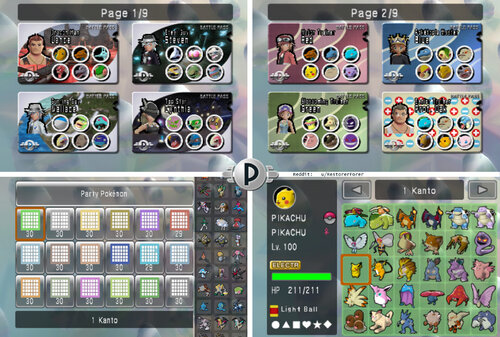
  2. Pokemon Battle Revolution italiano Tutti i Pokemon evoluti Configurazioni competitive + Little Cup + Pass personalizzati per allenatori iconici

    English Version: https://projectpokemon.org/home/files/file/5057-pokemon-battle-revolution-all-fullyevolved-pokemon-competitive-builds-little-cup-custom-passes-for-iconic-trainers/
     
     
    Creato da u/RestorerForer
    PAGINA DI DOWNLOAD DEL FILE: 
    https://projectpokemon.org/home/files/file/5057-pokemon-battle-revolution-all-fullyevolved-pokemon-competitive-builds-little-cup-custom-passes-for-iconic-trainers/
    > VERSIONE FINALE: 25 Settembre 2025
    QUESTO FILE NON CONTIENE POKEMON ILLEGALI NE E' DA CONSIDERARSI COME FILE PIRATA
    Questo è un salvataggio che ho creato io, QUESTA NON E' UNA ROM. Serve ad aiutare coloro che vogliono giocare il loro gioco che hanno comprato in maniera LEGALE senza fare grinding per qualsiasi cosa prima di essere in grado di combattere.
    CONTENUTI: 
    1. Riguardo il salvataggio
    2. Riguardo i Pokemon
    3. Guida all'installazione (Wii)
    4. Guida all'installazione (Dolphin)
    4.5. Guida all'installazione (Android Dolphin)
    5. Come editare i Pokemon/Il file di salvataggio/ creare dei team customizzati
    6. RISOLUZIONE DEI PROBLEMI (Wii)
    7. Arena Atollo in MODALITA' LIBERA!

    1. Riguardo il salvataggio
    Questo salvataggio contiene: Tutti i Pokemon evoluti (e molti per la Little Cup) con build competitive, tutti i pass lotta e tutti i costumi sbloccati, e 87 team che ho creato basandomi sui personaggi apparsi nel corso della serie, come Rosso, Camilla, Jasmin, Vera, Giovanni, Paul e molti altri!
    ▸ Il gioco ha quattro salvataggi: PKTOPIA, Rosso, Blu, Verde. Puoi rinominare questi salvataggi (Vedi "Editing del salvataggio")
    » PKTOPIA è un salvataggio completo con tutte le arene sbloccate e completate. Ha 104 pass lotta già pronti (Ma li puoi cancellare!)
    » Rosso è un salvataggio completo con tutto sbloccato, ma non ha i pass lotta già pronti (Così che tu possa creare i tuoi!) (Ha anche 60 pass amico!)
    » Blu ha tutti i Pokemon ma non è stato giocato. Questo servirà a te per permetterti di svolgere la tua partita con tutti i Pokemon. Ha anche tutti i costumi e i pass lotta sbloccati (Ha anche 60 pass amico!)  >> ORA INCLUDE TUTTI I 493 POKEMON! <<
    » Verde non ha nessun Pokemon, non è stato giocato, così da permetterti di connettere un DS, o di giocare con i pass noleggio se pensi che sia una sfida divertente! Ha comunque tutti i vestiti sbloccati!
     

    2. Riguardo i Pokemon
    - Ho fatto un database di tutti i Pokemon. C'è un file Excel e un file di testo nella cartella. Se vuoi trovare una mossa specifica o sistemare i Pokemon in base alla loro velocità, adesso potete!
    - Ho deciso di non dare a nessun Pokemon gli strumenti "scelta" (Bendascelta, Stolascelta e Lentiscelta) eccetto per i Pokemon con la mossa "Raggiro" e ho preferito usare le Assorbisfera, così che quando vorrete giocare coi vostri amici, i set non saranno così complicati, e i Pokemon saranno più prevedibili in base alla loro velocità. Inoltre, rovinano il bilanciamento del gioco. Ma nel caso ti piaccia giocare competitivo, costruisciti i set come vuoi!
    - In termini di legalità, tutti i Pokemon nei box hanno moveset legali seguendo il loro movepool di quarta generazione, eccetto per questi sei casi: 
    » Alcuni leggendari conoscono mosse che non possono imparare, per renderli deboli. Per esempio Kyogre ha Raggiaurora, una versione più debole di Geloraggio, per renderlo più bilanciato. QUESTO SI APPLICA SOLO AI LEGGENDARI DI COPERTINA! MEWTWO, MEW, JIRACHI E DARKRAI. Latios, Cresselia, e tutti gli altri leggendari/mitici non sono stati indeboliti!!!
    » Keckleon conosce Mimica. Pensavo fosse una mossa perfetta per lui, e funziona bene con la sua abilità. Può riflettere una mossa dello stesso tipo che lo ha appena colpito e rispondere con una STAB.
    » Pachirisu ha Sonoqui. Non impara questa mossa prima della quinta generazione, ma pensavo fosse perfetta per lui, altrimenti è completamente inutile. 
    » Unown ha...un moveset speciale. L'ho fatto principalmente per il meme! (Fa comunque schifo)
    » Magikarp ha Idropompa. Questa era una mossa esclusiva in quinta generazione e la impara tramite MT dalla ottava generazione in poi. 
    » Rotom nel Box 14 (OU Singles)conosce Idropompa, perché questo Rotom dovrebbe essere Rotom Lavaggio. 
    (Pokemon Battle Revolution è uscito prima di Platino, quindi le forme Rotom non erano state ancora rilasciate e quindi non sono presenti nel gioco. n.d.t)
    - In termini di Introforza, l'ho esclusa da qualsiasi Pokemon eccetto Unown e i Pokemon nel box "OU SINGLES" nel Box 14. Le loro Introforza sono: Unown (Fuoco) Magnezone (Fuoco) Latias (Fuoco) Slowbro (Elettro) Rotom (Ghiaccio) 
    - Tutti i Pokemon hanno una distribuzione delle statistiche e delle EV legittime. ECCETTO NEL SALVATAGGIO PKTOPIA, ho creato dei nuovi Pass Amico. 11 di questi pass utilizzano Pokemon deboli come Goldeen con abilità cheattate (Ma che non cambiano le statisitiche.) Questi Pokemon NON SONO ACCESSIBILI e NON SONO PRESENTI NEI PC. Tutto quello che potete fare è giocare con quei pass così come sono. I Pokemon con le abilità cheattate sono: 
    Macroforza: Ash (Buizel), Jessie (Meowth), Lyris (Whismur), Brock (Onix, Geodude, Bonsly, Croagunk), Misty (Psyduck,Goldeen), Lt. Surge (Voltorb), Blaine (Ponyta) 
    Prepotenza: Lucinda (Piplup), James (Mime Jr.), Chiara (Clefairy)
    Filtro: Brock (Golbat), Erika (Ivysaur), Blaine (Magcargo)
    Nuotovelox: Misty (Corsola)
    Piovischio: Misty (Politoed)
    Levitazione: Lt.Surge (Magnemite)
    Inoltre, l'unica mossa cheattata in questi pass è Distortozona, data al Blissey di Brock.
    Questi pass non sono presenti negli altri salvataggi! Solo quelli di PKTOPIA.
     
     
    3. Guida all'installazione (Wii)
    - Importare questo salvataggio su Wii RICHIEDE Homebrew, in quanto PBR non permette l'importazione di salvataggi. Usare Homebrew con SaveGameManagerGX bypassa tutto questo. 
    Prima, estraete il file scaricato, apritelo >> (LA VOSTRA REGIONE) >> aprite "PBR SAVE FILES" >> aprite "MAIN GAME SAVE FILE" e copiate la cartella 0001000052504245 o simili direttamente nel root della vostra scheda SD
    NON POTETE piazzare il file di salvataggio del gioco così com'è, ma dovete mettere L'INTERA CARTELLA 0001000052504245 COSI COM'E' dentro la scheda!!!
    Inserite la vostra scheda SD nella Wii. Poi;
    Usando SaveGameManagerGX su Homebrew, nel menù in alto, navigate verso la vostra scheda SD. Trovate l'icona per PBR, cliccate l'icona PBR e cliccate installa. Questo sovrascriverà tutti i dati che avete su PBR quindi ricordatevi di fare il backup se volete tenere i vostri vecchi file di salvataggio.
    Fatto!
    » SE NON DOVESSE FUNZIONARE/ VI MOSTRA L'ERRORE "unable to copy datas" cancellate la cartella 0001000052504245 dalla vostra scheda SD.
    » Ora, provate la cartella SOTTO la cartella "MAIN GAME SAVE FILE" ("BINARY") e mettete il file "data. bin" nel root della vostra scheda SD. Ora, provate a installarlo in SaveGameManager
    » Se anche questo non funzionasse, allora su SaveGameManagerGX dovrete cliccare il file .bin, cliccate "Decompress" e creerà un nuovo file su SGMGX e QUESTO file dovrebbe funzionare. 
    Se volete estrarre il vostro file per editarlo, per esempio se giocate per venti ore e volete editare un Pokemon senza perdere i vostri progressi, andate su SaveGameManagerGX,e nel menù superiore navigate sull'icona Wii, cliccate l'icona PBR e cliccate "Estrai" e navigate verso la vostra scheda SD
    Una volta che avete finito di editare il vostro file, re-iniettate il salvataggio. 
     
     
    4. Guida all'installazione (Dolphin)
    Prima, create un nuovo file di salvataggio su PBR. Poi, chiudete il gioco. Questo dovrebbe avervi creato una cartella. 
    Nel menù di selezione dei giochi di Dolphin, cliccate col destro su PBR e cliccate "Open Wii Save Location". Nella cartella "GeniusPbr", rimpiazzate il file "PbrSaveData" con il mio. Per trovare il file "PbrSaveData" andate su PBR SAVEILE COMPLETE\(LA VOSTRA REGIONE)\ PBR SAVE FILES \(IL VOSTRO FILE DI GIOCO)\0001000052504245\GeniusPbr e lo troverete nella vostra cartella GeniusPbr.
    Aprite Dolphin e giocate!
    C'E' UN IMPOSTAZIONE CHE DOVETE SPENGERE SU DOLPHIN: 
    I pass lotta potrebbero non essere mostrati correttamente (Ad esempio l'avatar dell'allenatore potrebbe non essere presente). Sulle impostazioni di Dolphin andate su Graphics -> Hacks -> e cliccate "Store EFB Copies to Texture Only" per disattivarlo. Dovrebbe sistemarlo senza compromettere gli altri giochi.
     
    4.5. Guida all'installazione (Android Dolphin)
    Assicurati di aver avviato il gioco e di aver SALVATO prima alla reception, altrimenti le cartelle non saranno state create!
    Vai su Config ==> Dati utente ==> Apri cartella dati utente
    Poi vai su Dati ==> GeniusPBR, e all'interno di questa cartella inserisci il nuovo salvataggio sostituendo il vecchio pbrSaveData.
     
     
    5. Come editare i Pokemon/Il file di salvataggio/ creare dei team customizzati

    Aprite il file "PbrSaveData" su PKHex. Editare i Pokemon è abbastanza semplice e dovreste arrivarci per conto vostro. 
    Un consiglio che ritengo necessario dirvi è che i Pokemon a volte non funzionano correttamente se non hanno informazioni sul luogo di incontro o informazioni sull'allenatore. Potete prendere ciascun Pokemon, copiarlo un paio di volte e adesso questi slot possiederanno dei dati. Da allora sarete in grado di editare quel Pokemon come volete voi, o importare Pokemon from Showdown utilizzando CTRL + T quando il testo da Showdown sarà copiato sulla clipboard e poi Shfit-Click per rimpiazzare il Pokemon vecchio con quello nuovo. 
    Potete editare il nome del vostro salvataggio andando su SAV --> Save Slot: (Selezionate il file che volete editare) --> Block Data, ed editate le informazioni dell'Allenatore corrente. Questo sarà il nome che verrà visto dagli altri giocatori se volete giocare online. 
    Ho anche aggiunto il codice file Binary "PCDATA" nella cartella "RAW POKEMON DATA" 
    Se aprite il vostro file di salvataggio su PKHex e trasferite questo file sulla finestra PKHex, rimpiazzerà tutti i Pokemon nel vostro file di salvataggio con i miei Pokemon. Questo può bypassare eventuali blocchi dovuti al cambio di regione, ma NON importerà i file di salvataggio completi, Pass Lotta customizzati, etc., il vostro file di salvataggio rimarrà intatto, conterrà solo i miei Pokemon. 
    Nel caso voi vogliate portare questi Pokemon questi Pokemon in un nuovo salvataggio, per farli funzionare, su PKHex dovete andare su "block data" nella casella "SAV" e dovete 
    Inoltre, per coloro che vogliono editare il salvataggio, ecco una guida veloce su come convertire il file in .bin
    Dovrete scaricare Dolphin su PC, poi creare una copia di PBR su Dolphin. Inserite il vostro file PbrSaveData corrente su PKHex nella cartella di salvataggio di Dolphin "GeniusPbr" (Cliccate col tasto destro PBR in "Dolphin loader", poi cliccate "Open Wii Save Folder").
    Poi, nel loader di Dolphin, cliccate col tasto destro PBR, e cliccate "Export Wii Save" e salverà il file nella vostra cartella di file in un salvataggio .bin - potrete quindi importare il vostro salvataggio .bin nella nostra Wii (nel caso abbiate problemi con il vostro file di salvataggio originale)
     
     
    6. RISOLUZIONE DEI PROBLEMI
    C'è un problema tecnico principale che può verificarsi e che bloccherà i tuoi pass, quindi te lo spiego.
    Per mantenere i pass così come sono, ne ho contrassegnati alcuni come “Pass amici” nonostante non siano effettivamente presenti nel menu dei pass amici. Se per qualche motivo uno di questi pass finisce in cima al menu Pass nella pagina 1, tutti gli altri pass non potranno più essere modificati.
    Se elimini tutti i pass nella pagina Pass personalizzati per crearne uno tuo, non potrai modificare NESSUN pass!
    Per risolvere il problema:
    1. Assicurati di eliminare tutti i pass tranne uno che NON è un pass amico (non puoi modificare il Pokemon o l'allenatore di un pass amico, quindi è facile da capire).
    2. Se hai già eliminato tutti i pass, reinstalla il file di salvataggio oppure vai su PKHex e modifica il pass di battaglia in modo che NON sia un pass amico, e il problema sarà risolto.
     
    6. RISOLUZIONE DEI PROBLEMI (Wii)
    Fate in modo che abbiate installato l'intera cartella 0001000052504245 nella vostra scheda SD, INCLUSA la cartella 0001000052504245. NON RINOMINATELA!!! in quanto è il nome in codice per PBR.
    NON RINOMINATE NESSUNO DEI FILE DELL'INTERA STRUTTURA O RISCHIATE DI NON FAR FUNZIONARE TUTTO IL GIOCO!!!
    Fate in modo che le vostre CIOS siano installate correttamente. Vi raccomando di reinstallare le vostre CIOS se non foste in grado di farlo funzionare, in quanto potrebbero essere datate. 
    Fate anche in modo di usare il vostro file PBR in base alla versione del vostro gioco (USA, EUR o JAP).
    CONTROLLATE CHE SAVEGAMEMANAGERGX SIA NELLA SUA VERSIONE PIU' AGGIORNATA!!! Link: https://sourceforge.net/projects/savegame-manager-gx/
    semplicemente andate nella cartella "apps" nella scheda SD della vostra Wii, eliminate la cartella SaveManagerGx e rimpiazzatela con una nuova (precedentemente estratta) 
    Se il messaggio "unable to copy datas" dovesse apparire, provate i seguenti passaggi: 
    Controllate che la cartella "0001000052504245" NON SIA nella vostra scheda SD. Per ora tenetela da part nel vostro PC
    Andate sul menù della vostra Wii, impostazioni e il vostro file di salvataggio. Cancellate PBR. (Fate il backup del vostro file di salvataggio usando SGMGX se non volete perdere niente).
    Aprite PBR, questo creerà un nuovo file di salvataggio. Poi, chiudete PBR
    Su SaveGameManagerGX scaricate questo nuovo file di salvataggio dalla Wii alla vostra scheda SD. Questo creerà la stessa struttura di cartelle necessaria per la vostra scheda SD.
    Andate sul vostro PC e sulla vostra scheda SD rimpiazzate il MIO file "PbrSaveData" con quello che avete installato dalla vostra Wii nello stesso identico posto
    Installate usando SGMGX e giocate!
     
     
    7. CODICE PER GIOCARE L'ARENA ATOLLO IN MODALITA' LIBERA!!!
    Tutto merito di abcboy! Ha fatto questa versione di PKHex così da permettere l'edit dei Pass Lotta e dei dialoghi direttamente su PKHex!
    Per usare questo codice, in Modalità libera, quando selezionate ogni Arena, tenete premuto il pulsante PIU' (+) mentre cliccate il tasto A durante la selezione di ogni Arena. Questo trasformerà l'arena selezionata nell'Arena Atollo per la prossima lotta
    Come installare il codice: 
    WII: Installare Ocarina su Homebrew: Mette il codice Gecko nella cartella "codes" nel root della vostra scheda SD e fate in modo che i trucchi siano attivi nelle impostazioni di gioco prima che carichiate PBR
    DOLPHIN: Mentre PBR è aperto andate su Tools -> Cheats Manager e cliccate "Gecko Codes", poi "add new code" e aggiungete il codice!

    CODICE EUROPE:
    0213028c 00004181 285356d2 FFEF0010 0213028c 00004800 E0000000 80008000
     

    Se ti piace il gioco e desideri un tema Wii personalizzato, dai un'occhiata qui!
    https://projectpokemon.org/home/files/file/5726-pokétopia-usbloadergx-theme/
     

    Buon divertimento!

        - Con affetto,
          Restorer Forever
        - Tradotto in Italiano da 
           Jackyjack307255

    47 downloads

       (0 reviews)

    0 comments

    Updated

  3. Pokémon Battle Revolution français Tous les Pokémon entièrement évolués, les builds compétitifs + la petite coupe + les passes personnalisées pour les dresseurs emblématiques. FRENCH VERSION

    English Version: https://projectpokemon.org/home/files/file/5057-pokemon-battle-revolution-all-fullyevolved-pokemon-competitive-builds-little-cup-custom-passes-for-iconic-trainers/
     
    REMARQUE :
    Ceci n’est ni illégal ni un piratage. Il s’agit d’une sauvegarde que j’ai créée moi-même et non d’une ROM. Elle est destinée à aider les joueurs qui souhaitent jouer au jeu qu’ils ont acheté légalement sans avoir à tout accumuler avant de combattre.
    CONTENU :
    I. À propos du fichier
    II. À propos des Pokémon
    III. Comment installer ? (Wii)
    IV. Comment installer ? (Dolphin)
    V. Comment modifier les Pokémon ou le fichier de sauvegarde, et comment créer une équipe personnalisée
    VI. Dépannage (Wii)
    VII. COLISÉE DE LAGUNA EN COMBAT LIBRE !
    -
    I. À propos du fichier
    1) Cette sauvegarde contient :
    - Tous les Pokémon pleinement évolués, ainsi que de nombreux Pokémon de la Little Cup, avec leurs configurations compétitives,
    - Tous les passes de combat débloqués,
    - Tous les accessoires de modes débloqués,
    - Tous les costumes brillants (uniquement sur la sauvegarde PKTOPIA !),
    - Ainsi que 87 équipes de Pokémon inspirées de personnages de la série animée et des jeux vidéo, tels que Red, Blue, Giovanni, Paul, Amaryllis, et bien d’autres !
    2) Le jeu comporte quatre fichiers de sauvegarde que vous pouvez, si vous le souhaitez, renommer (voir le point V pour savoir comment.) :
    a) PKTOPIA : Sauvegarde complète avec tous les colosseums débloqués et terminés, contenant 104 passes de combats pré-créés (que vous pouvez supprimer).
    b) Red : Sauvegarde complète à l’image de la précédente, mais sans les passes de combats pré-créés (à vous de créer le vôtre !), et disposant aussi de 60 passes ami.
    c) Blue : Sauvegarde possédant tous les Pokémon mais n’ayant pas encore été jouée. Tous les accessoires de mode et les modèles des passes sont débloqués, et il y a aussi les 60 passes ami, comme la deuxième sauvegarde.  >> IL COMPTE DÉSORMAIS LES 493 POKÉMON AINSI QUE LES ÉTAPES INTERMÉDIAIRES ! <<
    d) Green : Sauvegarde ne comprenant pas de Pokémon et n’ayant jamais été jouée, vous pouvez donc y connecter une DS ou jouer avec les passes de location du jeu. Cependant, tous les vêtements sont débloqués.
    Vous pouvez désormais ajouter des costumes brillants dans la nouvelle version de PKHeX!
    -
    II. À propos des Pokémon
    1) Une base de données de tous les Pokémon a été créée, et est trouvable dans le dossier (vous trouverez un fichier texte et un fichier Excel). Ainsi, si vous souhaitez trouver une attaque spécifique, trier les Pokémon, ou autre action vous permettant de mieux gérer le jeu pour vous, c’est possible !
    2) J’ai choisi de ne donner aucun objet type “Choix” (Mouchoir Choix, Bandeau Choix, Lunettes Choix) aux Pokémon du jeu, exceptés ceux dotés de l’attaque Ruse, et j’ai utilisé des Orbes Vie pour jouer avec des amis. Les sets ne sont pas trop compliqués et les paliers de vitesse sont plus prévisibles. De plus, ils ruinent un peu l’équilibre du jeu…
    En revanche, si vous aimez vraiment la compétition, n’hésitez pas à créer vos propres sets !
    3) Concernant la légalité des Pokémon, toutes les créatures de toutes les boîtes ont des sets d’attaques jusqu’à la quatrième génération parfaitement légaux, exceptés les cinq cas suivants ;
    - Certains Pokémon légendaires possèdent des attaques qu’ils ne peuvent normalement pas apprendre, afin de les affaiblir un petit peu. Par exemple, Kyogre maîtrise l’attaque Onde Boréale, de type Glace, une version plus faible de Laser Glace, pour équilibrer le Pokémon, en considération des autres capacités de son set.
    - Kecleon connaît l’attaque Photocopie, se mariant plutôt bien avec son talent, selon moi, car cela lui permet alors de renvoyer une attaque du même type que la dernière qui l’a touché, afin d’obtenir un STAB (Same Type Attack Bonus).
    - Pachirisu sait utiliser Par Ici, qu’il n’apprend qu’à partir de la cinquième génération, mais je pense que ça lui va bien et qu’il serait moins fort sans cela.
    - Magikarp connaît Hydrocanon
    - Zarbi est doté d’un ensemble d’attaques spéciales, simplement pour le fun ! (il est toujours aussi mauvais en revanche…)
    - Le Motisma se trouvant la boîte n°14 maîtrise la capacité Hydrocanon, car il est à l’origine un Motisma sous forme de machine à laver, donc de type Eau et Electrik.
    4) Pour ce qui est de l’attaque “Puissance Cachée”, je l’ai enlevé à tous les Pokémon, exceptés Zarbi et quelques Pokémon de l’OverUsed. Leurs pouvoirs cachés sont ;
    Zarbi (feu)
    Magnézone (feu)
    Latias (feu)
    Flagadoss (électrique)
    Motisma (glace)
    5) Tous les Pokémon ont des EV (Effort Value) et des répartitions de statistiques légitimes, excepté dans la sauvegarde PKTOPIA, dans laquelle 11 dresseurs utilisent des Pokémon ayant des capacités altérées n’entraînant pas la modification des statistiques. Ces Pokémon ne sont pas accessibles, et ne sont pas stockés sur le PC, vous pouvez donc simplement jouer avec les passes tels quels. Ces dites capacités altérées, ainsi que les Pokémon concernés, sont ;
    - Coloforce (Mustébouée de Sacha / Miaouss de Jessie / Chuchmur d’Amaryllis / Onix, Racaillou, Manzaï, et Cradopaud de Pierre / Psykokwak d’Ondine / Voltorbe de Major Bob / Ponyta d’Auguste)
    - Intimidation (Tiplouf d’Aurore / Mime Jr. de James / Mélofée de Blanche)
    - Filtre (Nosferalto de Pierre / Herbizarre d’Erika / Volcaropod d’Auguste)
    - Glissade (Corayon d’Ondine)
    - Crachin (Tarpaud d’Ondine)
    - Lévitation (Magnéti de Major Bob)
    6) Aussi, la seule attaque piratée de ces passes est la capacité Distorsion du Leuphorie de Pierre, qu’il ne possède initialement pas.
    -
    III. Comment installer ? (Wii)
    L’importation de la sauvegarde sur la Wii nécessite l’utilisation de Homebrew, étant donné que Pokemon Battle Revolution est verrouillé pour ne pas autoriser l’importation de sauvegarde. Utiliser Homebrew avec SaveGameManagerGX contourne ce problème.
    - Tout d’abord, décompressez le fichier télécharger, ouvrez-le.
    - Ouvrez la région de votre jeu, puis le dossier “PBR SAVE FILES”.
    - Ouvrez le dossier “(MAIN GAME SAVE FILE)”.
    - Copiez le dossier nommé “0001000052504245” ou un dossier similaire à la racine de votre carte SD. (Vous ne pouvez pas simplement placer la sauvegarde du jeu seule, vous devez y placer l’intégralité du dossier “0001000052504245” !)
    - Ensuite, insérez la carte SD dans la Wii.
    - En utilisant SaveGameManagerGX sur Homebrew, accédez à la carte SD dans le menu supérieur.
    - Repérez l’icône de Pokemon Battle Revolution.
    - Cliquez dessus, puis sur “Installer”. Cette action écrasera toutes les données du jeu, assurez-vous donc de les sauvegarder au préalable si vous souhaitez conserver un ancien fichier de jeu.
    Si le message “Impossible de copier les données” se manifeste, supprimez le dossier “0001000052504245” de votre carte SD.
    - Essayez maintenant le dossier “[BINARY]”, se trouvant juste en-dessous du dossier “(MAIN GAME SAVE FILE)”.
    - Placez le fichier “data.bin” à la racine de votre carte SD.
    - Essayez ensuite de l’installer dans SaveGameManagerGX.
    - Si cela ne fonctionne toujours pas, vous devrez peut-être cliquer sur le fichier .bin dans SGMGX, puis le décompresser, afin qu’un nouveau fichier soit créé directement dans SGMGX, fichier qui, lui, devrait marcher.
    Si vous souhaitez extraire le fichier de sauvegarde du jeu et procéder à une modification (par exemple, vous avez joué une vingtaine d’heures et vous voulez modifier un Pokémon sans perdre votre progression), accédez à SGMGX, et dans le menu supérieur, rendez-vous sur l’icône de la Wii, puis sur celle du jeu, et faites “Extraire vers la personnalisation”, avant d’accéder à votre carte SD.
    Une fois vos altérations effectuées, vous n’avez qu’à ré-injecter le fichier de sauvegarde.
    -
    IV. Comment installer ? (Dolphin)
    - Commencez par créer une nouvelle sauvegarde sur votre jeu. Pour ce faire, créez un fichier et jouez dessus jusqu’à pouvoir sauvegarder (donc cela passe par les didacticiels etc…), puis fermez le jeu une fois le dossier de sauvegarde créé.
    - Ensuite, rendez-vous dans votre liste de jeux sur Dolphin, puis faites un clic droit sur PBR.
    - Cliquez sur “Ouvrir l’emplacement de sauvegarde”.
    - Dans le dossier “GeniusPbr”, remplacez le fichier “PbrSaveData” par le mien. Pour trouver mon fichier, allez dans ;
    “PBR SAVEFILE COMPLETE”
    [Votre région]
    “PBR SAVE FILES”
    “(MAIN GAME SAVE FILE)”
    “0001000052504245”
    “GeniusPbr”
    Mon fichier se trouvera dans “GeniusPBR”.
    ATTENTION, il y aura un paramètre à désactiver dans Dolphin.
    Les passes de combat peuvent ne pas s’afficher correctement, en effet, l’avatar du dresseur sur la carte sera manquant. Pour résoudre ce problème, allez dans Dolphin, puis, en haut, dans “Graphismes”, puis sur “Hacks”, et ici, décochez “Stocker les copies EFB dans la texture uniquement”. Cela résoudra les problèmes et n’aura aucun impact sur les autres jeux.

    IV. Comment installer ? (Android Dolphin)
    Assurez-vous d'avoir lancé le jeu et d'avoir d'abord ENREGISTRÉ à la réception, sinon les dossiers ne seront pas créés !
    Allez dans Config ==> Données utilisateur ==> Ouvrir le dossier Données utilisateur.
    Naviguez ensuite vers Données ==> GeniusPBR. C'est dans ce dossier que vous devez placer la nouvelle sauvegarde en remplaçant l'ancien fichier pbrSaveData.
    -
    V. Comment modifier les Pokémon ou le fichier de sauvegarde, et comment créer une équipe personnalisée ?
    Pour modifier un Pokémon :
    Ouvrez le fichier “PbrSaveData” dans le logiciel PKHex.
    La modification d’un Pokémon est assez simple. Les Pokémon peuvent parfois ne pas fonctionner s’ils n’ont pas d’informations sur leur emplacement de rencontre ou leur dresseur d’origine. Un conseil si cela se produit ; vous pouvez copier n’importe quel Pokémon existants dans quelques emplacements, qui contiendront alors ces données. Vous pouvez ensuite modifier ce Pokémon comme vous le souhaitez, ou importer un Pokémon de Showdown par-dessus en utilisant Ctrl+T lorsque le texte de Showdown est copié dans le presse-papiers, puis Maj-clic pour remplacer l’ancien Pokémon par le nouveau.
    Pour modifier le fichier de sauvegarde :
    Sur PKHex, rendez-vous sur l’onglet “SAV”, puis dans “Save Slot”, choisissez ensuite la sauvegarde parmi les quatre (PKTOPIA, Red, Blue, Green), et sélectionnez “Block Data”, et il ne reste plus qu’à modifier la valeur de l’ID actuel, qui sera votre nom d’affichage, si vous choisissez de jouer en ligne, évidemment !
    Pour créer une équipe personnalisée :
    J'ai ajouté le fichier binaire “PCDATA” dans le dossier “RAW POKEMON DATA”.
    Si vous ouvrez votre propre fichier de sauvegarde dans PKHex et que vous le glissez-déposez dans la fenêtre PKHex, tous les Pokémon de votre sauvegarde seront remplacés par les miens. Cela permet de contourner un verrouillage régional, mais n'importera pas l'intégralité des données de sauvegarde, les passes de combat personnalisés, etc. Vous conserverez votre fichier de sauvegarde, mais avec tous mes Pokémon. Si vous faites glisser ces Pokémon dans un nouveau fichier, pour qu'ils fonctionnent, dans PKHEX, vous devez accéder à “Block Data” dans l'onglet “SAV” et saisir les informations du dresseur. Le fichier de sauvegarde nécessite un ID de Dresseur et un ID secret, sinon le Pokémon ne sera pas accessible.
    Pour ceux qui modifient le fichier de sauvegarde, voici un petit guide expliquant comment convertir le fichier au format .bin :
    Vous devrez télécharger Dolphin sur PC, puis disposer d'une copie de PBR sur Dolphin. Placez votre fichier “PbrSaveData” actuel de PKHex dans le dossier de sauvegarde Dolphin « GeniusPbr » (faites un clic droit sur PBR dans Dolphin Loader, puis cliquez sur “Ouvrir le dossier de sauvegarde Wii”).
    Dans Dolphin Loader, faites un clic droit sur PBR, puis cliquez sur « Exporter la sauvegarde Wii ». Le fichier du dossier de sauvegarde sera alors enregistré au format .bin. Vous pouvez maintenant importer ce fichier .bin sur votre Wii (si vous rencontrez des problèmes avec le fichier d'origine).
    -
    VI. Dépannage
    Il existe un problème majeur qui peut survenir et bloquer vos passes, je vais donc vous l'expliquer.
    Afin que les passes restent telles quelles, j'ai marqué certaines d'entre elles comme « Passes d'amis » bien qu'elles ne figurent pas dans le menu des passes d'amis. Si, pour une raison quelconque, l'une de ces passes se retrouve en tête du menu Passes à la page 1, toutes les autres passes seront bloquées et ne pourront plus être modifiées.
    Si vous supprimez tous les pass de la page Pass personnalisés pour créer les vôtres, vous ne pourrez plus modifier AUCUN pass !
    Pour résoudre ce problème :
    1. Assurez-vous de supprimer tous les pass SAUF ceux qui ne sont PAS des pass ami (vous ne pouvez pas modifier le Pokémon ou le dresseur d'un pass ami, c'est donc facile à repérer).
    2. Si vous avez déjà supprimé tous les pass, réinstallez simplement le fichier de sauvegarde ou allez dans PKHex et modifiez le pass de combat pour qu'il ne soit PAS un pass ami, cela résoudra le problème.
    Traduit avec DeepL.com (version gratuite)
    VI. Dépannage (Wii)
    Assurez-vous d'installer l'intégralité du dossier « 0001000052504245 » sur votre carte SD, Y COMPRIS le dossier « 0001000052504245 », et ne le renommez pas, car il s'agit du code du jeu PBR. Ne renommez aucun fichier et ne modifiez pas sa structure, sinon le jeu risque de ne pas fonctionner.
    Assurez-vous que votre CIOS est correctement installé. Je vous recommande de le réinstaller si tout échoue, car il peut être obsolète ! Vérifiez aussi que vous utilisez le fichier PBR correspondant à la région de votre jeu (USA, EUR ou JAP).
    Ensuite, assurez-vous bien que SaveGameManagerGX est à la dernière version ! Si ce n’est pas le cas, voici le lien menant à celle-ci :
    https://sourceforge.net/projects/savegame-manager-gx/
    Pour le remplacer, allez simplement dans le dossier "apps” de votre carte SD Wii, supprimez le dossier SaveGameManagerGX et remplacez-le par le nouveau (que vous aurez décompressé au préalable).
    Si le message d'erreur « Impossible de copier les données » persiste, essayez la solution suivante :
    Assurez-vous que mon dossier « 0001000052504245 » ne se trouve pas sur votre carte SD. Déplacez-le ailleurs sur votre PC pour le moment. Accédez au menu d'accueil de la Wii, aux paramètres, puis à vos données de sauvegarde. Supprimez PBR (attention, pensez à sauvegarder votre sauvegarde actuelle avec SGMGX si vous ne voulez pas la perdre).
    Ouvrez ensuite PBR : une nouvelle sauvegarde sera créée. Fermez PBR si c’est bien le cas. Dans SaveGameManagerGX, téléchargez cette nouvelle sauvegarde de la Wii sur votre carte SD. La structure de dossiers requise sera alors créée sur votre carte SD. Accédez à votre PC et, sur la carte SD, remplacez mon fichier “PbrSaveData” par celui que vous venez d'installer depuis votre Wii, au même emplacement bien sûr.
    Installez avec SGMGX et… jouez ! ^^

    VII:
    NOUVEAU CODE DE TRICHE POUR DÉBLOQUER LE COLISÉE DE LAGUNA EN COMBAT LIBRE !
    Tout cela grâce à abcboy ! Il a créé la version PKHex qui vous permet désormais de modifier les Passes de combat et les dialogues directement dans PKHex !
    Pour utiliser le code, en mode Combat Libre, lorsqu'un Colisée est sélectionné, maintenez le bouton PLUS (+) enfoncé tout en cliquant sur le bouton (A) pour sélectionner le Colisée. Cela le transformera en Colisée de Laguna pour le prochain combat.
    Pour installer le code
    Sur Wii : Installez Ocarina dans Homebrew. Enregistrez ce code dans un fichier Gecko Code sur votre carte SD (consultez le tutoriel) et le tour est joué !
    Sur Dolphin : Ouvrez PBR, allez dans Outils -> Gestionnaire de triche, puis dans Codes Gecko, puis ajoutez un nouveau code et saisissez-le.
    -
    CODE EUR :
    0213028c 00004181
    285356d2 FFEF0010
    0213028c 00004800
    E0000000 80008000
    Voici mon thème de menu Pokétopia USBLoaderGX pour Wii !
    https://projectpokemon.org/home/files/file/5726-pokétopia-usbloadergx-theme/
     
     
    Réalisé par : u/RestorerForer
    Traduit par : RayRoc & Shadic

    120 downloads

       (0 reviews)

    0 comments

    Updated

  4. 日本語版 (JAP) ポケモンバトルレボリューション ファイルを保存 - すべてのポケモンと競争力のあるビルド JAPANESE VERSION

    English Version: https://projectpokemon.org/home/files/file/5057-pokemon-battle-revolution-all-fullyevolved-pokemon-competitive-builds-little-cup-custom-passes-for-iconic-trainers/
     
     
    注意: これは違法または著作権侵害ではありません。
    これは私が自分で作成したセーブファイルで、ROMではありません。正規に購入したゲームを、バトル前に苦労してプレイせずにプレイしたい人のために作ったものです。
    コンテンツ:
    1. ファイルについて
    2. ポケモンについて
    3. インストールの仕方 (Wii)
    4. インストールの仕方 (Dolphin)
    4.5. インストールの仕方 (スマホ Dolphin)
    5. ポケモン/セーブファイル/バトルチームの作り方
    6. トラブルシューティング
    7. ラグーンコロシアムがフリーバトルに登場!

    1. ファイルについて
    このセーブファイルには、全ての実用性のある最終進化ポケモン(および多くのリトルカップに出場できるポケモン)、全てのバトルパスとファッションアイテムのアンロック、全ての色違いコスチュームが揃ったセーブデータから、原作ゲーム、アニメから数多くのキャラクターを再現しています。
    ▸ ゲームには4つのセーブファイル(PKTOPIA、Red、Blue、Green)があります。これらの名前は変更できます(セーブファイルの編集を参照)。
    » PKTOPIAは、すべてのコロシアムがアンロックされ、クリア済みのコンプリートデータです。104種類のバトルパスがあらかじめ用意されています(削除可能です!)。色違いのコスチュームも付いています。
    » Red はすべてがアンロックされた完全なセーブデータですが、あらかじめ用意されたバトルパスはありません。(自分で作成できます!)(フレンドパスも60個追加されました!)
    » グリーンはポケモンを全て持っていますが、まだプレイされていません。これは、ポケモンたちと共に自分なりにプレイするためのものです!衣装とパスのデザインは全てアンロックされています!(フレンドパスも60枚になりました!)
    » ブルーにはポケモンがいませんし、まだプレイされていないので、DSを接続するか、レンタルパスだけでプレイすることもできます。一から始めたい場合おすすめです!ただし、衣装はすべてアンロックされています!

    2. ポケモンについて
    - 全てのポケモンのデータベースを作成しました。フォルダ内にExcelファイルとテキストデータベースがあります。例えば、特定の技を探したり、ポケモンを素早さで並べ替えたりしたい場合、これで可能です!(ただし、英語なので、技名やポケモン名を英語で調べて検索する必要があります。)
    - ポケモンに「こだわり」アイテム(トリックを使うポケモン以外)を与えず、いのちのたまも控えめにしました。こうすることで、友達とプレイする際にセットが複雑になりすぎず、素早さの順序が予測しやすくなります。ただし、ゲームバランスが崩れてしまうのも難点です。本気で対戦したい場合、自分でセットを組んでみましょう!
    - ポケモンの正規性に関しては、ボックス内のすべてのポケモンは、以下の5つの例外を除き、完全に正規に再現可能な第4世代の技構成を持っています。
    » 一部の伝説ポケモンは、覚えられない技を覚えているため、弱体化させられています。例えばカイオーガは、バランス調整のためにれいとうビームの下位技であるオーロラビームを持っています。これはボックスアート版の伝説ポケモン、ミュウツー、ミュウ、ジラーチ、アルセウス、ダークライにのみ適用されます。ラティオス、クレセリア、その他の伝説ポケモン/幻ポケモンは弱体化させていません。
    » カクレオンは「まねっこ」を習得しています。彼にぴったりだと思ったし、特性とも相性が良いですね。カクレオンは、受けた技と同じタイプの技を真似して「タイプ一致」にさせることができます。
    » パチリスは「このゆびとまれ」を持っています。このポケモンはこの技を第5世代まで覚えませんが、パチリスには合っていると思いますし、これがないと役に立たないです。
    » コイキングはハイドロポンプを持っている。
    » アンノーンは…特別な技を持っています。お楽しみに!(相変わらず強くないけど)
    » ボックス 14 (OU シングル) のロトムは、ハイドロポンプを知っています。このロトムはウォッシュロトムの再現をしているためです。
    - めざめるパワーに関しては、アンノーンとボックス14のシングルOUポケモンを除くすべてのポケモンから除外しました。それらのめざめるパワーは次のとおりです:アンノーン(火)、ジバコイル(火)、ラティアス(火)、ヤドラン(電気)、ロトム(氷)。
    - 全てのポケモンは、正当なステータス分布と努力値を持っています。セーブデータPKTOPIAを除き、新しいフレンドパスをいくつか作成しました。これらのパスのうち11種類は、トサキントのような弱いポケモンにハックされた能力(ステータスは変更なし)を使用しています。これらのポケモンはアクセスできず、PCストレージにも保存されていないため、パスをそのまま使用してプレイするしかありません。ただし、ポケモンは特殊能力を持っていてもそれほど強くはありません。これはあくまでもお楽しみ要素です!
    これらの能力は以下のとおりです。
    巨大なパワー:サトシ(ブイゼル)、ムサシ(ニャース)、ヒガナ(ゴニョニョ)、タケシ(イワーク、イシツブテ、ウソハチ、グレッグル)、カスミ(コダック、トサキント)、マチス(ビリリダマ)、カツラ(ポニータ)
    とくせい いかく:ヒカリ(ポッチャマ)、コジロウ(マネネ)、アカネ(ピッピ)
    とくせい フィルター: タケシ (ゴルバット)、エリカ (フシギソウ)、カツラ (マグカルゴ)
    とくせい すいすい:カスミ(サニーゴ)、とくせい あめふらし:カスミ(ニョロトノ)、とくせい ふゆう:マチス(コイル)
    また、これらのパスでハッキングされた唯一の技は、トリックルームを使用したタケシのハピナスです。
    これらのパスは他のセーブファイルには存在しません!PKTOPIA だけがハッキングしたパスを持っています。

    3. インストールの仕方 (Wii)
    - WiiにセーブデータをインポートするにはHomebrewが必要です。PBR(バトレボ)はセーブデータのインポートがロックされているためです。HomebrewとSaveGameManagerGXを使えば、この問題を回避できます。
    まず、ダウンロードしたファイルを解凍し、それを開いて >> ゲームのリージョン(言語)を開いて >> 「(日本語版) バトレボ セーブ ファイル」フォルダを開いて >> 「(メインのゲームセーブファイル)」と書いてあるフォルダ(フォルダ名が長いの省略してます)を開き、「0001000052504245」または類似の名前のフォルダをSDカードのルートにコピーしてください。
    ゲームのセーブデータだけをSDカードにコピーすることはできません。「0001000052504245」フォルダ全体をSDカードにコピーする必要があります。
    次に、SDカードをWiiに挿入します。
    HomebrewのSaveGameManagerGXを使って、上部メニューでSDカードを選択します。PBRのアイコンを見つけます。PBRアイコンをクリックし、インストールをクリックします。これによりPBRに保存されているデータはすべて上書きされるため、古いファイルを保存したい場合は、事前にバックアップしておいてください。
    完了!
    » これが機能しない、または「データをコピーできません」というエラーが発生する場合は、SD カードから「0001000052504245」フォルダを削除してください。
    » 次に、「(MAIN GAME SAVE FILE)」フォルダの下のフォルダ「[バイナリ]」(フォルダ名は略してます)を試してください。「data.bin」ファイルをSDカードのルートに配置します。これをSaveGameManagerにインストールしてみてください。
    » それでもうまくいかない場合は、SaveGameManagerGXで.binファイルをクリックし、「解凍」をクリックするとSGMGXに新しいファイルが作成され、このファイルが最終的に機能するはずです。
    例えば20時間プレイした後、進行状況を失わずにポケモンを編集したい場合など、編集用にセーブファイルを抽出するには、SaveGameManagerGXを開き、上部メニューのWiiアイコンからPBRアイコンをクリックし、「カスタムに抽出」をクリックしてSDカードに移動します。
    編集が完了したら、セーブファイルを再度挿入してください。

    4. インストールの仕方 (Dolphin)
    まず、セーブスロットを作成してから保存することで、PBRで新しいセーブゲームを作成します。その後、ゲームを終了します。これでフォルダ構造が作成されます。
    Dolphinのゲーム選択メニューで、PBRを右クリックし、「Wiiのセーブ場所を開く」を選択します。「GeniusPbr」フォルダ内の「PbrSaveData」ファイルを私のファイルに置き換えます。私のPbrSaveDataファイルは、PBR SAVEFILE COMPLETE\(REGION)\PBR SAVE FILES\(メインのゲームセーブファイル) すべてのファイルを WIIのSD カードのルートにコピー&ペーストしてください (DOLPHIN の場合は README ファイルを参照してください)\0001000052504245\GeniusPbr に移動すると、GeniusPBRフォルダ内にあります。
    さあ、Dolphinを開いてプレイしましょう!
    Dolphinでオフにする必要がある設定が1つあります。
    バトルパスが正しく表示されない場合があります(トレーナーのアバターが表示されません)。Dolphinの設定で「グラフィック」→「ハック」に移動し、一番上の「EFBコピーをテクスチャのみに保存」をオフにしてください。これで問題は解決し、他のゲームにも影響はありません。
     
    4.5. インストールの仕方 (スマホ Dolphin)
    ゲーム内に移動し、まず受付でセーブしてください。そうしないとフォルダが作成されません!
    設定 → ユーザーデータ → ユーザーデータフォルダを開く
    次に データ → GeniusPBR へ移動し、このフォルダ内に古い pbrSaveData を上書きして新しいセーブデータを入れます。
     
     
    5. ポケモン/セーブファイル/バトルチームの作り方
    PKHexで「PbrSaveData」ファイルを開きます。ポケモンの編集方法は分かりやすいです。
    一つアドバイスをすると、ポケモンはMet Location/OT情報がないと正常に動作しないことがあります。既存のポケモンをいくつかのスロットにコピーすると、そのスロットにそのデータが保存されます。これで、そのポケモンを好きなように編集したり、Showdownからテキストをクリップボードにコピーした状態でCtrl+Tを押し、Shiftキーを押しながらクリックして古いポケモンを新しいポケモンに置き換えたりできます。
    PKHexでセーブファイル名を編集するには、「SAV」→「セーブスロット:(編集したいファイルを選択)」→「ブロックデータ」と進み、「Current OT」の値を編集します。これは、オンラインプレイを選択した場合のオンライン表示名になります。
    また、「ポケモン元データ」フォルダにバイナリ「PCデータ」ファイルを追加しました。
    PKHexで自分のセーブファイルを開き、そのファイルをPKHexウィンドウにドラッグ&ドロップすると、自分のセーブファイルにあるすべてのポケモンが私のポケモンに置き換えられます。これによりリージョンロックは回避されますが、セーブデータやカスタムバトルパスなどは完全にはインポートされません。セーブファイルはそのまま残りますが、私のポケモンは残ります。
    これらのポケモンを新しいファイルにドラッグして動作させるには、PKHEXのSAVタブの「ブロックデータ」に移動し、トレーナー情報を入力する必要があります。セーブファイルにはトレーナーIDとシークレットIDが必要です。そうしないと、ポケモンにアクセスできません。
    セーブファイルを編集する方のために、.binファイルへの変換方法について簡単に説明します。
    PCにDolphinをダウンロードし、DolphinにPBRのコピーを用意してください。PKHexから取得したPbrSaveDataファイルをDolphinのセーブフォルダ「GeniusPbr」に保存してください(Dolphin LoaderでPBRを右クリックし、「Wiiセーブフォルダを開く」をクリック)。
    次に、Dolphin LoaderでPBRを右クリックし、「Wiiセーブをエクスポート」をクリックすると、セーブフォルダ内のファイルが.binファイルに保存されます。これで、この.binファイルをWiiにインポートできます(元のファイルに問題がある場合)。
     
    6. トラブルシューティング
    主な不具合として、パスがロックされる現象が発生する可能性があるため説明します。
    現在のパス構成を維持するため、実際にはフレンドパスメニューに存在しないにもかかわらず、一部のパスを「フレンドパス」としてマークしています。何らかの理由で、これらのパスのいずれかがページ1のパスメニューの最前面に表示された場合、他の全てのパスが編集不可状態になります。
    カスタムパスページで全てのパスを削除して独自パスを作成すると、一切のパスを作成・編集できなくなります!
    修正方法:
    1. フレンドパス以外のパスを1枚残して全て削除してください(フレンドパスはポケモンやトレーナーを編集できないため、見分けがつきやすいです)。
    2. 既に全パスを削除してしまった場合、セーブデータを再インストールするか、PKHexでバトルパスを編集し「フレンドパスではない」状態に設定し直してください。これで復旧します。
     

    6. トラブルシューティング (Wii)
    「0001000052504245」フォルダ全体をSDカードにインストールしてください。「0001000052504245」フォルダはPBRのゲームコードであるため、名前を変更しないでください。ファイル名を変更したり、ファイル構造を編集したりすると、動作しなくなる可能性があります。
    CIOSが正しくインストールされていることを確認してください。それでも問題が解決しない場合は、CIOSを再度インストールすることをお勧めします。CIOSが古くなっている可能性があります。
    ゲーム バージョン (USA、EUR、または JAP) に一致する地域の PBR ファイルを使用していることを確認してください。
    SAVEGAME MANAGER GXが最新のアップデートバージョンであることを確認してください。リンク: https://sourceforge.net/projects/savegame-manager-gx/
    WII SDカードの「apps」フォルダに移動し、SaveGameManagerGXフォルダを削除して、新しいフォルダ(解凍済み)に置き換えてください。
    「データをコピーできません」というエラーメッセージが引き続き表示される場合は、以下の手順をお試しください。
    私の「0001000052504245」フォルダがSDカード上にないことを確認してください。とりあえず、PC上の別の場所に移動してください。
    Wiiのホームメニューを開き、設定からゲームのセーブデータへ進みます。PbrSaveDataを削除します。(現在のセーブデータを失いたくない場合は、SGMGXを使ってバックアップしておいてください。)
    PbrSaveDataを開くと、新しいセーブファイルが作成されます。PbrSaveDataを閉じます。
    SaveGameManagerGXで、この新しいセーブファイルをWiiからSDカードにダウンロードします。これで、SDカードに必要なフォルダ構造が作成されます。
    PCのSDカードで、私の「PbrSaveData」ファイルを、Wiiから同じ場所にインストールしたファイルと置き換えます。
    SGMGXを使ってインストールして、プレイしましょう!
     
    7. ラグーンコロシアムをフリーバトルで使えるコード!!!
    すべてabcboyさんのおかげです!彼はPKHex版を作成し、PKHexでバトルパスとセリフを直接編集できるようになりました!
    コードを使用するには、フリーバトルモードでコロシアムを選択する際に、プラス(+)ボタンを押したまま(A)ボタンをクリックしてコロシアムを選択してください。これで次のバトルがラグーンコロシアムになります!
    コードのインストール方法
    Wiiの場合:HomebrewでOcarinaをインストールします。このコードをSDカードのGeckoコードファイルに保存します(チュートリアルを参照)。これで完了です!
    Dolphinの場合:PBRを開いた状態で、「ツール」→「チートマネージャー」→「Geckoコード」に移動し、「新しいコードを追加」をクリックしてコードを保存します!
    -
    日本語版 コード:
    ポケモンバトルレボリューション(バージョン1/2 = 後期版)
    021289bc 00004181
    285075d2 FFEF0010
    021289bc 00004800
    E0000000 80008000
    ポケモンバトルレボリューション(バージョン0 = 初期版)
    021288c8 00004181
    28507292 FFEF0010
    021288c8 00004800
    E0000000 80008000
     
    これが私のPoketopia USBLoaderGX Wiiメニューテーマです!
    https://projectpokemon.org/home/files/file/5726-pokétopia-usbloadergx-theme/
     
    楽しんでもらえたら幸いです。
        -作成者:フォレル
        -翻訳者:ひろき0808

    113 downloads

       (0 reviews)

    0 comments

    Updated

  5. Pokémon Battle Revolution español archivo guardado completo con todos los Pokémon completamente evolucionados con configuraciones competitivas y pases personalizados para entrenadores icónicos. SPANISH VERSION

    English Version: https://projectpokemon.org/home/files/file/5057-pokemon-battle-revolution-all-fullyevolved-pokemon-competitive-builds-little-cup-custom-passes-for-iconic-trainers/
     
    NOTA: ESTO NO ES ILEGAL NI PIRATERÍA.
    Es un archivo de guardado que he creado yo mismo, NO UNA ROM. Es para ayudar a las personas que quieren jugar el juego que compraron LEGALMENTE sin tener que transferir para todo antes de poder luchar.

    CONTENIDO:
    1. Acerca del Fichero
    2. Acerca de los Pokémon
    3. Cómo instalar (Wii)
    4. Cómo instalar (Dolphin)
    5. Cómo editar el archivo Pokemon/ Savefile/ Crear equipo personalizado
    6. SOLUCIÓN DE PROBLEMAS (Wii)
    7. ¡Coliseo del Lago en Batalla Libre!
    1. Acerca del archivo:
    Este archivo de guardado incluye: todos los Pokémon Completamente Evolucionados (y muchos de la Copa Pequeña) con equipamientos competitivos; todos los pases de batalla y objetos de moda desbloqueados, así como 87 equipos que he formado con personajes de toda la serie, como Rojo, Cynthia, Jasmine, May, Giovanni, Paul ¡y muchos más!
    ▸ El juego tiene 4 Archivos de Guardado: PKTOPIA, Rojo, Azul, Verde. Puedes cambiarles el nombre (ver: Editar Archivo de guardado).
    " PKTOPIA es un archivo completo con todos los coliseos desbloqueados y completados. Tiene 104 pases de batalla pre-hechos (¡Puedes borrarlos!).
    " Red es un savefile completo con todo desbloqueado, pero no tiene pases de batalla pre-hechos. (¡Para hacer los tuyos propios!) (¡Ahora también tiene 60 pases de amigo!)
    " Azul tiene todos los Pokemon, pero no ha sido jugado. ¡Esto es para que tengas tu propia aventura con los Pokemon! ¡Todavía tiene todos los diseños de ropa y pases desbloqueados! (¡Ahora también tiene 60 pases de amigos!) >> ¡AHORA TAMBIÉN TIENE LOS 493 POKÉMON, INCLUIDAS LAS ETAPAS INTERMEDIAS! <<
    " Verde no tiene Pokemon, y no ha sido jugado, así que puedes conectar una DS, ¡o jugar sólo con Pases de Alquiler si encuentras ese reto divertido! Sin embargo, ¡todavía tiene toda la ropa desbloqueada!
    2. Acerca de los Pokémon
    - Ahora he hecho una base de datos de todos los Pokémon. Hay un archivo excel, y una base de datos de texto, en la carpeta. Si quieres encontrar un movimiento específico u ordenar los Pokémon por velocidad, por ejemplo, ¡ahora puedes hacerlo!
    - Decidí no dar a ningún Pokemon objetos de "Elección" (excepto a los que usan Truco) y fui modesto con las vidaesferas, para que cuando juegues con amigos, los sets no sean demasiado complicados, y los niveles de velocidad sean más predecibles. Además, arruinan un poco el equilibrio del juego. Pero si de verdad te gusta el competitivo, ¡construye tus propios sets!
    - En cuanto a la legalidad de los Pokemon, todos los Pokemon de las cajas tienen combinacion de movimientos de la Generación 4 totalmente legales, excepto estos 5 casos:
    " Algunos Legendarios conocen movimientos que no pueden aprender, para hacerlos más débiles. Por ejemplo Kyogre tiene Rayo Aurora, una versión más débil de Rayo Hielo, para equilibrarlo. ESTO SÓLO SE APLICA A LOS LEGENDARIOS DE LA CAJA ARTE, MEWTWO, MEW, JIRACHI, ARCEUS, Y DARKRAI, ¡y no he hecho más débiles a Latios, Cresselia, ni a ningún otro legendario/mítico!
    " Kecleon conoce a Copion. Simplemente pensé que le quedaba bien, y funciona bien con su Habilidad: puede reflejar un movimiento del mismo tipo que acaba de recibir para obtener STAB.
    " Pachirisu tiene Sígueme (Follow Me). No lo aprende hasta la Generación 5, pero creo que le sienta bien y que es inútil sin él.
    " Unown tiene... una combinacion de movimientos especial. Sólo por diversión. (sigue siendo un asco)
    " Magikarp tiene Hidrobomba.
    " Rotom en la Caja 14 (OU Individuales) conoce Hidrobomba, porque este Rotom está destinado a ser Rotom Lavadora.

    - En cuanto al Poder Oculto, lo excluí de todos los Pokemon, excepto Unown, y los Pokemon OU Individuales de la Caja 14. Sus Poderes Ocultos son: Unown(hielo) Magnezone(fuego) Latias(fuego) Slowbro(eléctrico) Rotom(hielo).
    - Todos los Pokemon tienen Estadisticas y EVs legítimos. EXCEPTO en guardar PKTOPIA, hice algunos nuevos Pases Amigos. 11 de estos pases usan Pokemon débiles como Goldeen con habilidades pirateadas (sin cambios en las estadísticas). Estos Pokemon NO son accesibles y no están en el almacenamiento del PC, así que todo lo que puedes hacer es jugar con los pases tal cual. Los Pokemon no son tan fuertes incluso con sus habilidades especiales, ¡es sólo por diversión!
    Estas habilidades son:
    Poder Enorme: Ash (Buizel), Jessie (Meowth), Zinnia (Whismur), Brock (Onix, Geodude, Bonsly, Croagunk), Misty (Psyduck, Goldeen), Lt. Surge (Voltorb), Blaine (Ponyta)
    Intimidacion: Dawn (Piplup), James (Mime Jr.), Whitney (Clefairy)
    Filtro: Brock (Golbat), Erika (Ivysaur), Blaine (Magcargo)
    Nado Rapido: Misty (Corsola), Llovizna: Misty (Politoed), Levitacion: Lt Surge (Magnemite)

    Además, el único movimiento pirateado en estos pases es el Blissey de Brock usando Trick Room.
    ¡Estos pases no están en los otros archivos de guardado! Sólo PKTOPIA tiene los hackeados.
    3. Cómo instalar (Wii)
    - Para importar los archivos guardados a Wii es necesario Homebrew porque PBR está bloqueado y no permite importar archivos guardados; si usas Homebrew con SaveGameManagerGX no tendrás que hacerlo.
    Primero, descomprime el archivo descargado, ábrelo >> abre tu región de juego >> abre la carpeta "Archivos de Guardado PBR" >> abre la carpeta "(ARCHIVO DE GUARDADO DEL JUEGO PRINCIPAL)", y copia la carpeta "0001000052504245" o de nombre similar a la raíz de tu tarjeta SD.
    NO PUEDES colocar el archivo de guardado del juego solo, ¡debes colocar la CARPETA "0001000052504245" ENTERA!
    A continuación, inserta la tarjeta SD en la Wii. A continuación;
    Usando SaveGameManagerGX en Homebrew, en el menú superior, navega hasta la tarjeta SD. Busca el icono de PBR. Haz clic en el icono de PBR y haz clic en instalar. Esto sobrescribirá cualquier dato que tengas en PBR, así que asegúrate de hacer primero una copia de seguridad si quieres conservar un archivo antiguo.
    Listo.

    » SI ESTO NO FUNCIONA/TIENE EL ERROR "unable to copy data", borre el archivo "0001000052504245" de tu tarjeta SD.
    » Ahora prueba la carpeta DEBAJO de la carpeta "(ARCHIVO DE GUARDADO DEL JUEGO PRINCIPAL)", "[BINARY]" - Ponga el archivo "data.bin" en la raíz de la tarjeta SD. Ahora intente instalar esto en SaveGameManager.
    » Y si esto no funciona, entonces en SaveGameManagerGX puede que tengas que hacer clic en el archivo .bin, hacer clic en "Descomprimir" y se creará un nuevo archivo en SGMGX y ESTE archivo finalmente debería funcionar.
    Para extraer el archivo guardado para editarlo, por ejemplo, si has jugado 20 horas y quieres editar un Pokémon sin perder tu progreso, ve a SaveGameManagerGX, en el menú superior ve al icono de Wii, haz clic en el icono de PBR y haz clic en Extraer a Personalizado y ve a tu tarjeta SD.
    Una vez finalizada la edición, vuelve a inyectar el archivo guardado.

    4. Cómo instalar (Dolphin)
    Primero, crea una nueva partida guardada en PBR, guardando después de crear una ranura de guardado. Luego cierra el juego. Esto creará una estructura de carpetas.
    En el menú de selección de juegos de Dolphin, haz clic con el botón derecho en PBR y haz clic en "Abrir ubicación de guardado de Wii". En la carpeta "GeniusPbr", sustituye el archivo "PbrSaveData" por el mío. Para encontrar mi archivo PbrSaveData, ve a ARCHIVO DE GUARDADO DE PBR COMPLETO (REGIÓN) Archivos de guardado de PBR (ARCHIVO DE GUARDADO DEL JUEGO PRINCIPAL) 0001000052504245 GeniusPbr y estará en la carpeta GeniusPBR.
    ¡Ahora abre Dolphin y juega!
    UN AJUSTE QUE PUEDE QUE TENGA QUE DESACTIVAR EN DOLPHIN:
    Los pases de batalla pueden no mostrarse correctamente (El avatar del entrenador no aparecerá). En los ajustes de Dolphin ve a Graphics -> Hacks y en la parte superior desactiva "Store EFB Copies to Texture Only". Debería arreglarse y no afectará a nada en otros juegos.
    4.5. Cómo instalar (Android Dolphin)
    Asegúrate de haber entrado en el juego y de haber GUARDADO primero en la recepción, ¡o de lo contrario no se habrán creado las carpetas!
    Ve a Configuración ==> Datos de usuario ==> Abrir carpeta de datos de usuario.
    A continuación, ve a Datos ==> GeniusPBR, y dentro de esta carpeta es donde debes colocar el nuevo archivo guardado, sustituyendo el antiguo pbrSaveData.

    5. Cómo editar el archivo Pokémon/ Savefile/ Crear Equipo Personalizado
    Abre el archivo "PbrSaveData" en PKHex. Es bastante autoexplicativo cómo editar Pokémon.
    Un consejo que tengo es que los Pokémon a veces no funcionan correctamente si no tienen Met Location/ OT info. Puedes coger cualquier Pokémon existente, copiarlo en algunas ranuras, y ahora estas ranuras tendrán esos datos, ahora puedes editar ese Pokémon en lo que quieras, o importar un Pokémon de Showdown encima de él usando Ctrl+T cuando el texto de Showdown se copia en el portapapeles y luego Shift-Click para reemplazar el viejo Pokémon por el nuevo.
    Puedes editar el nombre de tu archivo guardado en PKHex yendo a SAV --> Save Slot: (selecciona el archivo que quieres editar) --> Block Data, y simplemente edita el valor de Current OT. Este será tu nombre en línea si decides jugar en línea.

    También añadí el archivo Binario "PCDATA" en la carpeta "DATOS POKEMON EN BRUTO".
    Si abres tu propio archivo de guardado en PKHex y arrastras y sueltas este archivo en la ventana de PKHex, reemplazará todos los Pokemon de tu guardado con mis Pokemon. Esto puede evitar un bloqueo de región, pero NO importará los datos completos del juego guardado, los pases de batalla personalizados, etc., y conservarás tu archivo guardado, sólo que con todos mis Pokemon.
    En caso de que estés arrastrando estos Pokemon a un nuevo archivo, para que funcionen, en PKHEX necesitas ir a "datos de bloque" en la pestaña SAV, y necesitas introducir alguna información del entrenador. El archivo de guardado necesita cualquier ID de Entrenador + ID Secreto o el Pokemon no será accesible.
    También para aquellos que editen el archivo de guardado, una pequeña guía de cómo lo convierto a .bin:
    Necesitarás descargar Dolphin en PC, luego tener una copia de PBR en Dolphin. Pon tu archivo PbrSaveData actual de PKHex en la carpeta de guardado de Dolphin "GeniusPbr" (click derecho en PBR en Dolphin Loader, luego click en "Abrir la carpeta de guardado de Wii").
    Luego en el cargador Dolphin, haz clic derecho en PBR, y haz clic en "Exportar Guardado de Wii" y guardará el archivo en la carpeta de guardado en un .bin - ahora puedes importar este .bin a tu Wii (si tienes problemas con el archivo original).

    6. SOLUCIÓN DE PROBLEMAS
    Hay un problema técnico importante que puede bloquear tus pases, así que te lo explicaré.
    Para que los pases estén como están, he marcado algunos de ellos como «Pases de amigos» a pesar de que en realidad no están en el menú de pases de amigos. Si por alguna razón acabas con uno de estos pases al principio del menú de pases de la página 1, bloqueará todos los demás pases y no podrás editarlos.
    Si eliminas todos los pases de la página de pases personalizados para crear los tuyos propios, ¡no podrás crear ni editar NINGÚN pase!
    Para solucionarlo:
    1. Asegúrate de eliminar todos los pases EXCEPTO uno que NO sea un pase de amigo (no puedes editar el Pokémon o el entrenador de un pase de amigo, por lo que es fácil de distinguir).
    2. Si ya has eliminado todos los pases, vuelve a instalar el archivo guardado o entra en PKHex y edita el pase de batalla para que NO sea un pase de amigo, y así se solucionará.
    6. SOLUCIÓN DE PROBLEMAS (Wii)
    Asegúrate de instalar toda la carpeta "0001000052504245" en tu tarjeta SD, INCLUIDA la carpeta "0001000052504245", y no le cambies el nombre, ya que es el código del juego para PBR. No cambies el nombre de NINGÚN ARCHIVO ni edites la estructura de archivos o puede que no funcione.
    Asegúrate de que tu CIOS está instalado correctamente. Recomiendo rehacer la instalación de CIOS si todo lo demás falla. Puede que no esté actualizado.
    Asegúrate de que estás usando el archivo PBR de la región correspondiente a la versión del juego (USA, EUR o JAP).
    ¡¡¡ASEGURATE DE QUE SaveGameManagerGX ESTE EN LA ULTIMA VERSION ACTUALIZADA!!!
    Link: https://sourceforge.net/projects/savegame-manager-gx/
    simplemente ve a la carpeta "apps" de la tarjeta SD de tu WII, borra SaveGameManagerGX y sustitúyala por la nueva (descomprimida).
    Si el mensaje de error "unable to copy datas" sigue apareciendo, pruebe lo siguiente:
    Asegúrese de que mi carpeta "0001000052504245" NO está en su tarjeta SD. Por ahora, muévela a cualquier otro lugar de tu PC.
    Entra en el menú de inicio básico de Wii, ajustes, y ve a los datos de guardado de tu partida. Borra PBR. (Haz una copia de seguridad de tu partida guardada con SGMGX si no quieres perderla).
    Abre PBR para crear un nuevo archivo de guardado. Ahora cierra PBR.
    En SaveGameManagerGX, descarga este nuevo archivo de guardado de la Wii a tu tarjeta SD. Esto creará la estructura de carpetas exacta que necesitas en tu tarjeta SD.
    Ve a tu PC y, en la SD, sustituye MI archivo "PbrSaveData" por el que acabas de instalar desde tu Wii en la misma ubicación exacta.
    Instálalo con SGMGX y ¡a jugar!
    7. ¡¡¡NUEVO CÓDIGO DE TRUCOS PARA DESBLOQUEAR COLISEO LAGUNA EN BATALLA LIBRE!!!
    ¡Todo esto es gracias a abcboy! ¡Él hizo la versión PKHex que ahora puede editar Battlepasses y el diálogo directamente en PKHex!
    Para utilizar el código, en el modo de batalla libre, cuando se selecciona cualquier Coliseo, mantenga pulsado el botón PLUS (+) mientras hace clic en el botón (A) para seleccionar cualquier Coliseo. Esto lo convertirá en el Coliseo de la Laguna para la siguiente batalla.
    Para instalar el código
    en Wii: Instala Ocarina en Homebrew. Pon este código en un archivo Gecko Code en tu tarjeta SD (busca un tutorial) y ¡listo!
    en Dolphin: Con PBR abierto, ve a Herramientas -> Gestor de Trucos y ve a Códigos Gecko, luego añade un nuevo código y pon el código.

    -
    EUR CODE:
    0213028c 00004181
    285356d2 FFEF0010
    0213028c 00004800
    E0000000 80008000
     
    ¡Aquí está mi tema de menú Poketopia USBLoaderGX para Wii!
    https://projectpokemon.org/home/files/file/5726-pokétopia-usbloadergx-theme/
     
    Disfrutar!
        - Atentamente,
          Restorer Forever
        - Traduccido al español por: HaruhiroRD
     

    520 downloads

       (0 reviews)

    0 comments

    Updated

  6. Pokemon Battle Revolution Complete Savefile All Fully Evolved Pokemon Competitive Builds + Little Cup + Custom Passes for Iconic Trainers

    > FINAL VERSION:  24 November 2025
              reddit post if you want to comment <-- LET ME KNOW HERE IF YOU FIND ANY MISTAKES!
              If you enjoy and want to show your appreciation with green toiletpapers, I made a donation page!
     
    > 日本語 (Japanese): ダウンロード
    > ESPAÑOL (Spanish): DESCARGAR
    > FRANÇAIS (French): TÉLÉCHARGER
    > ITALIANO (Italian): SCARICAMENTO
    > DEUTSCH (German): HERUNTERLADEN <<< COMING SOON!
     
     
    NOTE: THIS IS NOT ILLEGAL OR PIRACY.
    It is a savefile I created myself, NOT A ROM. It's to help people who want to play the game they LEGALLY bought without having to grind for everything before being able to battle.
    I want to share it with people, so they can use it for single-player playthroughs of the game, local-play with friends, or for online play!
    DOWNLOAD LINK >>> Look over there! See that pesky little "Download" button? No..? Man... we need to get you some WiseGlasses!
     
     
    CONTENTS OF THIS GUIDE:
    About the File About the Pokémon How to Install (Wii) How to Install (Dolphin)       4.5. How to Install (Android Dolphin)
    How to edit the Pokemon/ Savefile/ Create Custom Team TROUBLESHOOTING LAGOON COLOSSEUM WITHOUT ONLINE??? (Cheat Code!)  
     
    1. About the File:
    This save file comes with: all Fully Evolved (and many Little Cup) Pokemon with competitive builds; all battle passes and fashion items unlocked, as well as 87 teams I have made of characters from across the series, such as Red, Cynthia, Jasmine, May, Giovanni, Paul and more! For shiny costumes, you can now use the new version of PKHeX to enable them, thanks to abcboy! But they mess with the costumes I made, hence I turned them off.

    ▸ The game has 4 Savefiles: PKTOPIA, Red, Blue, Green. You can rename these (see: 5. Editing Savefile).
    » PKTOPIA is a complete file with all colosseums unlocked and completed. It has 104 pre-made battle passes (You can delete them!) (They are handy for having battles with friends when you do not want to make your own teams, but for example want to have a themed battle like Misty VS Ash, or Lance VS Cynthia).
    » Red is a complete savefile with everything unlocked, but has no pre-made battle passes. (To make your own!) (It also now has 60 friend passes!)
    (This is the best file for making your own teams to battle with friends! The Pokemon are now all grouped together. All Pokemon are in Poke-Balls, EXCEPT Some are in Premier-Balls. This is to show they are the Pokemon intended for Singles (OU) and may have items like Choice Band, so you and your friends may agree upon not using the ones in Premier-Balls as they can be unfair).
    » Blue has all 493 Pokemon INCLUDING MIDDLE STAGES!, but has not been played. This is for you to have your own playthrough with the Pokemon! It still has all clothing and pass designs unlocked! (It also now has 60 friend passes!)
    » Green has no Pokemon, and has not been played, so you can connect a DS, or play only with Rental Passes if you find that challenge fun! However it still has all clothing unlocked!
     
     
    2. About the Pokémon
    - I have now made a database of all the Pokémon. There's an excel file, and a text database, in the folder. If you want to find a specific move/ sort the Pokémon by Speed stat, for example, now you can!
    - I chose not to give any Pokemon "Choice" items (except ones using Trick) and was sparing with Life Orbs, so that when playing with friends, sets aren't too complicated, and speed tiers are more predictable. Plus they kind of ruin the balance of the game. But if you're really into competitive, build your own sets!
     
    - In terms of Pokemon's legality, all Pokemon have fully legal Generation 4 movesets except these 6 cases:
    » Some Legendaries know moves they cannot learn, to make them weaker. For example Kyogre has Aurora Beam, a weaker version of Ice Beam, to balance him. THIS ONLY APPLIES TO BOXART LEGENDARIES, MEWTWO, MEW, JIRACHI, ARCEUS, AND DARKRAI, and I did not make Latios, Cresselia, or any other legendary/mythicals weaker!
    » Kecleon knows Copycat. I just thought it suited him, and it works well with his Ability- he can reflect back a move of the same type he was just hit with, to get STAB.
    » Pachirisu has Follow Me. He does not learn this until Generation 5, but I think it suits him and he is useless without it.
    » Unown has... a special moveset. Just for fun! (he still sucks)
    » Magikarp has Hydro Pump. He has this as an event-exclusive in Gen 5 and learns it by TM since Gen 8 now.
    » Rotom in Box 14 (OU Singles) knows Hydro Pump, because this Rotom is meant to be Rotom Wash. When I hacked him to have 1000 EVs, to match the actual stats of Rotom Wash, sadly the game will say "Cannot use illegal Pokemon" even when doing local-battles. If anyone knows a way around this I will update his stats.
    - In terms of Hidden Power, I excluded it from every Pokemon, except Unown, and the Singles OU Pokemon in Box 14. Their Hidden Powers are: Unown(fire) Magnezone(fire) Latias(fire) Slowbro(electric) Rotom(ice).
    - All Pokemon have legit statspreads and EVs. EXCEPT in save PKTOPIA, I made some new Friend Passes. 11 of these passes use weak Pokemon like Goldeen with hacked abilities (no change to stats). These Pokemon are NOT accessible and are not in the PC storage, so all you can do is play with the passes as they are. The Pokemon aren't that strong even with their special abilities though, it's just for fun!
    These abilities are:
    Huge Power: Ash (Buizel), Jessie (Meowth), Zinnia (Whismur), Brock (Onix, Geodude, Bonsly, Croagunk), Misty (Psyduck, Goldeen), Lt. Surge (Voltorb), Blaine (Ponyta)
    Intimidate: Dawn (Piplup), James (Mime Jr.), Whitney (Clefairy)
    Filter: Brock (Golbat), Erika (Ivysaur), Blaine (Magcargo)
    Swift Swim: Misty (Corsola), Drizzle: Misty (Politoed), Levitate: Lt Surge (Magnemite)
    Also, the only hacked move in these passes is Brock'a Blissey using Trick Room.
    These passes are not on the other save files! Only PKTOPIA has hacked ones.


    3. How to Install (Wii)
    - importing the save to Wii REQUIRES Homebrew because PBR is locked to not allowing a save to be imported; using Homebrew with SaveGameManagerGX bypasses this.
    First, unzip the downloaded file, open it >> open your game region >> open "PBR SAVE FILES" folder >> open "(MAIN GAME SAVE FILE)" folder, and copy the "0001000052504245" or similar named folder to the root of your SD card.
    You CAN NOT just place the game save on its own, you must put the ENTIRE "0001000052504245" FOLDER in!
    Then, insert SD card to Wii. Then;
    Using SaveGameManagerGX on Homebrew, on the top menu, navigate to the SD card. Find the icon for PBR. Click the PBR icon and click install. This will overwrite any data you have on PBR so make sure you back it up first if you want to keep an old file.
    Done!
    » IF THIS DOES NOT WORK/ HAS ERROR "unable to copy datas", delete the "0001000052504245" folder from your SD card.
    » Now try the folder BELOW the "(MAIN GAME SAVE FILE)" folder, "[BINARY]" - Put the"data.bin" file onto root of SD card. Now try installing this in SaveGameManager.
    » And if this does not work, then in SaveGameManagerGX you might have to click the .bin file, click "Decompress" and it will create a new file in SGMGX and THIS file should finally work.
    To extract the save file for editing, like say you play for 20 hours but now want to edit a Pokémon without losing your progress, go to SaveGameManagerGX, on the top menu navigate to the Wii icon, click PBR’s icon and click Extract to Custom and navigate to your SD card.
    Once editing is complete re-inject the save file.
     
     
    4. How to Install (Dolphin)
    First, create a new save game on PBR, by saving after creating a save slot. Then close the game. This creates folder structure.
    In the game-select menu of Dolphin, right click PBR and click “Open Wii Save Location”. In the "GeniusPbr" folder, replace the "PbrSaveData" file with mine. To find my PbrSaveData file go to PBR SAVEFILE COMPLETE\(REGION)\PBR SAVE FILES\(MAIN GAME SAVE FILE)\0001000052504245\GeniusPbr and it will be in the GeniusPBR folder.
    Now open Dolphin and play!
    ONE SETTING YOU MAY NEED TO TURN OFF IN DOLPHIN:
    Battle passes may not display correctly (The Trainer avatar will be missing). In Dolphin settings go to Graphics -> Hacks and at the top turn "Store EFB Copies to Texture Only" OFF. Should fix it and won't affect anything in other games.
     
    4.5. How to Install (Android Dolphin)
    Make sure you have gone into the game, and SAVED at the reception desk first, or else the folders will not have been created!
    Go to Config ==> User Data ==> Open User Data Folder
    The navigate to Data ==> GeniusPBR, and inside this folder is where you put the new save by replacing the old pbrSaveData.
     
     
    5. How to edit the Pokémon/ Savefile/ Create Custom Team
    Open the "PbrSaveData" file in PKHex. It's pretty self-explanatory how to edit Pokémon.
    One tip I have is, Pokémon will sometimes not work correctly if they have no Met Location/ OT info. You can take any existing Pokémon, copy it to a few slots, and now these slots will have that data, now you can edit that Pokémon into whatever you want, or import a Pokémon from Showdown on top of it by using Ctrl+T when the text from Showdown is copied to clipboard and then Shift-Click to replace the old Pokémon with the new one.
    You can edit your savefile name in PKHex by going to SAV --> Save Slot: (select the file you want to edit) --> Block Data, and simply edit the value of Current OT. This will be your online display name if you choose to do online play.
    I also added the Binary "PCDATA" file in the "RAW POKEMON DATA" folder.
    If you open your own savefile in PKHex and drag-and-drop this file into the PKHex window, it will replace all the Pokemon in your save with my Pokemon. This can bypass a region lock but will NOT import complete save game data, custom battlepasses, etc., and you will retain your savefile, just with all my Pokemon.
    In case you are dragging these Pokemon into a new file, for them to work, in PKHEX you need to go to “block data” in the SAV tab, and you need to input some trainer information. The save file needs any Trainer ID + Secret ID or the Pokémon won’t be accessible.
    Also for those of you who edit the savefile, a small guide on how I convert to .bin:
    You'll need to download Dolphin on PC, then have a copy of PBR on Dolphin. Put your current PbrSaveData file from PKHex into the Dolphin Save folder "GeniusPbr" (right click PBR in Dolphin Loader, then click "Open Wii Save Folder").
    Then in the Dolphin loader, right click PBR, and click "Export Wii Save" and it will save the file in the save folder into a .bin - you can now import this .bin to your Wii (if you have problems with the original file).
     
     
    6. TROUBLESHOOTING
    There's one main glitch that can occur that will lock your passes so I will explain it.
    In order to have the passes the way they are, I have marked some of them as "Friend Passes" despite them not actually being in the friend-pass menu. If you somehow end up with one of these passes at the front of the Passes menu on page 1, it will lock all other passes from being editable.
    If you delete all the passes in the Custom Pass page to make your own, you will be unable to create edit ANY passes!
    To fix it:
    1. make sure you delete every pass EXCEPT one that is NOT a friend pass (You cannot edit the Pokemon or Trainer of a friend pass, so it's easy to tell).
    2. If you already deleted all the passes, either just reinstall the save file, or go into PKHex and edit the battle pass to NOT be a friend pass, and it will fix it.
     
    6. TROUBLESHOOTING (Wii)
    Ensure you install the entire "0001000052504245" folder to your SD card INCLUDING the "0001000052504245" folder, and do not rename it as this is the game code for PBR. Do not rename ANY FILES or edit the file structure or it may not work. Make sure you're using the matching region PBR game (USA, EUR or JAP). ENSURE SAVEGAME MANAGER GX IS ON THE NEWEST UPDATE VERSION!!! Link: https://sourceforge.net/projects/savegame-manager-gx/
    simply go into the "apps" folder on your WII SD card, delete SaveGameManagerGX folder, replace it with the new one (unzipped). If the error message "unable to copy datas" still occurs, try the following: Ensure my "0001000052504245" folder is NOT on your SD card. Move it to anywhere else on your PC for now. Go into the basic Wii home menu, settings, and go to your game save data. Delete PBR. (Backup your current save with SGMGX if you don't want to lose it). Open PBR, this will create a fresh save file. Now close out of PBR. In SaveGameManagerGX, download this new savefile from the Wii to your SD card. This will now create the exact folder structure you need on your SD card. Go to your PC and on the SD, replace MY "PbrSaveData" file with the one you just installed from your Wii in the exact same location. Install using SGMGX and play!  
     
    7. NEW CHEAT CODE TO UNLOCK LAGOON COLOSSEUM IN FREE BATTLE!!!
    This is all thanks to abcboy! He made the PKHex version that can now edit Battlepasses and dialogue directly in PKHex!
    To use the code, in Free Battle mode, when you select any Colosseum, hold in the PLUS (+) button while clicking the (A) button to select any Colosseum. This turns it into Lagoon Colosseum for the next battle!
    To install the code,
    on Wii: Install Ocarina in Homebrew. Put the Gecko Code folder "codes" in the download on the root of your SD card and make sure cheats are turned on in the game settings on the screen before you load PBR.
    on Dolphin: While PBR is open, go to Tools -> Cheats Manager and go to Gecko Codes, then add new code and put in the code!
     
    USA CODE:
    02135150 00004181 2851DD12 FFEF0010 02135150 00004800 E0000000 80008000
    EUROPE CODE:
    0213028c 00004181 285356d2 FFEF0010 0213028c 00004800 E0000000 80008000
    JAPANESE CODE:
    021288c8 00004181 28507292 FFEF0010 021288c8 00004800 E0000000 80008000


    As a bonus for all the Battle Revolution Maniacs, my custom USBLoaderGX Pokemon Battle Revoluton homescreen theme is here: https://projectpokemon.org/home/files/file/5726-pokétopia-usbloadergx-theme/
    Just drag that folder to your SD card. You can go to the theme settings in USBLoaderGX on the Wii to select the PBR music track that is there to play on the Wii menu!
     
    Ennnnnjoy! And let me know how it goes or if there are any errors!

    4400 downloads

       (0 reviews)

    0 comments

    Updated

  7. Pokémon Quetzal version 8.2-English

    Fully completed PokeDex with EVERY Pokemon and LIVING DEX in the PC.
    Location: Littleroot in Players' house
    Trainer name: Alex Money at max
     
    Team at Level 100
    Greninja
    Skeledirge
    Rillaboom
    Manectric
    Lucario
    (Shiny) Nidoking


    422 downloads

       (0 reviews)

    0 comments

    Updated

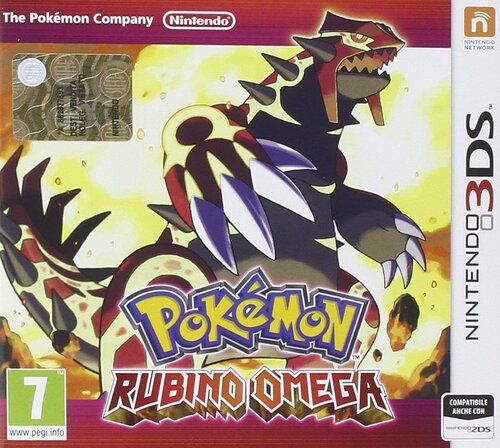
  8. Pokemon Omega Ruby Complete Save File (Italian)

    Bet you were expecting a Black 2 save, huh? Well! Not yet...it's taking a lot longer than what i've expected so while i'm completing it up, i want to quickly throw in my copy of Omega Ruby
    I originally completed the Pokedex in this game back in April-May 2024, but due to the fact that i wanted to shiny hunt in this game and wanted the shiny charm ASAP, i loaded this save file with a truck load of cheated lvl 100 mons with perfect stats and competitive items and natures. 
    I promised myself that throughout my completion of Pokemon games, one game at a time, i would eventually add some Pokemon with less stellar stats, but far more legitimate.
    I can happily say that as of Summer 2025, i finally achieved this result. (Especially considering that i have what, like... five-six national dexes completed? Seven if we count Black 2?
    So anyway, enjoy. There's plenty of good stuff here. 
    THIS SAVE FILE CONTAINS
    1) The entire Gen.6 Pokedex of all 721 Pokemon. This is NOT a living Dex but everything is here and it's 100% legal. There might be some mons i forgot to check (in that case i am so sorry and i'll remove them ASAP)
    2) A collection of my old shinies from other games, including: Some of my favorite Poke Radar hunts from Diamond, a few cute charm shinies, all my full odds shinies and a few extra ones from Black 2 😃
    3) A HUGE amount of shinies obtained with all possible method hunts from this game: Dexnav, Horde encounters, Chain fishing and RNG manips (also included, a few dupes) (some of them with their hidden items too)
    4) A Full team of LVL 100 Linoone with Pickup to use while item farming during Dexnav chains 
    5) A Muk with Sticky Hold and a Smoke Ball used for Chain Fishing
    6) A Shiny LVL 100 Altaria from my old save file, with the mega stone
    7) A LVL 100 Breloom with Spore and False Swipe for catching
    8  ) A LVL 100 Mawile with Sweet Scent that was given to me as a pk file from a friend of mine
    9) A collection of assorted events like Shiny Diancie, a few japanese ones,
    10) A faithful recreation of Wolfe Glick's winning team from 2016 (Curtesy of ImaBlisy on YT)
    11)  A Japanese Ditto with perfect IVs and a Destiny Knot i RNG manipulated from my japanese Platinum 
    12) My Singles team from SS and my Doubles team from Black to eventually use for the Maison (Ludicolo is missing the Absorb Bulb, if you want it, please remember that.)
    13) All my teams from FR to OR (They're also at LVL 100, so if you didn't want them then, maybe you want them now!)
    14) A shiny Aggron with a lot of ribbons and maxed out contest stats (the reason why the moveset is weird is because I was trying to get all possible ribbons, starting with Cool)
    And that's it! As usual feel free to edit this save file to your own liking and grab whatever you want. Expect to see the Black 2 save file for mid September to early October.
     

    822 downloads

       (0 reviews)

    0 comments

    Updated

  9. Pokémon Y Gold Trainer ID save (Italian)

    Hello everyone! I come once again with a save file i've technically finished in October of last year, but i only decided to complete it this year by taking down the Battle Maison with every possible combination (Except multi battle cause i don't have a second 3DS ). I also haven't done the Looker side quest because honestly i didn't feel like it, but as far as everything else it's all been completed. 
    THIS SAVE FILE CONTAINS: 
    All of the 721 Pokémon available in the Gen.6 Pokedex. This is NOT a living dex but everything is here and it's 100% legal.  A nice handful of shinies from other GBA/NDS games that i imported into Gen.6 because i like them A small collection of shinies that i found using all possible methods in this game: Friend Safari, Masuda, Chain Fishing and even Poké Radar My teams for Singles, Doubles, Triples and Rotation for the battle maison (Thanks to the Smogon Masterpost for Triples and Rotation.) Every single one of my teams from LG to OR (Blaziken has the nickname "Thorfinn" you can simply remove it by clicking the little icon on the nickname) A HA Female Charmeleon that i will need for a future shiny hunt  And i guess that's it. This save file is not as flashy as my B2 team (or any other one of my save files tbf) but i still like this one a lot. Feel free to edit this save file to your liking and to take whatever you need from this file 😃
    I will edit my Omega Ruby team in a few days since i did import my maison teams to Omega Ruby. I just need to finish the maison first, which will take...a few days? Maybe even weeks?

    186 downloads

       (0 reviews)

    0 comments

    Updated

  10. Pokémon Black 2 Five Star Save File (Italian)

    Hello everyone! I come here sharing yet another big summer project of mine, that is 100% completing (it's more like 95% technically speaking) Pokemon Black 2.
    I know i said i was going to publish this in September to early October, but i feel like i'm burned out for playing this game all summer long, and while i had a lot of fun, i am in desperate need of a break. I will update this save file eventually as i'll be finishing it up and getting everything at a later time like i did with SoulSilver
    THIS SAVE FILE CONTAINS: 
    1) All of the 649 Pokemon from the Gen.5 National Dex, this is NOT a living dex but everything is here and all of them are 100% legal.
    (Due to the fact that some Pokemon have been traded to me, i hold NO RESPONSIBILITIES in case these Pokemon turn out to be hacked/cheated. As far as i am concerned they're all legal and PkHeX doesn't have any issues with them too.)
    2) The three shinies you obtain for free in this game as well as a shiny Maractus i found while grinding 
    3) All of N's Pokemon
    4) All of Yancy and some of Curtis's Pokemon with their respective items
    5) All the Pokemon i have used for the PWT Type Expert tournament, some have been traded to me while others have been bred and trained by me
    6) Every single team of mine from LG to B2 
    7) My Singles Trio of Starmie, Scizor and Garchomp from SS + my Doubles rain team from Black
    8 ) A good collection of event Pokemon, including a good amount of shiny ones 
    9) A box full of HA Pokemon, some of which are really useful for breeding like Multiscale Dragonite and Moody Smeargle. There's also a Buizel, but i kept it there cause it has some cracked stats. 
    10) A box full of shinies i obtained via trading, either with IRL friends or through the Poke Classics Network as well as some of mine from other games
    Down here there's also a list of every Pokemon i've used for the Battle Subway/PWT and what items i've used. 
    BATTLE SUBWAY SINGLES: 
    Tokyo (Starmie) @Life orb, Roma (Scizor) @Lum berry, Berlino (Garchomp) @Focus Sash 
    BATTLE SUBWAY DOUBLES: 
    Asclepius (Politoed) @Choice Scarf, Ludicolo @Absorb Bulb, Roma (Scizor) @Life Orb,  Kerykeion (Gastrodon) @Rindo Berry
    (I'll also be using the same team for Battle Subway Multi but i don't have a second NDS/3DS yet so this'll have to wait) 
    PWT: 
    Tokyo (Starmie) @Life orb, Roma (Scizor) @Lum berry, Berlino (Garchomp) @Focus Sash 
    TYPE EXPERT TORUNAMENT: 
    Some of the Pokemon i used in these teams are scattered around my boxes, find them
    (I also STRONGLY recommend to swap items around using the move items option in the PC, and don't worry about some of them not being Level 50+, the level is automatically set to 50, clever!)
    NORMAL:  STAb (Staraptor) @Choice Band, Porygon-Z @Choice Scarf, Togekiss @Leftovers
    FIRE:  Infernape @Life Orb, Rotom-Heat @Choice Scarf, Heatran @Air Balloon/Choice Scarf 
    WATER: Asclepius  (Politoed) @Choice Scarf, Ludicolo @Absorb Bulb, Kingdra @Choice Specs, Kerykeion (Politoed)@Leftovers
    GRASS: Mia Figlia  (Whimsicott) @Focus Sash,  Bruteroot (Venusaur) @Choice Scarf,  Mango (Exeggutor) @Life Orb,  Mustard (Victeebell) @Choice Specs
    ELECTRIC: Electivire @Life Orb, Rotom Heat @Choice Scarf, Dipper (Galvantula) @Choice Specs (Galvantula is a placeholder, those two will take care of everything)
    FLYING: Zapdos @Life Orb, STAb (Staraptor) @Choice Band, Dragonite @Lum Berry (You can also go with Yache berry or a Focus Sash) 
    GROUND: Kerykeion (Gastrodon) @Leftovers, Droop Snoot (Excadrill) @Focus Sash,  Mamoswine @Choice Scarf
    ICE: Weavile @Expert Belt, Mamoswine @Choice Scarf, SPIKA ICE (Cloyster) @Focus Sash
    STEEL: Heatran @Air Baloon/Choice Scarf, PERF (Lucario) @Focus Sash, BUZZ (Metagross) @Choice Band 
    PSYCHIC: Latios @Expert Belt, BUZZ (Metagross) @Choice Band, Alakazam @Life Orb
    DRAGON: Latios @Expert Belt, Dragonite @Lum Berry, Berlino (Garchomp) @Focus Sash 
    BUG: City Cook (Volcarona) @Focus Sash (I STRONGLY suggest you breed a Larvesta on your own, i was being lazy), Roma (Scizor) @Lum Berry, Heracross @Leftovers
    FIGHTING: PERF (Lucario) @Focus Sash, Infernape @Life Orb, Heracross @Leftovers
    DARK: Weavile @Expert Belt, Montogmery (Krookodile) @Life Orb, Lago Duria (Drapion) @Black Sludge
    POISON: Lago Duria (Drapion) @Life Orb, Toxicroak @Black Sludge, Gengar @Choice Scarf
    GHOST: Gengar @Choice Scarf, Mismagius @Life Orb, Spiritomb @Choice Specs 
    ROCK: Gay Lefts (Omastar) @Mystic Water, Gay Rights (Kabutops) @Water Gem, Tyrannitar @Leftovers, Terrakion @Life Orb 
    And that's it. If you have any question regarding my strategies for the Subway, the Type Expert Tournament or any medal in particular, feel free to let me know. As usual, feel free to grab whatever you want from this team and use it to your liking
    I think i'll be taking a looooooong break from Pokémon games now and focus on something else.
     

    719 downloads

       (0 reviews)

    0 comments

    Updated

  11. Ultra Sun - All Legendary / Ultra Beast / Shiny Wormhole Pokémon

    This file contains 64 individual save (main) files, packaged in 3 zip files (available individually).
    You can either download the full set of files (US - Encounters Master.zip) by clicking the "Download this file" button on the right, or the individual zip files listed below.
    Important Notes:
    The saves place the character (male) directly in front of the encounter and were all originally backed up through "Checkpoint". PKSM was used to complete the Pokédex early in the playthrough to obtain the shiny charm. All encounters were found during an otherwise legitimate playthrough with no modifications/cheats/tools/hacks etc. Each file was tested for functionality by me on a digital copy of Ultra Sun using a N3DSXL. The Wormhole Ultra Beasts are all 2nd encounters (so you don't need to sit through any cutscenes or trainer battles). You may want to check Smeargle's PP before beginning the encounter as I didn't bother restoring it for a few of the earlier encounters during my playthrough. Be sure to change the trainer info on the files if you want a custom OT.  
    After the encounter was found, each file was backed up through "Checkpoint" and then modified through "PKHex" to contain: Pokemon: A single Pokémon (Smeargle) as the party lead that is more than capable of catching everything in game. It was caught (SOS Chain) and taught its skills legitimately, but its nature was changed from Rash to Adamant through "PKSM"  Ability: Technician Skills: False Swipe, Spore, Skill Swap, Soak Held Item: Metronome Nature: Adamant All other Pokémon in party and PC were deleted through "PKHex" Items: All "Rotom Powers" set to 995 through "PKHex" All "Items" set to 995 through "PKHex" All "Medicine" set to 995 through "PKHex" FILES INCLUDED:
    US - Non-Wormhole UB & Legendary.zip Blacephalon Cosmog Necrozma Poipole Solgaleo Tapu Bulu Tapu Fini Tapu Koko Tapu Lele Type: Null Zygarde  
    US - Shiny Wormholes.zip Abomasnow Altaria Audino Barbaracle Crustle Drapion Floatzel Grumpig Heliolisk Hippowdon  
    Lombre Magcargo Medicham Nuzleaf Quagsire Sigilyph Stunfisk Swanna Swellow Yanmega  
    US - Wormhole UB & Legendary.zip Legendary: Articuno Azelf Cobalion Cresselia Dialga Giratina Groudo Heatran Ho-Oh Kyurem Landorus Mesprit Mewtwo Moltres Raikou Rayquaza Regice Regirock Registeel Reshriam Suicune Terrakion Tornadus Uxie Virizion Xerneas Zapdos Ultra Beast: Buzzwole Guzzlord Kartana Nihilego Xurkitree  


    I hope you enjoy and happy hunting!
     
    US - Non-Wormhole UB & Legendary.zip US - Shiny Wormholes.zip US - Wormhole UB & Legendary.zip

    437 downloads

       (0 reviews)

    0 comments

    Updated

  12. Pokemon Outlaws Saves 01(6/8 Badges 40 Pokemon Lvl 45s)

    This is a built base team 40+ hour playthrough with 40 pokemon and 6/8 badges that will be soon finish elite 4.

    31 downloads

       (0 reviews)

    4 comments

    Submitted

  13. Pokémon SoulSilver Five Star Save File WITH Cute Charm Glitch (Italian)

    Hello Everyone! While completing Pokémon Diamond, i also decided to complete Pokémon SoulSilver by basically doing everything that this game has to offer, including getting the colored frame of every battle facility and a 100 win streak at the Battle Tower 😃
    THIS SAVE FILE CONTAINS:
    All of the 493 Pokémon in the Gen.4 Pokédex. This is NOT a living dex but everything is in here and 100% legal. (I hold NO RESPONSIBILITIES in case some of these Pokemon seem to be hacked/illegal. As far as i am concerned these are all legal for me)  A LOT of shinies obtained using the cute charm glitch+ a full odds male shiny Ponyta i found while grinding A collection of HG/SS exclusive events + some other event mons i added for the Pokédex A Wigglytuff in Box 11 with Smoke Ball that will activate the glitch The entire Unown alphabet My Gen 3-4 story teams (if you want them, you may never know) My battle frontier team of Starmie, Scizor and Garchomp (Starmie has been RNG manipulated, the others have been bred "traditionally") (team made with the help of the Battle Facility Discord) A collection of shinies obtained in other save files, either via full odds, RNG manipulation or via trade through the Poke Classics Network A shiny LVL 50 Aggron named "Smash" with maxxed out contest stats to use in other games as well as a lot of ribbons And that's it! As you can see a lot of time and effort has gone through this save file (And i'm still not done). Please feel free to grab whatever you want and edit this save file to your liking.

    2734 downloads

       (0 reviews)

    0 comments

    Updated

  14. Pokémon Black Four Star Save File (Italian)

    Hello everyone! Continuing my tradition of completing games then uploading them here, this is my completed copy of Pokémon Black. I have done basically everything here, i am just missing the trophy for multi battles but aside from that it's all been done.
    THIS SAVE FILE CONTAINS:
    1) All of the 649 mons available in Gen.5 registered in the Pokédex. This is NOT a living dex but everything is in here and 100% legal (I have completed the Pokédex by doing lots of trades in Gen.4 and transfering them over to Gen.5. I hold NO RESPONSIBILITIES in case these Pokémon are hacked/cheated. As far as i am concerned they're all legal) 2) Every single team i've used for beating Ingo and Emmett in the Battle Subway in Singles, Doubles and Multi. (Thanks to the Smogon Battle Subway Masterpost) 3) A random Shiny Mandibuzz i found while griniding 4) A random regular Metagross i've used my Master Ball on and kept as some sort of mascotte 5) All my teams from FRLG to HGSS (if you want them, you may never know) 6) A collection of my favorite Gen.4 Shinies transfered from Diamond and Soulsilver to here 7) LOADS of Shinies and competitive ready mons i've snagged using the Poké Classic Network 8 ) A collection of event distribution Pokémon i've injected into my cartridge using PKSM + the shiny doggos and Celebi from HGSS for the Zorua and Zoroak event 9) A Perfect IV Ditto i've RNG manipulated in my Japanese copy of Platinum for Masuda/breeding 10) A shiny Dragonite from my copy of Soulsilver in the GTS that apparently i forgot to redeem (it's yours my friend! as long as you have enough roopies) And that's it! Once again, i've put a lot of love and effort into this cartridge and it was a very fun game to 100% complete, even though it took me like...a couple months. As always feel free to edit and/or take whatever you want from this save file and do with it as you please. Meanwhile i'll have to decide wether to upload my Gen.6 savefiles or play through BW2
    5599 - Pokemon - Versione Nera (DSi Enhanced) (I)(WiKiLEAKS).sav

    514 downloads

       (0 reviews)

    0 comments

    Updated

  15. The Most Complete Save File for Gen 3 - Pokemon BOX (EUR)

    After 2 years of work, I have gathered all the Pokémon that can be legitimately obtained today in GEN 3, including Shadow Pokémon, Pokémon Channel, BOX, etc. All in .gci save from Pokémon BOX: Ruby & Sapphire (EUR).
    List of Pokemon:
    - All 384 Pokemon from the 6 GBA games (Including all forms of Unown) (Deoxys and Mew are excluded since they can only be obtained through events).
    - All trade Pokemon from the 6 GBA games.
    - All Pokemon from Pokemon Colosseum (Including Ho-Oh).
    - All Pokemon from Pokemon Colosseum (JPN) (Including Ho-Oh, Ageto Celebi, Pikachu from the Bonus Disc and the 3 Shadow Pokemon from the e-Reader).
    - All Pokemon from Pokemon XD: Gale of Darkness (Including the 3 Johto Starters with Ultimate Moves and Ribbon Master ZAPRONG).
    - Jirachi from Pokemon Channel (EUR).
    - All Prize Pokemons from Pokemon BOX: Ruby & Sapphire (Excluding Pichu).
    - My Teams from the 6 main games, including my team from Ruby (JPN). (All the Pokémon I use in my team have the circle mark, this will be useful to identify them, since I put the Gamecube Pokemon in their box and not in my team box.).
    - 2 Shinys that I got in this adventure :3
     
    Possible missing interesting Pokemons:
    - Shadow Togepi/Togetic from XD (This one is traded for ZAPRONG and I would have to play the whole game again if I wanted to have both.).
    - Jirachi from Pokemon Colosseum Bonus Disc (I don't plan on finishing Colosseum again, I used the Jirachi from Pokemon Channel).
    - Pichu from Pokemon BOX: Ruby & Sapphire (When you transfer it to Gen 4 you lose surf, so I'm not interested in getting it).
     
    That's all, I hope you like it, and any comments/suggestions are welcome! I've played most of this games in Spanish and tried to give each Pokémon a nickname.
    Enjoy my adventure!

    894 downloads

       (0 reviews)

    0 comments

    Updated

  16. Pokemon Fire Red

    The save file is for fire red and has the mystic and aurora tickets through homebrew distribution events 
     

    715 downloads

       (0 reviews)

    0 comments

    Updated

  17. Pokemon Emerald with 389hrs - Perfect for Hatching Eggs

    Perfect for Hatching Eggs, use the day care and dittos
    Today I just backed up my OG Pokémon Emerald save with lots of Pokémon traded over from Leaf green as well. 
    Enjoy this game is perfect for those looking to trade Pokémon over to new generations or older generations 
    Level 100 Charizard and Dagonite and many more  
    Pokemon - Emerald Version (USA, Europe) 389hrs.sav

    211 downloads

       (0 reviews)

    0 comments

    Submitted

  18. Sav Pokémon Esmeralda para hacer shiny hunt de latias o latios errante.

    Este es un archivo de guardado de Pokémon Esmeralda, tiene completada la historia principal y está guardado tras los creditos tras vencer al alto mando, justo para elegir  los colores para conseguir a latios o latias errantes. 
    El sav tiene Poémon para empezar la cacería del errante. Puedes cambiar el EO y el ID y el SID con pkhex. 

    213 downloads

       (0 reviews)

    0 comments

    Submitted

  19. Pokemon fire red

    284 downloads

       (0 reviews)

    0 comments

    Submitted

  20. Pokémon Diamond Version Five Star Save File (Italian)

    Hello everyone! In the summer of last year i decied to pursue a childhood goal of mine: Complete Pokémon Diamond 100%, doing everything the game can offer, and after a long four months, i managed to complete it (although i still play it to this day lol) and this is the result:
    THIS SAVE FILE CONTAINS:
    1) All of the 493 Pokémon available in the national dex. This is NOT a living dex but everything is in here. Darkrai, Shaymin and Arceus for some reason are flagged as "Illegal" (even though i did the events legitimately) but every single mon can be transfered to HOME no problem. There's also a lot of level 100 mons.
    2) Four level 80+ Linoone with pickup for item farming
    3) A perfect IV japanese Ditto with Destiny Knot i RNG manipulated in my japanese copy of Platinum for breeding/Masuda method
    4) A level 70 Smeargle with Spore, False Swipe, Mean Look and Super Fang for the roamers from my copy of Soulsilver
    5) All my Gen 3 and Gen 4 teams (if you want them, you may never know)
    6) A shiny Aggron named "Smash" with maxed out contest stats and a yellow scarf for the contest.
    7) Loads and i mean LOADS of shinies obtained via Poke Radar chaining, all of the hidden item mons include their hidden item
    8 ) A LVL 100 Breloom with Spore and False Swipe for Radar chaining and catching
    9) A lot of event distribution mons. Japanese, Battle in Orlando, Shiny Pichu and Milo, PKTOPIA, you name it!
    10) A bunch of shinies from other save files of mine and other save files i dug up thanks to the Poke Classics Network
    11) Two Chatots named "A" and "U" with chatter for RNG manipulation
    12) A random Feebas i had to trade with a friend (but we never ended up trading together ) 
    And that's it! As you can see i put a lot of love and effort into this game and to this day i'm very much in love with this save file. As always, feel free to edit this save file to your will and take everything you want 😃

    1378 downloads

       (0 reviews)

    0 comments

    Updated

  21. My Orginal Pokemon Red Save File

    This is my orginal pokemon save file. I downloaded it to replace the battery. which some how was still working after 26 years lol. It has pokemon that you could get from pokemon stadium. It also has a Mew that I got from Toy R US years ago. It also has 100% complete pokedex. I trained the pokemon up in this game alot so they are great to use in pokemon stadium. Did do miss no glitch...but who has not lol. I wanted to upload this so you all could enjoying a enjoy a piece of my childhood. This save files means alot as my dad got this game for christmas a few months after my mom died. Hope you all enjoy it. 

    558 downloads

       (0 reviews)

    0 comments

    Submitted

  22. Pokemon Black - Raval save file

    I bought this Pokemon Black which had a 313-hour save file on it. I pulled the save file using Checkpoint on a 3DS. It seemed like the OT was breeding as there were many eggs in the PC and team. I included the first six PC boxes as the rest seemed to be for breeding with duplicates and eggs. OT has 4 masterballs and 3 Exp shares, but I can't personally tell if there were cheats used. I had skipped Gen 5 so I have no idea what is normal or not, or how to identify things here. 
    This was uploaded for the miniscule possibility that OT one day wants to revisit his old save and happens upon this upload, however unlikely. There are a lot of hours spent on this.  

    548 downloads

       (0 reviews)

    0 comments

    Submitted

  23. Pokemon Blue - John save file

    I bought this cartridge(Pokemon - Blue Version (USA, Europe) (SGB Enhanced).gb) and pulled the save file using GB Operator. There's not much to say about the save file. Original player entered the hall of fame with a L79 Blastoise and 5 other Pokémon around L30. Only Box 1 and 12 were used. 

    221 downloads

       (0 reviews)

    0 comments

    Submitted

  24. Pokemon Sapphire - Landera save file

    I bought this Pokémon Sapphire(Pokemon - Sapphire Version (USA, Europe).gba) recently for my collection and saw that this was played quite a lot. I pulled the save file using the GB Operator. All of the caught Pokémon were named and I felt that this trainer cared for the game, at least up until they stopped playing. Additionally, there were multiple trades between the owner and another OT by the name of Taquin. The Blaziken came from Garrik. It feels like this could have been a good memory between two friends who played Gen 3 together. I'm uploading this on the off-chance that the original owner ever feels nostalgic about their childhood and somehow finds this, as unlikely it may be.

    747 downloads

       (0 reviews)

    0 comments

    Updated

  25. Pokemon Sapphire Version GAME BEAT

    Beat the Elite 4 and ALL 8 Badges in Pokemon Sapphire. Still need to catch the Regies, and Rayquaza. Also injected some event Pokemon (Lugia, Groudon, Jirachi, Deoxys, the 2 remaining Starters)

    338 downloads

       (0 reviews)

    0 comments

    Submitted


×
×
  • Create New...