


Soul DS
-
Posts
39 -
Joined
-
Last visited
-
Days Won
4
Content Type
Profiles
Pokédex
Portal
Technical Documentation
Pages
Tutorials
Forums
Events
Downloads
Gallery
Blogs
Everything posted by Soul DS
-
How to fix poke transporter gb error in emulator
Soul DS replied to LOLcoder's topic in ROM - GBA Discussion & Help
If I'm not mistaken, Poké Transporter GB is not supported by emulators, since it uses the link cable in an unusual way for emulators to be able to communicate between a GB/GBC game and a GBA game. I suppose your only lucks would be either doing it on real hardware (though it would require actual hardware and ruin your challenge), or use external softwares like PkHeX to do the transfer. -
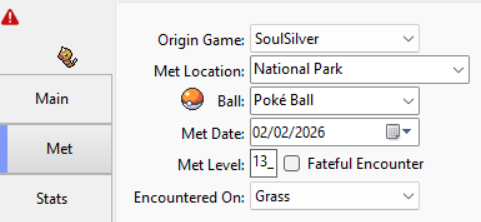
I've been doing some tests by opening my save files and looking at what I have in them, and some Pokémon are being incorrectly flagged as illegal: - In Pokémon Battle Revolution, it seems that a Pokémon in a Sport Ball is displayed as being in a Poké Ball (likely part of the ball reset when moving to a game not supporting said ball), leading to it being flagged as illegal while the Pokémon in itself is legit. I tested it with a Weedle caught in a Sport Ball in SoulSilver, which was then traded in Pokémon Diamond, and said Pokémon Diamond was then synched with Pokémon Battle Revolution to view its save. The synched game may impact the result for the ball compatibility, but I'm not currently able to test it more at the moment to give more feedback. Additionally, I have seen some Pokémon that are incorrectly flagged until being selected (there's also the PP gen 1/2 -> gen 7 transfer case, but from what I know it is a known thing): - In Pokémon SoulSilver, it seems Pokémon brought from Gen 3 are incorrectly flagged as being illegal ("Invalid: Can't have ball for encounter type."), which is automatically corrected upon loading the Pokémon. There may be more specific details into that, as I have some Gen 3 Pokémon that were traded from another game who don't show this issue (perhaps it is game specific/gets cleared upon trade?). - A similar problem may exist for Pokémon who were bred in a specific game but hatched in another, but I'll need to do more tests to see if I can see some logic in it/reproduce it properly before continuing on it. - Still in SoulSilver, some of my Pokémon have a Walking Mood set while in the PC, which PkHeX flags as incorrect and automatically corrects it. I haven't touched those Pokémon nor those Walking Mood, so it may be possible that said value can be kept in some form in the PC, but I would need to do more testing (in case the values are important, one of my PC Pokémon had 40 while another had 127). The cases given here are either very specific or not extremely specific, so you should be able to test it with local Pokémon granted they meet the conditions encountered here; if there's a need to do more testing, provide more info or get pkmn files as to make things easier, let me know, I may not be able to provide help right away depending on my time but I'll try to do my best.
-
Could you provide the files for those Pokémon (using the Save PKMN feature of PkHex)? I don't think much can be done without providing more info as it is rather vague as-is (no details on the movepools used).
-
SPIKE the Parasect seems to be an internal trade in Pokémon Yellow, where you can exchange a Tangela against a Parasect with the nickname SPIKE on Route 18; As such, it would have to be with a level 5~25 Tangela if bred in GSC.
-
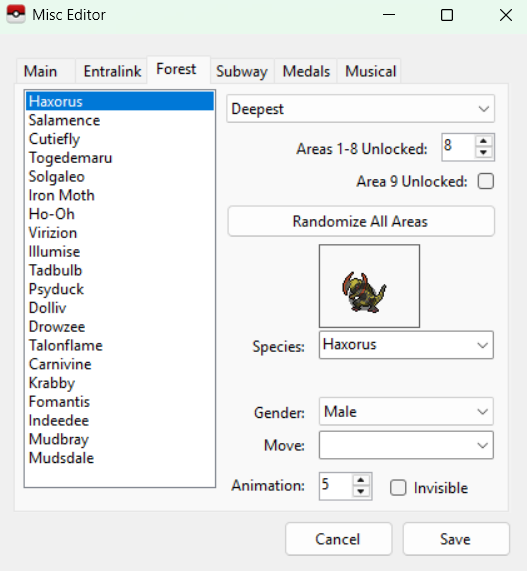
Found a silly issue: in a Black 2 or White 2 save, checking the EntreeForest tab in Block Data (no need to edit anything there), then checking the Forest tab in Misc Editor will report tons of invalid Pokemon being present while it should not happen.
-
Isn't the Umbreon from Colosseum shiny-locked?
-
The two Black saves and the Pearl save only contain blank data (all FF), a DeSmuME footer, and a tiny bit of data, but no real save data on its own, so nothing can be done with those. The HeartGold save file seems to contain (at least partially) legitimate save data, but I don't know at all how to properly investigate that nor do I know the root cause, so I think for further checks this will need to be done by someone else. On this, you mentioned the save file is from a randomizer: do you know exactly which randomizer it was, in case the Hack ROM has incidence on the save file format (though do not share the ROM, just knowing the Hack ROM)? May be good to know if someone else want to tackle the topic.
-
PKHex opening Japanese Crystal save as a corrupted mess
Soul DS replied to pokemario0411's topic in PKHeX
Wouldn't have fully suspected that, as I would have more expected the save file being "altered" this way leading to the game itself consider it as corrupted, the more you know. That's a bit the thing with heuristics, especially in Pokémon where games are made out of a bunch of unique game data varying by save file, it's hard to narrow down elements so that's not that surprising. As long as the command to access it either makes sense or is explained in advance (can be checked by users without discovering the comment on a forum post), it could work. -
PKHex opening Japanese Crystal save as a corrupted mess
Soul DS replied to pokemario0411's topic in PKHeX
A bit off-topic but I was wondering, seeing this post and the Black save file being recognised as an HeartGold save file from a few weeks ago in another post, but why isn't there a manual game selection option in PkHex for such cases? Bugs if incorrect types were to be selected/not easily accessible for users? (in addition to ultimately not solving the heuristic issue?) -
How can I unbrick Stark Mountain Charon battle?
Soul DS replied to Captain Demozan's topic in Miscellaneous Help
Edited the Heatran variable to be at 0 (not activated) instead of 1 (battleable) seems to do the trick to make the event no longer broken (or at least partially: Buck doesn't appear in the cutscene inside the mountain, but it doesn't cause any issue and he will appear normally for the cutscene outside of Stark Mountain, while Heatran will be able to be challenged after returning there). POKEMON PL.sav -
This is an issue that was found and reported in the latest stable version of PkHex, and has since been fixed in the development build, so if you want to use said feature without waiting for a new stable version you can use the development build.
-
I don't think enough information was provided here to come at a proper conclusion, but since the met level had to be edited, I suppose it may have been that you tried to set your Geodude as a Golem without editing its level, which would be impossible in normal play (to evolve your Geodude into a Golem, you first need to evolve it into Graveler, requiring to level it up by one level since those from Route 12 are already at evolution level, thus requiring it to at least be one level higher than the met level). From what you're telling, I guess the met level was reduced by 1 or more to make it legal.
-
Pokémon Black 2 - Victory Road 2F Error
Soul DS replied to Pocket Monsters's topic in Saves - Editing Help
Was wondering, I could understand boulders being incorrectly set as part of the save file (supposedly if they weren't switches, but rather set of coordinates where the boulder should go, with it being corrupted leading to issues here), but what could explain the trainer part that was mentioned? Unless it's an active cheat code leading to the issue. -
Pokémon Black 2 - Victory Road 2F Error
Soul DS replied to Pocket Monsters's topic in Saves - Editing Help
Aren't you suppose to push the boulders from the side, by finding the sub-areas, thus them not being visible here is normal? It's been a long time since I last played so I could be wrong. What do you mean also by the trainers are disabled? They aren't present? There aren't any on the place you shared, so it's hard to say anything. Overall, for save issues when possible, it's best to send the save file so that if anything is wrong in it it can be checked, as for now the statement alone doesn't give much info of what could be wrong. -
I'm not sure if those events would work as-is if imported in a German save file, since from what I understand, those custom cards execute code from very specific locations in the RAM and ROM that may differ between versions and languages, thus not being compatible with your game. May want to ask to I'm a Blisy for more info and help on the topic, I suppose.
-
Attempted to use the flag researcher feature on Black 2 save files (tied to another topic on the site I just answered where I had to take a look at flags), but the feature to compare two save files doesn't seem to work at all (always returns a "Save File Types are different."... even if the two save files are from the same game that the program can open, and worse, the same message is displayed even if I point the old and new save file to the same save file, or if I point to a duplicate of the save file).
-
The flag 804 was ON instead of OFF, which prevented Hugh from spawning, thus preventing the event taking place after beating the gym from happening. Here's a fixed save file for the issue: POKEMON B2.sav Seeing that you messed around a lot in your save file (cheated items, moves...), it's very well possible that you have other issues later down the line needing fixing (especially since I have no idea how you ended up with that in the first place), but I suppose it's a story for another time.
-
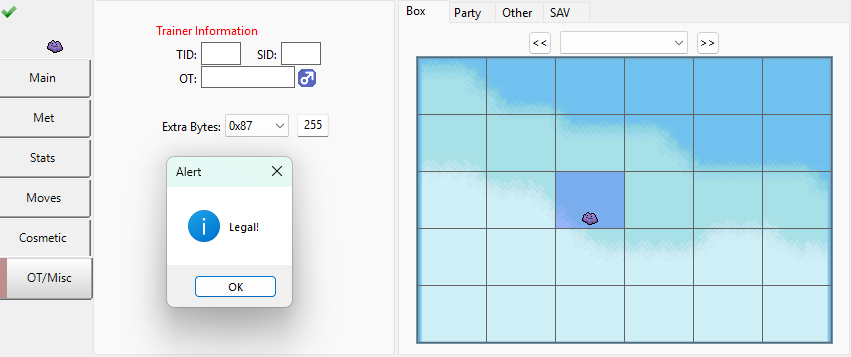
Not sure if it's considered important, since here it's "Pokémon that should be illegal but flagged as legal", but from what I'm understanding, since Pokémon with Transform cannot participate for Pokéstar Studios recordings, Ditto should be flagged as illegal if it has any Pokéstar Studios data. At a quick glance, the extra byte 0x87 seems to dictate the Pokéstar status, with 255 being star animation enabled, other values likely used to know how much your Pokémon has progressed/is famous, and 0 being the default value.
-
No date is tracked in the generation 1-3 games, since the gen 1 games + FRLG don't have any clock, and the gen 2 and RSE only keep track of days passing, not of specific dates. When moving your Pokémon to generation 4, the date of the transfer will be assigned (based on the date set in the DS, if done legitimately), and when moving it to generation 5, the date will be changed once more based on the date of the transfer to generation 5 (once more using the DS date): this generation 5 date is what is used for all of the games post generation 5. When transferring Pokémon from generation 5 to generation 6 using Poké Bank, a country and region is set for your Pokémon based on what was set in your 3DS: since it's unrelated to the language of the Pokémon itself (you could be transferring English, Spanish, German, Italian, Japanese, French, Korean Pokémon independently of the region of your console and language of your game), this setting doesn't really matter. As far as I know, the storage of the country and region was dropped in the Switch games, meaning it wouldn't matter either on the long run, so feel free to keep it as-is or edit it if it worries you. Not aware of any ban possible in your case since from what you're telling, the Pokémon would be identical to one that could have been received back in the days = legal Pokémon.
- 1 reply
-
- 1
-

-
Pokemon Crystal Pokemon missing from team and box
Soul DS replied to Schinkenspicker's topic in Saves - Editing Help
I tried to take a look at the save file and see what could be done, but I'm not very knowledgeable when it comes to corrupted save files tied to the save being interrupted in the middle of it. From what I can tell: - Suicune: A frequently used glitch in GSC involves having a Pokémon in the party, depositing it into the PC, and then saving and interrupting the save at the end of it to try to clone the Pokémon (save gets enough time to update the data of the Pokémon in the PC, thus the Pokémon deposited in the PC is registered there, but the Pokémon in the party doesn't get the time to be updated, so the party is kept as it was before the save, so with the Pokémon also being present in the party). From what you're telling in your case, the opposite happened: the Pokémon was in the PC, got put in the party, a save was done but got interrupted in the middle of it, meaning that the data of the PC was updated (Suicune removed from the PC), but the data of the party was not, meaning that Suicune ended up nowhere. I'm not sure if any leftover or duplicate data could be stored in the save file for the Pokémon due to not really knowing how the gen 2 save structure works, but for me it sounds like there isn't much hope for it (though from what you're telling, since it was freshly caught, it could have been worse). - Ledian Box 1: It seems the Ledian got corrupted, at least for part of its structure data. If you look closely at it, its species is listed as ????? in-game, has a weird amount of EXP, throwing it into a fight will incorrectly display the sprite of the previous entity present... and putting it inside the daycare (after leveling it up once to not have to pay an exorbitant amount of money) and getting it back will change it to another species. Luckily for it, the only data that may have been lost is the EXP from what I can tell, so restoring it through save editing is trivial. - Box 8: The box is actually not empty: it contains a glitch Pokémon with the ID FF (unrelated to the Suicune, it contains no data outside of its ID, just to clear any confusion). When the game sees it and its ID, it interprets that it reached the end of the box, and display the exit button instead of it and anything coming after, preventing you from checking it or removing any Pokémon coming after it. While it has its use to enable some glitches, here it's a bit useless since it doesn't allow to do anything. Not really sure how Suicune vanishing in box 7 would cause problems in boxes 1 and 8 (perhaps other corruptions happened?), though it's still a problem. I tried to fix the save on my side, by doing the following changes: - Setting the corrupted Ledyba back to its proper species and to level 15, so should no longer be corrupted - Removing the corrupted Pokémon from box 8 - Fixing the shifted names in box 7 - Reenabling the Suicune event in Tin Tower to allow you to catch it once more (seems to work fine, but not sure if there could be more flags than just what I set back) Pokemon Kristall.srm Let me know if anything else need to be changed, if I made a mistake, or if you need help for anything.- 1 reply
-
- 1
-

-
Language ID should be !=Japanese, not Japanese.
Soul DS replied to Darby's topic in Pokémon Legality
Just the Country/Sub Region/3DS Region part, as the language is already handled and changed to Japanese properly, from what I've seen. -
Language ID should be !=Japanese, not Japanese.
Soul DS replied to Darby's topic in Pokémon Legality
Doing that will work without issues as long as you keep in mind setting the Country to Japan. PkHex will flag it as legit and the game will have no problem with it, but since it will not have gone through the Poké Bank servers it may not be considered as one ultimately, though that's a question for Nintendo's servers and checks. Transferring it to HOME may or may not be a problem depending on what they check. -
Language ID should be !=Japanese, not Japanese.
Soul DS replied to Darby's topic in Pokémon Legality
If you were to transfer it legitimately, you would need to do: Japanese 3DS Crystal VC -> Japanese 3DS Poké Transporter -> Japanese 3DS Poké Bank -> Japanese copy of Pokémon SMUSUM on Japanese 3DS -> trade with an European 3DS playing an European copy of SMUSUM. The part that are impossible are trades between regions while playing Crystal, as well as all the parts tied to the Poké Bank, requiring a Japanese console. Once your Pokémon is in a gen 7 game, the only limitation you end up having is games being region locked, but you can still do trades between them. -
Language ID should be !=Japanese, not Japanese.
Soul DS replied to Darby's topic in Pokémon Legality
When you transfer a Pokémon legitimately for those between gen 1 and gen 5, their Country, Sub Region and 3DS Region are determined upon transfer in the Poké Transporter app based on what you set in your 3DS. For Pokémon obtained in gen 3 to 5, since Pokémon can freely be traded with games from other languages and regions, any location is valid as long as it can be used in a 3DS with the Poké Transporter app (you can send a Pokémon from a Japanese game to a French game, then do the transfer on an European console, therefore having an European location on a Japanese Pokémon). This is not exactly the case for gen 1 and gen 2, since specific languages could only be bought in specific regions and trades between regions are not possible (the Japanese versions can only be bought on Asian consoles, not European or American ones), meaning that an European console will never be able to transfer Pokémon from a gen 1 or gen 2 Japanese copy, therefore will never be able to label a gen 1 or 2 Japanese Pokémon as coming from an European Country, Sub Region or 3DS Region. -
Language ID should be !=Japanese, not Japanese.
Soul DS replied to Darby's topic in Pokémon Legality
The Country, Sub Region and 3DS Region do not match with the Japanese language, since the console are region-locked and do not allow you to set an European location (France) on a Japanese console. Change the Country to Japan, and the 3DS Region to Japan, and it should be okay.
