

Leaderboard




Popular Content
Showing content with the highest reputation on 12/06/19 in Posts
-
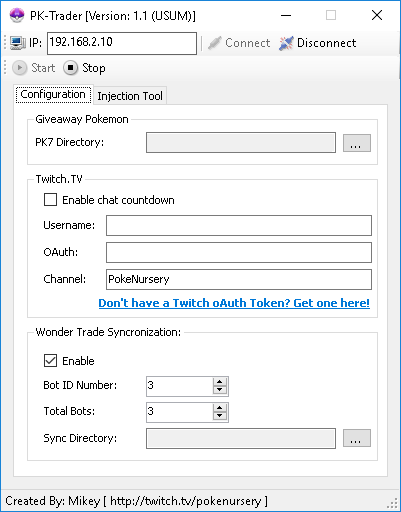
Project Pokemon, I'm not sure how much longer I will be doing giveaways so I've decide to go ahead and make one of my automated trade bots public. Currently I am releasing my Wonder Trade bot to the public. If you'd like to use it feel, free, it will be attached to this thread. If you have any questions on how to use it, please, don't hesitate to ask. This software requires a 3DS, both old & new supported, with CFW/NTR & InputRedirection. I've also add a Twitch.TV integration to it, so your Wonder Trades can have a timer for your chat participants to see. It also supports synchronizing multiple consoles together. Here's a basic breakdown of how to operate it: Above is a screen shot of the UI. Pretty straight forward. 1) In the IP text box, enter the local IP address of the 3DS console you wish to connect to. 2) For the PK7 directory, select the folder on your PC that contains the PK7 (Pokemon) files you wish to Wonder Trade. Optional: If you would like your trades to have a countdown in your Twitch.TV channel, 1) Check the box "Enable chat countdown." 2) Enter the username of your bot into the Username text box. 3) Enter your oAuth Token into in the oAuth Token text box. (If you do not have an oAuth Token you can quickly have one generated by clicking the blue link) 4) Enter the channel name you want your bot to enter when performing the countdown. Synchronization: As stated above, you can also "sync" numerous consoles to trade at the same time, on the same timer countdown. To do so, open multiple copies of the application, also make sure to put each executable in their own folder! Assign each console you're connect to a unique Bot ID Number, and select how many trade bots you are using total. The sync directory can be any directory of your choice on your PC. The bot merely writes/deletes text files from this directory to perform the synchronization. Good luck, and enjoy! PK-Trader 1.1.zip
 1 point
 -
@Tre you’ve only mentioned that the OT and ID matches your friends trainer information. Did you make sure the SID you inputted matches the SID on their game as well?1 point
-
Glad to see work still being done to preserve valuable information such as this in 2019!!1 point
-
event flags/constants are no longer reading from the correct byte array will fix sometime this weekend once I figure out the best way to do things1 point