


About This File
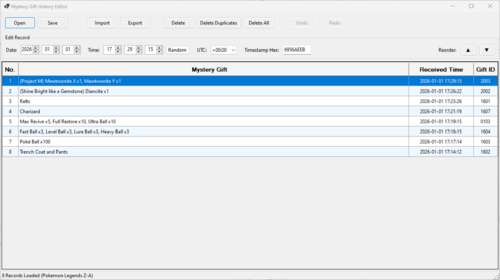
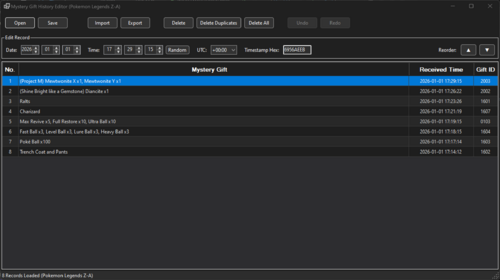
Mystery Gift History Editor is a PKHeX plugin designed to edit Mystery Gift history records. (Not the Mystery Gift itself).
Core Features
- Multi-Game Support: Automatically detects and edits Mystery Gift history form save files of Pokemon Scarlet/Violet and Pokemon Legends Z-A.
-
Comprehensive Record Editing:
- Time & Date: Modify the received date and time with automatic validation.
- Timezone Control: Adjust timestamps using a UTC offset selector.
- Hex Editor: Directly edit the raw hexadecimal timestamp for precise control.
- Randomizer: Instantly generate valid random received times.
User Interface
- Modern Grid View: Displays Gift Name, Received Time, and Gift ID.
- Multi-Selection: Supports Ctrl+Click, Shift+Click, and Ctrl+A to select and manipulate groups of records.
- Context Menu: Right-click rows to quickly copy the Gift Name, ID, or Decimal Timestamp to the clipboard.
- Rich Data Display: Correctly parses and displays names for Pokemon, Items (with quantities), Clothing, Money/LP, and Event Flags.
- Dark Mode: Full UI support for Dark Mode.
File & Batch Operations
-
Supported Formats:
- Import and export support for .msv (Scarlet/Violet) and .mza (Legends: Z-A) records.
- Partial import support for .wc9 and .wa9 files (Pokémon Mystery Gifts only).
-
Smart Import:
- Bulk Processing: Drag-and-drop multiple custom files at once; imports run asynchronously to keep the UI responsive.
- Duplicate Prevention: Automatically detects and skips duplicate Gift IDs during import.
-
Batch Export:
- Single Export: Save individual records to your custom file format.
- Multi-Export: Select multiple rows to automatically batch export them into separate files.
Record Management
- Reordering: Move single or multiple records Up and Down to organize history.
-
Cleanup Tools:
- Delete Duplicates: One-click removal of all duplicate entries.
- Delete All / Single: Clear the entire history or remove specific unwanted records.
- Full Undo/Redo: Robust history support for every action (Edits, Moves, Deletes, Imports).
I have included most of the Pokémon Legends: Z-A Mystery Gift records, which you can import into your save file.
Please note: This is my first PKHeX plugin, and it is relatively complex. I chose not to release it until all planned features were implemented, in order to ensure reliability and to establish a solid foundation for future plugins. As this is the first public release, please report any bugs or issues you encounter.
Special thanks to Kaphotics (GitHub kwsch) and theSLAYER for their outstanding work and invaluable contributions to the Project Pokémon community.
Edited by Gifted
What's New in Version 1.1.0 See changelog
Released
New Features
• Dark Mode: Full UI support for Dark Mode has been implemented.
• WC9 / WA9 Import: Partial support has been added for importing Mystery Gift Record from .wc9 and .wa9 files.
• Only Pokémon gifts are supported. Items, clothing, and event Wonder Cards are not supported at this time.
Improvements
• Selection Handling: Improved selection behavior when reordering records and when using the Undo/Redo buttons. Moved records now remain selected.
• Right-Click Selection: Right-clicking a Mystery Gift record now automatically selects that record.
• Keyboard Shortcuts: Adding keyboard shortcuts to open, save, export, import, delete, and move records.
• Import Sorting: Imported records are now automatically sorted by received time.
• Duplicate Records: Improved handling of duplicate Mystery Gift records.
Fixes
• Resolved an issue where multiple selected records could not be deleted properly.
• Corrected incorrect display names for certain Mystery Gifts.
Under the Hood
• Updated to .NET 10.
• Update PKHeX.Core to 26.1.7.
• Extensive code refactoring and performance optimizations.

