All Activity
- Past hour
-
With all those things about pokebank closure, i want to rush my perferct living dex, since i was trying without cheats but i don't have time to do this anymore... Sorry for noob questions, in pkhex discord no one answer those questions maybe this is too basic, but has someone that don't have much experience in this, isn't easy to me. How can i create a perfect pokemon from Fire Red that are in UM: 1 - TID/SID i put from my UM save? or Fire Red save? 2 - how can i generate pokemons that i just have one per save? for example, bulbasaur, egg? if egg, should i create a new save to use TID/SID? since for example, i can breed a bulbasaur, but not a charmander and squirtle in the same save, 1 for each starter? 3 - what is this Latest (not OT) Handler, that is "PKHeX" and if i change this, become ilegal? in some saves that i get here? 4 - if i get a pokemon by poketransfer his TID and SID should be different? 5 - to put full legal ribbons what level is suggested to have? 6 - perfect IV is dangerous right? should i put full lvl 100 and do hyper training? (this solve question 5) 7 - Should i touch in memories? 8 - Should i do manually with encounter database and mystery gift db, or download a save and edit? or should i use auto legaly mod?
-
 While this isn't Gen 7, I got these mons in HOME, give it a check. Should cover some of what you're requesting.
 -
 Hello everyone, In the interest of Pokemon preservation, and with the impending shutdown of Pokemon Bank, I am on a mission to transfer absolutely every single transferable Pokemon variation from my custom firmware 3DS to Pokemon HOME before the servers go offline forever. I am well aware of the PC box limit. A standard Gen 7 save has a maximum of 32 boxes (960 slots). Because a complete 1-to-807 National Dex plus all shiny, normal, and gender variations far exceeds this limit, I am not looking for a standard complete Living Dex save. Instead, I am looking for a save file (or a set of save files) specifically dedicated to housing just these physical/color variants and gender differences, so I can pass them from Bank to HOME. I need both Normal and Shiny versions for everything (except for officially Shiny Locked forms). Since forms that depend on items or battles revert when deposited into Bank/HOME, I am specifically looking for a save file organized with the forms that do permanently transfer. Here is the exact checklist of what I am hoping to find in the save: 1. Regional Forms (Alolan) Both Normal and Shiny for all: Rattata & Raticate Raichu Sandshrew & Sandslash Vulpix & Ninetales Diglett & Dugtrio Meowth & Persian Geodude, Graveler, & Golem Grimer & Muk Exeggutor Marowak 2. Permanent & Alternative Forms Both Normal and Shiny for all (unless noted): Unown: All 28 forms (A-Z, !, ?) Deoxys: Normal, Attack, Defense, Speed Burmy & Wormadam: Plant, Sandy, Trash Cloaks Shellos & Gastrodon: West Sea, East Sea Rotom: Normal, Heat, Wash, Frost, Fan, Mow Basculin: Red-Striped, Blue-Striped Deerling & Sawsbuck: Spring, Summer, Autumn, Winter Tornadus, Thundurus, Landorus: Incarnate & Therian Formes Keldeo: Ordinary & Resolute (Shiny Locked) Vivillon: All 18 Regional Patterns (Shiny) + Fancy & Poke Ball Event Patterns (Shiny Locked) Flabebe, Floette, Florges: Red, Yellow, Orange, Blue, White Flowers Pumpkaboo & Gourgeist: Small, Average, Large, Super Sizes Zygarde: 10% and 50% Formes Oricorio: Baile, Pom-Pom, Pa'u, Sensu Styles Lycanroc: Midday, Midnight, Dusk Forms Minior: Red, Orange, Yellow, Green, Blue, Indigo, Violet Cores 3. Sexual Dimorphism (Male vs. Female Visual Differences) I need 1 Male Normal, 1 Female Normal, 1 Male Shiny, and 1 Female Shiny for each of the following lines: Gen 1: Venusaur, Butterfree, Rattata/Raticate, Pikachu/Raichu, Nidoran line, Zubat/Golbat, Gloom/Vileplume, Kadabra/Alakazam, Doduo/Dodrio, Hypno, Krabby/Kingler, Rhyhorn/Rhydon, Goldeen/Seaking, Scyther, Magikarp/Gyarados. Gen 2: Meganium, Ledyba/Ledian, Xatu, Sudowoodo, Politoed, Aipom, Wooper/Quagsire, Murkrow, Wobbuffet, Girafarig, Gligar/Steelix, Scizor, Heracross, Sneasel/Weavile, Ursaring, Piloswine/Mamoswine, Octillery, Houndoom, Donphan. Gen 3: Torchic/Combusken/Blaziken, Beautifly, Dustox, Ludicolo, Nuzleaf/Shiftry, Meditite/Medicham, Roselia, Gulpin/Swalot, Numel/Camerupt, Cacturne, Milotic, Relicanth. Gen 4: Starly/Staravia/Staraptor, Bidoof/Bibarel, Kricketot/Kricketune, Shinx/Luxio/Luxray, Roserade, Combee (M/F), Pachirisu, Buizel/Floatzel, Ambipom, Gible/Gabite/Garchomp, Hippopotas/Hippowdon, Croagunk/Toxicroak, Finneon/Lumineon, Snover/Abomasnow, Rhyperior, Tangrowth. Gen 5: Unfezant, Frillish/Jellicent. Gen 6: Pyroar, Meowstic. 4. Transferable Event Forms Pikachu in a Cap: Original, Hoenn, Sinnoh, Unova, Kalos, Alola (All Shiny Locked) + Partner Cap (Can be Shiny). Ash-Greninja (Battle Bond): Shiny Locked. (Note: I am aware that Furfrou trims, Spiky-eared Pichu, Cosplay Pikachu, and item-dependent forms like Arceus/Silvally cannot be saved in Bank/HOME, so they are excluded from this request). If anyone has a comprehensive PKHeX file, a .main save, or knows a repository where a save file focused specifically on these exact variations is hosted, I would deeply appreciate it. Let's make sure these variants are safely preserved in the cloud before the 3DS ecosystem is completely disconnected. Thank you so much for your help!
 - Today
-

(Pokemon Moon) - Need help regarding a stuck battle team
marktuan replied to noire06's topic in Saves - Files and Requests
I think the issue is that the Battle Team is still registered as being used for that old tournament, and with the online services shut down there may not be a normal way to clear it in-game. If you’re comfortable editing the save, PKHeX might be worth checking for a Battle Team/competition-related flag. I’d definitely keep a backup of the original save before changing anything, though. Hopefully someone familiar with the Gen 7 save structure can take a look at your file and point you to the exact flag that needs clearing. sports games -
 As far as I know, all of USUM has this bug, where this Capped Pikachu could be shiny as long as your TSV isn't 1009
 -
Is possible for this to be in other language than ENG??
-
"Unable to use bank" What is the message you got? Also, you've redownloaded Bank from the eShop, right? If not, it may not function right.
- Yesterday
-
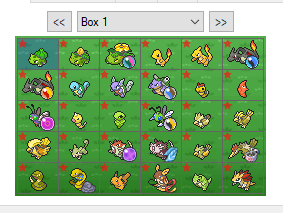 Is there a difference between the two downloads, please?
 -
Hi everyone. I am making this post out of desperation because I really really don't know what else to do. Previously (as in over 1y ago) I was able to use Bank in my wife's modded 3DS. For reference, all of the games we have are digital. However, last year when trying to send a Slowpoke I shiny hunted in Ultra Sun to Bank I had an internet issue and Bank started acting annoying. While I hoped that I could be able to use Bank in a couple of days, this Slowpoke thing happened in February 2025 and today, in August of 2026, I'm still unable to use Bank. The main issue is with her Ultra Moon file. Her ID is 228284, and every EVERY time I try to open Ultra Moon I get the "you previously used a different copy of this game. Please trying again using (her trainer's name) (Trainer ID No. 228284)" Despite it being the same savefile, game and Trainer ID, I keep getting the same error. Likewise, when I try to open another game I get the exact same error. I have already updated/deleted and reintalled both Bank and all games. However, nothing has worked. Please please please any help you can give will be greatly appreciated T.T
-
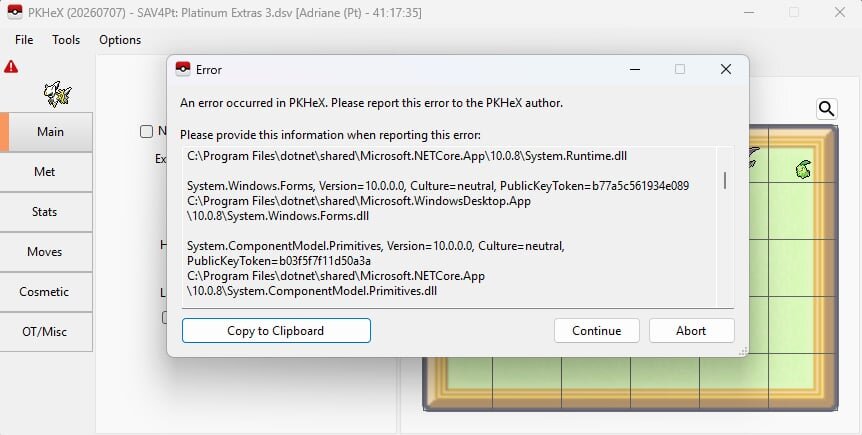
This happened to me since last week. I thought PKHex was doing maintenance or something. So I deleted it. I downloaded it again earlier today and the same ERROR still pops up. I posted about this and while waiting for replies, I tried looking for ways to fix this. I came up with a post that says, if there are bugs in saving files, maybe I need to download .NET. I tried to download it, and restarted my laptop. And this time it finally worked. Not sure if it was really .NET, but I suggest you try it.
-
Does anybody know how to fix this? It shows an ERROR every time I try to save a file in PKHex. I tried deleting PKHex and downloading it again but the ERROR still pops up. It happens to all of my games (GEN 1 to GEN 4). Can anyone help me please.
-
 From what I know, there is so save file compatibility issue for gen 5 when using a save from another language, and all versions have a kanji font, so there should not be display or compatibility issues when importing the save file in other versions. As such, importing the save file onto a real cart to do a transfer should be doable (or, alternatively, do an online trade to a real cart using an unofficial online server replacement such as Wiimfi, if it accepts using the unofficial version as a game, as to trade Pokémon to a real cart and then do the transfers from it). What will be trickier is that it is normally impossible to use kanji for names in gen 5 games, so the OT and Pokémon nickname will be impossible names, and I do not know if Poké Transporter, Pokémon Bank and Pokémon HOME check and/or flag that. Perhaps someone in here know the answer to that.
 -
 Hi, I’m looking for help with an old Pokémon White 2 save from a Chinese fan-translated NDS ROM that I played about six years ago. I have already extracted the original .sav file from the flashcart to my PC. The save itself has been checked and appears to be structurally usable: the actual Gen 5 save data is the standard 512 KB format, the trainer information, party and PC boxes can all be parsed normally, and all 38 Pokémon in the save have intact Gen 5 data/checksums. The game was a Chinese fan translation based on the Japanese version, so the Pokémon are internally marked as Japanese-language Pokémon, even though their species names were displayed in Chinese in the game. My goal is very specific: I want to transfer the exact individual Pokémon that are stored in this old save into Pokémon HOME. I am not looking for recreated/genned replacements, and I do not want someone to simply make new Pokémon with the same species, stats or moves. I want to preserve the actual Pokémon from my original save as faithfully as possible, including their original OT, TID/SID, PID, IVs, EVs, met data and other identity-related information, subject to whatever changes the legitimate generational transfer process normally makes. Ideally, I would like to migrate them through something as close as possible to: Gen 5 save → Poké Transporter / Pokémon Bank → Pokémon HOME Unfortunately, I no longer own a 3DS or a legitimate White 2 cartridge, so I cannot perform that migration myself. I’m therefore trying to find out what the best practical method would be in my situation. If someone here still has access to Pokémon Bank/Poké Transporter and the necessary hardware, I would also be very grateful for advice on whether my original save could be restored or otherwise used to perform the migration while keeping the original Pokémon rather than recreating them. These Pokémon have a lot of sentimental value to me. I really want the Pokémon I had when I was younger to somehow make it all the way into the present with me. I can provide the original save file, the cleaned 512 KB version, or additional technical details if they are needed for checking the save. Thank you very much for any advice or help.
 -

PKVault - Centralized pkm storage management & Pokedex app
IMI4tth3w replied to chnapy's topic in Saves - Tools
when you add a save directory, you need to add the closing / so for example, you'll want to add a save directory in the pkvault GUI as follows: /data/saves/ /data/saves-nds/ I did find the save path editor to be a little wonky, if you delete the first character, the interface to add a path just disappears. Additionally, before i submit an issue in Git, i noticed my Japanese Green save file is being identified as Blue version. Is there any plan to update so Green works? Last, it would be awesome if we could have version/generation specific sprites. Just found this project as i was seeking out alternatives for the ever looming pokemon Bank closure. Love what i'm seeing so far! - Last week
-
yes there is an option in the latest version, in the party tab
-
Is their a way to change a pokemon's gender
-
Sure, you can continue trying and compare your dumped data in a hex editor (like HxD) to see if you're able to obtain something different.
-
First of all, thanks for being so prompt with that. I really appreciate it. Second, can it be likely that the cartridge itself is dirty? Although it doesn't look dirty but when I tried to dump the save using GBXCart, I got a message saying: " Failed to read save data consistently. Please ensure that the cartridge contacts are clean. " I bypassed the validity check and dumped the save file anyway because I thought since the save file is corrupted it must be not consistent.
-
Hi, I am in a similar situation. My 3ds does not recognize my Alpha Sapphire cartridge anymore and the furthest I was able to get was to access the .sav file through godmode9. I'm very new to all of this, therefore, could you maybe explain in a bit more detail how exactly you were able to access 'main' ?
-
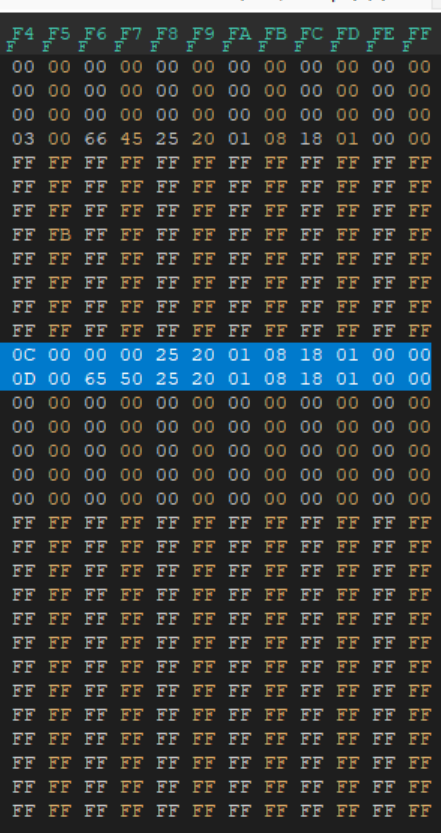
Bad news, nothing is present in your attached file that can be salvaged. Save data structure (Generation III) - Bulbapedia, the community-driven Pokémon encyclopedia Your save file only has blocks 3, C, & D present; everything else is FF FF FF... meaning uninitialized. In blocks C & D, they are all zero except for the box names being present (BOX 1, BOX 2). Block 3 is basically all zero besides a couple of bytes that aren't Pokémon. Nothing to recover, since everything is matching a "new game" state. Your save data, when viewed in a hex editor, as reference:
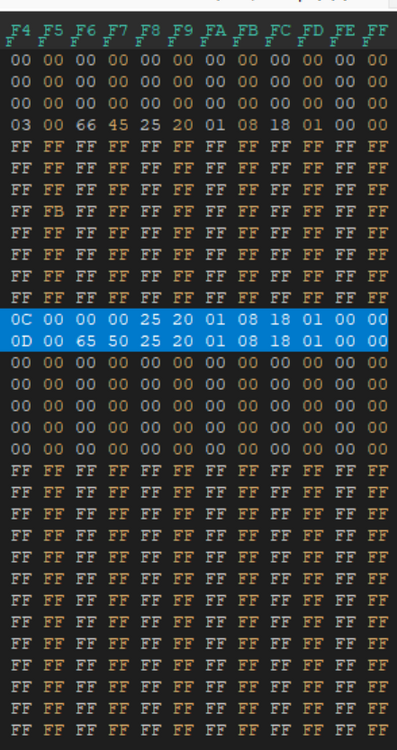
-
Authentic cartridge. Had a message saying "the save file has been erased due to corruption or damage" Can someone please help and try to salvage my save? In my 25 years of playing Pokemon, this is my first time doing EV training. Would not want to lose my first EV-trained pokemon. Appreciate the help guys! Pokemon - Emerald Version (USA, Europe).sav
-

Bug in Dump Box in Pokémon Battle Revolution Saves
Kaphotics replied to Pocket Monsters's topic in PKHeX
Thanks, fixed on latest commit. PBR: retain party stats, recognize party size · kwsch/PKHeX@c46596c The latest development build should allow for importing the files that are 220 bytes. -
There were previous HOME events via NFC. The NFC scans (using NFC tools on iOS/Android) we got was not a distro file, but rather data for a link, and it seems to have some kind encryption protection thingy (has a rotating CMAC), probably to ensure it is only valid at the time of scanning and thus could not unlock. Still worth a shot, but I am not expecting much.
-
 Is anyone here attending this year that also has access to a Flipper or some other way to capture and save/emulate NFC tags? I attended Worlds last year and this is the first time it seems they're doing the in-person distribution by scannning an NFC kiosk for medals and this year's mon in the Home app - I'm assuming by using your phone or perhaps the contact point in the joycon. I use my Flipper to emulate amiibos all the time so I'm assuming it would probably work. Unfortunately this year I will be out of country and I was wondering if someone here would be willing to try to save the NFC distro file so it could be preserved and distributed.
 -
 As of the last update, Time Gears became Time Cogs and they can be found on the floor in Temporal Tower now, not only in walls.