Cellsplitter
-
Posts
9 -
Joined
-
Last visited
-
Sys-EncounterBot: Pokémon hunting bots
Cellsplitter replied to SkyLink98's topic in RAM - Switch Guides and Other Resources
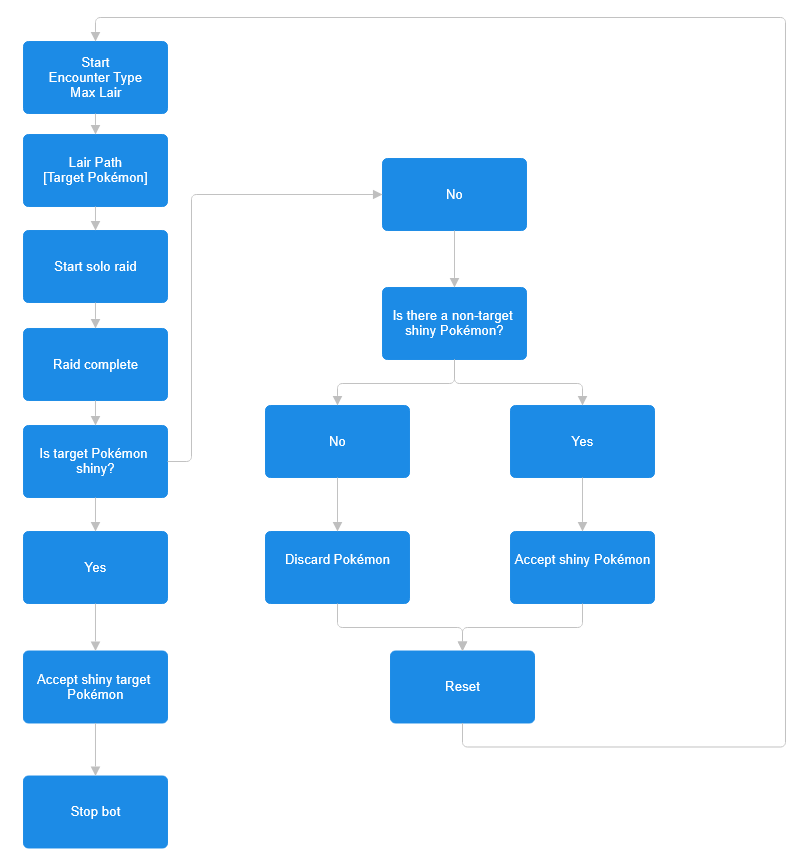
I managed to get Sys-EncounterBot running recently (after gutting most of my plugins etc) and I have a some questions. Can the SWSH_EncounterBot be setup such that it will auto accept non-targeted shinies automatically during Dynamax Adventures (as well as the target)? So far during my limited testing the bot will stop if any Pokémon shows up as shiny when it would be better if it accepted them instead of stopping (as long as target is non-shiny) and then keep going. Is there a stop condition that works this way or is there no way to have it auto-accept shinies and keep hunting until the target is obtained? I made a quick flowchart of what I had in mind and attached it as an image with this post.
-
I was going through my Pokemon Stadium 2 save file in PKHeX and I noticed my legit Celebi from back in the day was flagged as invalid. Invalid: Unable to match an encounter from origin game. Invalid: Met Time of Day value is not within the expected range. Invalid: Fateful Encounter with no matching Encounter. Has the Mystery Gift data been contributed? Valid Move 1: C-Default move. Valid Move 2: C-Default move. Valid Move 3: C-Default move. Valid Move 4: C-Default move. Valid: Nickname does not match another species name. Valid: Current level is not below met level. Encounter Type: Invalid (Celebi) Version: GSC PID Type: None Encounter Type: Invalid (Celebi) Version: GSC Level: 5 I uploaded the pk2 file around 3 years ago in this thread after I had dumped my gb saves. Is there a database perhaps where this 'mon could be saved in for posterity? 0251 - CELEBI - 5D41.sk2
-
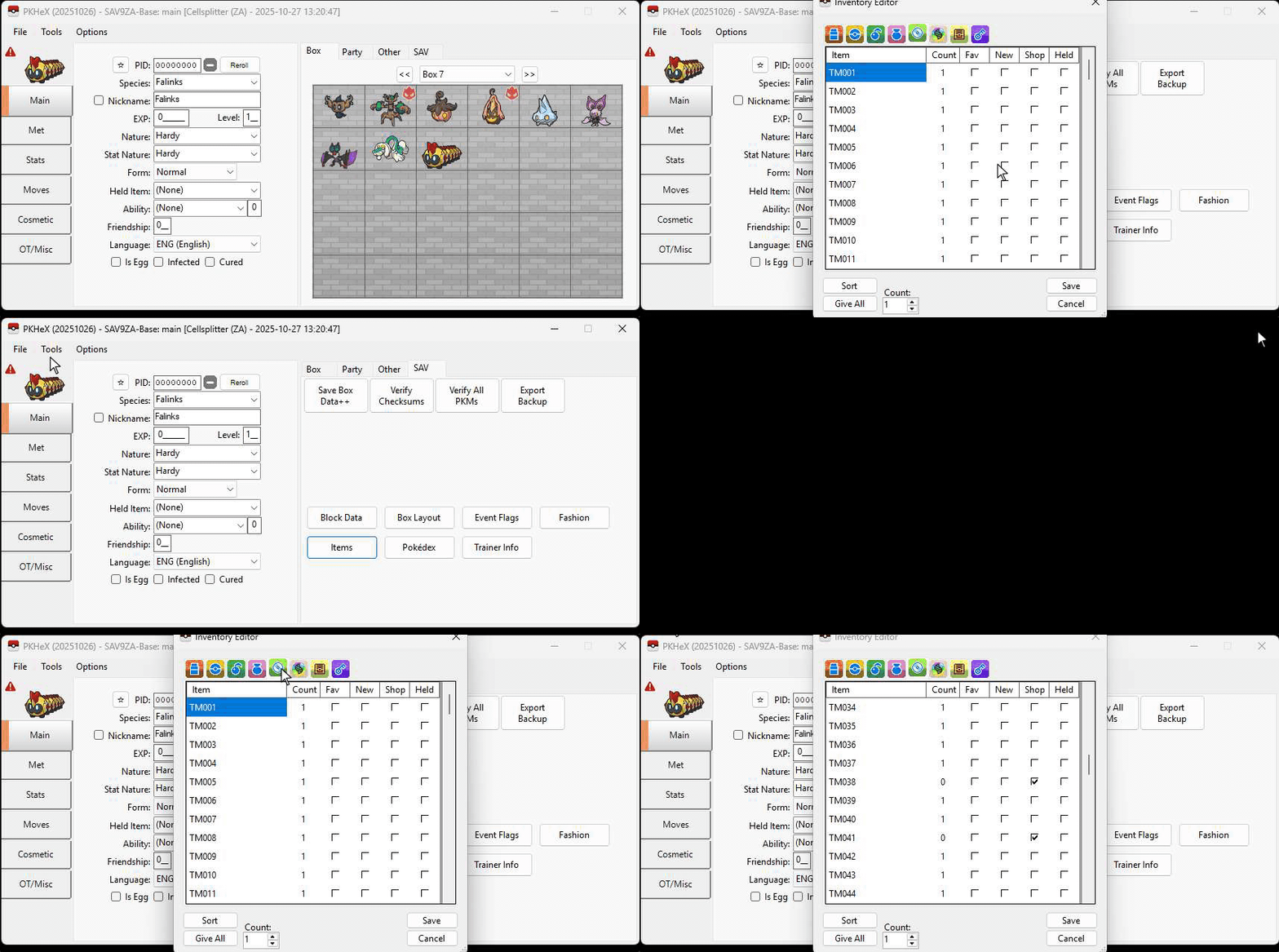
This is something I noticed after checking out the item editing with PKHex. Even when not editing any of items but you click 'Save' on the edit screen all items loses their 'New' status. I've recorded a short demonstration of me clicking 'Save' when doing nothing on a untouched save file and then reloading it after exporting it. We can see how TMs I've never even seen all lose their 'New' status. This happens to ALL items (even key items). This is also confirmed in game. I miss that little red dot.
-
Gen I - V Event Contributions Thread
Cellsplitter replied to theSLAYER's topic in Event Contributions
Dug up my old Red and Crystal saves and made sure to backup these event Pokemon. These are from events in Sweden back in the day. Mailed in the GB carts and hoped they'd come back lol. No certificate for Celebi can be found sadly. Mew TID: 219 OT: SWEDEN Celebi TID: 40992 OT: FRANCO 151 - MEW - E475.pk1 251 - CELEBI - AE6B.pk2 -
Edit checksum in savefile for shiny WISHMKR Jirachi
Cellsplitter replied to Cellsplitter's topic in Saves - Editing Help
Thanks for the reply. I do realize that the resulting Jirachi will be no different then one I could inject manually with PKHeX. However it is the process that makes it feel more genuine and frankly, more fun. I also did try to manually change the checksum with a hexeditor. I found the current checksum (3C71) at AFF0 and changed it to the desired one. I then opened the savefile with PKHeX and re-saved over the old one. However, when I load this savefile up it sais it's corrupt and loads up the backup save instead. Is there something I'm missing? -
I've been digging into how it would be possible to edit the checksum on my Pokemon Sapphire savefile so that it ends up at A030 for a shiny (naughty) Jirachi from the Pokemon Colosseum Bonus Disc. Sites such as JirachiCalc have been useful in helping me figuring out my current checksum but that's about it. I've read a lot of older posts about using hexeditors and such but I always end up more confused and ultimately give up in the end. I'd apricate any help and possible explenations so I can understand and maybe generate other types of Jirachis down the line. My current checksum is at 3C71. Savefile is attached below. POKEMON_SAPP_AXPE01.sav
-
Thanks I'll give it a try myself
-
Is there a way to compress the save file in any way to make it load? I can still load the save in more oldschool save editors like PikaSav for example (with the "force SAV" function").
-
I am currently playing Pokemon Crystal (EU) again on my Game Boy Color and with the help of a Mega Memory cart and a GB USB Smart card I am able to backup and transfer the save file to my PC. I then tried to load this save file in the PKHeX application but I am met with the following error messages. Here's a link to download the save file: https://drive.google.com/file/d/0B_mmJOG1759lRGtyQ1BoTFJacVE/view?usp=sharing