

This mod patches a lot of things to bring the best possible playing experience. Here's what it will patch for you:
- Starter editing - Makes playing as other Pokémon possible
- High-Res model patching - Prevents your model from disappearing during certain closeups
- Portrait patching - Shows the default portrait in the absence of a more specific emotion portrait
- Animation patching - Substitute missing story animations with dungeon ones to avoid the attack animation being used for everything
- And something else in the scripts specific to Pokémon Super Mystery Dungeon that can't be mentioned without revealing spoilers. It is the last item in a similar list in this video if you're fine with being spoiled, or if you've seen it before.
You must have Java on your computer to use this.
This has been tested on the North American and European versions of Pokémon Super Mystery Dungeon, and the North American version of Pokémon Mystery Dungeon: Gates to Infinity. I don't know if will work on the Japanese version of Pokémon Super Mystery Dungeon, but it will not work on any other version of Pokémon Mystery Dungeon: Gates to Infinity.
Instructions
-
On the New Project window, choose "Starter Mod" in the drop-down, and fill in the name with something that makes sense. Then click OK.
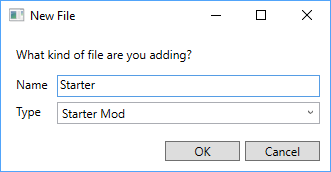
- Wait until the loading is complete. This is one of the heavier mods, and may take some time even on beefier computers.
- Save the solution, to avoid having to repeat step 2 if something goes wrong.
-
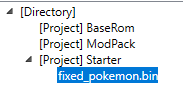
Expand the project you just created and open "fixed_pokemon.bin". You can do this either by double-clicking or by right-clicking and clicking Open.
-
Edit things to your liking. You should see this when editing Pokémon Super Mystery Dungeon (Gates to Infinity has a much simpler interface):
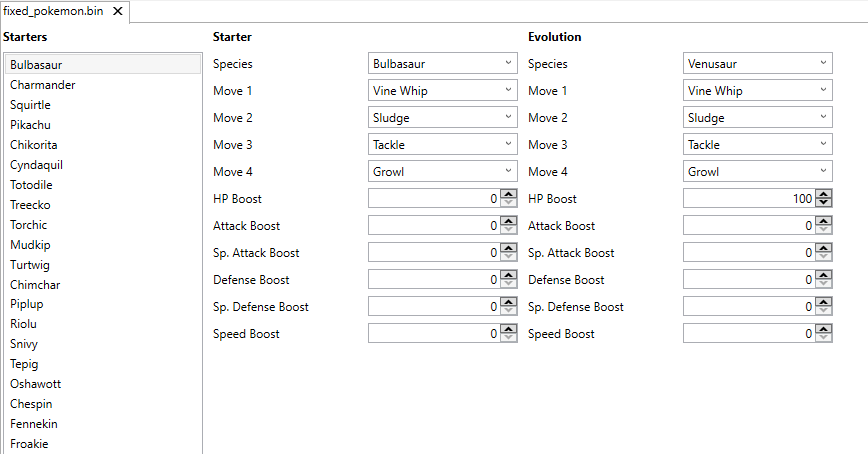
For the purpose of this guide, I'll do this: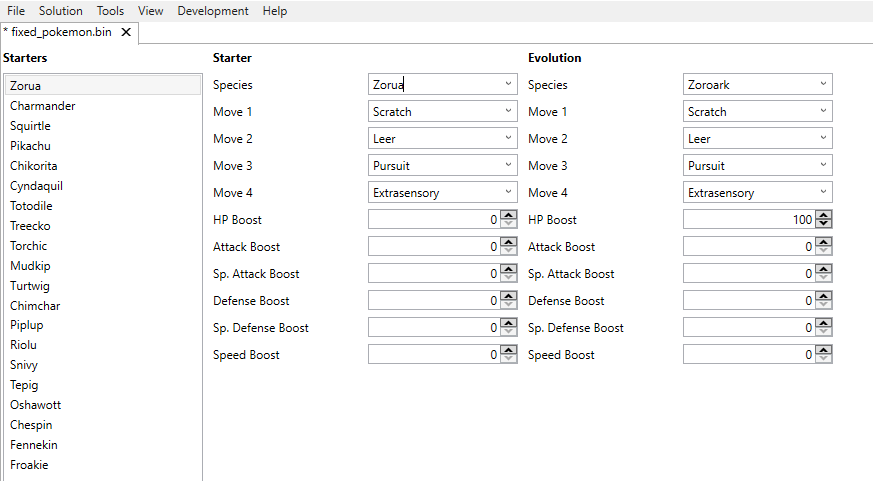
Things to consider:- Each Pokémon must have 4 moves. It's been a while since I tried having less, but I remember things not working with fewer than 4 moves. In my example, I got the first three moves from the level up, and the fourth from Zorua's set of egg moves, although you are not required to stick to these; you can pick anything you want.
- (PSMD only) The evolution must be the final evolution in the line. If you pick a Pokémon with multiple evolutions, the first on will be used. Refer to the PSMD Pokédex index to find which evolution comes first (for example, if the starter is Eevee, the first evolution is Vaporeon).
-
Click File -> Save -> Save File.
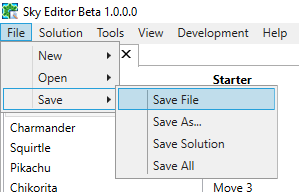
- You can now rebuild the mod-pack. Note that this may take a while.
Edited by evandixon
-
 1
1
-
 1
1
-
 1
1
-
 2
2
-
 1
1
Recommended Comments
Create an account or sign in to comment
You need to be a member in order to leave a comment
Create an account
Sign up for a new account in our community. It's easy!
Register a new accountSign in
Already have an account? Sign in here.
Sign In Now