Jump to content
  • Starter Mod

    This mod patches a lot of things to bring the best possible playing experience. Here's what it will patch for you:

    • Starter editing - Makes playing as other Pokémon possible
    • High-Res model patching - Prevents your model from disappearing during certain closeups
    • Portrait patching - Shows the default portrait in the absence of a more specific emotion portrait
    • Animation patching - Substitute missing story animations with dungeon ones to avoid the attack animation being used for everything
    • And something else in the scripts specific to Pokémon Super Mystery Dungeon that can't be mentioned without revealing spoilers. It is the last item in a similar list in this video if you're fine with being spoiled, or if you've seen it before.

    You must have Java on your computer to use this.

    This has been tested on the North American and European versions of Pokémon Super Mystery Dungeon, and the North American version of Pokémon Mystery Dungeon: Gates to Infinity. I don't know if will work on the Japanese version of Pokémon Super Mystery Dungeon, but it will not work on any other version of Pokémon Mystery Dungeon: Gates to Infinity.

    Instructions

    1. On the New Project window, choose "Starter Mod" in the drop-down, and fill in the name with something that makes sense. Then click OK.
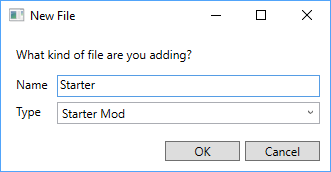
      image.png
    2. Wait until the loading is complete. This is one of the heavier mods, and may take some time even on beefier computers.
    3. Save the solution, to avoid having to repeat step 2 if something goes wrong.
    4. Expand the project you just created and open "fixed_pokemon.bin". You can do this either by double-clicking or by right-clicking and clicking Open.
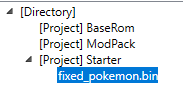
      image.png
    5. Edit things to your liking. You should see this when editing Pokémon Super Mystery Dungeon (Gates to Infinity has a much simpler interface):
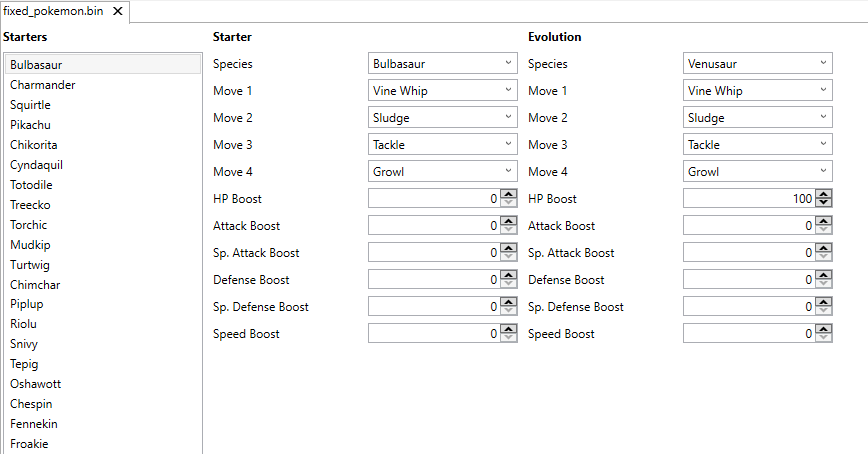
      image.png
      For the purpose of this guide, I'll do this:
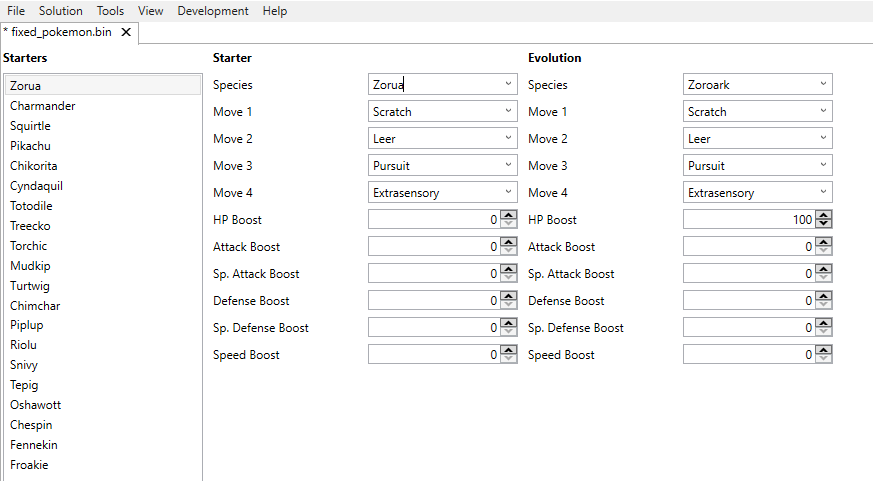
      image.png
      Things to consider:
      • Each Pokémon must have 4 moves. It's been a while since I tried having less, but I remember things not working with fewer than 4 moves. In my example, I got the first three moves from the level up, and the fourth from Zorua's set of egg moves, although you are not required to stick to these; you can pick anything you want.
      • (PSMD only) The evolution must be the final evolution in the line. If you pick a Pokémon with multiple evolutions, the first on will be used. Refer to the PSMD Pokédex index to find which evolution comes first (for example, if the starter is Eevee, the first evolution is Vaporeon).
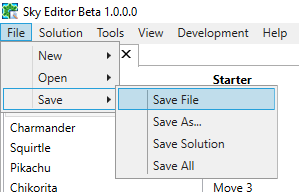
    6. Click File -> Save -> Save File.
      image.png
    7. You can now rebuild the mod-pack. Note that this may take a while.

    Edited by evandixon

    • Like 1
    • V-Wheeeeeel!!! 1
    • Amazed 1
    • Confused 2
    • Ditto 1


    User Feedback

    Recommended Comments


    So i got everything to work but i don't know how to actually get the mods onto SMD because i'm using citra. Do you know how to get the mods loaded onto citra?

    Share this comment


    Link to comment
    Share on other sites

    Is it normal with the starter mod for a replaced partner Pokemon to still lack some portraits? It seems there are certain (or maybe just one) portrait(s) that are blank (sometimes with the happy arc sprite above them). I haven't noticed any missing portraits yet for the player Pokemon. I used Espurr for the partner.

    Share this comment


    Link to comment
    Share on other sites

    On 1/10/2026 at 10:43 PM, calmpalm said:

    Is it normal with the starter mod for a replaced partner Pokemon to still lack some portraits? It seems there are certain (or maybe just one) portrait(s) that are blank (sometimes with the happy arc sprite above them). I haven't noticed any missing portraits yet for the player Pokemon. I used Espurr for the partner.

    I figured it out--this Pokemon comes with reversed graphics, so those have to be edited too.

    Share this comment


    Link to comment
    Share on other sites

    On 10/12/2025 at 12:10 AM, MysticOpal said:

    So i got everything to work but i don't know how to actually get the mods onto SMD because i'm using citra. Do you know how to get the mods loaded onto citra?

    open ur citra  and right click on your mystery dungeon game in citra there should be smth called open mod path. there should be a few numbers. the same numbers are in the file that u just created under modpack/output/SDCard/luma/titles get the ones from this modpack and replace the one in your mod folder with them :)

    Share this comment


    Link to comment
    Share on other sites

    Sorry if this has been fixed before but i can compile the mod perfectly fine, no errors in the editor and i unblocked the zip files before using them on both the rom (super mystery dungeon) and the editor and no matter what file type i export as when i boot the game on either an emulator or my console it simply displays the little loading circles for one cycle then hard crashes. attached is the only changes i made in starter mod and i added Model Mod and Portrait Mod aswell, but even without those it does the exact same thing. Has anyone had this before?

    Screenshot 2026-02-24 205252.png

    Screenshot 2026-02-24 205258.png

    20260224_201915.jpg

    Edited by KusanagiRui

    Share this comment


    Link to comment
    Share on other sites

    I have a question, would it be possible to change what Eevee evolves into in Super? I'd like to make one for my friend, and it's very important that Eevee will evolve into Glaceon and not Vaporeon.

    Share this comment


    Link to comment
    Share on other sites


    Create an account or sign in to comment

    You need to be a member in order to leave a comment

    Create an account

    Sign up for a new account in our community. It's easy!

    Register a new account

    Sign in

    Already have an account? Sign in here.

    Sign In Now

×
×
  • Create New...