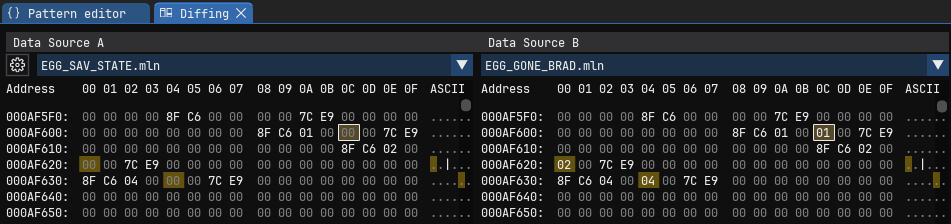
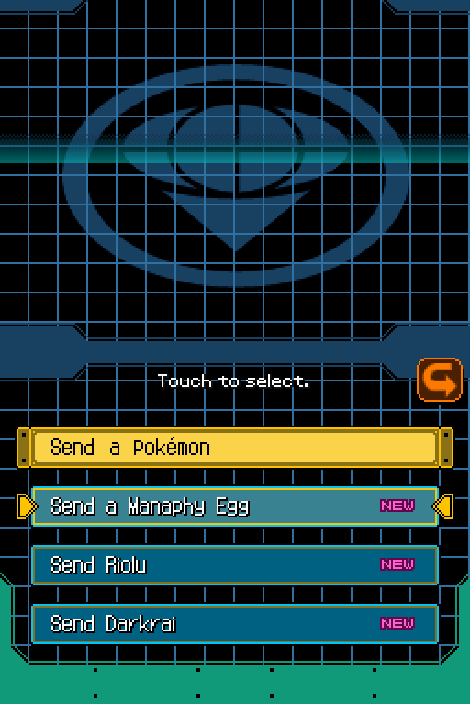
After some tinkering, I was able to locate where "Sent pokemon" is tracked in pokemon ranger 2 (USA) within RAM (emulator).
On the left is a Save file with all event pokemon ready to be sent (Thanks to InsaneNutter for providing the save). On the right is my OG save file that already transferred all event pokemon. I made multiple ranger > pearl transfers on emulator, then analyzed save states made before & after each transfer. From this I was able to narrow down the memory address that tracks the transfer status of each event pokemon.
0xAF60C - Manaphy Egg
00 - Ready to Send
01 - Sent
0xAF620 - Kyle's Riolu
00 - Ready to Send
02 - Sent
0xAF634 - Darkrai
00 - Ready to Send
04 - Sent
I tried making some emulator cheat codes, though I'm very new to all this, and the ones I tested didn't work (memory address looks like it's offset?). However, if you want to reset these events for yourself WITHOUT wiping your save data:
1) Load your save file into an emulator.
2) Make a save state on the main menu (BEFORE SELECTING RANGER NET).
3) Upload your save state into a hex editor (ex: https://web.imhex.werwolv.net/).
4) Set the addresses listed above to (00) and save the changes. (if using imhex, it'll download as "file.bin", just change the extension to ".mln" or whatever format your emulator uses.)
4) Load your save state into an emulator, and the changes should take effect.
5) If you want these changes to be permanent on your save file, select your profile to enter the game, and immediately save at one of the in-game save points.
Also attached my now restored save to this post as well. Hope this helps others too attached to wipe their save!
POKE_RANGER2_YP2E01_00.trim.sav