



ScoopDunk
-
Posts
2 -
Joined
-
Last visited
Content Type
Profiles
Pokédex
Portal
Technical Documentation
Pages
Tutorials
Forums
Events
Downloads
Gallery
Blogs
Files posted by ScoopDunk
-
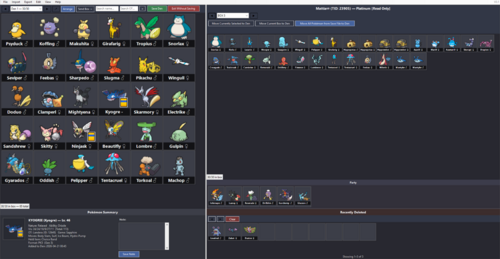
PKDen
By ScoopDunk in Save Editing
PKDen is a .pk file extractor, viewer, organizer, and backup tool for Pokémon data across all main-series games (Gens 1-9). The goal of this project is to have an easy to use local Pokémon storage system for all mainline Pokémon games.
PKDen was created in full by Claude A.I.
PKDen remembers window size and in-program formatting between uses. Adjusting window size, sprite size and view preferences to your liking is recommended for the best experience. It’s recommended to place PKDen.exe in a Programs folder, since PKDen creates files in the same folder where the executable is located.
What PKDen CAN Do:
• Import Pokémon from any save file into PKDen for long-term storage
• Import .pk files (all formats pk1 through pk9) from folders or individual files
• Organize Pokémon across unlimited custom-named Dens (30 slots each)
• Export Pokémon as PKHeX-compatible .pk files (filenames match PKHeX's naming scheme)
• Export by generation
• Search across all Dens by species name or Original Trainer
• Sort Dens by National Dex, Species, Level, IVs, shiny status, OT, and more
• View detailed summaries: nature, ability, IVs, moves, held item, origin game
• Add personal notes and transfer timestamps to each Pokémon
IMPORTANT: PKDen is NOT a save editor.
Your Pokémon game save files are opened in READ-ONLY mode. PKDen cannot and will not modify, overwrite, or inject data into your original save files. To edit Pokémon or save files directly, use PKHeX or another dedicated save editor.
What PKDen CANNOT Do:
• Modify, edit, or inject Pokémon into save files
• Edit any attribute of a Pokémon (moves, IVs, stats, etc.)
• Check legality or flag illegal Pokémon
• Generate or breed new Pokémon
• Modify trainer info, Pokédex, items, money, or anything else in a save file
For those features, use PKHeX directly.
Using PKDen Alongside PKHeX:
PKDen and PKHeX complement each other:
• PKDen is a library. Think large-scale storage and organization
• PKHeX is a workshop. Think editing, injection, legality checking, breeding etc
Data Storage:
PKDen stores everything in two files next to the executable:
• PKDen.den: your Pokémon collection (custom binary format)
• PKDen.settings: your view preferences (sprite size, labels, etc.) - PKDen remembers window size and in-program formatting between uses. Adjusting window size, sprite size and view preferences to your liking is recommended for the best experience.
A "backgrounds" folder is created if you set custom Den backgrounds.
No registry entries, no hidden AppData files. The program is fully portable.
Credits:
PKDen uses PKHeX as its backend for reading, writing, and rendering Pokémon data.
• PKHeX Version: 26.04.11
• PKHeX Repository: https://github.com/kwsch/PKHeX
• PKHeX License: GPL-3.0
All sprite assets, species data, move/ability strings, entity parsing, and save-file format handling come from PKHeX.
PKDen Version: 0.1
created in full by Claude A.I.
Download
Grab PKDen.exe below. It's a self-contained single file. No installer. It’s recommended to place PKDen.exe in a Programs folder, since PKDen creates files in the same folder where the executable is located.
GITHUB: https://github.com/ScoopDunk/PKDen/releases
3 downloads
(0 reviews)Updated