drifted
-
Posts
7 -
Joined
-
Last visited
Content Type
Profiles
Pokédex
Portal
Technical Documentation
Pages
Tutorials
Forums
Events
Downloads
Gallery
Blogs
Everything posted by drifted
-
pk3DS: Pokémon 3DS ROM Editor and Randomizer
drifted replied to Kaphotics's topic in ROM - 3DS Research and Development
not exactly any "xxx"s but the entire alolan graveler line is displayed as "- 918/919/920" respectively, and i do recall changing their evolution conditions before so ive likely given one of them a null evolution requirement and thats what causes the crash do you know how to get around this? ik i have to probably do something with my backup romfs but idk what exactly im meant to do with them ty for replying though i appreciate you ong edit: they also dont show up with any sprites, but the rest of their data (held items, types etc) all seem to be the same -
pk3DS: Pokémon 3DS ROM Editor and Randomizer
drifted replied to Kaphotics's topic in ROM - 3DS Research and Development
somehow managed to fish up the evolution editor as well, crashes pk3ds entirely after i close the error message it give me whenever i try to open the evolution editor, stating that "item" cant be null im assuming that means that ive changed a pokemon to evolve with an item being used, but never said what item, so that causes the crash? can i edit the romfs manually somehow to circumvent ts? error message: Exception Details: System.ArgumentNullException: Value cannot be null. Parameter name: item at System.Windows.Forms.Control.MarshaledInvoke(Control caller, Delegate method, Object[] args, Boolean synchronous) at System.Windows.Forms.Control.Invoke(Delegate method, Object[] args) at pk3DS.Main.<B_Evolution_Click>b__49_0() in D:\a\1\s\pk3DS\Main.cs:line 939 at System.Threading.ExecutionContext.RunInternal(ExecutionContext executionContext, ContextCallback callback, Object state, Boolean preserveSyncCtx) at System.Threading.ExecutionContext.Run(ExecutionContext executionContext, ContextCallback callback, Object state, Boolean preserveSyncCtx) at System.Threading.ExecutionContext.Run(ExecutionContext executionContext, ContextCallback callback, Object state) at System.Threading.ThreadHelper.ThreadStart() Loaded Assemblies: -------------------- mscorlib, Version=4.0.0.0, Culture=neutral, PublicKeyToken=b77a5c561934e089 C:\Windows\Microsoft.NET\Framework64\v4.0.30319\mscorlib.dll pk3DS, Version=1.0.0.0, Culture=neutral, PublicKeyToken=null C:\Users\iduh7\Downloads\pk3DS\pk3DS.exe System, Version=4.0.0.0, Culture=neutral, PublicKeyToken=b77a5c561934e089 C:\WINDOWS\Microsoft.Net\assembly\GAC_MSIL\System\v4.0_4.0.0.0__b77a5c561934e089\System.dll System.Windows.Forms, Version=4.0.0.0, Culture=neutral, PublicKeyToken=b77a5c561934e089 C:\WINDOWS\Microsoft.Net\assembly\GAC_MSIL\System.Windows.Forms\v4.0_4.0.0.0__b77a5c561934e089\System.Windows.Forms.dll System.Drawing, Version=4.0.0.0, Culture=neutral, PublicKeyToken=b03f5f7f11d50a3a C:\WINDOWS\Microsoft.Net\assembly\GAC_MSIL\System.Drawing\v4.0_4.0.0.0__b03f5f7f11d50a3a\System.Drawing.dll System.Core, Version=4.0.0.0, Culture=neutral, PublicKeyToken=b77a5c561934e089 C:\WINDOWS\Microsoft.Net\assembly\GAC_MSIL\System.Core\v4.0_4.0.0.0__b77a5c561934e089\System.Core.dll System.Configuration, Version=4.0.0.0, Culture=neutral, PublicKeyToken=b03f5f7f11d50a3a C:\WINDOWS\Microsoft.Net\assembly\GAC_MSIL\System.Configuration\v4.0_4.0.0.0__b03f5f7f11d50a3a\System.Configuration.dll System.Xml, Version=4.0.0.0, Culture=neutral, PublicKeyToken=b77a5c561934e089 C:\WINDOWS\Microsoft.Net\assembly\GAC_MSIL\System.Xml\v4.0_4.0.0.0__b77a5c561934e089\System.Xml.dll pk3DS.Core, Version=1.0.0.0, Culture=neutral, PublicKeyToken=null C:\Users\iduh7\Downloads\pk3DS\pk3DS.Core.dll -------------------- User Message: An unhandled exception has occurred. The program must now close. -
pk3DS: Pokémon 3DS ROM Editor and Randomizer
drifted replied to Kaphotics's topic in ROM - 3DS Research and Development
okay now i have an actual question to ask that isnt routed in me being fundamentally stupid is this message telling me to NOT use layeredfs to get the CROs and CRR working on my 3ds otherwise it'll fail the RSA check? do i need to install smth else on my 3ds to get these files to work properly? or should i not bother and stfu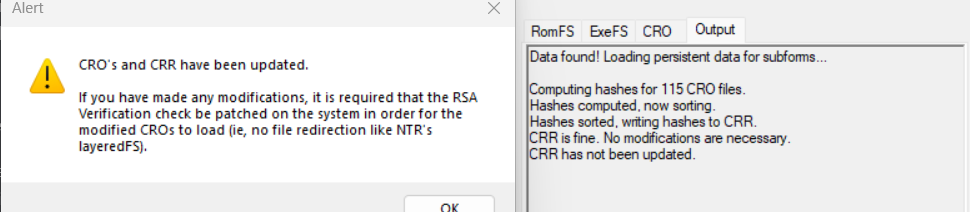
-
pk3DS: Pokémon 3DS ROM Editor and Randomizer
drifted replied to Kaphotics's topic in ROM - 3DS Research and Development
so i tried that, i put both the exefs and romfs folders inside luma/titles/0004000000164800 (i switched to editing pokemon sun bc it would be easier) and whenever i enabled game patching with the latest version of layeredfs and tried to load pokemon sun, both of the games screens would turn grey after the game took abt a year to load. not exactly sure why that happened, apparently it was an arm11 core (1) exception prefetch abort (svcBreak) but nowhere online seems to be having the same issue as me im able to restore the game back to normal if i put the unmodified romfs and exefs (and everything else) into luma/titles/0004000000164800 and repatch pokemon sun so i know its just an issue with those files, but im too stupid to know what that issue is i can send a photo of the arm 11 exception error message if need be obviously edit: i didnt realise im meant to rebuild the romfs and exefs in pk3ds holy fish i need shot in the forehead no wonder that never worked before, ill try the rebuilt romfs and exefs to see if they work instead, my bad for being such a moron -
pk3DS: Pokémon 3DS ROM Editor and Randomizer
drifted replied to Kaphotics's topic in ROM - 3DS Research and Development
no, you have to use the base game version of your rom -
pk3DS: Pokémon 3DS ROM Editor and Randomizer
drifted replied to Kaphotics's topic in ROM - 3DS Research and Development
ohhhhhh so i am just stupid then, thank you so much anyway!!!! ill try that -
pk3DS: Pokémon 3DS ROM Editor and Randomizer
drifted replied to Kaphotics's topic in ROM - 3DS Research and Development
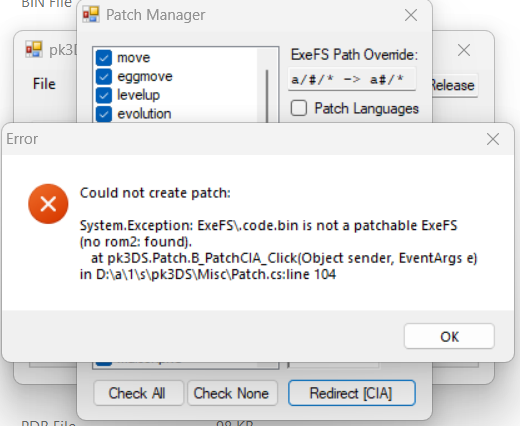
i havent seen anyone else mention this so it may just be a me problem but pk3ds refuses to let me rebuild my exeFS and romFS, in every way possible it dosent even TRY to give me hope when i rebuild them as a patch, instead it just gives me this error - regardless of how many or how few options i have ticked on the left its extremely annoying and im wondering what im meant to do to fix it? the error message isnt the most clear to say the least this is ultra sun btw, and i havent randomised anything, but i have edited text and pokemon stats (and moves)